DHCPv6-client errors in event viewer

sheilakmcd

New member
Local time
2:17 PM
Messages
2
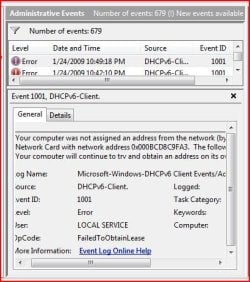
Every 7 minutes this error is logged in event viewer.

I have wired connection disabled, wireless connection works fine. It actually works much better than it did with XP Pro. Lan transfers are much faster.

What's causing this and how to stop it?
 

Attachments

  • Capture.JPG
    Capture.JPG
    46.2 KB · Views: 238

My Computer

OS
Windows 7

My Computer

Computer Manufacturer/Model Number
ENIAC
OS
Windows 7 RC 7100 32bit/64bit
CPU
Intel Core2Duo E4500 2.20 GHz
Motherboard
ASUS P5LD2-X/1333
Memory
2x1GB Kinsgston DDR2 800MHz
Graphics Card(s)
Nvidia 8500GT
Sound Card
Onboard High Definition Audio Device
Monitor(s) Displays
Sony Bravia 42"
Case
LINKW 2222
Cooling
Standard Intel
Keyboard
Some cheap one
Mouse
Microsoft Intellimouse something
Internet Speed
24MBps ADSL
What uses it?

I can disable that protocol for the adapter, but I was mostly just trying to learn. On this clean install to new hard drive of Windows 7, only added software AVGFree 8, what would be trying to use it and for what purpose? Just curious.
 

My Computer

OS
Windows 7
Well, since there are several protocols supported and active for your adapter, they are trying to get their job done. So, for those you don't need, you can disable them so their job isn't bugging you anymore.

We're probably having the same errors in our configuration, provided we don't have an IPv6 DHCP server active on our network, so it's a logical thing to happen. By disabling the protocols / services you don't need , you disable future system attempts from trying to use them.
 

My Computer

Computer Manufacturer/Model Number
ENIAC
OS
Windows 7 RC 7100 32bit/64bit
CPU
Intel Core2Duo E4500 2.20 GHz
Motherboard
ASUS P5LD2-X/1333
Memory
2x1GB Kinsgston DDR2 800MHz
Graphics Card(s)
Nvidia 8500GT
Sound Card
Onboard High Definition Audio Device
Monitor(s) Displays
Sony Bravia 42"
Case
LINKW 2222
Cooling
Standard Intel
Keyboard
Some cheap one
Mouse
Microsoft Intellimouse something
Internet Speed
24MBps ADSL
sheila it is trying to grab an ipv6 address from router/modem via dhcp... since your router/modem does not support ipv6 (i'm guessing), this is why the error pops up...

coincidently i just pulled this up 5 min ago.... i have the same thing in log as well, no worry.

If you are on a router and have UPNP enabled, and can also see which program is using UPNP and its port, you will see that Microsoft uses it with Toredo (ipv6) udp ports 58035 & 50604

also Microsoft media foundation (iexplorer.exe) udp ports 56368 & 56369
 

My Computer

Computer Manufacturer/Model Number
CUSTOM
OS
XP/win7 x86 build 7127
CPU
Athlon64 X2 DUAL 4200+ 2.21ghz
Motherboard
ASUS K8 PRO SLI
Memory
2GB Dual Chan DDR2 Corsair
Graphics Card(s)
Nvidia 6800GT
Sound Card
nvidia
Monitor(s) Displays
19' LCD
Screen Resolution
1280x1024
Hard Drives
WD 250, 2x500, 2x1TB IDE/USB
WD 250 SATA (system)
SEAGATE 120 Sata
PSU
coolermaster 450
Case
SUPERFLOWER
Cooling
1 HDD bay fan, 5x80mm Case Fans, AEROGATE II Fan/Temp
Keyboard
MS wireless
Mouse
MS Wireless
Internet Speed
fassssssssst
I had the same problem on my 780i, errors from that one every 7 minutes on the nose. Had to turn that off for sure. I wonder if updating the Router firmware would fix that sort of error message?

Now all I get is the Diagnoses scheduled error which I'am not too sure what that means.
 

My Computer

Computer type
PC/Desktop
Computer Manufacturer/Model Number
Home built
OS
Windows 7 Ult, Windows 8.1 Pro,
CPU
Q9650-4.275GHz, E8600 4.5GHz, E6750-3.8GHz
Motherboard
Evga 780i FTW
Memory
G.Skill PC2 9600 1200Mhz 5 5 5 15 2T
Graphics Card(s)
GTX480
Sound Card
Asus Xonar D2
Monitor(s) Displays
HannsG
Screen Resolution
1680X1050
Hard Drives
GSkill Phoenix Pro 120GB SSD
PSU
ThermalTake Toughpower 1000Watt modular
Case
ThermalTake XaserV
Cooling
Xigmatek S1283
Keyboard
Logitech G15
Mouse
Logitech G9
Internet Speed
T1
I had the same problem. Removing IPv6 from the adapter sorted it. Microsoft are aware of this, so let's hope a permanent fix is forthcoming..
 

My Computer

Computer Manufacturer/Model Number
Homebuilt
OS
Windows 7 Ultimate x64
CPU
DualCore Intel Core 2 Duo E6600, 2400 MHz
Motherboard
Asus P5W DH Deluxe
Memory
4GB
Graphics Card(s)
NVIDIA GeForce 7600 GS
Sound Card
Realtek HD
Monitor(s) Displays
Samsung SyncMaster T220(G)/MagicSyncMaster T220(G) (Digital)
Screen Resolution
1680 x 1050
Hard Drives
SAMSUNG HD103UJ
ST3400620AS
ST3400620AS
ST3500630AS
Back
Top
