DHPC client IPs

topche

New member
Local time
10:35 PM
Messages
5
Location
Sofia, Bulgaria
Hello all,
I have Windows 7 Professional 32 bit and two network cards (one connected to the router and another one connected direct to the home media player).
I start sharing my connection from internet to the Media player and everything work fine with no problems.
My question is how to give to my media player ALWAYS one and same IP. It is very annoying every time to look what IP have media player and typing this IP when I upload something to the player.
 

My Computer

Computer Manufacturer/Model Number
Assembled
OS
Windows 7 Professional 32-bit
CPU
Intel(R) Core(TM)2 Duo CPU E4500 @ 2.20 Ghz
Memory
2,00 GB
Graphics Card(s)
NVIDIA GeForce 8600 GT
hi topche, and welcome to sevenforums,

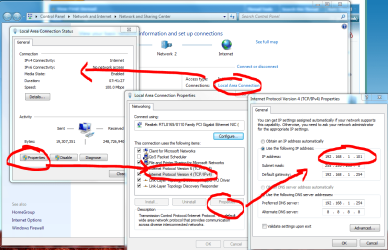
i think a screenshot would say a thousand words.
 

Attachments

  • ip.PNG
    ip.PNG
    230.5 KB · Views: 46

My Computer

Computer Manufacturer/Model Number
mickey megabyte 1234
OS
ultimate 64 sp1
CPU
i5 2500K [email protected]
Motherboard
MSI P67A-GD53
Memory
8 gigs GSkill Ripjaws 1600
Graphics Card(s)
amd hd6950
Sound Card
creative x-fi gamer
Monitor(s) Displays
samsung 24"
Screen Resolution
1920x1080
Hard Drives
ocz vertex 2e 60 gig, samsung f3 1tb, buffalo 2tb ext
PSU
antec 550
Case
antec three hundred
Cooling
i'm a cooling fan
Keyboard
saitek eclipse ii
Mouse
logitech g3
Internet Speed
about 4 Mbps
Other Info
i love win7
Maybe my English is vary wrong... The problem is not how to have permanent IP to my desktop. My desktop is DHCP server role. I want to give from this desktop one and same IP to clients (my home media player). This is the question.
My home media player is not desktop or computer.This is only player device with network and there is not possibility to chose manual setting IP, only DHCP. So I want my windows to give always same IP to this device.
 

My Computer

Computer Manufacturer/Model Number
Assembled
OS
Windows 7 Professional 32-bit
CPU
Intel(R) Core(TM)2 Duo CPU E4500 @ 2.20 Ghz
Memory
2,00 GB
Graphics Card(s)
NVIDIA GeForce 8600 GT
sorry, i misunderstood you.

what is your media player?
 

My Computer

Computer Manufacturer/Model Number
mickey megabyte 1234
OS
ultimate 64 sp1
CPU
i5 2500K [email protected]
Motherboard
MSI P67A-GD53
Memory
8 gigs GSkill Ripjaws 1600
Graphics Card(s)
amd hd6950
Sound Card
creative x-fi gamer
Monitor(s) Displays
samsung 24"
Screen Resolution
1920x1080
Hard Drives
ocz vertex 2e 60 gig, samsung f3 1tb, buffalo 2tb ext
PSU
antec 550
Case
antec three hundred
Cooling
i'm a cooling fan
Keyboard
saitek eclipse ii
Mouse
logitech g3
Internet Speed
about 4 Mbps
Other Info
i love win7
If you're running a server role, you can manually set your static IP to whatever device you wish... Access the DHCP snapin and set that IP/Machine Name to static
 

My Computer

OS
7 Pro
I just share my connection on Windows. How to access this DHCP snapin ? I look into the services .. but there is no something like DHCP server or snapin ...
 

My Computer

Computer Manufacturer/Model Number
Assembled
OS
Windows 7 Professional 32-bit
CPU
Intel(R) Core(TM)2 Duo CPU E4500 @ 2.20 Ghz
Memory
2,00 GB
Graphics Card(s)
NVIDIA GeForce 8600 GT
if you are truly running a "DHCP" role (you've run DcPromo), your DCHP snapin will be under your "Administrative" tools.

If you aren't running DHCP role - you're router will be handing them out. No biggie, you can set static IPs through your router as well.

ipconfig /all - find your "Default Gateway" Copy the address (192.168.1.1 - or similiar) paste that into your browswer. You'll then be able to set DHCP through the router.
 

My Computer

OS
7 Pro
if you are truly running a "DHCP" role (you've run DcPromo), your DCHP snapin will be under your "Administrative" tools.

If you aren't running DHCP role - you're router will be handing them out. No biggie, you can set static IPs through your router as well.

ipconfig /all - find your "Default Gateway" Copy the address (192.168.1.1 - or similiar) paste that into your browswer. You'll then be able to set DHCP through the router.
Actually I am not sure that my desktop have really DHCP server role. I just click on "Share my connection", after that I have IP to the second network card (for example 192.168.137.1).On this card is direct connected my media player. Configure my media player to find DHCP server and player found 192.168.137.1 like DHCP server. Get IP address and that is. I have internet on my media player. My general question is : Have on windows something like in UNIX/Linux systems to configure - for this MAC address should give always THIS IP .. that is ..
I don't know really how this sharing work, because when I try to put manual IP on my media player I have connection from my desktop to my media player, but no Internet on the player. So only way to have Internet is to use DHPC option. And in this case I want to have always one and same IP on my media player.

I hope to understand everything that I say ... because my English is .. :cry:
 

My Computer

Computer Manufacturer/Model Number
Assembled
OS
Windows 7 Professional 32-bit
CPU
Intel(R) Core(TM)2 Duo CPU E4500 @ 2.20 Ghz
Memory
2,00 GB
Graphics Card(s)
NVIDIA GeForce 8600 GT
the direct connection from the dekstop to the media center (without internet) suggests it's the default gateway of the 2nd nic card. Were you manually putting the default gateway in on the 2nd NIC?
 

My Computer

OS
7 Pro
if you are truly running a "DHCP" role (you've run DcPromo), your DCHP snapin will be under your "Administrative" tools.

If you aren't running DHCP role - you're router will be handing them out. No biggie, you can set static IPs through your router as well.

ipconfig /all - find your "Default Gateway" Copy the address (192.168.1.1 - or similiar) paste that into your browswer. You'll then be able to set DHCP through the router.
Actually I am not sure that my desktop have really DHCP server role. I just click on "Share my connection", after that I have IP to the second network card (for example 192.168.137.1).On this card is direct connected my media player. Configure my media player to find DHCP server and player found 192.168.137.1 like DHCP server. Get IP address and that is. I have internet on my media player. My general question is : Have on windows something like in UNIX/Linux systems to configure - for this MAC address should give always THIS IP .. that is ..
I don't know really how this sharing work, because when I try to put manual IP on my media player I have connection from my desktop to my media player, but no Internet on the player. So only way to have Internet is to use DHPC option. And in this case I want to have always one and same IP on my media player.

I hope to understand everything that I say ... because my English is .. :cry:

The easy way to do this "if you had an actual router" is to just set up a DHCP reservation for the media player in the routers settings. Internet sharing will have limited options compared to a real router. :)
 

My Computer

Computer type
PC/Desktop
Computer Manufacturer/Model Number
Home built
OS
Windows 7 Ult, Windows 8.1 Pro,
CPU
Q9650-4.275GHz, E8600 4.5GHz, E6750-3.8GHz
Motherboard
Evga 780i FTW
Memory
G.Skill PC2 9600 1200Mhz 5 5 5 15 2T
Graphics Card(s)
GTX480
Sound Card
Asus Xonar D2
Monitor(s) Displays
HannsG
Screen Resolution
1680X1050
Hard Drives
GSkill Phoenix Pro 120GB SSD
PSU
ThermalTake Toughpower 1000Watt modular
Case
ThermalTake XaserV
Cooling
Xigmatek S1283
Keyboard
Logitech G15
Mouse
Logitech G9
Internet Speed
T1
Back
Top