Solved Diablo 2 'Rainbow colours' bug

MichaelMarr

New member
Member
Local time
12:34 PM
Messages
44
Location
Liverpool
Hi,
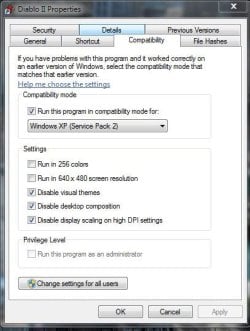
I was wondering if anybody could help me with a problem I'm having. When I start Diablo 2 the colours are all messed up they seem to be in a rainbow sort of style I don't really know how to explain but I've googled around about this and can't seem to find a fix?. I'm running windows 7 home premium and I have changed the video options for the game to directdraw along with setting the compatibility to windows xp service pack 2. If anyone could help me find a permanent fix for this I would be most grateful.
Thanks
 

My Computer

Computer type
PC/Desktop
Computer Manufacturer/Model Number
HP Pavillion S5306UK
OS
Windows 7
Graphics Card(s)
Chipset
Browser
Firefox
Diablo 2...good times good times...if only DIII would be out already ;)

IIRC that color bug is connected to the anti aliasing setting. Switch it off and you should be good to go.
I just checked the properties..this is how i have it set

Capture.JPG


Here's something I never tried myself because I didn't have the need for it:

Here is how to fix it without playing in Window mode :)

Just alt tab out of Diablo when you start it and open Task Manager (Ctrl+Shift+Esc). Under the Processes tab find explorer.exe and End Process it. Alt tab back to Diablo II and the colours should be normal :P That's how it worked for me. If you want to start your explorer.exe again: Task Manager-> Processes-> File -> New Task (Run...) -> type "exlorer.exe" and hit enter :) Hope it helps!

-DG
 

My Computer

Computer Manufacturer/Model Number
HP m8000n
OS
Windows 7 Ultimate x86
CPU
DualCore AMD Athlon 64 X2, 2600 MHz 5200+
Motherboard
Asus M2N68-LA (Narra)
Memory
Samsung 2GB DDR2
Graphics Card(s)
Onboard NVIDIA GeForce 6150SE nForce 430
Sound Card
Onboard nVIDIA nForce 6100-430 (MCP61P)
Monitor(s) Displays
Westinghouse 19" LED
Screen Resolution
1280x1024
Hard Drives
SATA II Seagate Barracuda 500GB
USB II WD Elements 500GB
USB II WD My Book 1TB
USB II WD My Book 2TB
PSU
Stock (HP)
Case
Stock (HP)
Cooling
Stock
Keyboard
Logitech Classic KB 200
Mouse
Standard HP opticle USB mouse
Good times indeed I was just browsing through the games I had installed on my PC and noticed it :p

Works perfectly now :D thanks for the help DG.
 

My Computer

Computer type
PC/Desktop
Computer Manufacturer/Model Number
HP Pavillion S5306UK
OS
Windows 7
Graphics Card(s)
Chipset
Browser
Firefox
I'm glad you got it fixed :D

DII one of my all time favorites. I ruined it for myself when I got the Hero Editor :(
 

My Computer

Computer Manufacturer/Model Number
HP m8000n
OS
Windows 7 Ultimate x86
CPU
DualCore AMD Athlon 64 X2, 2600 MHz 5200+
Motherboard
Asus M2N68-LA (Narra)
Memory
Samsung 2GB DDR2
Graphics Card(s)
Onboard NVIDIA GeForce 6150SE nForce 430
Sound Card
Onboard nVIDIA nForce 6100-430 (MCP61P)
Monitor(s) Displays
Westinghouse 19" LED
Screen Resolution
1280x1024
Hard Drives
SATA II Seagate Barracuda 500GB
USB II WD Elements 500GB
USB II WD My Book 1TB
USB II WD My Book 2TB
PSU
Stock (HP)
Case
Stock (HP)
Cooling
Stock
Keyboard
Logitech Classic KB 200
Mouse
Standard HP opticle USB mouse
This Is such a simple fix you will slap yourself

Left click Diablo 2 shortcut> Properties> compatibility; then put on windows Xp (service pack 2), check Disable video composition APPLY

Then (this is the important part) >>>>>>>>>>>>>>>>>>

Go to Start>All programs>Diablo2>Video Test

after you run the video test it will work
 

My Computer

OS
windows 7 ultimate x64
It works with Win 7 Professional fine :cool:
 

My Computer

Computer Manufacturer/Model Number
Toshiba
OS
Windows 7 Professional x86
CPU
???
Motherboard
???
Memory
???
Graphics Card(s)
Inbuilt
Sound Card
Inbuilt
Monitor(s) Displays
Inbuilt
Hard Drives
???
PSU
???
Case
Toshiba plastic case
Cooling
???
This Is such a simple fix you will slap yourself

Left click Diablo 2 shortcut> Properties> compatibility; then put on windows Xp (service pack 2), check Disable video composition APPLY

Then (this is the important part) >>>>>>>>>>>>>>>>>>

Go to Start>All programs>Diablo2>Video Test

after you run the video test it will work

Wow I was Giving up hope on ever being able to play Diablo 2 with its original video quality when I stumbled upon this.I can now enjoy the good times lol......DIABLO 2 FOR LIFE
 

My Computer

Computer type
PC/Desktop
Computer Manufacturer/Model Number
Hp
OS
Windows 7 Home Premium 64-bit
CPU
AMD Phenom 2 X4 820 processor 2.80 ghz
Motherboard
Pegatron
Memory
8GB
Graphics Card(s)
Nvidia GeForce 250 GTS
Sound Card
Nvidia Virtual Audio Device (wave Extensible)(WDM)
Monitor(s) Displays
2 24IN Dell Monitors
Screen Resolution
1366x768
Hard Drives
3.5 in 1 TB WD
2.5 in 1.5 TB Seagate
3.5 in 3 TB Seagate
PSU
650 Watt
Case
antec 900 series
Cooling
5 Cool max Chameleon Fans 3 Intake 2 Outake
Keyboard
Razer DeathStalker
Mouse
Razor DeathAdder
Internet Speed
10 Mbs
Antivirus
Eset Nod32 and Malwarebytes
Browser
Firefox
Other Info
Rainbow Fan LED Lights
Rosewill RCR-IC00140-in-1 3.5-inch Internal Card Reader
Back
Top