didn't find any partition

Made26

New member
Local time
7:50 AM
Messages
5
Yep, I would also like to see the picture.

I think that this was moved out of another similar thread and rightly so, since in that case it showed only Unknown and not initialised. The similarity ends there. The right side of the disk did not show anything - neither the disk capacity nor the status (like unallocated) ( Also it was dropped and so a physical damage was suspected)

In your case I am sure the Disk Management will show the disk capacity, and also that it is unallocated.( you said so. :)) Since you also said it was plugged in I presume it is an external drive.

Since it is almost time for me to retire for the day, I shall post this without waiting for the screenshot.

Download and install MiniTools Partition Wizard Home Edition 7.8 (14 MB) from Free download Magic Partition Manager Software, partition magic alternative, free partition magic, partition magic Windows 7 and server partition software - Partition Wizard Online

Recovery with Partition Wizard:
Run Partition Wizard 7.

Your disk1 may be shown as “unallocated” and without a drive letter.


Click on Partition Recovery Wizard and Next.

In the Partition Recovery Wizard screen, select the drive to be recovered and click on Next.

Select Full Disk, and then Next.

Select Quick Scan, Next

If the partition is found select and double click on it. Does the Partition Explorer show all the files?


Close the Partition Explorer and click on Finish.

The Main Screen will show the restored Drive but may be without a drive letter.


Right click on the drive, click on Change letter and give a drive letter.

Click on Apply to execute the two pending operations.

The partition is restored and your drive will be functional as before and you can access the files and folders.


Hi Jumanji,

I've lost my kid's birth videos in my 2tb WD.. So glad I've found this thread, which is the only one I've found really helpful after two weeks of searching. I've downloaded Mini Partition Wizard and run it as follows:
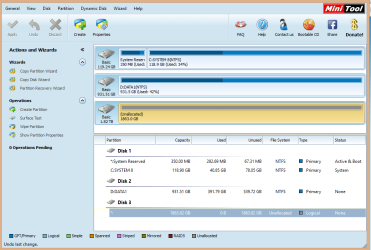
partition1.png

I've done most of the steps you outlined above, up to the following:
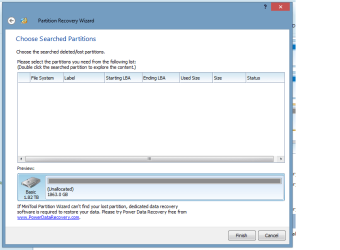
Partition Recovery Wizard > Select Drive > Full Disk > Quick Scan
However, it didn't find any partition. How do you suggest I proceed from here? As you can see in the screenshot, I don't have bad sectors.

Your help and guidance would be much appreciated.
 
Last edited by a moderator:

My Computer

Computer type
PC/Desktop
Computer Manufacturer/Model Number
Custom Build
OS
Windows 8
CPU
i5 3.2ghz
Motherboard
Gigabyte H97M
Memory
Corsair Vengeance 8gb
Graphics Card(s)
NVidia GeForce GTX 980
Hi Made26,

Welcome onboard.

Is your 2TB WD HDD an external HDD? Please indicate the model number.

What exactly happened to it? Did you or anybody drop it/ was there a power outage when it was being used or all of a sudden the drive became unaccessible ?

Did your drive come with Smartware? Were you using it?

How does it appear in Windows Disk Management? Please post a screenshot.

http://www.sevenforums.com/tutorials/274797-disk-management-post-screen-capture-image.html
 

My Computer

OS
Windows 7 Home Premium 32 bit
My HDD is a WD Caviar Green. I extracted it from a WD Mybook Essential two weeks ago. I must've disconnected it during a read / write operation... A very costly lesson of always properly eject your external hardware before disconnecting!

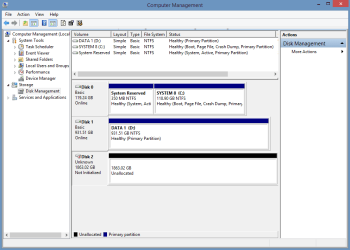
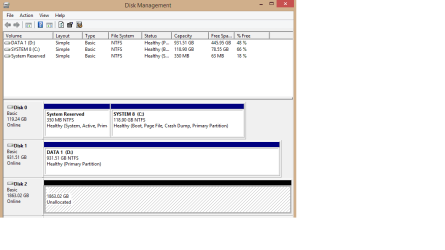
So I disassembled the case, pulled the small PCB attached to the disk unit (the PCB allows interfacing with power wall plug and USB cable). Afterwards I installed it in my PC, checked the BIOS to ensure it is enabled, etc. When I opened it in Windows, the following appeared:
partition2.png

I'm not familiar with Smartware, so no.

Let me know if you need more information..
 

My Computer

Computer type
PC/Desktop
Computer Manufacturer/Model Number
Custom Build
OS
Windows 8
CPU
i5 3.2ghz
Motherboard
Gigabyte H97M
Memory
Corsair Vengeance 8gb
Graphics Card(s)
NVidia GeForce GTX 980
OK, you have already done some engineering work on it :). We shall be doing more of it and its going to be a long-drawn process.

To start with, run Partition Recovery Wizard Quick Scan on Disk2 1863.02 GB drive again. When quick scan completes what do you see? Please post a screenshot of it.. A screeshot like this

25-12-2014 11-51-24.jpg
 

My Computer

OS
Windows 7 Home Premium 32 bit
If partition recovery is not possible, then - and only then - data recovery procedures.
 

My Computer

OS
Windows 7 Home Premium 32 bit
Ok, doing the quick scan now... If this is anything like I did yesterday (unfortunately I didn't take a screenshot), this would take about 6 hours.

Thanks for your patience. This is my first time posting in forums :)
 

My Computer

Computer type
PC/Desktop
Computer Manufacturer/Model Number
Custom Build
OS
Windows 8
CPU
i5 3.2ghz
Motherboard
Gigabyte H97M
Memory
Corsair Vengeance 8gb
Graphics Card(s)
NVidia GeForce GTX 980
Ok, If the partitions are intact, Quick scan should find it in no time - atleast the first partition which usually starts @ LBA 2048. When it does not find the start of any partition, then it converts itself to a slow search .

Now I believe that your partitions have been lost. Anyway, let the scan complete.

Once the scan is complete and you confirm that no partitions indeed were found then proceed to data recovery as follows:

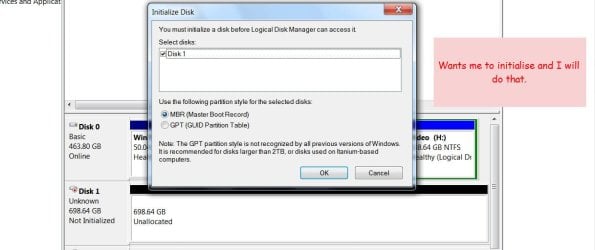
When you open Windows Disk Management, does it ask you to initialise your Disk 2? If it does then go ahead and initialise it as an MBR disk ( I am assuming that it was initialised as an MBR disk). Just stop with initialisation.That should bring your disk from "Unknown" "Not initialised" to "Basic" "Online". Your disk will still remain "Unallocated"

If it does not ask you to initialise, right click on the red arrow on Disk 2 in the disk map and try to initialise it.
,
If the initialisation attempt throws out an error message it signifies severe file system corruption.Close Windows Disk Management

Either way - whether initialisation succeeds or fails - go ahead with data recovery using PhotoRec.

You said video. In what format is it? Check whether PhotoRec can recover that format from the file list here
File Formats Recovered By PhotoRec - CGSecurity

If yes go ahead.

Download Windows Version of TestDisk/PhotoRec from TestDisk Download - CGSecurity
( either Windows (both 32bit and 64 bit) or Windows 64bit ( if your Windows 64bit lacks WoW64))

Run only photorec_win.exe in Test disk and not testdisk_win.exe

A guide here: Go to the topic Recovery in http://www.sevenforums.com/software/193467-guide-using-photorec-recovery-software.html

You have to connect another external drive with sufficient free space to copy the recovered files before running PhotoRec if your internal disks can't take it..

Edit: You may also have a look at this: Recover Deleted Files With PhotoRec | Worldstart's Tech Tips And Computer Help
 
Last edited:

My Computer

OS
Windows 7 Home Premium 32 bit
The quick scan shows that there were no partitions:
partition3.png

I'm going ahead with the next step, initializing the disks.
However, based on reading your forum posts I understand that initializing will format the drive. So, when exactly do I stop the initialization? Unfortunately I'm a complete newbie in this and I don't want to stop it too late or too early..
 

My Computer

Computer type
PC/Desktop
Computer Manufacturer/Model Number
Custom Build
OS
Windows 8
CPU
i5 3.2ghz
Motherboard
Gigabyte H97M
Memory
Corsair Vengeance 8gb
Graphics Card(s)
NVidia GeForce GTX 980
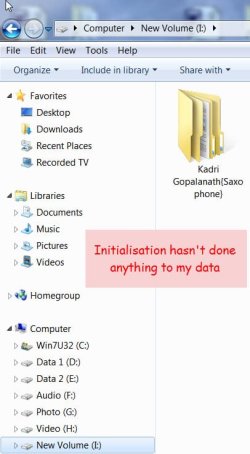
Please wait till I compose my post and upload it clarifying your doubts.

You may go ahead with initialisation after reading that post which I am preparing now.
 

My Computer

OS
Windows 7 Home Premium 32 bit
......However, based on reading your forum posts I understand that initializing will format the drive. So, when exactly do I stop the initialization? Unfortunately I'm a complete newbie in this and I don't want to stop it too late or too early..

Which of my Forum post says that initialising will format the drive? I think you have just misread.

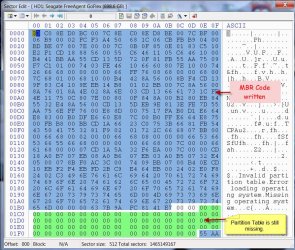
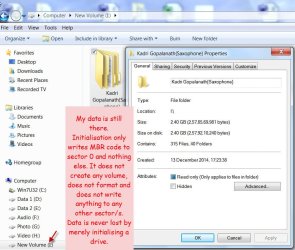
I have been consistently trying to tell one and all that contrary to the misconceived notion that Initialisation will destroy the data, it only writes the MBR code to Sector 0 and does nothing more. It does not create a new volume, it does not format any volume, it does not write anything to any other sector save sector 0. One will never lose any data merely initialising the disk.

So just initialise and stop with it. (Do not create a simple volume, do not format - these are the steps we normally follow with a new disk. If you get into the create new volume step just cancel it.) Proceed with data recovery with PhotoRec after initialising as in my post #8.

What Initialisation Does:

A26-12-2014 08-55-19.jpg

B26-12-2014 08-37-27.jpg

C26-12-2014 09-08-20.jpg

D26-12-2014 09-22-04.jpg

E26-12-2014 09-36-29.jpg

F26-12-2014 09-45-10.jpg

G26-12-2014 09-53-55.jpg
 

My Computer

OS
Windows 7 Home Premium 32 bit
jumanji I'm also trying to understand. Please let me know if I understand correctly.

Once I initialize a drive all it does is wright a MBR code to the front of the drive. Nothing else if I stop at that point.

At that time I will be able to access that drive and all of its partition if their are any.

Does this apply to a C drive (Windows drive) and or a data drive?
 

My Computer

Computer type
PC/Desktop
Computer Manufacturer/Model Number
Home made Desktop
OS
Windows 10 Pro. 64/ version 1709 Windows 7 Pro/64
CPU
Intel i7-6800K @ 4.3
Motherboard
ASUS X-99 Deluxe II
Memory
Corsair Platinum 16 gig @2400
Graphics Card(s)
EVGA GTX 1070 OC
Monitor(s) Displays
Asus 27" LED LCD/VE278Q
Screen Resolution
1920-1080 or 1280-720 HDMI
Hard Drives
INTEL SSD 730-240 Gb Sata 3.0/
PSU
EVGA Platium 1200W
Case
Phanteks Luxe Tempered Glass 8 fans/ one radiator
Cooling
XSPC/ Water Cooled CPU
Keyboard
Das 4 Professional
Mouse
Logitech M705/MX Anywhere 2-S
Internet Speed
100 mbits
Antivirus
Microsoft Security Essentials/ Malwarebytes Premium 3.0/ SAS
Browser
I.E. 11 default/Firefox/ ISP Time Warner Cable/Spectrum
Other Info
LG BluRay Burner/
Sound system-KLipsch-THX/
Icy Dock ssd Hot Swap bays.
jumanji I'm also trying to understand. Please let me know if I understand correctly.

Once I initialize a drive all it does is wright a MBR code to the front of the drive. Nothing else if I stop at that point.

At that time I will be able to access that drive and all of its partition if their are any.

Does this apply to a C drive (Windows drive) and or a data drive?

That is a good question.

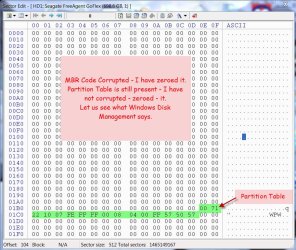
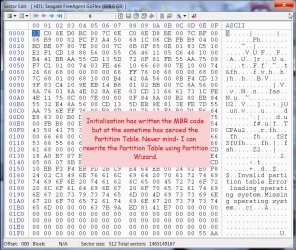
When the drive is initialised, it not only writes the MBR code but also zeroes the partition table.( though we say it only writes the MBR or MBR Code)

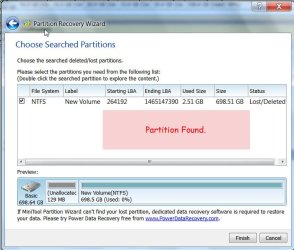
However one can always rewrite the Partition Table with Partition Wizard if the partitions existed and the partition table got eliminated when initialising.

( In OP's case no partition could be found and therefore data recovery becomes a necessity. Initialisation is recommended so as to bring the drive online and PhotoRec running on Windows can see an online drive.)

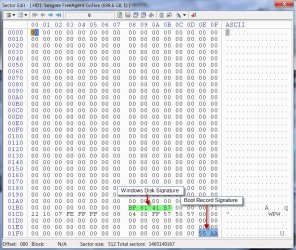
Strictly speaking, no MBR is needed for data drives since they need not boot. However those will still need Windows Disk Signature and Boot Record signature - which are considered part of the MBR code.

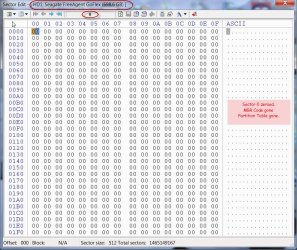
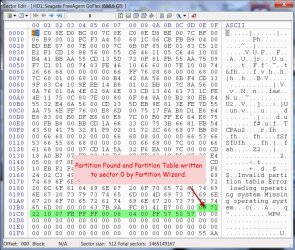
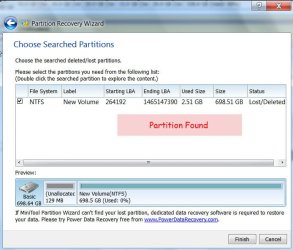
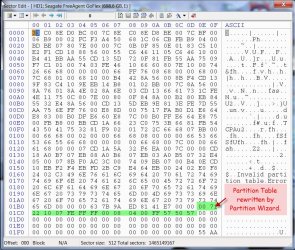
This will be seen in the following screenshot, where I zeroed Sector 0 in the external drive eliminating the MBR Code and partition table. Partition Recovery Wizard then found the partition and wrote into sector 0. Drive accessible now only with Windows Disk Signature and Boot Record Signature and of course the Partition Table, all written by PW.

26-12-2014 15-20-11.jpg

Windows however will always write the full MBR Code to all drives sans the partition table. Partition Table gets written only when one creates new volumes. Even at this stage no data will be lost since the partition table is written into sector 0.

The final point: if one saves sector 0 (512Bytes) for all his MBR drives using bootice, he only needs to restore it with bootice when Sector 0 gets corrupted and the drive becomes inaccessible. This is a simple procedure for all data drives.
 
Last edited:

My Computer

OS
Windows 7 Home Premium 32 bit
Pictorial representation of what is stated in the previous post:

A26-12-2014 12-03-44.jpg

b26-12-2014 12-11-51.jpg

c26-12-2014 12-17-40.jpg

d26-12-2014 12-23-04.jpg

e26-12-2014 12-59-07.jpg

f26-12-2014 13-12-19.jpg

G26-12-2014 13-18-38.jpg
 

My Computer

OS
Windows 7 Home Premium 32 bit
Jumanji,

You're right; I must've read about it someplace else. Thanks for putting together such a comprehensive explanation! I feel a bit smarter now :-p

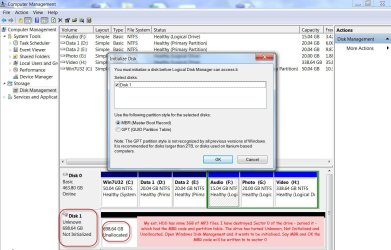
I've initialized the disk and as you said, it is now Basic and Online. However, there is still no drive letter. Is this ok?
partition4.png

Furthermore; I've read the guide and your documentation on using the PhotoRec software. The question is, what happens if I don't have enough drive space for the recovered files? I have about 1.5TB of data to be recovered, and my spare disk only have about 500gb left..
 

My Computer

Computer type
PC/Desktop
Computer Manufacturer/Model Number
Custom Build
OS
Windows 8
CPU
i5 3.2ghz
Motherboard
Gigabyte H97M
Memory
Corsair Vengeance 8gb
Graphics Card(s)
NVidia GeForce GTX 980
You can't assign a drive letter unless you create a volume but we are not going to create a new volume. So do not bother about a drive letter.

I just wanted it to be brought online so that Windows sees the drive (and not blind to it) and PhotoRec running on Windows sees a drive online.

PhotoRec will straight away start copying the files to the destination. I think it will stop copying if it runs out of space but I really do not know :). In any case I would not recommend copying to any space in your system drive.

You can run PhotoRec any number of times safely since there is no way you can go wrong and it does not write anything to the drive under recovery even if you do mistakes in the procedure.

You may wait till you get the adequate capacity external drive to copy all at one go without fear.

Did you find out whether PhotoRec can deal with the video file formats in your external drive?

File Formats Recovered By PhotoRec - CGSecurity
 
Last edited:

My Computer

OS
Windows 7 Home Premium 32 bit
Back
Top