Solved Difference between System Restore Point and System Checkpoint?

asif143

New member
Local time
2:20 AM
Messages
16
I would like to know the differences between System Restore Point and System Checkpoint. What happens when someone restores his system using System Restore Point or using System Checkpoint? What are actually restored after both processes? How much memory is consumed by each Restore Point? I will be grateful if someone enlighten me with his knowledge. Sorry if my language seems halting to someone.
 

My Computer

Computer type
PC/Desktop
Computer Manufacturer/Model Number
Custom build
OS
Windows 7 Ultimate x86
CPU
Intel® Pentium® Processor G2010 2.80GHz-Ivy Bridge-Dual core
Motherboard
GIGABYTE B75M-D3H
Memory
DDR3-4GB
Graphics Card(s)
Galaxy Nvidia Geforce GTX 450
Monitor(s) Displays
Monitor HCM7LWAT21 43cm (HCL)
Screen Resolution
1440x900
Hard Drives
320 GB
PSU
Cooler Master Thunder 450 Watts
Internet Speed
3.1 mbps
Antivirus
Microsoft Security Essential
Browser
Firefox, IE 10.
Restore point is a Windows 7 default ability.
As far as I know Windows 7 has no such thing as check point.
 

My Computer

Computer type
PC/Desktop
Computer Manufacturer/Model Number
Home made Desktop
OS
Windows 10 Pro. 64/ version 1709 Windows 7 Pro/64
CPU
Intel i7-6800K @ 4.3
Motherboard
ASUS X-99 Deluxe II
Memory
Corsair Platinum 16 gig @2400
Graphics Card(s)
EVGA GTX 1070 OC
Monitor(s) Displays
Asus 27" LED LCD/VE278Q
Screen Resolution
1920-1080 or 1280-720 HDMI
Hard Drives
INTEL SSD 730-240 Gb Sata 3.0/
PSU
EVGA Platium 1200W
Case
Phanteks Luxe Tempered Glass 8 fans/ one radiator
Cooling
XSPC/ Water Cooled CPU
Keyboard
Das 4 Professional
Mouse
Logitech M705/MX Anywhere 2-S
Internet Speed
100 mbits
Antivirus
Microsoft Security Essentials/ Malwarebytes Premium 3.0/ SAS
Browser
I.E. 11 default/Firefox/ ISP Time Warner Cable/Spectrum
Other Info
LG BluRay Burner/
Sound system-KLipsch-THX/
Icy Dock ssd Hot Swap bays.
System Restore Point : Sort of snaphot of current state of disk volume. It will be made when:
  • At program install (if program is well written)
  • At program uninstall (if program is well written)
  • At windows patch install
  • At windows patch uninstall
  • When doing a system restore.
  • When you make a manual restore point
After you make a restore point (either manually or by operations described above):
  • Every block on disk that's written to: old state will be save in antoher block on disk. So old contents will be saved. Old state will be saved once for each block (and only if it was really used by a file). If you use a free block it will mark the block "was free earlier" .that's why restore points are so small. Only overwritten blocks are saved. Pagefile.sys and other volatile stuff will not be in restore point.
So win7 knows what the block contents was at time of making "restore point". So it can reconstruct the disk let's say "go back in time". This is used for "previous versions of files" http://www.sevenforums.com/tutorials/85679-previous-versions-restore-files-folders.html and for "system restore" http://www.sevenforums.com/tutorials/700-system-restore.html

Assume the following:
-you have files now
-you have a restore point 1 day ago
-you have a restore point 2 days ago

Now you can revert two days back in time. System will first rollback to 1 day ago state, then to 2 days ago state. It does it in one run, but logically that's what happens.

System Checkpoint never heard about it. I think it's just a synomym (?)
 

My Computer

Computer type
Laptop
Computer Manufacturer/Model Number
ACER ASPIRE 5742G
OS
Microsoft Windows 7 Home Premium 64-bits 7601 Multiprocessor Free Service Pack 1
CPU
Intel(R) Core(TM) i3 CPU M 370 @ 2.40GHz
Motherboard
Acer Aspire 5742G
Memory
4,00 GB
Graphics Card(s)
ATI Mobility Radeon HD 5400 Series
Sound Card
(1) AMD High Definition Audio Device (2) Realtek High Defi
Screen Resolution
1366 x 768 x 32 bits (4294967296 colors) @ 60 Hz
Hard Drives
WDC WD5000BEVT-22ZAT0
The only reference to "system checkpoint" I found was when it is used interchangeably with "restore point". Different terms that mean the same thing. Unfortunately terms are not always used consistently. Different terms may have the same meaning or the same term may have multiple meanings.

Restore points consume disk space, not memory. The amount of space will vary widely depending on the reason for creation and the system changes that occurred since the last restore point.

This article explains system restore more fully:
System Restore - Microsoft Windows
 

My Computer

Computer type
PC/Desktop
Computer Manufacturer/Model Number
HP
OS
Windows 7 Pro 64 bit
CPU
Xeon W3520
Memory
8 GB
Graphics Card(s)
Nvidia Geforce 210
The only reference to "system checkpoint" I found was when it is used interchangeably with "restore point". Different terms that mean the same thing. Unfortunately terms are not always used consistently. Different terms may have the same meaning or the same term may have multiple meanings.

Restore points consume disk space, not memory. The amount of space will vary widely depending on the reason for creation and the system changes that occurred since the last restore point.

This article explains system restore more fully:
System Restore - Microsoft Windows
Indeed terms are not always used consistently. Drives me crazy sometimes. People use the term disk, partition, volume.... totally wrong most of time

Another example. "I can move my cursor, but nothing else is on screen". They mean the mouse pointer, not the text cursor. (although a mouse pointer is sometimes called "mouse cursor")
 

My Computer

Computer type
Laptop
Computer Manufacturer/Model Number
ACER ASPIRE 5742G
OS
Microsoft Windows 7 Home Premium 64-bits 7601 Multiprocessor Free Service Pack 1
CPU
Intel(R) Core(TM) i3 CPU M 370 @ 2.40GHz
Motherboard
Acer Aspire 5742G
Memory
4,00 GB
Graphics Card(s)
ATI Mobility Radeon HD 5400 Series
Sound Card
(1) AMD High Definition Audio Device (2) Realtek High Defi
Screen Resolution
1366 x 768 x 32 bits (4294967296 colors) @ 60 Hz
Hard Drives
WDC WD5000BEVT-22ZAT0
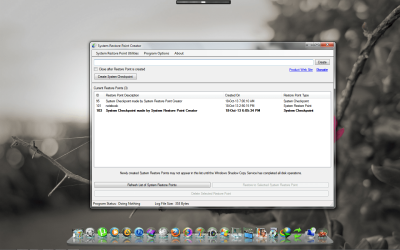
Lot of thanks to you guys for the coherent and meaningful replies, I know how to manually create a restore point or schedule to create restore point but lately I have got a good program to create a restore point or scheduled restore point with one click (snapshot in the attachment), from that I got the term "System Checkpoint", Hence the meaning is clear to me now for you guys. Thanks.
 

Attachments

  • Restore point creator.png
    Restore point creator.png
    653.6 KB · Views: 8

My Computer

Computer type
PC/Desktop
Computer Manufacturer/Model Number
Custom build
OS
Windows 7 Ultimate x86
CPU
Intel® Pentium® Processor G2010 2.80GHz-Ivy Bridge-Dual core
Motherboard
GIGABYTE B75M-D3H
Memory
DDR3-4GB
Graphics Card(s)
Galaxy Nvidia Geforce GTX 450
Monitor(s) Displays
Monitor HCM7LWAT21 43cm (HCL)
Screen Resolution
1440x900
Hard Drives
320 GB
PSU
Cooler Master Thunder 450 Watts
Internet Speed
3.1 mbps
Antivirus
Microsoft Security Essential
Browser
Firefox, IE 10.
You are trying to use a 3rd party program to do what Windows 7 does quiet well all by itself.

Are you having any problems using Windows 7 Restore points?
 

My Computer

Computer type
PC/Desktop
Computer Manufacturer/Model Number
Home made Desktop
OS
Windows 10 Pro. 64/ version 1709 Windows 7 Pro/64
CPU
Intel i7-6800K @ 4.3
Motherboard
ASUS X-99 Deluxe II
Memory
Corsair Platinum 16 gig @2400
Graphics Card(s)
EVGA GTX 1070 OC
Monitor(s) Displays
Asus 27" LED LCD/VE278Q
Screen Resolution
1920-1080 or 1280-720 HDMI
Hard Drives
INTEL SSD 730-240 Gb Sata 3.0/
PSU
EVGA Platium 1200W
Case
Phanteks Luxe Tempered Glass 8 fans/ one radiator
Cooling
XSPC/ Water Cooled CPU
Keyboard
Das 4 Professional
Mouse
Logitech M705/MX Anywhere 2-S
Internet Speed
100 mbits
Antivirus
Microsoft Security Essentials/ Malwarebytes Premium 3.0/ SAS
Browser
I.E. 11 default/Firefox/ ISP Time Warner Cable/Spectrum
Other Info
LG BluRay Burner/
Sound system-KLipsch-THX/
Icy Dock ssd Hot Swap bays.
You are trying to use a 3rd party program to do what Windows 7 does quiet well all by itself.

Are you having any problems using Windows 7 Restore points?
Nope, it's working fine, I think it's better than default one. (the program do that same process with just one click, moreover it has few more option like preserving restore point, schedule restore point, creates multiple restore point)
 

My Computer

Computer type
PC/Desktop
Computer Manufacturer/Model Number
Custom build
OS
Windows 7 Ultimate x86
CPU
Intel® Pentium® Processor G2010 2.80GHz-Ivy Bridge-Dual core
Motherboard
GIGABYTE B75M-D3H
Memory
DDR3-4GB
Graphics Card(s)
Galaxy Nvidia Geforce GTX 450
Monitor(s) Displays
Monitor HCM7LWAT21 43cm (HCL)
Screen Resolution
1440x900
Hard Drives
320 GB
PSU
Cooler Master Thunder 450 Watts
Internet Speed
3.1 mbps
Antivirus
Microsoft Security Essential
Browser
Firefox, IE 10.
Back
Top