
Difference in RUN command box in Windows 7

dersed

New member
Local time
6:02 AM
Messages
1
I have two version of Windows 7 Ultimate.


One at my office and one at my home. The one that is at my home contains the RUN dialog box that always opens programs in Admin Mode.

At office ( I am not on any office-specific DOMAIN/WORKGROUP) my Win7 Ultimate RUN dialog box doesnt show this option.

How can I enable it in the RUN Dialog box ????
 

Attachments
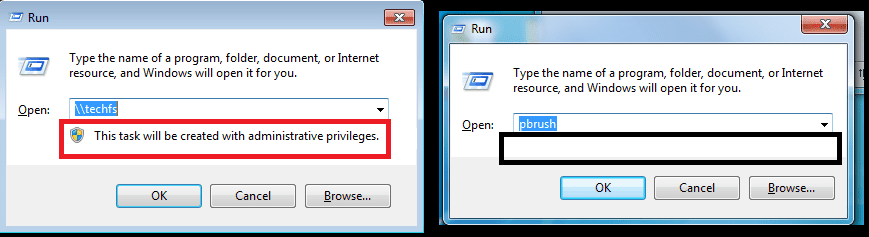
  • Run.png
    Run.png
    12.3 KB · Views: 15

My Computer

OS
Windows 7 Ultimate x64
Welcome to Seven Forums dersed. Are you Admin of the PC at work? The run dialog will open with admin privileges if you open it on an admin account. If you are admin, you can kill explorer through task manager, then launch a new explorer from an advanced command prompt and that would give you a run dialog with the admin priviliges. A Guy
 

My Computer

Computer type
PC/Desktop
OS
Windows 10 Home x64
CPU
INTEL Core i5-750 Quad-Core 3.37GHz
Motherboard
ASUS P7P55D
Memory
HyperX Fury Black Series 8GB (2 x 4GB) 1866Mhz
Graphics Card(s)
EVGA GeForce GTX 750 Superclocked 1GB 128-Bit GDDR5
Monitor(s) Displays
LG 32MA68HY 32" IPS
Screen Resolution
1920 x 1080
Hard Drives
Samsung 840 Evo 120GB, SEAGATE 500GB Barracuda® 7200.12, SATA 3 Gb/s, 7200 RPM, 16MB cache
PSU
ANTEC TruePower New TP-550, 80 PLUS, 550W
Case
ANTEC Three Hundred Illusion
Cooling
COOLER MASTER Hyper 212 Plus, 4 x 120mm 1 x 140mm Noctua's
Internet Speed
85 + Mbps
Antivirus
Avast
Browser
Vivaldi
Welcome to the Seven Forums.

I'm on a slow connection to the net :-(
...and I see that A Guy beat me to the post
...while I was waiting on this video to upload to YouTube.

Did you do recall doing something like this...

...on the computer at work?

Does restarting your work computer get rid of that statement under the Run dialog box's "Open:" field?
 

My Computer

Computer type
Laptop
Computer Manufacturer/Model Number
Employer provided Dell Latitude
OS
W7 Pro SP1 64bit
CPU
i7
Memory
8GB
Graphics Card(s)
Intel HD Graphics
Hard Drives
crappy SSD
Antivirus
Employer mandated Symantec Endpoint Protection
Browser
Pale Moon 64bit, IE11 64bit & Chrome 64bit
The difference happens when the launched application will have full admin privileges, the message is a warning. Often that happens when you're admin and UAC is disabled, therefore everything runs as admin always. The warning may also appear if you're running under the built-in administrator account, which is by default immune to UAC and runs everything elevated too. Otherwise it should not appear, meaning that the new app will run with reduced permissions.
 

My Computer

Computer type
Laptop
Computer Manufacturer/Model Number
Toshiba Sattelite A665-S6092
OS
Windows 7 Ultimate x64
CPU
Intel Core i7-740QM
Memory
8 GB DDR3
Graphics Card(s)
NVIDIA GeForce 330GT
Screen Resolution
1366x768
Hard Drives
Samsung 840 SSD 500GB
1TB USB3 external HD
Cooling
Coolermaster Notepal U3 notebook cooling pad
Internet Speed
3mbps ASDL
Antivirus
ClamWin 0.98.7
Browser
Opera 12.17 x86 (main), Firefox 38 (sec), IE11 (last resort)
Back
Top