Different boot animation.

dabedoo

New member
Local time
1:47 AM
Messages
43
Why is my boot animation changing for the seven one to the vista one ?
I dont understand why this is happening ?

I installed the same Seven version on 5 different pc's but some of them
are showing the vista boot animation and others are changing from seven to
vista to seven after several reboots ??

Cant figure why ??

windows_seven_boot.jpg

vistabootscreen.jpg
 

My Computer

OS
Win Seven Ultimate RTM
CPU
Intel Core i7 920
Motherboard
Intel DX 58SO
Memory
4 gigs ram
Graphics Card(s)
Nvidia GTX 260
Sound Card
Digidesign
Monitor(s) Displays
Acer 26"
Screen Resolution
1920*1200
Case
Antec
Cooling
Noctua
Internet Speed
Lan
The only thing that comes to mind is that you did an upgrade fom vista rather than a clean install...
 

My Computer

Computer type
PC/Desktop
Computer Manufacturer/Model Number
LENOVO K450 @3.0GHZ
OS
64-bit Windows 8.1 Pro
CPU
Core(TM) i5 CPU 4330 Haswell @ 3.20GHz
Motherboard
LENOVO
Memory
12.00 GB
Graphics Card(s)
Intel(R) HD Graphics
Sound Card
Intel HD integtrated
Monitor(s) Displays
HP 25' ISP Monitor
Screen Resolution
1900/1020
Hard Drives
(1) ST1000DM003-1CH162 (2) Generic STORAGE DEVICE USB Device (3) Generic STORAGE DEVICE USB Device
Internet Speed
100mb down/10mb up
I'm not sure, but this might work:

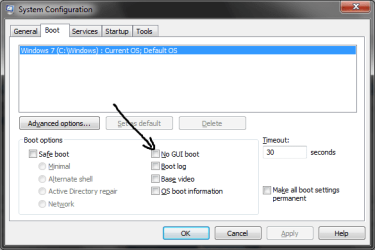
Start Menu>Type "msconfig" (no quotation marks)>"Boot" tab>Make sure the setting "No GUI Boot is UNCHECKED.
no gui boot.png
 

My Computer

Computer type
PC/Desktop
Computer Manufacturer/Model Number
Multirama PC Expert [Bulgaria]
OS
Windows 7 Home Premium [64-Bit]
CPU
Intel Core 2 Quad CPU Q8200 @ 2.33 GHz
Motherboard
GIGABYTE GA-G31M-S2C
Memory
4094 MB DDR2
Graphics Card(s)
SAPPHIRE Radeon HD 6970 (2 GB VRAM)
Sound Card
Realtek ALC883 @ Intel 82801GB ICH7 - High Definition Audio
Monitor(s) Displays
Samsung SyncMaster BX2235 [21.5" LCD with LED Backlight]
Screen Resolution
1920x1080
Hard Drives
Hitachi HDT721075SLA360 - 750 GB
PSU
Cooler Master GX750 - 750W
Case
Multirama (Black / 2010 Revision)
Cooling
Stock + Cooler Master
Keyboard
Logitech G510 (Gaming Keyboard)
Mouse
Razer Lachesis (4000 DPI, Blue Version)
Internet Speed
Vivacom Optical [100 Mbps]
Browser
Chrome [Windows]
Hi dabedoo

Try this ....

The invalid and wrong boot screen for Windows 7 is due to missing locale entry in boot record, which failed to be set when editing or rebuilding the BCD. When locale is not found, Windows boot loader does not know which boot locale folder to look for the animated bootscreen. Thus, in order to fix the boot screen so that the boot screen can be reverted, restored or reseted back to original animated Windows 7 boot screen, just run one of the following commands in elevated command prompt with administrator rights:

bcdedit /set {current} locale en-US
or
bcdboot %WinDir% /l en-US


Change the en-US to the language version of the installed Windows 7, such as ja-JP, de-DE, es-ES, pt-BR, zh-CN, zh-TW, fr-FR, fi-FI and etc.

Restart the computer after running the command to see the new boot UI (user interface) be used again. To check if the locale setting has been entered properly, just run the bceedit command in command prompt that runs as administrator.
Source
 

My Computers

System One System Two

  • Computer type
    PC/Desktop
    Computer Manufacturer/Model Number
    ChillBlast - Custom to my design
    OS
    Windows 11 Pro x64 [Latest Release and Release Preview]
    CPU
    Ryzen 9 5950X, 3.8 - 5.2 MHz
    Motherboard
    Asus Prime X570-Pro
    Memory
    64GB [2 x 32GB] DDR4 3200MHz
    Graphics Card(s)
    4GB NVIDIA GEFORCE GTX 1650 Ti
    Sound Card
    On-board SPDIF to 5.1 System + HDMI [5.1 system]
    Monitor(s) Displays
    32" UHD 32 Bit HDR Monitor + 43" UHD 4K 32Bit HDR TV
    Screen Resolution
    2 x 3840 x 2160 @60Hz
    Hard Drives
    1TB M2 SSD OS, 500GB Fast Access SSD, 2 x 8TB Data + Various Externals from 1TB to 4TB, 10TB NAS
    PSU
    NZXT C750 80 PLUS Gold 750W Modular PSU
    Case
    Workstation Case [Matt Black]
    Cooling
    NZXT Kraken X63 280mm CPU Cooler +2x Quiet Case fans
    Keyboard
    Logitech Wireless MX Keys & K400 + others
    Mouse
    Logitech Wireless MX Master 3S
    Internet Speed
    920 MB Down 50 MB Up
    Antivirus
    BitDefender Total Security Pro
    Browser
    Chrome (always run latest Non-Beta)
    Other Info
    Also run ...
    Laptop - Quad 8GB - Windows 10 Pro x64
    Nexus 7 Android tablet x2
    Samsung 10.2" tablet
    Blackview TAB 8 4G Android Tablet c/w Keyboard
    Wacom Intuos Pro Medium Pen Pad
    Wacom Intuos Pro Small Pen Pad
    Wacom Expresskeys Remote
    Loopdeck+ Graphics Controller
    Shuttle Pro v2 Control
  • Computer type
    Laptop
    System Manufacturer/Model Number
    Dell XPS 17 10750H
    OS
    Windows 11 Pro x64 Latest RP
    CPU
    Intel I7 10750H 5.0GHz
    Motherboard
    Dell XPS
    Memory
    32GB [2x16GB] DDR4 2933 MHz
    Graphics Card(s)
    nVidia GTX1650Ti 4 GB GDDR6
    Sound Card
    Stock [Realtek] 4 Speaker
    Monitor(s) Displays
    17" IPS UHD+ Infinity Edge Touchscreen
    Screen Resolution
    3840 x 2400
    Hard Drives
    2TB M2 NVMe, 4TB External + various 500GB & 1TB External NVMe (also have access to spinner HDD from
    PSU
    Stock
    Case
    Stock XPS Aluminium & Carbon Fibre
    Cooling
    Stock - Active Fan Control
    Keyboard
    Backlit + Various Logitech
    Mouse
    Stock Track Pad + Logitech MX Trackball
    Internet Speed
    72 MB Down 18MB Up
    Browser
    Chrome
    Other Info
    Also run ...
    Laptop - Quad 8GB - Windows 10 Pro x64
    Nexus 7 Android tablet x2
    10.2" tablet
    Sony Z3 Android Smartphone
    Wacom Intuos Pro Medium Pen Pad
    Wacom Intuos Pro Small Pen Pad
    Wacom Expresskeys Remote
    Loopdeck+ Graphics Controller
    Shuttle Pro v2 Control Pad
    10TB NAS
The only thing that comes to mind is that you did an upgrade fom vista rather than a clean install...

+1 the most common cause of this is an Upgrade, but some tweak utilities can have the same effect.

I'm not sure, but this might work:

Start Menu>Type "msconfig" (no quotation marks)>"Boot" tab>Make sure the setting "No GUI Boot is UNCHECKED.
View attachment 26892

I've just tried this as a troubleshooting option & it just displays a black screen on bootup. Nice idea though :D
 

My Computer

Computer Manufacturer/Model Number
Compaq Desktop
OS
Windows 7 Ultimate x64
CPU
AMD Sempron Dual Core
Memory
3GB
Graphics Card(s)
NVIDIA GeForce 6150SE nForce 430
Screen Resolution
1024x768
Hard Drives
150GB Sata
I didn't upgrade from vista and no gui boot is unchecked....am gonna try the
bcdedit trick, thxx
 

My Computer

OS
Win Seven Ultimate RTM
CPU
Intel Core i7 920
Motherboard
Intel DX 58SO
Memory
4 gigs ram
Graphics Card(s)
Nvidia GTX 260
Sound Card
Digidesign
Monitor(s) Displays
Acer 26"
Screen Resolution
1920*1200
Case
Antec
Cooling
Noctua
Internet Speed
Lan
One thing I forgot to add :o

It is strongly recommended that you create a backup of the BCD store before making any changes to it.

bcdedit /export "D:\BCD Backup\Bcd Backup" Creates a backup to a pre-created folder, in this case “BCD Backup” on drive D:

bcdedit /import "D:\BCD Backup\Bcd Backup" Restores the backup previously created

Although the actual commands given should not cause any problems it's always best to be sure
 

My Computers

System One System Two

  • Computer type
    PC/Desktop
    Computer Manufacturer/Model Number
    ChillBlast - Custom to my design
    OS
    Windows 11 Pro x64 [Latest Release and Release Preview]
    CPU
    Ryzen 9 5950X, 3.8 - 5.2 MHz
    Motherboard
    Asus Prime X570-Pro
    Memory
    64GB [2 x 32GB] DDR4 3200MHz
    Graphics Card(s)
    4GB NVIDIA GEFORCE GTX 1650 Ti
    Sound Card
    On-board SPDIF to 5.1 System + HDMI [5.1 system]
    Monitor(s) Displays
    32" UHD 32 Bit HDR Monitor + 43" UHD 4K 32Bit HDR TV
    Screen Resolution
    2 x 3840 x 2160 @60Hz
    Hard Drives
    1TB M2 SSD OS, 500GB Fast Access SSD, 2 x 8TB Data + Various Externals from 1TB to 4TB, 10TB NAS
    PSU
    NZXT C750 80 PLUS Gold 750W Modular PSU
    Case
    Workstation Case [Matt Black]
    Cooling
    NZXT Kraken X63 280mm CPU Cooler +2x Quiet Case fans
    Keyboard
    Logitech Wireless MX Keys & K400 + others
    Mouse
    Logitech Wireless MX Master 3S
    Internet Speed
    920 MB Down 50 MB Up
    Antivirus
    BitDefender Total Security Pro
    Browser
    Chrome (always run latest Non-Beta)
    Other Info
    Also run ...
    Laptop - Quad 8GB - Windows 10 Pro x64
    Nexus 7 Android tablet x2
    Samsung 10.2" tablet
    Blackview TAB 8 4G Android Tablet c/w Keyboard
    Wacom Intuos Pro Medium Pen Pad
    Wacom Intuos Pro Small Pen Pad
    Wacom Expresskeys Remote
    Loopdeck+ Graphics Controller
    Shuttle Pro v2 Control
  • Computer type
    Laptop
    System Manufacturer/Model Number
    Dell XPS 17 10750H
    OS
    Windows 11 Pro x64 Latest RP
    CPU
    Intel I7 10750H 5.0GHz
    Motherboard
    Dell XPS
    Memory
    32GB [2x16GB] DDR4 2933 MHz
    Graphics Card(s)
    nVidia GTX1650Ti 4 GB GDDR6
    Sound Card
    Stock [Realtek] 4 Speaker
    Monitor(s) Displays
    17" IPS UHD+ Infinity Edge Touchscreen
    Screen Resolution
    3840 x 2400
    Hard Drives
    2TB M2 NVMe, 4TB External + various 500GB & 1TB External NVMe (also have access to spinner HDD from
    PSU
    Stock
    Case
    Stock XPS Aluminium & Carbon Fibre
    Cooling
    Stock - Active Fan Control
    Keyboard
    Backlit + Various Logitech
    Mouse
    Stock Track Pad + Logitech MX Trackball
    Internet Speed
    72 MB Down 18MB Up
    Browser
    Chrome
    Other Info
    Also run ...
    Laptop - Quad 8GB - Windows 10 Pro x64
    Nexus 7 Android tablet x2
    10.2" tablet
    Sony Z3 Android Smartphone
    Wacom Intuos Pro Medium Pen Pad
    Wacom Intuos Pro Small Pen Pad
    Wacom Expresskeys Remote
    Loopdeck+ Graphics Controller
    Shuttle Pro v2 Control Pad
    10TB NAS
I didn't upgrade from vista and no gui boot is unchecked....am gonna try the
bcdedit trick, thxx

You didn't upgrade, but was Vista previously installed? If so, did you format the drive (advanced install options) and then install Windows 7?
 

My Computer

Computer Manufacturer/Model Number
Dell XPS 15 L502x
OS
Windows 7 Ultimate x64 SP1
CPU
Core i7-2670QM
Memory
8GB DDR3 PC3-10600
Graphics Card(s)
Intel HD Graphics 3000 + GeForce GT 540M
Screen Resolution
1920x1080
Hard Drives
1TB 5400RPM Seagate
our family one downstairs does this. thought it was down to having a old intel graphics card
 

My Computer

Computer type
PC/Desktop
Computer Manufacturer/Model Number
Custom Build
OS
Windows 8 Pro 64 bit
CPU
Intel Core i7 3770K @ 4.2 GHz
Motherboard
Gigabyte Z77X-D3H
Memory
8GB Corsair XMS3 1333mhz 2x4GB
Graphics Card(s)
Gigabyte Radeon HD 7970 OC WindForce
Sound Card
VIA High Definition Audio
Monitor(s) Displays
Dell S2740L
Screen Resolution
1920x1080
Hard Drives
Samsung 250GB 840 Pro (2.5) (OS+Aps)
Toshiba DT01ACA100 1TB 7200RPM (3.5) (Games)
PSU
Coolmaster Silent ProM 600W
Case
Coolermaster HAF 912 Plus
Cooling
Cooler Master Hyper 612S
Keyboard
Logitech Wireless Keyboard
Mouse
Thermaltake TteSPORTS Theron Gaming Mouse
Internet Speed
50-60Mbs (DL) 12-20Mbs (UL) BT Infinity FTTC
Antivirus
Bitdefender Anti Virus Plus 2015
Browser
Google Chrome
Other Info
Samsung SH-B083L 8x Blu-Ray Reader
I didn't upgrade from vista and no gui boot is unchecked....am gonna try the
bcdedit trick, thxx

You didn't upgrade, but was Vista previously installed? If so, did you format the drive (advanced install options) and then install Windows 7?

I came from xp and formatted before installing 7 :sarc:
 

My Computer

OS
Win Seven Ultimate RTM
CPU
Intel Core i7 920
Motherboard
Intel DX 58SO
Memory
4 gigs ram
Graphics Card(s)
Nvidia GTX 260
Sound Card
Digidesign
Monitor(s) Displays
Acer 26"
Screen Resolution
1920*1200
Case
Antec
Cooling
Noctua
Internet Speed
Lan
if 7 reverts to vista bootscreen after being tinkered with can you replace the vista boot screen with your own and get a custom boot screen?
 

My Computer

Computer Manufacturer/Model Number
dell demesion 2400
OS
windows 7
CPU
cellron 220
Motherboard
idk i found it
Memory
640 mb
Graphics Card(s)
idk
Sound Card
sound blaster
Monitor(s) Displays
1995 gloldstar
Hard Drives
2 wd 80gb
PSU
what?
Case
65 dollar case with a window put in it
Cooling
1 120 mm fan in back
Last edited:

My Computer

Computer Manufacturer/Model Number
Averatec 6130HS-20
OS
Windows 7 Professional 32-bit (6.1, Build 7600)
CPU
Intel(R) Pentium(R) 4 3.00 GHz HT
Memory
2.0 GB
Graphics Card(s)
ATI Mobility Radeon 9600 64MB
Sound Card
Realtek AC'97 Audio
Screen Resolution
1280 x 800
Hard Drives
Seagate 96023A 60GB 7200RPM -
Seagate FreeAgentDesktop 250GB
Cooling
20 Inch Box Fan
Mouse
Targus PAWM10 Wireless Optical Laptop Mouse
Back
Top