Different BSOD while gaming

Noobs

New member
Local time
10:31 AM
Messages
16
Yeah, it started happening (frequently) since last night. I usually just ignore it, but today I receive 2 in a row (during gaming and after hard-restart)..

UPDATED: New attachment. (23-10-2012)
 
Last edited:

My Computer

OS
Windows 7 Ultimate 32bit sp1
Welcome

Avira is known to cause BSODs on some systems, please uninstall it.
Code:
Start Menu\Programs\Avira	Public:Start Menu\Programs\Avira	Public
Start Menu\Programs\Avira\Avira Desktop	Public:Start Menu\Programs\Avira\Avira Desktop	Public
DAEMON Tools Lite	"c:\program files\daemon tools lite\dtlite.exe" -autorun	WALKER\Presario	HKU\S-1-5-21-3527483958-861926469-1139164370-1000\SOFTWARE\Microsoft\Windows\CurrentVersion\Run
Use MSE, it does not cause problems on the windows 7 OS. It's free+light weight as well.
Daemon tools is known to cause BSOD. Please uninstall it.

Reinstall the latest drivers for your graphic card from the manufacturers website but first uninstall via control panel. Use Driver Sweeper to get rid of any remaining drivers and avoid CCC - Catalyst control center during installation.

Keep us posted
 

My Computer

Computer type
PC/Desktop
Computer Manufacturer/Model Number
Self assembled
OS
Windows 10 Home 64Bit
CPU
Intel Core i5 10400 @ 2.90GHz
Motherboard
Intel Corporation DG41WV (PROCESSOR)
Memory
8.00GB Single-Channel Unknown @ 1329MHz (16-20-20-38)
Sound Card
Realtek High Definition Audio
Monitor(s) Displays
DELL E170S
Screen Resolution
1280x1024 pixels
Hard Drives
931GB TOSHIBA DT01ACA100 (SATA)
238GB TEAM TM8PS7256G (SATA SSD)
Case
Nothing Fancy
Cooling
Fans
Keyboard
A4 Tech Co LTD
Mouse
A4 Tech Co Ltd/Logitech
Internet Speed
25 Mbps
Welcome

Avira is known to cause BSODs on some systems, please uninstall it.
Code:
Start Menu\Programs\Avira	Public:Start Menu\Programs\Avira	Public
Start Menu\Programs\Avira\Avira Desktop	Public:Start Menu\Programs\Avira\Avira Desktop	Public
DAEMON Tools Lite	"c:\program files\daemon tools lite\dtlite.exe" -autorun	WALKER\Presario	HKU\S-1-5-21-3527483958-861926469-1139164370-1000\SOFTWARE\Microsoft\Windows\CurrentVersion\Run
Use MSE, it does not cause problems on the windows 7 OS. It's free+light weight as well.
Daemon tools is known to cause BSOD. Please uninstall it.

Reinstall the latest drivers for your graphic card from the manufacturers website but first uninstall via control panel. Use Driver Sweeper to get rid of any remaining drivers and avoid CCC - Catalyst control center during installation.

Keep us posted

Thank you for the fast reply and better program recommendation. I used Avira because well, I didn't know any better.
Daemon Tools was installed coz I needed it for installing Sims 3 stuff.. :I

Off-topic - Will uninstalling CCC affect my graphics/gaming experience?
 

My Computer

OS
Windows 7 Ultimate 32bit sp1

My Computer

Computer type
PC/Desktop
Computer Manufacturer/Model Number
Self assembled
OS
Windows 10 Home 64Bit
CPU
Intel Core i5 10400 @ 2.90GHz
Motherboard
Intel Corporation DG41WV (PROCESSOR)
Memory
8.00GB Single-Channel Unknown @ 1329MHz (16-20-20-38)
Sound Card
Realtek High Definition Audio
Monitor(s) Displays
DELL E170S
Screen Resolution
1280x1024 pixels
Hard Drives
931GB TOSHIBA DT01ACA100 (SATA)
238GB TEAM TM8PS7256G (SATA SSD)
Case
Nothing Fancy
Cooling
Fans
Keyboard
A4 Tech Co LTD
Mouse
A4 Tech Co Ltd/Logitech
Internet Speed
25 Mbps
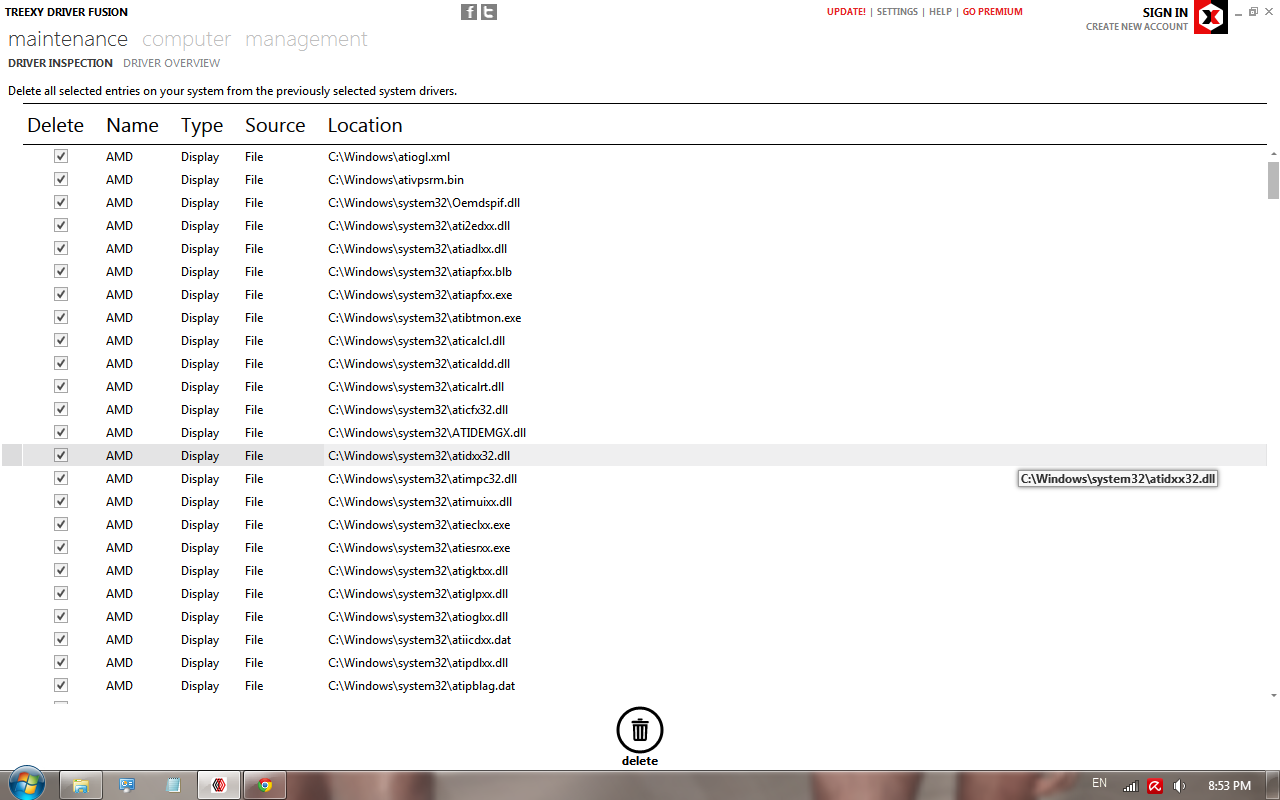
Okay I'm stupid.
What should I do with these?
Delete all? (All of them are AMD files, lol)
chhzs.png
 

My Computer

OS
Windows 7 Ultimate 32bit sp1
Yup ^
 

My Computer

Computer type
PC/Desktop
Computer Manufacturer/Model Number
Self assembled
OS
Windows 10 Home 64Bit
CPU
Intel Core i5 10400 @ 2.90GHz
Motherboard
Intel Corporation DG41WV (PROCESSOR)
Memory
8.00GB Single-Channel Unknown @ 1329MHz (16-20-20-38)
Sound Card
Realtek High Definition Audio
Monitor(s) Displays
DELL E170S
Screen Resolution
1280x1024 pixels
Hard Drives
931GB TOSHIBA DT01ACA100 (SATA)
238GB TEAM TM8PS7256G (SATA SSD)
Case
Nothing Fancy
Cooling
Fans
Keyboard
A4 Tech Co LTD
Mouse
A4 Tech Co Ltd/Logitech
Internet Speed
25 Mbps
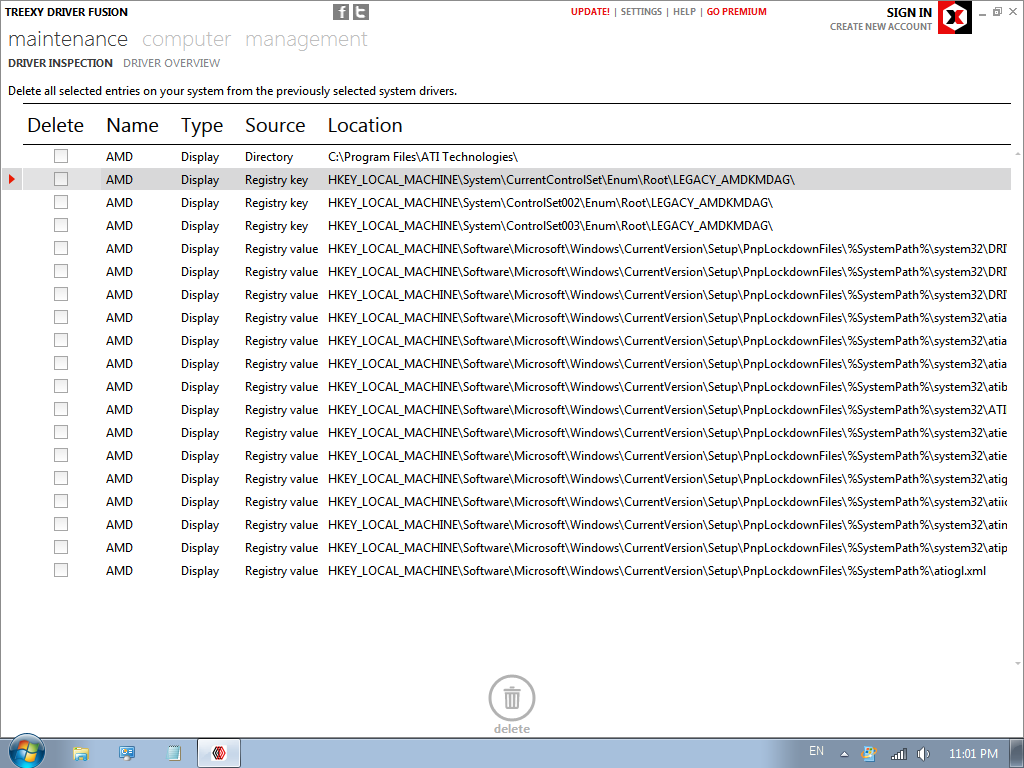
I'm going to assume that my graphics turned shitty after deleted those files.. (You can see the difference between the screenshot)
I can't seem to delete these files, I restarted 3 times. Nothing. :/
8tMce.png
 

My Computer

OS
Windows 7 Ultimate 32bit sp1

My Computer

Computer type
PC/Desktop
Computer Manufacturer/Model Number
Self assembled
OS
Windows 10 Home 64Bit
CPU
Intel Core i5 10400 @ 2.90GHz
Motherboard
Intel Corporation DG41WV (PROCESSOR)
Memory
8.00GB Single-Channel Unknown @ 1329MHz (16-20-20-38)
Sound Card
Realtek High Definition Audio
Monitor(s) Displays
DELL E170S
Screen Resolution
1280x1024 pixels
Hard Drives
931GB TOSHIBA DT01ACA100 (SATA)
238GB TEAM TM8PS7256G (SATA SSD)
Case
Nothing Fancy
Cooling
Fans
Keyboard
A4 Tech Co LTD
Mouse
A4 Tech Co Ltd/Logitech
Internet Speed
25 Mbps
I recieved 2 more BSOD today.. I'm not even gaming this time. I was watching video while on Tumblr. And the whole screen jacked up and bam BSOD number 1: Driver_IRQL_Not_Less_or_Equal..
After the hard-restart, it came up with 2nd BSOD: Bad_Pool_header

I turned off my laptop for 5min and turned it back on.. Does this happen coz of the overheating or something else?

I also included the latest dump files in my first post.
 

My Computer

OS
Windows 7 Ultimate 32bit sp1
There are no dump files.
 

My Computer

Computer type
PC/Desktop
Computer Manufacturer/Model Number
Self assembled
OS
Windows 10 Home 64Bit
CPU
Intel Core i5 10400 @ 2.90GHz
Motherboard
Intel Corporation DG41WV (PROCESSOR)
Memory
8.00GB Single-Channel Unknown @ 1329MHz (16-20-20-38)
Sound Card
Realtek High Definition Audio
Monitor(s) Displays
DELL E170S
Screen Resolution
1280x1024 pixels
Hard Drives
931GB TOSHIBA DT01ACA100 (SATA)
238GB TEAM TM8PS7256G (SATA SSD)
Case
Nothing Fancy
Cooling
Fans
Keyboard
A4 Tech Co LTD
Mouse
A4 Tech Co Ltd/Logitech
Internet Speed
25 Mbps
There are no dump files.

I just realize that. /sigh
Sorry
(there's no dump files in the directory as well)

I guess I have to wait for my laptop to crash again then.
 

My Computer

OS
Windows 7 Ultimate 32bit sp1
Okay
 

My Computer

Computer type
PC/Desktop
Computer Manufacturer/Model Number
Self assembled
OS
Windows 10 Home 64Bit
CPU
Intel Core i5 10400 @ 2.90GHz
Motherboard
Intel Corporation DG41WV (PROCESSOR)
Memory
8.00GB Single-Channel Unknown @ 1329MHz (16-20-20-38)
Sound Card
Realtek High Definition Audio
Monitor(s) Displays
DELL E170S
Screen Resolution
1280x1024 pixels
Hard Drives
931GB TOSHIBA DT01ACA100 (SATA)
238GB TEAM TM8PS7256G (SATA SSD)
Case
Nothing Fancy
Cooling
Fans
Keyboard
A4 Tech Co LTD
Mouse
A4 Tech Co Ltd/Logitech
Internet Speed
25 Mbps
Back
Top