Different BSOD's upon login in regular mode and in safe mode

phaktory

New member
Local time
9:09 AM
Messages
2
I started getting BSOD's right after login after boot up. I get a number of different ones and occasionally some repeat. When I come up in safe mode (with and without networking) I can function as long as I don't do too much. I've drive tested my system drive and I also did a memory test. I've also not made any changes recently. If I do too much it will BSOD though. When I start copying files off my system drive to my storage array, I BSOD if I'm doing more than a couple gigs.

I can't seem to get a consistent BSOD. I've listed most of the ones below, I haven't caugh them all.


Any help is appreciated and thank you in advance.
  • Memory Management with Stop 1a
  • Cache Manager with 0x34 I think
  • Stop with 0X24
  • Stop with a 0x7f
  • Page fault in non-paged area with a Win32k.sys
got 2 more new ones today

  • special pool detected memory corruption 0xC1
  • pfn_list_corrupt 0x4E
Going to add new dump in reply here in a bit.
 
Last edited:

My Computer My Computer

At a glance

7x64 ProAMD 1090T8gigGTX 680
Computer type
PC/Desktop
Computer Manufacturer/Model Number
custom
OS
7x64 Pro
CPU
AMD 1090T
Motherboard
ASUS Extreme IV
Memory
8gig
Graphics Card(s)
GTX 680
Hard Drives
WD 450
Antivirus
SEP11
Browser
IE9
Lots of crashes but they are not showing any probable cause.

Do these, as a test:

Free up the startup.

  1. Click on the Start button
  2. Type “msconfig (without quotes), click the resulting link. It will open the System Configuration window.
  3. Select the “Startup” tab.
  4. Deselect all items other than the antivirus.
  5. Apply > OK
  6. Accept then restart.
Stop nVidia automatic driver update:

  • Open nVidia control center.
  • Help> Updates. It will open the nVidia updates window.
  • Click the preferences tab.
  • Uncheck "Automatically check for updates"
  • Apply > OK.
If the crashes continue to occur after doing these, enable Driver Verifier to monitor the drivers.
Driver Verifier - Enable and Disable
Run Driver Verifier for 24 hours or the occurrence of the next crash, whichever is earlier.

   Information
Why Driver Verifier:
It puts a stress on the drivers, ans so it makes the unstable drivers crash. Hopefully the driver that crashes is recorded in the memory dump.

How Can we know that DV is enabled:
It will make the system bit of slow, laggy.

   Warning
Before enabling DV, make it sure that you have earlier System restore points made in your computer. You can check it easily by using CCleaner looking at Tools > System Restore.

If there is no points, make a System Restore Point manually before enabling DV.

   Tip


Let us know the results, with the subsequent crash dumps, if any.
 

My Computer My Computer

At a glance

Microsoft Windows 10 Pro Insider Preview 64-bitIntel(R) Core(TM) i3-4130 CPU @ 3.40GHzCorsair Vengence 4GB x2 (8.00GB Dual-Channel ...2047MB GeForce GTS 450 (ZOTAC International)
Computer type
PC/Desktop
Computer Manufacturer/Model Number
Self Assembled
OS
Microsoft Windows 10 Pro Insider Preview 64-bit
CPU
Intel(R) Core(TM) i3-4130 CPU @ 3.40GHz
Motherboard
Gigabyte Technology Co., Ltd. B85M-D3H
Memory
Corsair Vengence 4GB x2 (8.00GB Dual-Channel DDR3 @ 798MHz)
Graphics Card(s)
2047MB GeForce GTS 450 (ZOTAC International)
Sound Card
Onboard (Realtek High Definition Audio)
Monitor(s) Displays
LG Flatron E2040T
Screen Resolution
1600x900
Hard Drives
Western Digital 1 TB
Seagate 500 GB
PSU
Corsair VS550
Case
Cooler Master K380
Cooling
Cooler Master Seidon 120V Plus
Keyboard
Logitech MK260r
Mouse
Logitech MK260r
Internet Speed
PMPL Broadband
Antivirus
Windows Defender + MBAM
Browser
Firefox
Other Info
Dell Studio 15" Laptop
I already went into msconfig and disabled more stuff. I can't get into Nvidia because I cannot successfully come up outside of safe mode or SFWN. I've done a lot of testing and posting here was my last resort before I go ahead and reload.

I can force it to to BSOD simply by copying large amounts of file.. usually within 30 seconds from my system drive to my Raid 5 array..

Here is another dump compilation after enabling.
 

My Computer My Computer

At a glance

7x64 ProAMD 1090T8gigGTX 680
Computer type
PC/Desktop
Computer Manufacturer/Model Number
custom
OS
7x64 Pro
CPU
AMD 1090T
Motherboard
ASUS Extreme IV
Memory
8gig
Graphics Card(s)
GTX 680
Hard Drives
WD 450
Antivirus
SEP11
Browser
IE9
Plan to update the BIOS.
Code:
BiosMajorRelease = 8
BiosMinorRelease = 15
BiosVendor = American Megatrends Inc.
BiosVersion = 0406   
[COLOR=Red]BiosReleaseDate = 10/18/2010[/COLOR]
Scan the system for possible virus infection.

Test your RAM modules for possible errors.
How to Test and Diagnose RAM Issues with Memtest86+
Run memtest for at least 8 passes, preferably overnight.


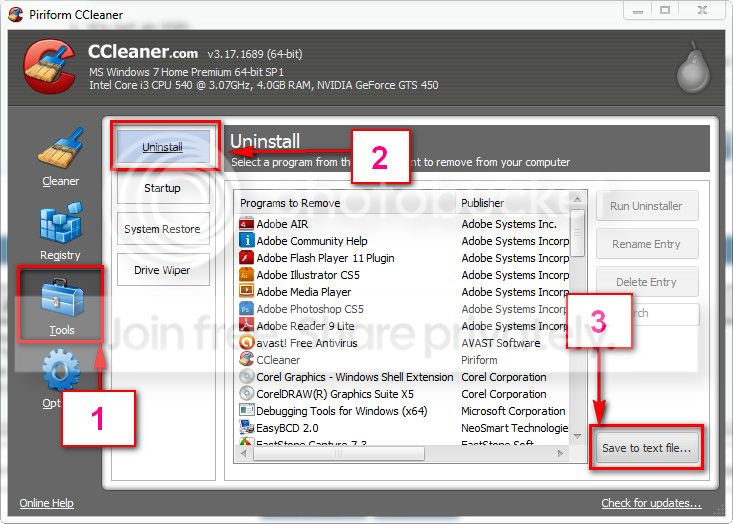
Download and install CCleaner. Then run it.
Go to "Tools" .... by default it will open the "uninstall" tab.
Click on save as text file. Save it on your desktop.
Upload the text file for us.
2012-11-02_224417.jpg
 

My Computer My Computer

At a glance

Microsoft Windows 10 Pro Insider Preview 64-bitIntel(R) Core(TM) i3-4130 CPU @ 3.40GHzCorsair Vengence 4GB x2 (8.00GB Dual-Channel ...2047MB GeForce GTS 450 (ZOTAC International)
Computer type
PC/Desktop
Computer Manufacturer/Model Number
Self Assembled
OS
Microsoft Windows 10 Pro Insider Preview 64-bit
CPU
Intel(R) Core(TM) i3-4130 CPU @ 3.40GHz
Motherboard
Gigabyte Technology Co., Ltd. B85M-D3H
Memory
Corsair Vengence 4GB x2 (8.00GB Dual-Channel DDR3 @ 798MHz)
Graphics Card(s)
2047MB GeForce GTS 450 (ZOTAC International)
Sound Card
Onboard (Realtek High Definition Audio)
Monitor(s) Displays
LG Flatron E2040T
Screen Resolution
1600x900
Hard Drives
Western Digital 1 TB
Seagate 500 GB
PSU
Corsair VS550
Case
Cooler Master K380
Cooling
Cooler Master Seidon 120V Plus
Keyboard
Logitech MK260r
Mouse
Logitech MK260r
Internet Speed
PMPL Broadband
Antivirus
Windows Defender + MBAM
Browser
Firefox
Other Info
Dell Studio 15" Laptop
Back
Top