
Hi there,
Yesterday I decided to install XP alongside my Windows 7, in order to make it a dual boot. Before Installing XP, I had Win 7 taking up my entire hdd as well as the standard 100mb System Reserved Partition that is usually created when installing Win 7. So when I went to install XP, I created a 20GB partition. All went well and I followed the instructions from one of the guides here on the site (thanks shawn)
However what strikes me as odd is that when I'm in XP and 7, there are different drive letters reported for each OS.
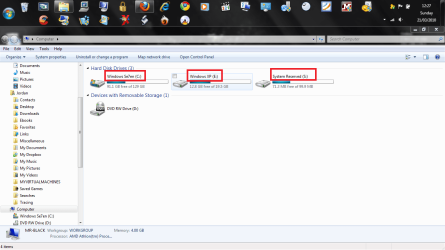
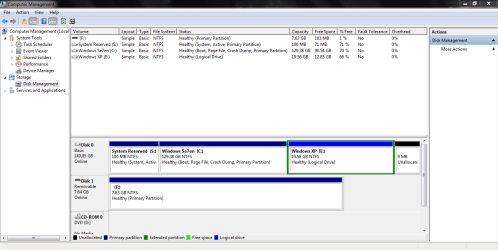
This is what I see in Windows 7 :
PLEASE SEE SCREENSHOTS
-------------------------------
And this is what I see in XP :
http://public.blu.livefilestore.com/y1pX7gBQ0dN_cLh18crzi62G-WJOxM5x_wjB6IP2Z08f5AQ3jW8euCQsiNTqY9q5N0KiMUC00gP_HMvQrDvKeWzyQ/2.bmp
As you can see in Win 7 my Windows Se7en is marked as C: and my Windows XP is marked as E: and finally my System Reserved is marked as S:
HOWEVER
In XP I get something totally different, my System Reserved is marked as C: my Windows Se7en is marked as D: and finally my Windows XP is marked as F:
So as you can see from all of this I am baffled :huh: Why can't it just stick with one Drive Letter for both Operating Systems ?
Would it be possible for me to hide the respective partitions ? For example, in Windows 7 all I would like to see is my Windows Se7en Partition and the System Reserved Partition. And naturally for XP all I would like see is the single Windows XP Partition only.
How can I fix this ?
Once again thank you very much guys !
Best
JordanJP
Yesterday I decided to install XP alongside my Windows 7, in order to make it a dual boot. Before Installing XP, I had Win 7 taking up my entire hdd as well as the standard 100mb System Reserved Partition that is usually created when installing Win 7. So when I went to install XP, I created a 20GB partition. All went well and I followed the instructions from one of the guides here on the site (thanks shawn)
However what strikes me as odd is that when I'm in XP and 7, there are different drive letters reported for each OS.
This is what I see in Windows 7 :
PLEASE SEE SCREENSHOTS
-------------------------------
And this is what I see in XP :
http://public.blu.livefilestore.com/y1pX7gBQ0dN_cLh18crzi62G-WJOxM5x_wjB6IP2Z08f5AQ3jW8euCQsiNTqY9q5N0KiMUC00gP_HMvQrDvKeWzyQ/2.bmp
As you can see in Win 7 my Windows Se7en is marked as C: and my Windows XP is marked as E: and finally my System Reserved is marked as S:
HOWEVER
In XP I get something totally different, my System Reserved is marked as C: my Windows Se7en is marked as D: and finally my Windows XP is marked as F:
So as you can see from all of this I am baffled :huh: Why can't it just stick with one Drive Letter for both Operating Systems ?
Would it be possible for me to hide the respective partitions ? For example, in Windows 7 all I would like to see is my Windows Se7en Partition and the System Reserved Partition. And naturally for XP all I would like see is the single Windows XP Partition only.
How can I fix this ?
Once again thank you very much guys !
Best
JordanJP
Attachments
My Computer
At a glance
Windows 7 baby ! : DIntel Core i7 720QM @ 1.60GHz6.0GB Dual-Channel DDR3 @ 662MHzATI Mobility Radeon HD 5650
- Computer Manufacturer/Model Number
- HP Envy 17 4054ca
- OS
- Windows 7 baby ! : D
- CPU
- Intel Core i7 720QM @ 1.60GHz
- Motherboard
- Hewlett-Packard 1449 (CPU)
- Memory
- 6.0GB Dual-Channel DDR3 @ 662MHz
- Graphics Card(s)
- ATI Mobility Radeon HD 5650
- Sound Card
- IDT High Definition Audio CODEC
- Monitor(s) Displays
- Generic PnP Monitor @ 1600x900
- Screen Resolution
- 1600X900
- Hard Drives
- 78.15GB INTEL SSDSA2M080G2GC ATA Device (IDE)


