Ding-Dong Sound When Turning off Monitor

prsnrs

New member
Local time
5:31 PM
Messages
23
I recently did a clean install of Win 7 Pro 64 bit. There were some issues requiring repeated formats and reinstallations. The only remaining issue I can recognize is a wierd one - namely, when I turn off the monitor I hear a "ding-dong" sound from my speakers. If I turn on the monitor fast enough, the ding-dong stops. If I wait, the PC goes into an irretrievable sleep. None of these symptoms occur in the Safe Mode. I upgraded my video driver but the symptoms persisted. I've not been able to find a Win 7 compatible driver for my sound card - Soundblaster X-FI SB0467 (according to Dell/support).

Any thoughts/solutions would be greatly appreciated.

PRSNRS
 

My Computer My Computer

At a glance

Win 7 Pro 64 bitIntel Cor 2 [email protected].4GBnVidea GeForce 7950 GX2
Computer Manufacturer/Model Number
Dell XPS-720
OS
Win 7 Pro 64 bit
CPU
Intel Cor 2 [email protected].
Motherboard
Dell
Memory
4GB
Graphics Card(s)
nVidea GeForce 7950 GX2
Sound Card
Creative SB X-Fi
Monitor(s) Displays
SynchMaster 214T
Screen Resolution
1600 x 1200 (Native)
Internet Speed
Hi Speed
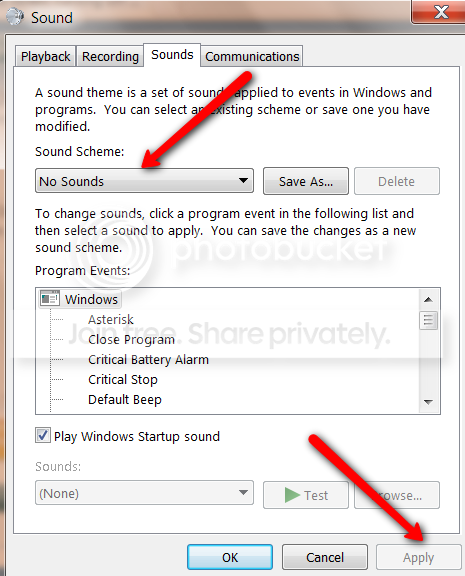
Right click on the loudspeaker icon next to the clock > Sounds > set it to "No Sounds" > Apply. Maybe that helps.

2010-04-21_1128.png
 

My Computer My Computer

At a glance

Vista, Windows7, Mint Mate, Zorin, Windows 8from 1.6GHz Duo to i7
Computer Manufacturer/Model Number
HP, Dell, Gateway, Toshiba - 4 laptops and 2 desktops
OS
Vista, Windows7, Mint Mate, Zorin, Windows 8
CPU
from 1.6GHz Duo to i7
Monitor(s) Displays
2x HP w2207
Hard Drives
5x HDD, 7x SSD, 12x Externals
Keyboard
with trackball - no mices
Mouse
Trackball mice
Internet Speed
DSL 6000
Thank you! It worked! You're a genius. I turned off the monitor for 30 seconds and then 60 seconds ==> no ding-dong and know irretrievable Sleep.

Can you explain why this fix worked or refer me to a reference?

Regardless of the explanation I am very grateful for your input.

PRSRNS
 

My Computer My Computer

At a glance

Win 7 Pro 64 bitIntel Cor 2 [email protected].4GBnVidea GeForce 7950 GX2
Computer Manufacturer/Model Number
Dell XPS-720
OS
Win 7 Pro 64 bit
CPU
Intel Cor 2 [email protected].
Motherboard
Dell
Memory
4GB
Graphics Card(s)
nVidea GeForce 7950 GX2
Sound Card
Creative SB X-Fi
Monitor(s) Displays
SynchMaster 214T
Screen Resolution
1600 x 1200 (Native)
Internet Speed
Hi Speed
Thank you! It worked! You're a genius. I turned off the monitor for 30 seconds and then 60 seconds ==> no ding-dong and know irretrievable Sleep.

Can you explain why this fix worked or refer me to a reference?

Regardless of the explanation I am very grateful for your input.

PRSRNS
There is no reference. This is a basic system function. Either you know about it or you don't. But now you know. LOL.
 

My Computer My Computer

At a glance

Vista, Windows7, Mint Mate, Zorin, Windows 8from 1.6GHz Duo to i7
Computer Manufacturer/Model Number
HP, Dell, Gateway, Toshiba - 4 laptops and 2 desktops
OS
Vista, Windows7, Mint Mate, Zorin, Windows 8
CPU
from 1.6GHz Duo to i7
Monitor(s) Displays
2x HP w2207
Hard Drives
5x HDD, 7x SSD, 12x Externals
Keyboard
with trackball - no mices
Mouse
Trackball mice
Internet Speed
DSL 6000
OK. There are lots of folks having the same problem (I did a Google serach). No one suggested your fix.

PRS
 

My Computer My Computer

At a glance

Win 7 Pro 64 bitIntel Cor 2 [email protected].4GBnVidea GeForce 7950 GX2
Computer Manufacturer/Model Number
Dell XPS-720
OS
Win 7 Pro 64 bit
CPU
Intel Cor 2 [email protected].
Motherboard
Dell
Memory
4GB
Graphics Card(s)
nVidea GeForce 7950 GX2
Sound Card
Creative SB X-Fi
Monitor(s) Displays
SynchMaster 214T
Screen Resolution
1600 x 1200 (Native)
Internet Speed
Hi Speed
Thank you! It worked! You're a genius. I turned off the monitor for 30 seconds and then 60 seconds ==> no ding-dong and know irretrievable Sleep.

Can you explain why this fix worked or refer me to a reference?

Regardless of the explanation I am very grateful for your input.

PRSRNS
There is no reference. This is a basic system function. Either you know about it or you don't. But now you know. LOL.
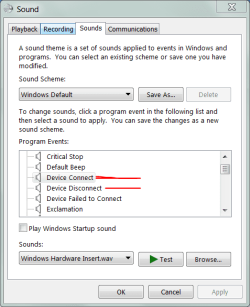
My monitor is connected via HDMI, so I cannot test. Is disabling a single event sound effect a more surgical solution?
 

Attachments

  • Capture.PNG
    Capture.PNG
    15.6 KB · Views: 3

My Computer My Computer

At a glance

Windows 7 UltimateIntel Q95504x2GB HyperXATI HD3850 512
Computer Manufacturer/Model Number
Asus P5B
OS
Windows 7 Ultimate
CPU
Intel Q9550
Motherboard
Asus P5B
Memory
4x2GB HyperX
Graphics Card(s)
ATI HD3850 512
Sound Card
Creative X-Fi Platinum
Monitor(s) Displays
Samsung 50 / Samsung 24
Screen Resolution
1920*1080 / 1920*1200
Hard Drives
Multiple RAID volumes
PSU
ThermalTake ToughPower
Case
Armor
Cooling
Liquid
Keyboard
$6 2.4 gHz desktop
Internet Speed
Just this side of fast enough.
See, now you can go and help these other clueless people.
 

My Computer My Computer

At a glance

Vista, Windows7, Mint Mate, Zorin, Windows 8from 1.6GHz Duo to i7
Computer Manufacturer/Model Number
HP, Dell, Gateway, Toshiba - 4 laptops and 2 desktops
OS
Vista, Windows7, Mint Mate, Zorin, Windows 8
CPU
from 1.6GHz Duo to i7
Monitor(s) Displays
2x HP w2207
Hard Drives
5x HDD, 7x SSD, 12x Externals
Keyboard
with trackball - no mices
Mouse
Trackball mice
Internet Speed
DSL 6000
Thank you! It worked! You're a genius. I turned off the monitor for 30 seconds and then 60 seconds ==> no ding-dong and know irretrievable Sleep.

Can you explain why this fix worked or refer me to a reference?

Regardless of the explanation I am very grateful for your input.

PRSRNS
There is no reference. This is a basic system function. Either you know about it or you don't. But now you know. LOL.
My monitor is connected via HDMI, so I cannot test. Is disabling a single event sound effect a more surgical solution?

Now you are getting fancy. Someone who does not like sounds normally wants them all off.
 

My Computer My Computer

At a glance

Vista, Windows7, Mint Mate, Zorin, Windows 8from 1.6GHz Duo to i7
Computer Manufacturer/Model Number
HP, Dell, Gateway, Toshiba - 4 laptops and 2 desktops
OS
Vista, Windows7, Mint Mate, Zorin, Windows 8
CPU
from 1.6GHz Duo to i7
Monitor(s) Displays
2x HP w2207
Hard Drives
5x HDD, 7x SSD, 12x Externals
Keyboard
with trackball - no mices
Mouse
Trackball mice
Internet Speed
DSL 6000
It's A DVI Problem.VGA Has no issues

(the thing whs said is not a solution to the problem,it's like hiding a problem.anyway that helps too if you don't want any windows sound.thanks whs.)
i have the same problem you have.i also have a samsung monitor.it started giving those ding-dong sounds recently.no problem rather than the ding dong sounds.what i found is,it's a problem in the dvi interface.ding dong sound when using dvi.when using vga,nothing happens.runs cool.i think its something wrong with the dvi cable or dvi port.i don't have another dvi cable or an dvi supported monitor.so i can't test right now.if you still have the samsung monitor,please try changing the dvi cable and post the results if you can.
 

My Computer My Computer

At a glance

Windows 7 Ulitimate 64-Bit [Final]Intel Dual Core E5200 @ 2.50Ghz2GB PC2 (2x1GB)ATI Sapphire HD 5770
OS
Windows 7 Ulitimate 64-Bit [Final]
CPU
Intel Dual Core E5200 @ 2.50Ghz
Motherboard
Gigabyte EG41M-S2H
Memory
2GB PC2 (2x1GB)
Graphics Card(s)
ATI Sapphire HD 5770
Sound Card
Realtek HD Audio (ALC 888)
Monitor(s) Displays
Samsung B2430H 24"
Hard Drives
1x Maxtor 200GB 7200 RPM
1x Samsung 80GB 7200 RPM Sata II
Back
Top