direct connection not working

Cowz92

New member
Local time
8:22 PM
Messages
11
Just moved into apt complex. They said you're not supposed to bring your modem so I didn't. It just stated to bring a ethernet cable, so I did. The wireless works fine but whenever I try to plug to the socket from my computer directly with the ethernet cable it doesn't work. When I try to go on a website it just says a DNS error. I've checked my adapter done some trouble shooting from random sites. Nothing seems to work. Also I've used 3 different cords.

Thanks anyone who gives me some kind of feedback.
 

My Computer

OS
Windows 7 64 bit
So, your apartment complex provides wifi, and that works, correct? If they also allow you to connect to their network via ethernet cable, and you are having problems, then you need to contact your apartment manager and get some help.
 

My Computer

Computer Manufacturer/Model Number
Dell XPS 15 L502x
OS
Windows 7 Ultimate x64 SP1
CPU
Core i7-2670QM
Memory
8GB DDR3 PC3-10600
Graphics Card(s)
Intel HD Graphics 3000 + GeForce GT 540M
Screen Resolution
1920x1080
Hard Drives
1TB 5400RPM Seagate
I did they told me to call the company. Been waiting for a phone call back for a while. Been looking for some basic trouble shooting guides.
 

My Computer

OS
Windows 7 64 bit
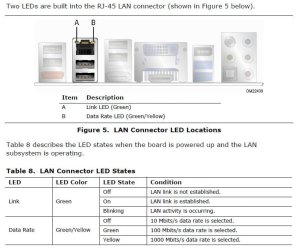
Most adapters will have an LED on each side of the Ethernet plug. One side (left) is the connection indicator the other side is a speed indicator. If you plug the LAN cable in and there's no lights, the line is dead. You'll have to wait for your service company to check it out.
 

Attachments

  • LAN Port.JPG
    LAN Port.JPG
    65.5 KB · Views: 12

My Computer

Computer type
PC/Desktop
Computer Manufacturer/Model Number
Built 2/11/2011
OS
Windows 7 Pro-x64
CPU
i7-2600 3.4GHz - 3.8GHz Turbo
Motherboard
Intel DH67BL-B3
Memory
8Gb - 2x4GB, Muskin 991770 PC3-1333
Graphics Card(s)
Integrated Intel HD 2000
Sound Card
Integrated Intel 10.1 HD, RealTek ALC892
Monitor(s) Displays
Asus LCD VH222H, Haier HL24XSL2a
Screen Resolution
1920x1080, 1920x1080
Hard Drives
Crucial SSD C300-128Gb,
Western Digital WD5002AALX - 500Gb,
Western Digital WD7501AALS - 750Gb
PSU
Seasonic 650W 80+ Gold Modular
Case
Rosewill Defender
Cooling
Stock CPU, Four 120mm case fans, PCH fan added
Keyboard
Logitech EX100 Y-RBH94 Wireless
Mouse
Logitech EX100 M-RCE95 Wireless
Internet Speed
3.0/1.5 Mbs
Antivirus
Microsoft Security Essentials
Browser
Microsoft Internet Explorer 11
Other Info
Antec Veris Premier-Multimedia IR Station,
Cyber Accoustics-3602 Speakers,
AFT XM-5U Card Reader,
Hauppauge TV-HVR-2250,
Sony LX300 USB Turntable
It's all green when the computer is off. but when it's on it's blinking yellow.
 

My Computer

OS
Windows 7 64 bit
I'm sure you have already tried this but going to a command prompt by typing cmd in the text entry box after clicking the Windows 7 Start button should give you a command prompt. There type in ipconfig and what do you see there ? It should show something like the following:

Windows IP Configuration


Wireless LAN adapter Wireless Network Connection:

Connection-specific DNS Suffix . : xxx.xx.xxxxxxx
Link-local IPv6 Address . . . . . : xxx:xxx:xxxx:xxx:xxxx
IPv4 Address. . . . . . . . . . . : 192.168.1.100
Subnet Mask . . . . . . . . . . . : 255.255.255.0
Default Gateway . . . . . . . . . : 192.168.1.1

Ethernet adapter Bluetooth Network Connection:

Media State . . . . . . . . . . . : Media disconnected
Connection-specific DNS Suffix . :

What does it show for you ? In my case its showing the wireless connection and not the ethernet since I am using wireless. Also you should test the ethernet connection on another network like a friend's to see if its not the lan connector located in the appartment. I have sometimes noticed that the ethernet lan connection does not automatically show up when connected. Sometimes it works and sometimes it dpes not. I can't explain it I think its Windows 7.

Hope the above helps

Victor
 

My Computer

Computer Manufacturer/Model Number
HP Pavilion dv7 Notebook PC
OS
Windows 7 64 bit Home Premium
CPU
Processor Intel(R) Core(TM) i7 CPU Q 720 @ 1.60GHz
Motherboard
HP
Memory
6GB
Graphics Card(s)
NVidia GeForce GT 230 1GB
Screen Resolution
1200x900
Hard Drives
620GB with 3 x partitions C: D: E:
Mouse
Touchpad
Internet Speed
12MB Download 2MB Upload
I'm sure you have already tried this but going to a command prompt by typing cmd in the text entry box after clicking the Windows 7 Start button should give you a command prompt. There type in ipconfig and what do you see there ? It should show something like the following:

Ethernet adapter Bluetooth Network Connection:

Media State . . . . . . . . . . . : Media disconnected
Connection-specific DNS Suffix . :

What does it show for you ? In my case its showing the wireless connection and not the ethernet since I am using wireless. Also you should test the ethernet connection on another network like a friend's to see if its not the lan connector located in the appartment. I have sometimes noticed that the ethernet lan connection does not automatically show up when connected. Sometimes it works and sometimes it dpes not. I can't explain it I think its Windows 7.

Hope the above helps

Victor

Here took a picture of the CMD log with my phone.
http://i.imgur.com/ietEL.jpg
 

My Computer

OS
Windows 7 64 bit
Blinking Yellow is normal behaviour, it means the connection is live and activity is occuring.

Ok, the thing I can see wrong there, is that you don't have an IP address. The output of ipconfig is what Windows uses when it can't find a network or (as in this case) the network isn't handing out IP addresses.

What's weird, is usually, those errors are DCHP errors, but Wireless is working fine... unless they use a different router for wireless, which is possible.

Ordinarily, I would suggest you set up a Static IP, but as this router is being used by many other people, it would probably be difficult to get a IP that isn't in use.

I would suggest you contact management/whoever deals with it, as it seems like a router issue.
 

My Computer

Computer type
PC/Desktop
Computer Manufacturer/Model Number
Medion Erazer (note to self: insert model number) - with custom additions
OS
Windows 10 Pro x64
CPU
Intel Core i5 7400 @ 3.00GHz
Motherboard
OEM supllied with PC
Memory
8GB 2133Mhz DDR4 (OEM supplied)
Graphics Card(s)
Gygabyte Windforce GTX 1050Ti (Factory Overclocked)
Sound Card
Realtek
Monitor(s) Displays
Acer Al1980 + HKC
Screen Resolution
1360*768(HKC) / 1280*1024(Acer)
Hard Drives
1TB Toshiba
1TB WD Caviar Green
120GB Samsung Evo 840
PSU
OEM supplied (no power rating on case)
Case
OEM Supplied
Cooling
Stock
Keyboard
Logitech Wireless
Mouse
Logitect Wireless
Internet Speed
40Mb/s Down 10Mb/s Up
Antivirus
Defender
Browser
Firefox
Blinking Yellow is normal behaviour, it means the connection is live.

Ok, the thing I can see wrong there, is that you don't have an IP address. The output of ipconfig is what Windows uses when it can't find a network.

What's weird, is usually, those errors are DCHP errors, but Wireless is working fine... unless they use a different router for wireless, which is possible.

I would suggest you contact management/whoever deals with it, as it seems like a router issue.

Could it be anything with my computer? I did a few tweaks and what not a while back. However, I was connected to a 2wire modem/router. I'd like to exhaust all efforts on my end. I`m still waiting for them to call me back, the IP provider.
 

My Computer

OS
Windows 7 64 bit
Could it be anything with my computer? I did a few tweaks and what not a while back.

It could be... that would certainly explain the Lan/wireless differential. What "tweaks" did you do. I honestly don't know why people feel the need to "tweak" Windows 7. It only leads to trouble.
 

My Computer

Computer type
PC/Desktop
Computer Manufacturer/Model Number
Medion Erazer (note to self: insert model number) - with custom additions
OS
Windows 10 Pro x64
CPU
Intel Core i5 7400 @ 3.00GHz
Motherboard
OEM supllied with PC
Memory
8GB 2133Mhz DDR4 (OEM supplied)
Graphics Card(s)
Gygabyte Windforce GTX 1050Ti (Factory Overclocked)
Sound Card
Realtek
Monitor(s) Displays
Acer Al1980 + HKC
Screen Resolution
1360*768(HKC) / 1280*1024(Acer)
Hard Drives
1TB Toshiba
1TB WD Caviar Green
120GB Samsung Evo 840
PSU
OEM supplied (no power rating on case)
Case
OEM Supplied
Cooling
Stock
Keyboard
Logitech Wireless
Mouse
Logitect Wireless
Internet Speed
40Mb/s Down 10Mb/s Up
Antivirus
Defender
Browser
Firefox
Could it be anything with my computer? I did a few tweaks and what not a while back.

It could be... that would certainly explain the Lan/wireless differential. What "tweaks" did you do. I honestly don't know why people feel the need to "tweak" Windows 7. It only leads to trouble.

Can't say why I exactly did it. I don't remember exactly but I`m trying to remember I know I did some stuff in REGEDIT and some in another thing I can't quite remember the name of it but it had to do with mircosoft something. Looking online for tweaks trying to find the ones I did.
 

My Computer

OS
Windows 7 64 bit
It's going to be pretty much impossible to determine whether you've broken something with your tweaks if you can't remember what you've done.

In these cases... well a clean install is normally best, although I am loathe to recommend that if it might not be your computer, and especially as Wireless is working, so you still have internet.

One thing that you COULD try, is from an elevated command prompt, type (without quotes) "ipconfig /release *" followed by "ipconfig /renew *"
 

My Computer

Computer type
PC/Desktop
Computer Manufacturer/Model Number
Medion Erazer (note to self: insert model number) - with custom additions
OS
Windows 10 Pro x64
CPU
Intel Core i5 7400 @ 3.00GHz
Motherboard
OEM supllied with PC
Memory
8GB 2133Mhz DDR4 (OEM supplied)
Graphics Card(s)
Gygabyte Windforce GTX 1050Ti (Factory Overclocked)
Sound Card
Realtek
Monitor(s) Displays
Acer Al1980 + HKC
Screen Resolution
1360*768(HKC) / 1280*1024(Acer)
Hard Drives
1TB Toshiba
1TB WD Caviar Green
120GB Samsung Evo 840
PSU
OEM supplied (no power rating on case)
Case
OEM Supplied
Cooling
Stock
Keyboard
Logitech Wireless
Mouse
Logitect Wireless
Internet Speed
40Mb/s Down 10Mb/s Up
Antivirus
Defender
Browser
Firefox
I'm sure you have already tried this but going to a command prompt by typing cmd in the text entry box after clicking the Windows 7 Start button should give you a command prompt. There type in ipconfig and what do you see there ? It should show something like the following:

Ethernet adapter Bluetooth Network Connection:

Media State . . . . . . . . . . . : Media disconnected
Connection-specific DNS Suffix . :

What does it show for you ? In my case its showing the wireless connection and not the ethernet since I am using wireless. Also you should test the ethernet connection on another network like a friend's to see if its not the lan connector located in the appartment. I have sometimes noticed that the ethernet lan connection does not automatically show up when connected. Sometimes it works and sometimes it dpes not. I can't explain it I think its Windows 7.

Hope the above helps

Victor

Here took a picture of the CMD log with my phone.
http://i.imgur.com/ietEL.jpg

Thanks for the pic. What it tells me is that the ethernet card appears to be properly installed and its enabled. Assuming its not a driver issue you really would need to test it out somehow on another network as mentioned like a friends or with a router that has DHCP enabled for a wired connection. If your using a firewall maybe you could disable it for 5-10 minutes while you try connecting the lan cable to the appartment lan connection. Also try running a ipconfig /renew to see if you get any errors or does it just time out ?

Hope the above helps.

Victor
 

My Computer

Computer Manufacturer/Model Number
HP Pavilion dv7 Notebook PC
OS
Windows 7 64 bit Home Premium
CPU
Processor Intel(R) Core(TM) i7 CPU Q 720 @ 1.60GHz
Motherboard
HP
Memory
6GB
Graphics Card(s)
NVidia GeForce GT 230 1GB
Screen Resolution
1200x900
Hard Drives
620GB with 3 x partitions C: D: E:
Mouse
Touchpad
Internet Speed
12MB Download 2MB Upload
I'm sure you have already tried this but going to a command prompt by typing cmd in the text entry box after clicking the Windows 7 Start button should give you a command prompt. There type in ipconfig and what do you see there ? It should show something like the following:

Ethernet adapter Bluetooth Network Connection:

Media State . . . . . . . . . . . : Media disconnected
Connection-specific DNS Suffix . :

What does it show for you ? In my case its showing the wireless connection and not the ethernet since I am using wireless. Also you should test the ethernet connection on another network like a friend's to see if its not the lan connector located in the appartment. I have sometimes noticed that the ethernet lan connection does not automatically show up when connected. Sometimes it works and sometimes it dpes not. I can't explain it I think its Windows 7.

Hope the above helps

Victor

Here took a picture of the CMD log with my phone.
http://i.imgur.com/ietEL.jpg

Thanks for the pic. What it tells me is that the ethernet card appears to be properly installed and its enabled. Assuming its not a driver issue you really would need to test it out somehow on another network as mentioned like a friends or with a router that has DHCP enabled for a wired connection. If your using a firewall maybe you could disable it for 5-10 minutes while you try connecting the lan cable to the appartment lan connection. Also try running a ipconfig /renew to see if you get any errors or does it just time out ?

Hope the above helps.

Victor

Whenever I do ipconfig /renew, "Windows IP configuration" Just stays below it. Then pops up with "An error occurred while renewing interface Local Area Connections : unable to contact your DHCP server. Request has timed out.
 

My Computer

OS
Windows 7 64 bit
Does the above error come up right away when you enter the command and hit return or does it take a minute or so ? It seems to be that it its likely the company's issue right now as I cannot see any issues with the lan connection on Windows 7. I was looking for a different error indicating that it could be a TCP/IP issue on Windows 7. You can also try this command from the cmd prompt. Try typing ping 127.0.0.1 and see if you get replies. I have read that is another method of checking to see if the TCP/IP stack is working on the computer. Make sure the wireless is disabled when you try this.

I do have another question for you. Has the ethernet connector on the Windows 7 computer worked before ?

Victor
 

My Computer

Computer Manufacturer/Model Number
HP Pavilion dv7 Notebook PC
OS
Windows 7 64 bit Home Premium
CPU
Processor Intel(R) Core(TM) i7 CPU Q 720 @ 1.60GHz
Motherboard
HP
Memory
6GB
Graphics Card(s)
NVidia GeForce GT 230 1GB
Screen Resolution
1200x900
Hard Drives
620GB with 3 x partitions C: D: E:
Mouse
Touchpad
Internet Speed
12MB Download 2MB Upload
Back
Top