Direct installation to Program Files (x86) folder

tenbear

New member
Member
Local time
5:15 AM
Messages
20
Location
Vermont
I have Home Premium 64 bit and I am trying to install Adobe Pagemaker, a 32 bit app. The installer seems to be confused on whether to install it to the Program Files folder or to the Program files (x86) folder. Is there any way I can direct the installer to the Program Files (x86) folder? Pagemaker worked on Vista even though it is officially not compatible with Vista. Some functions did not work, eg Spellcheck.

Any thoughts would be welcome.
 

My Computer My Computer

At a glance

Windows 7 Home Premium 64 bitAMD Core Duo4G
Computer Manufacturer/Model Number
Gateway NV5212u
OS
Windows 7 Home Premium 64 bit
CPU
AMD Core Duo
Memory
4G
Hard Drives
320G
Case
Laptop
You could try installing the program in compatibility mode - Im not sure whether this will direct it to the x86 folder :

To install a driver OR program in compatibility mode - right click the setup.exe file - click properties - click compatibility - check run in compatibility with vista/xp etc - check run as administrator - leave the rest blank. Start setup.exe and install.

You can also run the program in compatibility mode once its installed by doing the same as above except right click the shortcut to the program - click properties etc.

There are some similar threads listed at the bottom of the page that maybe of use.

My only other suggestion is to install it to where ever it goes, and just see what happens - you can easily uninstall the program or setup a restore point prior to installation to make sure nothing is corrupted.
 

My Computer My Computer

At a glance

XP, Vista, W7 64bit Home PremiumIntel Core Duo 6850 3.0 ghz @ 3.7 ghz4GB Corsair DDR 2 PC-6400Ati 4870 1ghz
OS
XP, Vista, W7 64bit Home Premium
CPU
Intel Core Duo 6850 3.0 ghz @ 3.7 ghz
Motherboard
Asus P5E
Memory
4GB Corsair DDR 2 PC-6400
Graphics Card(s)
Ati 4870 1ghz
Sound Card
Supreme FX 11
Monitor(s) Displays
View Sonic VX1962wm
Screen Resolution
1680 X1050
Hard Drives
3 Seagate Sata Drives 160gb 250gb 500gb
PSU
Thermaltake 600 watt
Case
NZXT Alpha
Cooling
3X120cm Fans
Keyboard
Microsoft Digital Media Pro Keyboard
Mouse
Microsoft Wheel Mouse Optical
Internet Speed
1.5Mb to 8Mb/384k
whest, thanks for the suggestion. I tried that with the same results as before.

Fyi, the message I get is "This version of this file is not compatible with the version of Windows you're running. Check your computer's system information to see whether you need an x86 (32 bit) or x64 (64 bit) version of the program, and then contact the software publisher."

Adobe no longer supports this program so contacting them is useless. I know it is 32 bit as I have had it running on XP and vista 32 bit.
 

My Computer My Computer

At a glance

Windows 7 Home Premium 64 bitAMD Core Duo4G
Computer Manufacturer/Model Number
Gateway NV5212u
OS
Windows 7 Home Premium 64 bit
CPU
AMD Core Duo
Memory
4G
Hard Drives
320G
Case
Laptop
Did you try installing it in compatibility with XP XPSP1,2,3 well worth a try. If you know which year it was released try installing it in compatibility mode with the OS thats closest to that period.
 

My Computer My Computer

At a glance

XP, Vista, W7 64bit Home PremiumIntel Core Duo 6850 3.0 ghz @ 3.7 ghz4GB Corsair DDR 2 PC-6400Ati 4870 1ghz
OS
XP, Vista, W7 64bit Home Premium
CPU
Intel Core Duo 6850 3.0 ghz @ 3.7 ghz
Motherboard
Asus P5E
Memory
4GB Corsair DDR 2 PC-6400
Graphics Card(s)
Ati 4870 1ghz
Sound Card
Supreme FX 11
Monitor(s) Displays
View Sonic VX1962wm
Screen Resolution
1680 X1050
Hard Drives
3 Seagate Sata Drives 160gb 250gb 500gb
PSU
Thermaltake 600 watt
Case
NZXT Alpha
Cooling
3X120cm Fans
Keyboard
Microsoft Digital Media Pro Keyboard
Mouse
Microsoft Wheel Mouse Optical
Internet Speed
1.5Mb to 8Mb/384k
Whest - Sorry, that didn't work. Got the same message. :cry:
 

My Computer My Computer

At a glance

Windows 7 Home Premium 64 bitAMD Core Duo4G
Computer Manufacturer/Model Number
Gateway NV5212u
OS
Windows 7 Home Premium 64 bit
CPU
AMD Core Duo
Memory
4G
Hard Drives
320G
Case
Laptop
This is something I do, I make a folder where I want the program to install and do a custom install.

If you want the install on a drive other than C drive, the same applies, just note that a high percentage of the install will be on C drive anyway. That does not seem to bother anything.

Good luck
 

My Computer My Computer

At a glance

Windows 7 ProIntel(R) Pentium(R) Duel CPU E2200 2.20 Ghz4 gb 2.96 UsableOnboard
OS
Windows 7 Pro
CPU
Intel(R) Pentium(R) Duel CPU E2200 2.20 Ghz
Motherboard
GA-G41M-ES2L
Memory
4 gb 2.96 Usable
Graphics Card(s)
Onboard
Sound Card
Onboard
Hard Drives
2 - 1TB WD Sata Drives
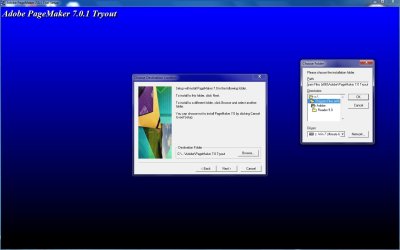
You can direct the install to any directory that you want. See attached.
 

Attachments

  • Capture.jpg
    Capture.jpg
    78.5 KB · Views: 138

My Computer My Computer

At a glance

Windows 7
OS
Windows 7
huffman, I can't get as far as doing a custom install. The error message comes up before I get to that stage.

nickle, how did you get to that screen? I get the error message as soon as I start to install. I have PM6.5, not 7 as your illustration shows, maybe that is the difference.
 

My Computer My Computer

At a glance

Windows 7 Home Premium 64 bitAMD Core Duo4G
Computer Manufacturer/Model Number
Gateway NV5212u
OS
Windows 7 Home Premium 64 bit
CPU
AMD Core Duo
Memory
4G
Hard Drives
320G
Case
Laptop
Back
Top