direct3D problem

no one

New member
Local time
10:49 PM
Messages
17
I just installed a game and when I tried to play it, it gave me that message:

73338325.png


At first I thought I must have forgotten to turn them on (since the game can still be played fine in windows XP) so I open the DirectX Diagnostic Tool and turn out, none of the DirectX features were available:

55436697.png


How can I turn those on?
 

My Computer

OS
windows 7
Hi

Go to this link to download the drivers for your system :)

Regards
 

My Computer

Computer Manufacturer/Model Number
Custom
OS
Win7 HP (x64)/Win7 Ultimate (x64)
CPU
Core i7 920
Motherboard
Intel X58
Memory
6 x 2GB Corsair XMS3
Graphics Card(s)
CF HD4890
Sound Card
Asus Xonar
Monitor(s) Displays
Dell 2408WFP
Screen Resolution
1920 x 1200
Hard Drives
2 x 150GB WDC Velociraptors (Raid 0)
1 x 1TB Seagate
1 x 1.5TB Seagate
PSU
Corsair HX1000W
Case
Antec 1200
Keyboard
Razer Lycosa/N52te
Mouse
Razer Lachesis
your graphics chip is still supported by intel, and there are drivers available.

download and install the latest graphics drivers from intel.

install them, then install the latest directx from microsoft.

please report back to let us know how it went.
 
Last edited:

My Computer

Computer Manufacturer/Model Number
mickey megabyte 1234
OS
ultimate 64 sp1
CPU
i5 2500K [email protected]
Motherboard
MSI P67A-GD53
Memory
8 gigs GSkill Ripjaws 1600
Graphics Card(s)
amd hd6950
Sound Card
creative x-fi gamer
Monitor(s) Displays
samsung 24"
Screen Resolution
1920x1080
Hard Drives
ocz vertex 2e 60 gig, samsung f3 1tb, buffalo 2tb ext
PSU
antec 550
Case
antec three hundred
Cooling
i'm a cooling fan
Keyboard
saitek eclipse ii
Mouse
logitech g3
Internet Speed
about 4 Mbps
Other Info
i love win7
I downloaded this one, extract it and tried to installbut it told me my comp did not meet minimum requirement and quit.

So um... What now?
 

My Computer

OS
windows 7
i'm very sorry, i gave you the wrong download link - it was for linux - silly mickey doing things too quickly :o

try this one - i don't know if you're 32 or 64 bit, but i assume 32...

note that the page says it's for the intel 82865G graphics controller, as per your second screenshot.
 

My Computer

Computer Manufacturer/Model Number
mickey megabyte 1234
OS
ultimate 64 sp1
CPU
i5 2500K [email protected]
Motherboard
MSI P67A-GD53
Memory
8 gigs GSkill Ripjaws 1600
Graphics Card(s)
amd hd6950
Sound Card
creative x-fi gamer
Monitor(s) Displays
samsung 24"
Screen Resolution
1920x1080
Hard Drives
ocz vertex 2e 60 gig, samsung f3 1tb, buffalo 2tb ext
PSU
antec 550
Case
antec three hundred
Cooling
i'm a cooling fan
Keyboard
saitek eclipse ii
Mouse
logitech g3
Internet Speed
about 4 Mbps
Other Info
i love win7
Hi

Try this link - you will need to download the utility and let it scan your system.
 

My Computer

Computer Manufacturer/Model Number
Custom
OS
Win7 HP (x64)/Win7 Ultimate (x64)
CPU
Core i7 920
Motherboard
Intel X58
Memory
6 x 2GB Corsair XMS3
Graphics Card(s)
CF HD4890
Sound Card
Asus Xonar
Monitor(s) Displays
Dell 2408WFP
Screen Resolution
1920 x 1200
Hard Drives
2 x 150GB WDC Velociraptors (Raid 0)
1 x 1TB Seagate
1 x 1.5TB Seagate
PSU
Corsair HX1000W
Case
Antec 1200
Keyboard
Razer Lycosa/N52te
Mouse
Razer Lachesis
@mickey megabyte: the link you gave me can't be open, it always turn out to be blank 0.o

@
Lomai:
this is the result:
Graphics Driver

Product Detected Intel® 865G
Current Driver Installed 6.01.7600.16385
An Intel device was detected but your operating system is not supported by this utility. Please visit Download Center to look for available software.


Audio Driver for Intel® Desktop Board

Product Detected
Current Driver Installed
This device is unknown or unsupported. Please contact the manufacturer for possible updates. More information>>

Wireless Networking

Product Detected
Current Driver Installed
This device is unknown or unsupported. Please contact the manufacturer for possible updates. More information>>

Wired Networking

Product Detected Intel(R) 82562 based Network Controller(OEM)
Current Driver Installed 8.0.47.1
Your driver is current.
So which driver do I need to download?
 

My Computer

OS
windows 7
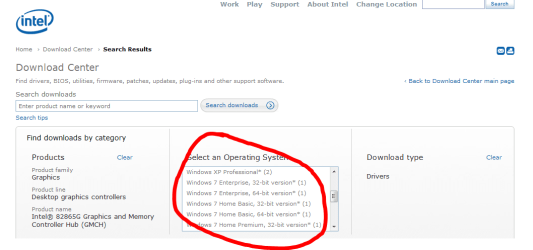
on the link i gave you, i see as below. i don't know why it's blank for you.

you need to select your flavour of windows 7 from the 'select an operating system' box...

i don't know which one you will need as you haven't told us which version of win 7 you use.

you need graphics drivers for the 865 family

then you'll see available drivers lower down the page.

good luck and let us know if you need more help.
 

Attachments

  • os.PNG
    os.PNG
    26.3 KB · Views: 65

My Computer

Computer Manufacturer/Model Number
mickey megabyte 1234
OS
ultimate 64 sp1
CPU
i5 2500K [email protected]
Motherboard
MSI P67A-GD53
Memory
8 gigs GSkill Ripjaws 1600
Graphics Card(s)
amd hd6950
Sound Card
creative x-fi gamer
Monitor(s) Displays
samsung 24"
Screen Resolution
1920x1080
Hard Drives
ocz vertex 2e 60 gig, samsung f3 1tb, buffalo 2tb ext
PSU
antec 550
Case
antec three hundred
Cooling
i'm a cooling fan
Keyboard
saitek eclipse ii
Mouse
logitech g3
Internet Speed
about 4 Mbps
Other Info
i love win7
When I picked my OS (windows 7 ultimate 32 bit), it gave me only one result with no download in it 0.o. It gave me a link to some support site.
 

My Computer

OS
windows 7
Hi

Try this link for the driver download and make sure you have a read on the comments:

To make the driver work, you need to open up the device manager in Windows. Go the the "My Computer" icon and right-click it. When the context menu appears, click properties. From there, you should be able to open the Device manager from the left side of the window. If your having trouble finding it, then go to start and search "device manager". Click on the correct result when it appears. Once you have the device manager open, expand the "display adapters". Right click on the device and when the context menu appears, press update driver. A window will open to help you through the whole process. It will be easier if you choose to browse to the location that you save this file to. Remember to click on the .ini file because it holds the information needed to install this driver. Click next, select your driver again, and your done. It's that easy.
*this is best done under admin credentials to avoid any UAC-related issues

If that does not work - try this link

Hope this helps and keep us posted :)

Regards
 

My Computer

Computer Manufacturer/Model Number
Custom
OS
Win7 HP (x64)/Win7 Ultimate (x64)
CPU
Core i7 920
Motherboard
Intel X58
Memory
6 x 2GB Corsair XMS3
Graphics Card(s)
CF HD4890
Sound Card
Asus Xonar
Monitor(s) Displays
Dell 2408WFP
Screen Resolution
1920 x 1200
Hard Drives
2 x 150GB WDC Velociraptors (Raid 0)
1 x 1TB Seagate
1 x 1.5TB Seagate
PSU
Corsair HX1000W
Case
Antec 1200
Keyboard
Razer Lycosa/N52te
Mouse
Razer Lachesis
IT WORK!!! Hell yeah!

Arigatou gozaimasu!
 

My Computer

OS
windows 7
Hi

Thanks for letting us know :)

Regards
 

My Computer

Computer Manufacturer/Model Number
Custom
OS
Win7 HP (x64)/Win7 Ultimate (x64)
CPU
Core i7 920
Motherboard
Intel X58
Memory
6 x 2GB Corsair XMS3
Graphics Card(s)
CF HD4890
Sound Card
Asus Xonar
Monitor(s) Displays
Dell 2408WFP
Screen Resolution
1920 x 1200
Hard Drives
2 x 150GB WDC Velociraptors (Raid 0)
1 x 1TB Seagate
1 x 1.5TB Seagate
PSU
Corsair HX1000W
Case
Antec 1200
Keyboard
Razer Lycosa/N52te
Mouse
Razer Lachesis
Back
Top