
Directories renamed

AndrewW

New member
Local time
5:45 AM
Messages
4
I always keep my data on a separate disk to the OS, so i can restore / upgrade without impacting my data.
The issue i am seeing is
i have a number of users who all have their data on the d:\ drive in directories called
d:\user1s Documents
d:\user2s Documents
d:\user3s Documents

In the cmd prompt this still looks right, however in explorer all i now see is 3 sets of "My Documents" folders in the d:\ drive
The same applies to photos and music.
Where can i turn off this annoying behaviour with in windows 7 so i see the real locations? This behaviour appears to be a recent change
Thanks
Andrew
 

My Computer

OS
Windows 7
I always keep my data on a separate disk to the OS, so i can restore / upgrade without impacting my data.
The issue i am seeing is
i have a number of users who all have their data on the d:\ drive in directories called
d:\user1s Documents
d:\user2s Documents
d:\user3s Documents

In the cmd prompt this still looks right, however in explorer all i now see is 3 sets of "My Documents" folders in the d:\ drive
The same applies to photos and music.
Where can i turn off this annoying behaviour with in windows 7 so i see the real locations? This behaviour appears to be a recent change
Thanks
Andrew

I'm not too sure of how to turn the behaviour off, because this is condired to be a "feature" of the whole virtual folder solution. For example, I redirected "My Documents" to point to "F:\Documents", but when I go to F:, I see "My Documents".

The folder name hasn't changed, it's just displayed that way.

One solution that you can try is to create 3 folders:
  • D:\User 1
  • D:\User 2
  • D:\User 3
And then in each, create a "Documents" folder (or "Pictures", "Videos", etc...):
  • D:\User 1\Documents
  • D:\User 2\Documents
  • D:\User 3\Documents
And then redirect the "My Documents" folder for each user into the relevant location.

I'd also recommend creating each "User X" folder from within the relevant user profile, so that permissions from that profile will be applied.
 

My Computer

Computer type
PC/Desktop
Computer Manufacturer/Model Number
Virtual Machine
OS
Windows 7 Professional 32-bit SP1
CPU
AMD A4/A6
Motherboard
Intel Corporation 440BX Desktop Reference Platform
Memory
3.00GB EDO
Graphics Card(s)
VMware SVGA 3D
Sound Card
High Definition Audio Device
Monitor(s) Displays
Generic Non-PnP Monitor on VMware SVGA 3D
Screen Resolution
1440x900
Hard Drives
1 x 60GB VMware Virtual SATA Hard Drive ATA Device
Antivirus
Kaspersky Total Security
Why do the directories only rename them selves slowly ? if there some sort of scheduled job
 

My Computer

OS
Windows 7
Why do the directories only rename them selves slowly ? if there some sort of scheduled job

No. file/folder renames happen instantly.

If you are having trouble, then perhaps if you run a disk check?
  1. Click the Start Orb
  2. Click "Computer"
  3. Right-Click the drive you want to check, and select "Properties"
  4. Under "Tools", "Error Checking", click "Check Now"
  5. Turn on "Automatically fix file system errors"
  6. Click "Start"
 

My Computer

Computer type
PC/Desktop
Computer Manufacturer/Model Number
Virtual Machine
OS
Windows 7 Professional 32-bit SP1
CPU
AMD A4/A6
Motherboard
Intel Corporation 440BX Desktop Reference Platform
Memory
3.00GB EDO
Graphics Card(s)
VMware SVGA 3D
Sound Card
High Definition Audio Device
Monitor(s) Displays
Generic Non-PnP Monitor on VMware SVGA 3D
Screen Resolution
1440x900
Hard Drives
1 x 60GB VMware Virtual SATA Hard Drive ATA Device
Antivirus
Kaspersky Total Security
Dzomlija
at the os level this is correct, but these aliases take weeks to happen, not sure what triggers its,
I rename them back, and there fine for a bit then suddenly all renamed again.

Where is this alias name stored, a file or registery, and can i modify it
 

My Computer

OS
Windows 7
Why bother with redirecting them in the first place? I keep all of my important files on my second physical drive (D:) in folders, but I don't ever change the redirection. This way, my folders aren't bungled up by permissions issues. If I had multiple users, I'd just put security on the folders.
 

My Computer

OS
Windows 7 Ultimate x64 SP1
CPU
Intel Core i7-2600
Motherboard
Gigabyte GA-P67A-UD3P-B3
Memory
12 GB Patriot Extreme DDR3-1333
Graphics Card(s)
Nvidia GTX 470
Monitor(s) Displays
Dell UltraSharp 2209WA
Hard Drives
OCZ Agility3 240 GB, WD5001AALS, WD7501AALS
PSU
OCZ ModStream 700W
Case
CoolerMaster HAF 912 Advanced
Cooling
CoolerMaster Hyper 212 Plus
Dzomlija
at the os level this is correct, but these aliases take weeks to happen, not sure what triggers its,
I rename them back, and there fine for a bit then suddenly all renamed again.

Where is this alias name stored, a file or registery, and can i modify it

Try this:
  1. Close all open Windows Explorer views
  2. Press <WINDOWS_LOGO_KEY>+<R>
  3. Type "RUN" (without quotes) and press <ENTER>
  4. In the command prompt window, type "D:" and press <ENTER>
  5. type "CD \Documents" and press <ENTER>. (Substitute Documents forthat actual folder name of "My Documents". If the name contains spaces, enclose it in quotes
  6. type "ATTRIB -S -R -H DESKTOP.INI" and press <ENTER>
  7. type "NOTEPAD DESKTOP.INI" and press <ENTER>
  8. Press <CTRL>+<P> and print a copy of the DESKTOP.INI file for reference, in case you want to change the display name back to the default "My Documents"
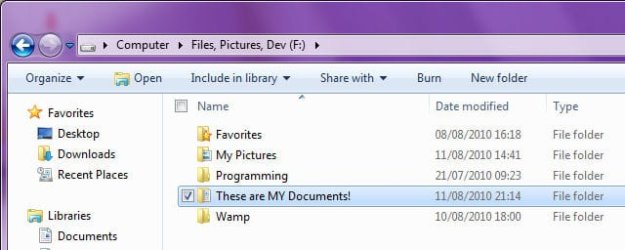
  9. Change the value of "LocalizedResourceName=" to whatever you want. In the screenshots below, I used "These are MY Documents!"
  10. Close Notepad, and save changes
  11. Go back to the Command Prompt
  12. type "ATTRIB +S +R +H DESKTOP.INI" and press <ENTER>
  13. Repeat steps 5 to 12 for the other user's "My Documents" folders
  14. type "EXIT" and press <ENTER>
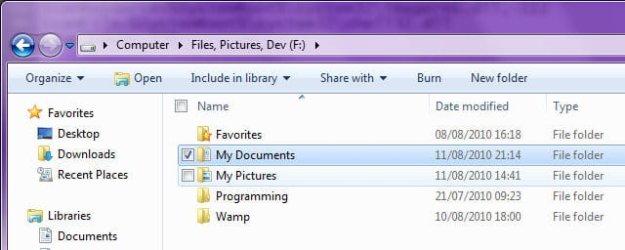
  15. Open Window Explorer, navigate to you D:, and presto, a custom display name for "My Documents", as shown in the following screenshots:
Image1.jpg
Before editing DESKTOP.INI


Image2.jpg
After editing DESKTOP.INI
 

My Computer

Computer type
PC/Desktop
Computer Manufacturer/Model Number
Virtual Machine
OS
Windows 7 Professional 32-bit SP1
CPU
AMD A4/A6
Motherboard
Intel Corporation 440BX Desktop Reference Platform
Memory
3.00GB EDO
Graphics Card(s)
VMware SVGA 3D
Sound Card
High Definition Audio Device
Monitor(s) Displays
Generic Non-PnP Monitor on VMware SVGA 3D
Screen Resolution
1440x900
Hard Drives
1 x 60GB VMware Virtual SATA Hard Drive ATA Device
Antivirus
Kaspersky Total Security
Thanks Dzomlija, thats the file i was looking for
 

My Computer

OS
Windows 7
Thanks Dzomlija, thats the file i was looking for

Glad it worked for you, Andrew.

In fact, it has prompted me to write a tutorial on how to do this, so that other users who have the same problem will be able to fix it too...
 

My Computer

Computer type
PC/Desktop
Computer Manufacturer/Model Number
Virtual Machine
OS
Windows 7 Professional 32-bit SP1
CPU
AMD A4/A6
Motherboard
Intel Corporation 440BX Desktop Reference Platform
Memory
3.00GB EDO
Graphics Card(s)
VMware SVGA 3D
Sound Card
High Definition Audio Device
Monitor(s) Displays
Generic Non-PnP Monitor on VMware SVGA 3D
Screen Resolution
1440x900
Hard Drives
1 x 60GB VMware Virtual SATA Hard Drive ATA Device
Antivirus
Kaspersky Total Security
Can you provide a link to the tutorial please? There are so many it's sometimes hard to find one.
 

My Computer

Computer type
PC/Desktop
Computer Manufacturer/Model Number
Lenovo IdeaCenter 450
OS
Windows 10 Pro X64
CPU
Intel Quad Core i7-4770 @ 3.4Ghz
Memory
16.0GB PC3-12800 DDR3 SDRAM 1600 MHz
Graphics Card(s)
Intel Integrated HD Graphics
Sound Card
Realtek HD Audio
Monitor(s) Displays
HP 22" LCD
Screen Resolution
1680 x 1050
Hard Drives
250GB Samsung EVO SATA-3 SSD
2TB Seagate ST2000DM001 SATA-2
1.5TB Seagate ST3150041AS SATA
Keyboard
Dell USB
Mouse
Lenovo USB
Internet Speed
Cable via Road Runner 3MB Upload, 30MB Download
Antivirus
Windows Defender, MBAM Pro, MBAE
Browser
Seamonkey
Other Info
UEFI/GPT
PLDS DVD-RW DH16AERSH

My Computer

Computer type
PC/Desktop
Computer Manufacturer/Model Number
Virtual Machine
OS
Windows 7 Professional 32-bit SP1
CPU
AMD A4/A6
Motherboard
Intel Corporation 440BX Desktop Reference Platform
Memory
3.00GB EDO
Graphics Card(s)
VMware SVGA 3D
Sound Card
High Definition Audio Device
Monitor(s) Displays
Generic Non-PnP Monitor on VMware SVGA 3D
Screen Resolution
1440x900
Hard Drives
1 x 60GB VMware Virtual SATA Hard Drive ATA Device
Antivirus
Kaspersky Total Security
Thank you.
 

My Computer

Computer type
PC/Desktop
Computer Manufacturer/Model Number
Lenovo IdeaCenter 450
OS
Windows 10 Pro X64
CPU
Intel Quad Core i7-4770 @ 3.4Ghz
Memory
16.0GB PC3-12800 DDR3 SDRAM 1600 MHz
Graphics Card(s)
Intel Integrated HD Graphics
Sound Card
Realtek HD Audio
Monitor(s) Displays
HP 22" LCD
Screen Resolution
1680 x 1050
Hard Drives
250GB Samsung EVO SATA-3 SSD
2TB Seagate ST2000DM001 SATA-2
1.5TB Seagate ST3150041AS SATA
Keyboard
Dell USB
Mouse
Lenovo USB
Internet Speed
Cable via Road Runner 3MB Upload, 30MB Download
Antivirus
Windows Defender, MBAM Pro, MBAE
Browser
Seamonkey
Other Info
UEFI/GPT
PLDS DVD-RW DH16AERSH
Back
Top