Solved DirectX problem causing Games to lag

CompEnthusiast

New member
Local time
4:37 AM
Messages
28
Hi all,

I am having some problems in playing a game Call of Duty 7 Black Ops.I had Nvidia Geforce 210 1 gb gpu earlier,although it's not a high end gpu for gaming yet I would play this same game at a resolution 800 x 600 or 1024 x 768 resolution without any lag.Few weeks ago I have upgraded my gpu to Nvidia Geforce Gt610 2gb and tried my hands on Cod 7 .In spite of having larger memory and better graphic engine I am experiencing lag while playing the same game Cod7. Game playing is stuttering and lagging,not running smoothly unlike before.I have also tried with lower resolution 800 x 600 but the result is same.

I then googled a bit and interestingly i found that it might be the Directx version causing this problem.My earlier gpu used to support Directx10 but this new one supports Directx11. I found that most of the games don't support Directx 11 and that's why lag might occur. I also found a list of games supporting Directx11 where most of the call of duty games are missing including the one I am telling about.The link is given below.You can also check it.

https://en.wikipedia.org/wiki/List_of_games_with_DirectX_11_support

One more thing,when I was installing Cod 7 after installing my new gpu,the game installed successfully but it gave options to install Directx and Visual c++ 2005.I checked the boxes next to these two options but some error appeared in case of both.The message was something like "Error 740: The requested operation requires elevation " with the path to a folder called "Redist" containing both Directx and Visual c++ applications within the game's installation folder.I then went to that location and installed both of them manually and launched the game and then experienced a stuttering and lagging game play.

I don't exactly know what is really causing my problem.So I came here,asking for some help from you people,looking for some fix or tweaks if any.If you have some questions or any queries do ask me,I will try my best to answer them.

Thanks in Advance.
 

My Computer

Computer type
PC/Desktop
Computer Manufacturer/Model Number
Custom Build
OS
Windows 7 Ultimate x64
CPU
Intel Core 2 Duo E7300 @ 2.66Ghz,2.67Ghz
Memory
4 gb
Graphics Card(s)
NVidia GeForce Gt 610 2 Gb
Hard Drives
Seagate 250 Gb
Browser
Chrome
I would try reinstalling COD 7 using elevated privilege. Right click on the installer and choose "Run as Administrator".

It may be that DirectX and C++ 2005 still didn't install properly, even though you did it manually.

It's worth a shot...
 

My Computer

Computer type
PC/Desktop
Computer Manufacturer/Model Number
Mellon Labs (custom build)
OS
Win 7 Pro x64/Win 10 Pro x64 dual boot
CPU
AMD FX 8350 Vishera @ 4200
Motherboard
ASUS M5A97 R2.0
Memory
16 GB Mushkin Blackline DDR3-2400 @ 1866 (9-10-10-10-31)
Graphics Card(s)
XFX Radeon R9 280 Double D Black Edition
Sound Card
Realtek HD Audio on MB. Sounds great.
Monitor(s) Displays
Acer 24", Acer 22"
Screen Resolution
3840 x 1080
Hard Drives
1 x Mushkin Chronos 120 GB SSD (Win 10)
1 x Samsung 850 EVO 250 GB SSD (Win 7)
1 x WD 1TB SATA Blue
1 x WD 1TB SATA Green
PSU
Corsair TX-750
Case
CoolerMaster HAF 912+
Cooling
Coolermaster Seidon 240M Liquid AIO. 6 case fans
Keyboard
Logitech G710+
Mouse
Logitech G500s
Internet Speed
Much better since I got fiber, but still way overpriced.
Antivirus
MSE, Malware Bytes for scanning
Browser
Firefox
Other Info
Corsair VOID USB headphones.

A Mellon Labs X-1 - LCD Smartie driven system status display.

Brought to you by the letter E
Thanks @Mellon Head for your reply,I will definitely give it another try as I just love COD games,just would like to ask you what do you exactly mean by reinstalling COD 7 using elevated privilege?I mean how to do it?Choosing "Run as Administrator" while performing re installation will do it or is there any thing more to do?Would you please explain the procedure?
 

My Computer

Computer type
PC/Desktop
Computer Manufacturer/Model Number
Custom Build
OS
Windows 7 Ultimate x64
CPU
Intel Core 2 Duo E7300 @ 2.66Ghz,2.67Ghz
Memory
4 gb
Graphics Card(s)
NVidia GeForce Gt 610 2 Gb
Hard Drives
Seagate 250 Gb
Browser
Chrome
Right click on the installer file, and from the menu that pops up, choose "Run as Administrator".

That gives the installer elevated privilege, and it should get you around that error message. Remember to uninstall COD first, before you try to reinstall.
 

My Computer

Computer type
PC/Desktop
Computer Manufacturer/Model Number
Mellon Labs (custom build)
OS
Win 7 Pro x64/Win 10 Pro x64 dual boot
CPU
AMD FX 8350 Vishera @ 4200
Motherboard
ASUS M5A97 R2.0
Memory
16 GB Mushkin Blackline DDR3-2400 @ 1866 (9-10-10-10-31)
Graphics Card(s)
XFX Radeon R9 280 Double D Black Edition
Sound Card
Realtek HD Audio on MB. Sounds great.
Monitor(s) Displays
Acer 24", Acer 22"
Screen Resolution
3840 x 1080
Hard Drives
1 x Mushkin Chronos 120 GB SSD (Win 10)
1 x Samsung 850 EVO 250 GB SSD (Win 7)
1 x WD 1TB SATA Blue
1 x WD 1TB SATA Green
PSU
Corsair TX-750
Case
CoolerMaster HAF 912+
Cooling
Coolermaster Seidon 240M Liquid AIO. 6 case fans
Keyboard
Logitech G710+
Mouse
Logitech G500s
Internet Speed
Much better since I got fiber, but still way overpriced.
Antivirus
MSE, Malware Bytes for scanning
Browser
Firefox
Other Info
Corsair VOID USB headphones.

A Mellon Labs X-1 - LCD Smartie driven system status display.

Brought to you by the letter E
Hi Mellon Head,i did what you said,I reinstalled the game with elevated privilege after uninstalling it.This time the previous error message didn't appear but while installing directx,towards the completion of it's installation process a different error message came saying "An internal error occurred.Please refer to DXError.log and DirectX.log in your Windows folder to determine problem".In case of Visual c++ installation it got successfully completed.
I went to the Windows folder but didn't find any file such as DXError.log but did find the DirectX.log . For your convenience I've attached the file.See if you could figure out something from it.

When I launched the game it was stuttering and lagging like before.
 

Attachments

My Computer

Computer type
PC/Desktop
Computer Manufacturer/Model Number
Custom Build
OS
Windows 7 Ultimate x64
CPU
Intel Core 2 Duo E7300 @ 2.66Ghz,2.67Ghz
Memory
4 gb
Graphics Card(s)
NVidia GeForce Gt 610 2 Gb
Hard Drives
Seagate 250 Gb
Browser
Chrome
Well, I looked at the log and basically the log is telling you that you already have everything installed already. If you look at the log, you'll see that everything says "XXX has been installed already". That might be the source of your error.

Try opening the start menu and in the search box type "DXDiag" (without quotes). When DXDiag.exe pops up, right click and choose "Run as Administrator". See if it reports any problems and post them.
 

My Computer

Computer type
PC/Desktop
Computer Manufacturer/Model Number
Mellon Labs (custom build)
OS
Win 7 Pro x64/Win 10 Pro x64 dual boot
CPU
AMD FX 8350 Vishera @ 4200
Motherboard
ASUS M5A97 R2.0
Memory
16 GB Mushkin Blackline DDR3-2400 @ 1866 (9-10-10-10-31)
Graphics Card(s)
XFX Radeon R9 280 Double D Black Edition
Sound Card
Realtek HD Audio on MB. Sounds great.
Monitor(s) Displays
Acer 24", Acer 22"
Screen Resolution
3840 x 1080
Hard Drives
1 x Mushkin Chronos 120 GB SSD (Win 10)
1 x Samsung 850 EVO 250 GB SSD (Win 7)
1 x WD 1TB SATA Blue
1 x WD 1TB SATA Green
PSU
Corsair TX-750
Case
CoolerMaster HAF 912+
Cooling
Coolermaster Seidon 240M Liquid AIO. 6 case fans
Keyboard
Logitech G710+
Mouse
Logitech G500s
Internet Speed
Much better since I got fiber, but still way overpriced.
Antivirus
MSE, Malware Bytes for scanning
Browser
Firefox
Other Info
Corsair VOID USB headphones.

A Mellon Labs X-1 - LCD Smartie driven system status display.

Brought to you by the letter E
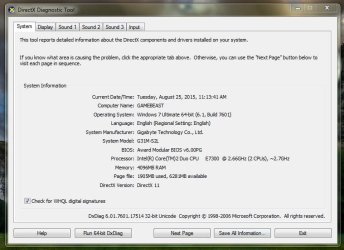
Hi Mellon Head, I run the DXDiag according to the way you suggested,but no such error showed up.Only the reporting window showed up.For your convenience I've attached it.
 

Attachments

  • DxDiag report.JPG
    DxDiag report.JPG
    77.8 KB · Views: 0

My Computer

Computer type
PC/Desktop
Computer Manufacturer/Model Number
Custom Build
OS
Windows 7 Ultimate x64
CPU
Intel Core 2 Duo E7300 @ 2.66Ghz,2.67Ghz
Memory
4 gb
Graphics Card(s)
NVidia GeForce Gt 610 2 Gb
Hard Drives
Seagate 250 Gb
Browser
Chrome
Hi Mellon Head,just one more thing I would like to inform you,I have Core 2 duo E7300 cpu which has 2 cores at 2.66 Ghz and 2.67 Ghz respectively.During booting before the appearence of windows logo it also used to show up like I mentioned but lately it is only showing one core at 1.60 Ghz (266 x 6). I checked at task manager's resource monitor option,under the cpu tab there both cpu's i.e. cpu 0 and cpu 1 are being shown,but when I ran CPU Z program it only showed one core at 1.60 Ghz.I am wandering if one of my cpu cores might have collapsed.I would like to know if it is at all possible for one of the two cores to collapse like that?

Could it be a possible reason behind the lag during gameplay? I just noticed the problem yesterday that's why I'm posting it today.
 

My Computer

Computer type
PC/Desktop
Computer Manufacturer/Model Number
Custom Build
OS
Windows 7 Ultimate x64
CPU
Intel Core 2 Duo E7300 @ 2.66Ghz,2.67Ghz
Memory
4 gb
Graphics Card(s)
NVidia GeForce Gt 610 2 Gb
Hard Drives
Seagate 250 Gb
Browser
Chrome
That could definitely cause a lag during game play. Have you changed any power management settings recently? Or your multiplier in BIOS?

It's odd that one of your cores would shut down like that, and that your processor would downclock. There has to be a recent change in setting, or else the motherboard or processor is broken, or throttling because of heat.

In addition, I think the DirectX is actually OK. DirectX 11 seems to have been installed all right. I think the problem lies with your processor.
 

My Computer

Computer type
PC/Desktop
Computer Manufacturer/Model Number
Mellon Labs (custom build)
OS
Win 7 Pro x64/Win 10 Pro x64 dual boot
CPU
AMD FX 8350 Vishera @ 4200
Motherboard
ASUS M5A97 R2.0
Memory
16 GB Mushkin Blackline DDR3-2400 @ 1866 (9-10-10-10-31)
Graphics Card(s)
XFX Radeon R9 280 Double D Black Edition
Sound Card
Realtek HD Audio on MB. Sounds great.
Monitor(s) Displays
Acer 24", Acer 22"
Screen Resolution
3840 x 1080
Hard Drives
1 x Mushkin Chronos 120 GB SSD (Win 10)
1 x Samsung 850 EVO 250 GB SSD (Win 7)
1 x WD 1TB SATA Blue
1 x WD 1TB SATA Green
PSU
Corsair TX-750
Case
CoolerMaster HAF 912+
Cooling
Coolermaster Seidon 240M Liquid AIO. 6 case fans
Keyboard
Logitech G710+
Mouse
Logitech G500s
Internet Speed
Much better since I got fiber, but still way overpriced.
Antivirus
MSE, Malware Bytes for scanning
Browser
Firefox
Other Info
Corsair VOID USB headphones.

A Mellon Labs X-1 - LCD Smartie driven system status display.

Brought to you by the letter E
Hi Mellon Head,sorry for my late reply as i was ill for past few days, please don't mind for that.But now I've recovered a bit and feeling quite well. :D

No,I didn't change any power management settings or any such settings which could downclock the cpu. Although recently i formatted the c drive and fresh installed windows and after that entered into the bios and from there increased the cpu frequency multiplier from 6 to 10.Now my cpu is again running at 2.66 Ghz.Also reinstalled the game with elevated privilege but the lag is still there during the gameplay. I don't understand what could possibly be causing this problem.

One more thing within msconfig->Boot->Advanced options the Number of processors box is unchecked and it is showing 1.My cpu is Intel core 2 duo e7300 at 2.66ghz,2.67 ghz .Should it show 1 or 2 for 2 cores?
 

My Computer

Computer type
PC/Desktop
Computer Manufacturer/Model Number
Custom Build
OS
Windows 7 Ultimate x64
CPU
Intel Core 2 Duo E7300 @ 2.66Ghz,2.67Ghz
Memory
4 gb
Graphics Card(s)
NVidia GeForce Gt 610 2 Gb
Hard Drives
Seagate 250 Gb
Browser
Chrome
My msconfig show the same as yours with 6 cores. Those options are for debugging and whatnot. They should all be greyed out or unchecked.

Sometimes helps with stutter:
- Disable C1E and IEST (SpeedStep) in BIOS
- Make sure you are on a High Performance Power Plan.
- Run HWInfo with sensors and check the min value for Bus Clock and Core Clock values (they shouldn't drop below their normal values)
 

My Computer

Computer type
PC/Desktop
Computer Manufacturer/Model Number
Custom Build
OS
Windows 7 Ultimate x64 SP1
CPU
AMD Phenom 2 1090T
Motherboard
Gigabyte GA-890FXA-UD5
Memory
2x8GB Kingston HyperX Fury Black 1600Mhz Unganged
Graphics Card(s)
MSI GTX 970 Gaming 4G
Sound Card
Realtek On-Board HD 7.1 Audio / Logitech G35
Monitor(s) Displays
3xAcer GD245HQ
Screen Resolution
1920x1080
Hard Drives
Samsung 850 Pro 512GB SSD - OS /
WD Caviar Black SATA 3 - 1 TBx2 - Dynamic RAID 0 /
WD Caviar Green SATA 2 - 640GBx2 - Dynamic RAID 0 /
WD Caviar Green SATA 2 - 640GB - Internal Backup /
Seagate Barracude SATA 3 - 3TB - External Backup/ Sync
PSU
HighPower 1000W
Case
Cooler Master HAF 932
Cooling
Noctua NH-D14
Keyboard
Logitech G19
Mouse
Logitech G500
Internet Speed
100/4 Mbit Cable (100GB quota)
Antivirus
ZoneAlarm Extreme Security / MBAM Pro / MBAE Free / SAS Free
Browser
IE 11 - Firefox - Chrome
Other Info
Logitech F710/ G27/ G940/ Z5500 // TrackIR 5 // Nvidia 3D Surround Vision
My msconfig show the same as yours with 6 cores. Those options are for debugging and whatnot. They should all be greyed out or unchecked.
While you are correct in all respects, I have to disagree with this one even though you are right...

My wife's quad will not run with all four cores unless I go into MSConfig and specify four cores. I don't know why this is so, but it has to be done, otherwise her quad Phenom II only runs on one core. Maybe compenthusiast is having a similar issue? That's my guess based on the information in this thread.

I know it sounds all wrong, but maybe it will work.
 

My Computer

Computer type
PC/Desktop
Computer Manufacturer/Model Number
Mellon Labs (custom build)
OS
Win 7 Pro x64/Win 10 Pro x64 dual boot
CPU
AMD FX 8350 Vishera @ 4200
Motherboard
ASUS M5A97 R2.0
Memory
16 GB Mushkin Blackline DDR3-2400 @ 1866 (9-10-10-10-31)
Graphics Card(s)
XFX Radeon R9 280 Double D Black Edition
Sound Card
Realtek HD Audio on MB. Sounds great.
Monitor(s) Displays
Acer 24", Acer 22"
Screen Resolution
3840 x 1080
Hard Drives
1 x Mushkin Chronos 120 GB SSD (Win 10)
1 x Samsung 850 EVO 250 GB SSD (Win 7)
1 x WD 1TB SATA Blue
1 x WD 1TB SATA Green
PSU
Corsair TX-750
Case
CoolerMaster HAF 912+
Cooling
Coolermaster Seidon 240M Liquid AIO. 6 case fans
Keyboard
Logitech G710+
Mouse
Logitech G500s
Internet Speed
Much better since I got fiber, but still way overpriced.
Antivirus
MSE, Malware Bytes for scanning
Browser
Firefox
Other Info
Corsair VOID USB headphones.

A Mellon Labs X-1 - LCD Smartie driven system status display.

Brought to you by the letter E
It doesn't hurt to check whether 2 cores are working, but HWInfo will show it anyway. Core 2 Duo has 2 real cores with no hyper-threading, right? OP can also run Prime95 while running HWInfo to see if any throttling is happening.

By the way I get mixed reviews for GT610, some say it is decent for its price others say it is not working for them.

In any case, maybe check with some other games and some benchmarks too to see if it is a system-wide issue. It may even turn out to be a problem with this particular game.

So to cap (in addition to my previous post):
- Run HWInfo along with Prime95, check any throttling and keep an eye on the temperatures.
- Install some other game, and a benchmark or two (Unigine Heaven and Valley, and 3d Mark 11 for example)
 

My Computer

Computer type
PC/Desktop
Computer Manufacturer/Model Number
Custom Build
OS
Windows 7 Ultimate x64 SP1
CPU
AMD Phenom 2 1090T
Motherboard
Gigabyte GA-890FXA-UD5
Memory
2x8GB Kingston HyperX Fury Black 1600Mhz Unganged
Graphics Card(s)
MSI GTX 970 Gaming 4G
Sound Card
Realtek On-Board HD 7.1 Audio / Logitech G35
Monitor(s) Displays
3xAcer GD245HQ
Screen Resolution
1920x1080
Hard Drives
Samsung 850 Pro 512GB SSD - OS /
WD Caviar Black SATA 3 - 1 TBx2 - Dynamic RAID 0 /
WD Caviar Green SATA 2 - 640GBx2 - Dynamic RAID 0 /
WD Caviar Green SATA 2 - 640GB - Internal Backup /
Seagate Barracude SATA 3 - 3TB - External Backup/ Sync
PSU
HighPower 1000W
Case
Cooler Master HAF 932
Cooling
Noctua NH-D14
Keyboard
Logitech G19
Mouse
Logitech G500
Internet Speed
100/4 Mbit Cable (100GB quota)
Antivirus
ZoneAlarm Extreme Security / MBAM Pro / MBAE Free / SAS Free
Browser
IE 11 - Firefox - Chrome
Other Info
Logitech F710/ G27/ G940/ Z5500 // TrackIR 5 // Nvidia 3D Surround Vision
Hi Mellon Head & GokAy,first of all thanks for your suggestions... i will run those things suggested by you people to check if there is any throttle in case of my cpu.

But there is a good news.I think I have solved the lagging problem upto a decent extent & it seems the directx version was causing the problem.What I did is I just googled about the directx version compatibility of the game and from several links I found the game i.e. COD7 prefers directx 9.0c . So I just downloaded it,extracted and installed,then launched the game and to my surprise it worked and the game is running quite well now.There is still some amount of lagging though but i can say that I am playing the game almost 75% - 80% better than earlier.

Now I think there are 3 directx version running simultaneously in my pc, directx 11,10 and 9.0c because 11 was automatically installed during the installation of gpu driver,10 was installed during the installation of cod7 and i myself installed the 9.0c version separately afterwards. Maybe that's why the game is still lagging a bit but anyway it's running much much better than earlier as i said almost 75% - 80% better. I wasn't sure about the plan but i tried and it worked,feeling very happy now. :D :D
 

My Computer

Computer type
PC/Desktop
Computer Manufacturer/Model Number
Custom Build
OS
Windows 7 Ultimate x64
CPU
Intel Core 2 Duo E7300 @ 2.66Ghz,2.67Ghz
Memory
4 gb
Graphics Card(s)
NVidia GeForce Gt 610 2 Gb
Hard Drives
Seagate 250 Gb
Browser
Chrome
Well, I'm glad that you're making progress. :)
 

My Computer

Computer type
PC/Desktop
Computer Manufacturer/Model Number
Mellon Labs (custom build)
OS
Win 7 Pro x64/Win 10 Pro x64 dual boot
CPU
AMD FX 8350 Vishera @ 4200
Motherboard
ASUS M5A97 R2.0
Memory
16 GB Mushkin Blackline DDR3-2400 @ 1866 (9-10-10-10-31)
Graphics Card(s)
XFX Radeon R9 280 Double D Black Edition
Sound Card
Realtek HD Audio on MB. Sounds great.
Monitor(s) Displays
Acer 24", Acer 22"
Screen Resolution
3840 x 1080
Hard Drives
1 x Mushkin Chronos 120 GB SSD (Win 10)
1 x Samsung 850 EVO 250 GB SSD (Win 7)
1 x WD 1TB SATA Blue
1 x WD 1TB SATA Green
PSU
Corsair TX-750
Case
CoolerMaster HAF 912+
Cooling
Coolermaster Seidon 240M Liquid AIO. 6 case fans
Keyboard
Logitech G710+
Mouse
Logitech G500s
Internet Speed
Much better since I got fiber, but still way overpriced.
Antivirus
MSE, Malware Bytes for scanning
Browser
Firefox
Other Info
Corsair VOID USB headphones.

A Mellon Labs X-1 - LCD Smartie driven system status display.

Brought to you by the letter E
Thanks Mellon Head :D
 

My Computer

Computer type
PC/Desktop
Computer Manufacturer/Model Number
Custom Build
OS
Windows 7 Ultimate x64
CPU
Intel Core 2 Duo E7300 @ 2.66Ghz,2.67Ghz
Memory
4 gb
Graphics Card(s)
NVidia GeForce Gt 610 2 Gb
Hard Drives
Seagate 250 Gb
Browser
Chrome
Having different versions of DirectX at the same time is normal and not a cause for issues. Black Ops uses 9.0c I believe so updating it was a good idea.
 

My Computer

Computer type
PC/Desktop
Computer Manufacturer/Model Number
Custom Build
OS
Windows 7 Ultimate x64 SP1
CPU
AMD Phenom 2 1090T
Motherboard
Gigabyte GA-890FXA-UD5
Memory
2x8GB Kingston HyperX Fury Black 1600Mhz Unganged
Graphics Card(s)
MSI GTX 970 Gaming 4G
Sound Card
Realtek On-Board HD 7.1 Audio / Logitech G35
Monitor(s) Displays
3xAcer GD245HQ
Screen Resolution
1920x1080
Hard Drives
Samsung 850 Pro 512GB SSD - OS /
WD Caviar Black SATA 3 - 1 TBx2 - Dynamic RAID 0 /
WD Caviar Green SATA 2 - 640GBx2 - Dynamic RAID 0 /
WD Caviar Green SATA 2 - 640GB - Internal Backup /
Seagate Barracude SATA 3 - 3TB - External Backup/ Sync
PSU
HighPower 1000W
Case
Cooler Master HAF 932
Cooling
Noctua NH-D14
Keyboard
Logitech G19
Mouse
Logitech G500
Internet Speed
100/4 Mbit Cable (100GB quota)
Antivirus
ZoneAlarm Extreme Security / MBAM Pro / MBAE Free / SAS Free
Browser
IE 11 - Firefox - Chrome
Other Info
Logitech F710/ G27/ G940/ Z5500 // TrackIR 5 // Nvidia 3D Surround Vision
Thanks GokAy :D
 

My Computer

Computer type
PC/Desktop
Computer Manufacturer/Model Number
Custom Build
OS
Windows 7 Ultimate x64
CPU
Intel Core 2 Duo E7300 @ 2.66Ghz,2.67Ghz
Memory
4 gb
Graphics Card(s)
NVidia GeForce Gt 610 2 Gb
Hard Drives
Seagate 250 Gb
Browser
Chrome
Back
Top