Solved Dirsync

katto01

New member
Local time
7:31 PM
Messages
4
Hello,
Dirsync is installed in the Program Files directory. It performs synchronization between directories (I use it as a form of backup). It need to write reports IN the program files directories.
Apparently it can't.
DirSync does not allow you to change reporting location.
Any ideas?

Thanks

Katto01
 

My Computer

OS
Windows 7 Home 32 bit
Have you had it run as administrator?
 

My Computer

Computer Manufacturer/Model Number
SMN-Productions
OS
Windows 7 x86/x64, Server 2008r2, Web Server 2008
CPU
i7 v2 3930K Steping stone 2
Motherboard
ASUS Rampage IV Extreme
Memory
G.SKILL Ripjaws Z Series 32GB
Graphics Card(s)
AMD HD 5770
Monitor(s) Displays
Acer 21" and Samsung 20"
Hard Drives
Patriot Pyro 80GB
PSU
1000 Watt
Case
HAF-X
Cooling
4 Fans
Keyboard
Black Widow Ultimate
yes, and i have the same problem om 3 pcs

yes, and i have the same problem om 3 pcs
 

My Computer

OS
Windows 7 Home 32 bit
Have you used this program in the past?
 

My Computer

Computer Manufacturer/Model Number
SMN-Productions
OS
Windows 7 x86/x64, Server 2008r2, Web Server 2008
CPU
i7 v2 3930K Steping stone 2
Motherboard
ASUS Rampage IV Extreme
Memory
G.SKILL Ripjaws Z Series 32GB
Graphics Card(s)
AMD HD 5770
Monitor(s) Displays
Acer 21" and Samsung 20"
Hard Drives
Patriot Pyro 80GB
PSU
1000 Watt
Case
HAF-X
Cooling
4 Fans
Keyboard
Black Widow Ultimate
DirSync

Yes, It worked great on XP
 

My Computer

OS
Windows 7 Home 32 bit
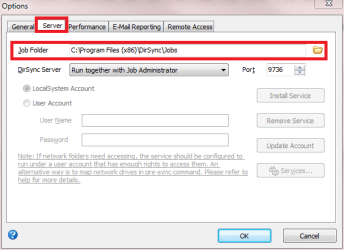
If we are talking about the same application, you can change the job folder here (View menu > Options):

DirSync1.png

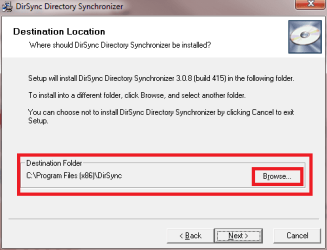
Also, if you change the install folder during the installation, the job folder is automatically set to that folder. Simply install the app somewhere else than system protected folders.

DirSync2.png

Kari
 

My Computer

Computer type
Laptop
Computer Manufacturer/Model Number
HP ENVY 17-1150eg
OS
Windows 10 Pro x64 EN-GB
CPU
1.6 GHz Intel Core i7-720QM Processor
Memory
6 GB
Graphics Card(s)
ATI Mobility Radeon HD 5850 Graphics
Sound Card
Beats sound system with integrated subwoofer
Monitor(s) Displays
17" laptop display, 22" LED and 32" Full HD TV through HDMI
Screen Resolution
1600*900 (1), 1920*1080 (2&3)
Hard Drives
Internal: 2 x 500 GB SATA Hard Disk Drive 7200 rpm
External: 2TB for backups, 3TB USB3 network drive for media
Cooling
As Envy runs a bit warm, I have it on a Cooler Master pad
Keyboard
Logitech diNovo Media Desktop Laser (bluetooth)
Mouse
Logitech Performance Mouse MX
Internet Speed
50/10 Mbps VDSL
Antivirus
Windows Defender 4.3.9431.0
Browser
Maxthon 3.5.2., IE11
DirSync

Yes, thank you that worked
 

My Computer

OS
Windows 7 Home 32 bit
Back
Top