
You are using an out of date browser. It may not display this or other websites correctly.
You should upgrade or use an alternative browser.
You should upgrade or use an alternative browser.
disable DVD maker
- Thread starter Sudhir
- Start date
Why would you want to disable it? If you have no need for it then you can just not use it. You could try moving the start menu icons to a backup folder somewhere else on your HD, that way it won't show under 'All Programs'
My Computer
- Computer Manufacturer/Model Number
- Compaq Desktop
- OS
- Windows 7 Ultimate x64
- CPU
- AMD Sempron Dual Core
- Memory
- 3GB
- Graphics Card(s)
- NVIDIA GeForce 6150SE nForce 430
- Screen Resolution
- 1024x768
- Hard Drives
- 150GB Sata
I'll do some digging for you and report back 
My Computer
- Computer Manufacturer/Model Number
- Compaq Desktop
- OS
- Windows 7 Ultimate x64
- CPU
- AMD Sempron Dual Core
- Memory
- 3GB
- Graphics Card(s)
- NVIDIA GeForce 6150SE nForce 430
- Screen Resolution
- 1024x768
- Hard Drives
- 150GB Sata
You can disable DVD Maker,
Open Control Panel -> Programs, and click 'Turn Windows features on or off' and under 'Media Features' you can de-select DVD Maker.
This will disable, not uninstall, so you can easily re-select it if you need to.
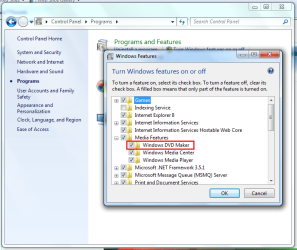
Open Control Panel -> Programs, and click 'Turn Windows features on or off' and under 'Media Features' you can de-select DVD Maker.
This will disable, not uninstall, so you can easily re-select it if you need to.
My Computer
- Computer Manufacturer/Model Number
- Compaq Desktop
- OS
- Windows 7 Ultimate x64
- CPU
- AMD Sempron Dual Core
- Memory
- 3GB
- Graphics Card(s)
- NVIDIA GeForce 6150SE nForce 430
- Screen Resolution
- 1024x768
- Hard Drives
- 150GB Sata