
You are using an out of date browser. It may not display this or other websites correctly.
You should upgrade or use an alternative browser.
You should upgrade or use an alternative browser.
Disable Group Separator Line
- Thread starter usvpn
- Start date
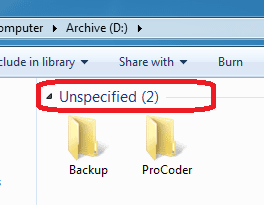

This separator has something to do with Grouping. My Windows 7 is in italian so I can't help you through the menus.
If you right-click an empty area of your Explorer window, there will be something about Grouping.
If you right-click an empty area of your Explorer window, there will be something about Grouping.
My Computer
- Computer Manufacturer/Model Number
- Custom Build
- OS
- Windows 7 Ultimate x64 SP1 clean install
- CPU
- AMD Athlon 64 X2 6400+
- Motherboard
- Asus M2N-E SLI
- Memory
- 4 GB
- Graphics Card(s)
- 2 x NVidia Geforce 8600 GTS
- Sound Card
- Trust 5.1 Surround USB
- Monitor(s) Displays
- Benq FP931 19"
- Screen Resolution
- 1280x1024@32bit@75MHz
- Hard Drives
- 1 x Western Digital 500GB SATA (OS installation), 2 x Seagate 320GB SATA, 1 x Seagate 250GB IDE (in external USB box), 1 x TrekStor 750GB USB
- PSU
- 650W
- Keyboard
- Logitech Cordless Desktop EX 100
- Mouse
- Logitech Cordless Optical
- Internet Speed
- 8192 kbps / 640 kbps

I don't think you can do it globally, but you can do it by library. As CyberZeus says right click an empty space and select Group By-> (none). It should apply to the whole library.
My Computer
- Computer type
- Laptop
- Computer Manufacturer/Model Number
- Hewlett-Packard/G62-107SA Notebook
- OS
- Microsoft Windows 7 Home Premium 64-bit Service Pack 1
- CPU
- Intel(R) Core(TM) i3 CPU M 330 @ 2.13GHz
- Motherboard
- Hewlett-Packard 1425
- Memory
- 8 GB DDR3
- Graphics Card(s)
- Intel(R) HD Graphics
- Sound Card
- Realtek High Definition Audio
- Monitor(s) Displays
- Builtin
- Screen Resolution
- 1366 x 768 x 32 bits (4294967296 colors) @ 60 Hz
- Hard Drives
- 250 GB SATA Hard Disk Drive 7200 rpm
2TB Seagate GoFlex USB 2 Drive
1TB Iomega Prestige USB 2 Drive
1.5TB Iomega Prestige USB 2 Drive (Samsung)
2TB WD MyBook Live NAS.
- Mouse
- Logitech Anywhere MX
- Internet Speed
- 152 Mbs download 10 Mbs upload
- Antivirus
- Norton 360
- Browser
- Chrome
Thank you kado, as I said my Windows 7 is in italian, I didn't know the exact entry in the menuI don't think you can do it globally, but you can do it by library. As CyberZeus says right click an empty space and select Group By-> (none). It should apply to the whole library.

My Computer
- Computer Manufacturer/Model Number
- Custom Build
- OS
- Windows 7 Ultimate x64 SP1 clean install
- CPU
- AMD Athlon 64 X2 6400+
- Motherboard
- Asus M2N-E SLI
- Memory
- 4 GB
- Graphics Card(s)
- 2 x NVidia Geforce 8600 GTS
- Sound Card
- Trust 5.1 Surround USB
- Monitor(s) Displays
- Benq FP931 19"
- Screen Resolution
- 1280x1024@32bit@75MHz
- Hard Drives
- 1 x Western Digital 500GB SATA (OS installation), 2 x Seagate 320GB SATA, 1 x Seagate 250GB IDE (in external USB box), 1 x TrekStor 750GB USB
- PSU
- 650W
- Keyboard
- Logitech Cordless Desktop EX 100
- Mouse
- Logitech Cordless Optical
- Internet Speed
- 8192 kbps / 640 kbps
This separator has something to do with Grouping. My Windows 7 is in italian so I can't help you through the menus.
If you right-click an empty area of your Explorer window, there will be something about Grouping.
Correct...
If you right-click on a blank space in a folder you can select Group and choose how to group the items within that folder.
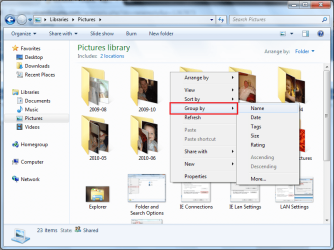
You can also Group-by (none) which will reset the folder view.

Note
The (none) option is only available if you have previously grouped a folder as you can see by the 2 comparison pics
OS
My Computer
- Computer Manufacturer/Model Number
- Compaq Desktop
- OS
- Windows 7 Ultimate x64
- CPU
- AMD Sempron Dual Core
- Memory
- 3GB
- Graphics Card(s)
- NVIDIA GeForce 6150SE nForce 430
- Screen Resolution
- 1024x768
- Hard Drives
- 150GB Sata