
Is there a way to disable or reset the Access Control List 'subsystem' - not the User Account Control, I'm cool with that.
First up - I am the only user of my computer, no other person has access to it, and I am not connected to any network other than the Internet. So I have no requirement for ACL's - there's only one account (Administrative) - who should have permission to access everything.
Please don't give me a lecture on security. In my mis-spent youth I was a system programmer for large corporations. I am quite happy to admit that I inadvertently did something to cause this annoyance - but if I knew what then I would undo it.
if I move c:\users\<myaccount>\My Documents\mydoc.txt to c:\mydoc.txt it will have a security lock showing, yet I can, read, write, copy, move and really delete the file
if I copy c:\users\<myaccount>\My Documentsmydoc.txt to c:\mydoc.txt it will NOT have a security lock showing
Gradually I am noticing more and more of these security icons appearing, they don't prevent me doing anything access wise - read/write/delete etc. But they do hide other icon overlays that I really would like to see - symlink, junction, tortoise SVN to name a couple
I've tried taking ownership of the drives and folders - makes no difference. The only way I can get rid of the lock icon overlay is to give Everyone full control over the item with the lock.
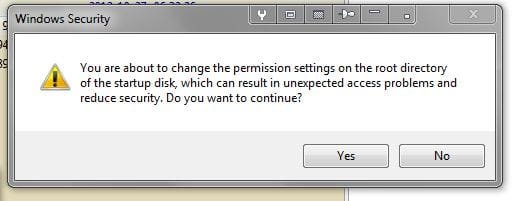
I thought of giving Everyone full control over the C: drive - but I get the error message in the attachment - which suggests I probably ought not do that.
Thanks
First up - I am the only user of my computer, no other person has access to it, and I am not connected to any network other than the Internet. So I have no requirement for ACL's - there's only one account (Administrative) - who should have permission to access everything.
Please don't give me a lecture on security. In my mis-spent youth I was a system programmer for large corporations. I am quite happy to admit that I inadvertently did something to cause this annoyance - but if I knew what then I would undo it.
if I move c:\users\<myaccount>\My Documents\mydoc.txt to c:\mydoc.txt it will have a security lock showing, yet I can, read, write, copy, move and really delete the file
if I copy c:\users\<myaccount>\My Documentsmydoc.txt to c:\mydoc.txt it will NOT have a security lock showing
Gradually I am noticing more and more of these security icons appearing, they don't prevent me doing anything access wise - read/write/delete etc. But they do hide other icon overlays that I really would like to see - symlink, junction, tortoise SVN to name a couple
I've tried taking ownership of the drives and folders - makes no difference. The only way I can get rid of the lock icon overlay is to give Everyone full control over the item with the lock.
I thought of giving Everyone full control over the C: drive - but I get the error message in the attachment - which suggests I probably ought not do that.
Thanks
Attachments
My Computer
- Computer type
- PC/Desktop
- Computer Manufacturer/Model Number
- generic - made to spec
- OS
- Win 7 Professional 64bit
- CPU
- I5 650 @ 3.2GHz
- Motherboard
- Gigabyte H55M-UD2H
- Memory
- 6G
- Graphics Card(s)
- AMD Radeon R7 200 Series
- Sound Card
- whatever is on mobo
- Monitor(s) Displays
- 1 x 24" Samsung
- Screen Resolution
- 1920x1200
- Hard Drives
- Internal 1x256GB Toshiba SSD
Internal 1x2TB
External 2 slot USB 3.0 dock (various drives)
External 1 500GB USB 2.0 drive
- PSU
- 850W Antech Modular
- Case
- Shiny Black Aluminium
- Cooling
- extra fans - sucker in front, blower at back - noisy & cool
- Keyboard
- Microsoft USB Dual Receiver Wireless Keyboard
- Mouse
- Microsoft USB Dual Receiver Wireless Mouse
- Internet Speed
- 20/1Mbps down/up
- Antivirus
- MSE
- Browser
- Firefox and Chrome
- Other Info
- Hitachi USB 3.0 adapter


