Disable other users from seeing my files

A3CIB

New member
Local time
12:40 PM
Messages
33
Hi

how can i disable other users from seeing my files?

& i dont want my user profile to be accessed from another computer on my network, how can i disable that?

Many Thanks
 

My Computer My Computer

OS
Windows 7
CPU
AMD 64 6000+
Motherboard
GIGABYTE
Memory
4GB DDR 2
Monitor(s) Displays
22"
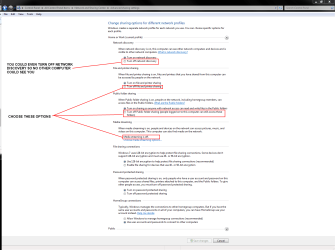
Open Network and Sharing Center, choose Change advanced sharing option and see attachment. Use a strong password and keep it private
 

Attachments

  • SharingOptions.PNG
    SharingOptions.PNG
    47.1 KB · Views: 1,072

My Computer My Computer

Computer Manufacturer/Model Number
PartsIsParts
OS
Windows 7 Ultimate 64bit
CPU
Intel Pentium D 3Ghz
Motherboard
ASRock G31M-S
Memory
4 Gigs PC 6400
Graphics Card(s)
Nvidia GeForce 8500 GT
Sound Card
Realtek High Definition Audio Integrated
Monitor(s) Displays
AOC 19inch X2
Screen Resolution
1024 X 768 (I'm Old)
Hard Drives
Segate ST3160815AS Serial ATAII
Western Digital WD1600AAJA-75PSA0 Serial ATAII
PSU
500 watt..don't know mfg.
Case
Giant Black 4u rackmount I've had for years
Cooling
Stock CPU extra 120s in case
Keyboard
Generic Made in China
Mouse
Logitech USB Optical Scroll
Internet Speed
What ever comcast decides to give me usually 21Mbps up/5mbps
Ok, Can i also disable other Admins from seeing my files?
 

My Computer My Computer

OS
Windows 7
CPU
AMD 64 6000+
Motherboard
GIGABYTE
Memory
4GB DDR 2
Monitor(s) Displays
22"
If you are talking about other members of the local administrators group, seeing and accessing files that are within your profile, meaning your libraries then try this and see if it works....open your libraries folder, right click on the individual icon like documents or music and from the "Share With" fly out window choose "Nobody"
and see if that works for you. I believe they can open the folder but the contents will not be visible to them, at least that's how it's working here. Let me know.
 

My Computer My Computer

Computer Manufacturer/Model Number
PartsIsParts
OS
Windows 7 Ultimate 64bit
CPU
Intel Pentium D 3Ghz
Motherboard
ASRock G31M-S
Memory
4 Gigs PC 6400
Graphics Card(s)
Nvidia GeForce 8500 GT
Sound Card
Realtek High Definition Audio Integrated
Monitor(s) Displays
AOC 19inch X2
Screen Resolution
1024 X 768 (I'm Old)
Hard Drives
Segate ST3160815AS Serial ATAII
Western Digital WD1600AAJA-75PSA0 Serial ATAII
PSU
500 watt..don't know mfg.
Case
Giant Black 4u rackmount I've had for years
Cooling
Stock CPU extra 120s in case
Keyboard
Generic Made in China
Mouse
Logitech USB Optical Scroll
Internet Speed
What ever comcast decides to give me usually 21Mbps up/5mbps
If you are talking about other members of the local administrators group, seeing and accessing files that are within your profile, meaning your libraries then try this and see if it works....open your libraries folder, right click on the individual icon like documents or music and from the "Share With" fly out window choose "Nobody"
and see if that works for you. I believe they can open the folder but the contents will not be visible to them, at least that's how it's working here. Let me know.
You can pretty much ignore this previous post. Upon retesting it doesn't work at all. I don't know what I was seeing the first time around, probably just my old eyes. I will check further and see if I can come up with any other way.
 

My Computer My Computer

Computer Manufacturer/Model Number
PartsIsParts
OS
Windows 7 Ultimate 64bit
CPU
Intel Pentium D 3Ghz
Motherboard
ASRock G31M-S
Memory
4 Gigs PC 6400
Graphics Card(s)
Nvidia GeForce 8500 GT
Sound Card
Realtek High Definition Audio Integrated
Monitor(s) Displays
AOC 19inch X2
Screen Resolution
1024 X 768 (I'm Old)
Hard Drives
Segate ST3160815AS Serial ATAII
Western Digital WD1600AAJA-75PSA0 Serial ATAII
PSU
500 watt..don't know mfg.
Case
Giant Black 4u rackmount I've had for years
Cooling
Stock CPU extra 120s in case
Keyboard
Generic Made in China
Mouse
Logitech USB Optical Scroll
Internet Speed
What ever comcast decides to give me usually 21Mbps up/5mbps
Welcome to the forum A3CIB.

To set permissions on a shared folder by using the Windows interface
  1. Open Computer Management.
  2. If the User Account Control dialog box appears, confirm that the action it displays is what you want, and then click Yes.
  3. In the console tree, click System Tools, click Shared Folders, and then click Shares.
  4. In the details pane, right-click the shared folder, and then click Properties.
  5. On the Share Permissions tab, set the permissions you want:
    • To assign permissions to a shared folder to a user or group, click Add. In the Select Users, Computers, or Groups dialog box, find or type the user or group name, and then click OK.
    • To revoke access to the shared folder, click Remove.
    • To set individual permissions for the user or group, in Permissions for group or user, select Allow or Deny.
  6. To set file and folder permissions that apply to users who log on locally or using Remote Desktop Services, click the Security tab and set the appropriate permissions
This is another one in tutorial form with pictures that might be easier to understand.
http://www.7tutorials.com/share-libraries-or-folders-using-sharing-wizard
 

My Computer My Computer

Computer type
PC/Desktop
Computer Manufacturer/Model Number
Home built
OS
Windows 7 Ult, Windows 8.1 Pro,
CPU
Q9650-4.275GHz, E8600 4.5GHz, E6750-3.8GHz
Motherboard
Evga 780i FTW
Memory
G.Skill PC2 9600 1200Mhz 5 5 5 15 2T
Graphics Card(s)
GTX480
Sound Card
Asus Xonar D2
Monitor(s) Displays
HannsG
Screen Resolution
1680X1050
Hard Drives
GSkill Phoenix Pro 120GB SSD
PSU
ThermalTake Toughpower 1000Watt modular
Case
ThermalTake XaserV
Cooling
Xigmatek S1283
Keyboard
Logitech G15
Mouse
Logitech G9
Internet Speed
T1
Under the properties of the file or folder you can choose the security tab, you can choose to add a specific user and then deny that specific user full control under the Deny column, but if your other admin group users are at all savvy then they will just take ownership and change the ntfs permissions back to administrators group full control, so this is not really a solution. The one thing that I have found that will work is EFS (Encrypting File System) it’s a little heavy handed if you ask me and will probably generate a fair bit of overhead if we’re talking about a lot of files and folders, but you may want to look into it, just make sure you under stand it http://windows.microsoft.com/en-US/windows-vista/Encrypt-or-decrypt-a-folder-or-file and make sure you backup your certificate, locally and on a thumb drive or external device of some kind look here http://windows.microsoft.com/en-us/windows-vista/Back-up-Encrypting-File-System-EFS-certificate
Not sure any of this is much help, but administrators are called that for a reason. Good luck, maybe someone else will have an idea.
 

My Computer My Computer

Computer Manufacturer/Model Number
PartsIsParts
OS
Windows 7 Ultimate 64bit
CPU
Intel Pentium D 3Ghz
Motherboard
ASRock G31M-S
Memory
4 Gigs PC 6400
Graphics Card(s)
Nvidia GeForce 8500 GT
Sound Card
Realtek High Definition Audio Integrated
Monitor(s) Displays
AOC 19inch X2
Screen Resolution
1024 X 768 (I'm Old)
Hard Drives
Segate ST3160815AS Serial ATAII
Western Digital WD1600AAJA-75PSA0 Serial ATAII
PSU
500 watt..don't know mfg.
Case
Giant Black 4u rackmount I've had for years
Cooling
Stock CPU extra 120s in case
Keyboard
Generic Made in China
Mouse
Logitech USB Optical Scroll
Internet Speed
What ever comcast decides to give me usually 21Mbps up/5mbps
ok will try that, also i have noticed if you are using a linux live cd you can get access to admin files.

Any solutions for that?

Many thanks
 

My Computer My Computer

OS
Windows 7
CPU
AMD 64 6000+
Motherboard
GIGABYTE
Memory
4GB DDR 2
Monitor(s) Displays
22"
ok will try that, also i have noticed if you are using a linux live cd you can get access to admin files.

Any solutions for that?

Many thanks

Nope,, Windows Security is NTFS, Linux does not recognize NTFS as a valid security method. So, yes, you can have access to all the files.

Also note,, Other Windows admins can take ownership and gain access to your files regardless of what you do, they are admins and have all the rights you do. You would have to not allow any other admins exist on your local PC. Nor allow other users access to your Admin account. That is just the way it is.

The only solution to either of these issues is encryption..... TrueCrypt is a good solution.
 

My Computer My Computer

Computer Manufacturer/Model Number
Self Built
OS
Win 7 Ultimate 32bit
CPU
C2D E6600 2.4Ghz
Motherboard
Intel D965WH
Memory
4G Kingston KHX5400D2
Graphics Card(s)
EVGA GTX 570 HD SC (012-P3-1573-KR)
Sound Card
On-Board
Monitor(s) Displays
Samsung 226BW
Screen Resolution
1680 x 1050
Hard Drives
2 x 250 Seagate Barracuda
2 x 500 Seagate Barracuda (Raid1)
PSU
Corsair TX750W
Case
In-Win C589
Cooling
Stock Intel Cooling
Back
Top