Disable preview in file open dialog.. how??

myarmor

New member
Local time
3:16 PM
Messages
13
How do I disable the preview pane in a file open dialog (it seems to be the standard W7 open dialog with enabled preview)?

In Windows Explorer there are a button to turn it on/off, but not in a open dialog.
There doesn't seem to be any option to turn it off anywhere and Alt+P apparently doesn't.

I know it is possible as I found it by chance several months ago, but I've managed to to forget how.

I can't understand how they would add a preview pane without an obvious way to get rid of it (i.e same button as in explorer).

I've tried searching the forums, but I've only managed to find threads related to Windows Explorer, not the open dialog, and they seem to be different in behavior.
 

My Computer My Computer

Computer type
PC/Desktop
Computer Manufacturer/Model Number
Selfbuilt
OS
Windows 7 Professional x64 Retail
CPU
Intel i7 3770K
Motherboard
ASUS P8Z77-V Deluxe
Memory
16GB Corsair Vengeance DDR3-1600 CL9
Graphics Card(s)
XFX Radeon HD7950 DD 3GB
Sound Card
Integrated
Monitor(s) Displays
BENQ G2400WD
Screen Resolution
1920x1200
Hard Drives
WDC WD10EZEX
SEAGATE ST2000DM001 x2
WDC WD2500BEV
PSU
Corsair AX760
Case
Cooler Master Storm Trooper
Cooling
Stock
Keyboard
Logitech G510
Mouse
Logitech G9x
Internet Speed
12Mbs
Antivirus
NOD32 Antivirus
Browser
Firefox
When you refer to the open dialog are you talking about when you attempt to open a file that has no default program? If so, you can just set a default program to use, and clicking the open button or double clicking it will open the file in that program. You can still open the file in an alternative program by using the drop-down menu of the open button or using open with...

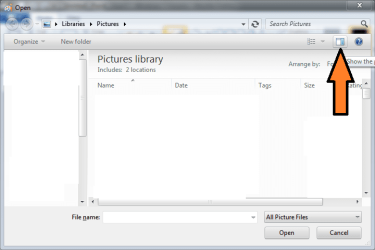
If you're talking about the open dialog from within a program such as Paint, you can close the preview pane via a button on the top right of the open dialog.

opendialog.png
 

My Computer My Computer

Computer Manufacturer/Model Number
Apple Macbook Pro (April 2009)
OS
W7 Ult. x64 | OS X
CPU
Intel Mobile Core 2 Duo 2.93Ghz [T9800 Penryn]
Motherboard
NVIDIA nForce 730i Rev. B1 [Mac-F2268EC8 (U2E1)]
Memory
4096MB Samsung DDR3 Dual Channel [PC3-8500F 1066Mhz]
Graphics Card(s)
NVIDIA GeForce 9600M GT 512MB [G96M Rev. C1]
Sound Card
SB X-Fi Surround 5.1 USB | Onboard Realtek (Disabled)
Monitor(s) Displays
Acer x223wbd 22" | Apple Anti-Glare 17" (Disabled)
Screen Resolution
{Current} 1440x900 {Acer} 1680x1050 {Apple} 1920x1200
Hard Drives
{Internal}
Seagate Momentus 320GB 2.5" 7200RPM [ST9320421AS]

{Externals}
LaCie 320GB USB 2.0 HDD [301284UR]
LaCie 750GB USB 2.0 FW400 eSATA HDD [301314U]
LaCie 1TB USB 2.0 HDD [301304UR]
PSU
Magsafe
Case
Aluminum/Unibody (MBP52)
Cooling
2 x 6000 RPM Fans
Keyboard
Logitech G-15v2 [PN 920-000379]
Mouse
Logitech G-9 [PN 910-000338]
Internet Speed
12Mbps/2.5Mbps w/ 24Mbps Speed Boost [Comcast]
Other Info
Logitech X-540 Speakers [PN 970223-0122]
Sennheiser PC-151 Headset
If you're talking about the open dialog from within a program such as Paint, you can close the preview pane via a button on the top right of the open dialog.

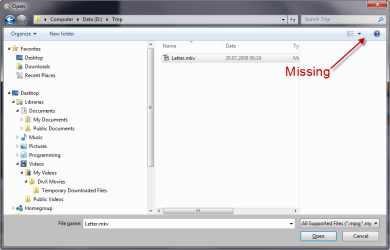
View attachment 72923
That's what I'm talking about.. However, it seems the guilty part might
be Nero Vision Xtra, and not W7 itself as I initially thought.

It doesn't have that button, and Alt+P doesn't work.. which is very annoying indeed.
Either it starts playing the inside the preview, or it just consumes space.

Both of which are not useful at all.

I've attached a snag of the dialog.
 

Attachments

  • missing.png
    missing.png
    28.7 KB · Views: 50

My Computer My Computer

Computer type
PC/Desktop
Computer Manufacturer/Model Number
Selfbuilt
OS
Windows 7 Professional x64 Retail
CPU
Intel i7 3770K
Motherboard
ASUS P8Z77-V Deluxe
Memory
16GB Corsair Vengeance DDR3-1600 CL9
Graphics Card(s)
XFX Radeon HD7950 DD 3GB
Sound Card
Integrated
Monitor(s) Displays
BENQ G2400WD
Screen Resolution
1920x1200
Hard Drives
WDC WD10EZEX
SEAGATE ST2000DM001 x2
WDC WD2500BEV
PSU
Corsair AX760
Case
Cooler Master Storm Trooper
Cooling
Stock
Keyboard
Logitech G510
Mouse
Logitech G9x
Internet Speed
12Mbs
Antivirus
NOD32 Antivirus
Browser
Firefox
Back
Top