Disable the "Do you want to change the color scheme"

vsub

New member
Member
Local time
7:45 PM
Messages
66
When I run some heavy load games that thing often appear and minimizes the game or sometimes when I minimize it or exit.

I tried all I could find here and in google but nothing works(except maybe disabling aero but I don't want to do that)

Unchecking all maintenance messages from Control Panel\System and Security\Action Center\Change Action Center settings
and adding couple of keys in HKEY_CURRENT_USER\Software\Microsoft\Windows\DWM and restarting the pc does nothing
 

My Computer My Computer

At a glance

Windows 7 Ultimate x64 SP1i7 4771 3.5Ghz2x8GB DDR3 GEIL EVO LEGGERAPALIT GTX 750 TI StormX Duo
Computer type
PC/Desktop
Computer Manufacturer/Model Number
Custom Build
OS
Windows 7 Ultimate x64 SP1
CPU
i7 4771 3.5Ghz
Motherboard
ASUS B85 Plus
Memory
2x8GB DDR3 GEIL EVO LEGGERA
Graphics Card(s)
PALIT GTX 750 TI StormX Duo
Monitor(s) Displays
Samsung T24D390
Screen Resolution
1920x1080
Hard Drives
Samsung SSD 840 EVO 128GB
2TB Seagate SATA 3
600GB WD Blue SATA 2
PSU
Seasonic S12II 520W Bronze
Case
Cooler Master Force 500
Antivirus
Avast Free
Browser
Firefox
Hello vsub mate try these first
SFC /SCANNOW Command - System File Checker
Disk Check < if necessary include the /f and /r in the command line as per Option2
Run these in safe mode and the sfc often best run for two to three runs – you can leave out the /r switch in ckdsk if you feel it not necessary
NB SFC best run for about three scans

if no fix then these

SUPERAntiSpyware | Remove Malware | Remove Spyware - AntiMalware, AntiSpyware, AntiAdware!
Malwarebytes | Malwarebytes Anti-Malware Premium
AdwCleaner Download
ADW download from bleeping computer delete any rubbish found with the malware scans
(NB If you are running Kaspersky as the main AV then it might need disabling it when trying ADW because it does not like it at times)

Why exactly do you want to keep transparency?? I find it slows my machines down and cannot see the value of it.

Also take a look at this
Optimize Windows 7
 

My Computer My Computer

At a glance

Desk1 7 Home Prem / Desk2 10 Pro / Main lap A...Desk1 i5 3750K / Laptop i7 GTX 860M / Desk2 i...Desk1 8GB (1866) / Desk2 16GB (1333) / Laptop...Desk 1& 2NVidia GTX 650 & Laptops on board Intel
Computer type
PC/Desktop
Computer Manufacturer/Model Number
Own build (new) Desk1 / Asus ROG Win 7 / Desk2 1st build
OS
Desk1 7 Home Prem / Desk2 10 Pro / Main lap Asus ROG 10 Pro 2 laptop Toshiba 7 Pro Asus P2520 7 & 10
CPU
Desk1 i5 3750K / Laptop i7 GTX 860M / Desk2 i5 2500
Motherboard
Desk1 Asus P877-V / Desk2 Gigabyte H67 UD3H / Laptop ?
Memory
Desk1 8GB (1866) / Desk2 16GB (1333) / Laptop 8Gb DDR3
Graphics Card(s)
Desk 1& 2NVidia GTX 650 & Laptops on board Intel
Sound Card
Desk 1 & 2 -XONAR DG Realtek High Def audio Laptop
Monitor(s) Displays
Desk 1 Benq HD 2450 / Desk2 Philips 24" / Laptop 17.5"
Screen Resolution
1920x1080 D1 & D2 & Laptop 1
Hard Drives
Desk1 Samsung 120GB 830 SSD
Asus ROG 256GB 850 Pro SSD
Desk2 Samsung 840 256 SSD
Toshiba 120GB EVO
PSU
Desk 1 Corsair HX 1050/ Laptop ? / Desk 2 Corsair HX 650
Case
Desk 1 Cooler HAF XM ? Toshiba laptop / Desk2 Coolermaster
Cooling
Fans on all Desk1 -2 Desk2 - all Coolermasters 5 Laptop ?
Keyboard
Desk 1 MS Sidewinder X6 Desk 2 MS Sidewinder X 4
Mouse
Desk 1&2 - Gigabyte MS 900 gamer - laptop - Logitec wireless
Internet Speed
ADSL2+
Other Info
One other Desktop (tester) and spare Toshba laptop both with SSD's
Running Kaspersky 2016 ISS on all machines config'd identically
Logitec audio stereo systems on each machine (x3)
Canon MG5250MFC
Router/modem TP-Link running WPA2SK
I don't have any problems related to anything that those programs can fix.
And about the question...the transparency is nice but there are two other things I keep aero enabled for.
1.The main reason...I have preview of the window when I point it with the mouse in the taskbar(this is disabled if aero is off)
2.Aero applies vsync to games that have an ability to run if window mode but with aero off on some games vsync don't work in window mode and I get terrible screen tearing.

Bottom line is,aero is useful to me but that message is annoying.
 

My Computer My Computer

At a glance

Windows 7 Ultimate x64 SP1i7 4771 3.5Ghz2x8GB DDR3 GEIL EVO LEGGERAPALIT GTX 750 TI StormX Duo
Computer type
PC/Desktop
Computer Manufacturer/Model Number
Custom Build
OS
Windows 7 Ultimate x64 SP1
CPU
i7 4771 3.5Ghz
Motherboard
ASUS B85 Plus
Memory
2x8GB DDR3 GEIL EVO LEGGERA
Graphics Card(s)
PALIT GTX 750 TI StormX Duo
Monitor(s) Displays
Samsung T24D390
Screen Resolution
1920x1080
Hard Drives
Samsung SSD 840 EVO 128GB
2TB Seagate SATA 3
600GB WD Blue SATA 2
PSU
Seasonic S12II 520W Bronze
Case
Cooler Master Force 500
Antivirus
Avast Free
Browser
Firefox
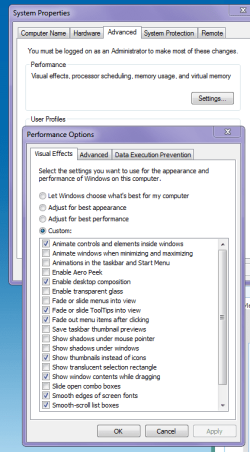
1.The main reason...I have preview of the window when I point it with the mouse in the taskbar(this is disabled if aero is off)

Then something is wrong because it should not prevent the peek view when hovering over the taskbar icon - mine never has see this section of the Optimise tutorial Visual Effects Settings - Change and pic of how mine is set up.


With your games point I am not sure what that is all about to be honest.
 

Attachments

  • TRANSPARENCY 2.PNG
    TRANSPARENCY 2.PNG
    23.6 KB · Views: 0

My Computer My Computer

At a glance

Desk1 7 Home Prem / Desk2 10 Pro / Main lap A...Desk1 i5 3750K / Laptop i7 GTX 860M / Desk2 i...Desk1 8GB (1866) / Desk2 16GB (1333) / Laptop...Desk 1& 2NVidia GTX 650 & Laptops on board Intel
Computer type
PC/Desktop
Computer Manufacturer/Model Number
Own build (new) Desk1 / Asus ROG Win 7 / Desk2 1st build
OS
Desk1 7 Home Prem / Desk2 10 Pro / Main lap Asus ROG 10 Pro 2 laptop Toshiba 7 Pro Asus P2520 7 & 10
CPU
Desk1 i5 3750K / Laptop i7 GTX 860M / Desk2 i5 2500
Motherboard
Desk1 Asus P877-V / Desk2 Gigabyte H67 UD3H / Laptop ?
Memory
Desk1 8GB (1866) / Desk2 16GB (1333) / Laptop 8Gb DDR3
Graphics Card(s)
Desk 1& 2NVidia GTX 650 & Laptops on board Intel
Sound Card
Desk 1 & 2 -XONAR DG Realtek High Def audio Laptop
Monitor(s) Displays
Desk 1 Benq HD 2450 / Desk2 Philips 24" / Laptop 17.5"
Screen Resolution
1920x1080 D1 & D2 & Laptop 1
Hard Drives
Desk1 Samsung 120GB 830 SSD
Asus ROG 256GB 850 Pro SSD
Desk2 Samsung 840 256 SSD
Toshiba 120GB EVO
PSU
Desk 1 Corsair HX 1050/ Laptop ? / Desk 2 Corsair HX 650
Case
Desk 1 Cooler HAF XM ? Toshiba laptop / Desk2 Coolermaster
Cooling
Fans on all Desk1 -2 Desk2 - all Coolermasters 5 Laptop ?
Keyboard
Desk 1 MS Sidewinder X6 Desk 2 MS Sidewinder X 4
Mouse
Desk 1&2 - Gigabyte MS 900 gamer - laptop - Logitec wireless
Internet Speed
ADSL2+
Other Info
One other Desktop (tester) and spare Toshba laptop both with SSD's
Running Kaspersky 2016 ISS on all machines config'd identically
Logitec audio stereo systems on each machine (x3)
Canon MG5250MFC
Router/modem TP-Link running WPA2SK
Back
Top