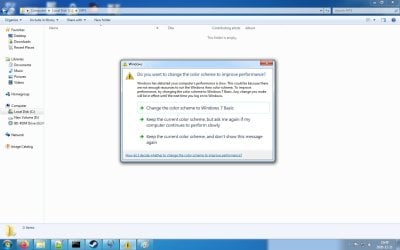
Have you read through
this?
It might be everything you tried, but maybe not the registry setting.
THANK YOU Simpilot. You know I have been trying to disable this stupid thing for years with registry edits and what not, none of those seem to work but thanks to you I found a workaround today
Im gonna line it out here for everyone whos having the same problem as I did

So what this entails is making .bat files to easily switch themes. In my example I would disable Aero before playing a game and enable it after for example
Now it seems like just stopping and starting the aero service seems to work as well so you could shorten these commands down and skip the themeswitcher program if you want but I just dont trust Windows to not **** up so Im gonna take the long route
First of all you need to get this program
Winaero Theme Switcher (at the bottom of the page)
Then you need to install it, and put the installation folder into your system path. Start by going to your installation folder and copying its path. Then go to Control Panel>System>Advanced System Settings>Advanced tab>Enviroment Variables then under System Variables scroll down to Path, click edit. Use your right arrow key to go as far to the right as you can then put a ; symbol at the end (if there isnt one there already) then paste your copied path after that symbol
Now you are able to use themeswitcher in cmd, congratulations! What I did now was right click my desktop, go to Personalize. Then I selected 1 Aero theme, scrolled up clicked save theme and named it "Aero1" then did the same thing with a basic theme and called it basic1
When this is done the themes get saved in C:\Users\(yourusername)\AppData\Local\Microsoft\Windows\Themes so copy the themes you created from there and paste them in C:\Windows\Resources\Themes
Now it is time to create the files that will switch themes automatically for you
Make a new text file. Paste this into the text file
echo OFF
net stop uxsms
themeswitcher.exe basic
Then save the file, rename it from .txt to .bat (Make sure you have disabled hide extension for known filetypes in Control Panel>Folder Options>View tab)
And now you have made a file which will turn off Windows Aero and enable a basic theme. Congratulations!
Now lets make a file that will turn on Windows Aero again. Same procedure create a text file and paste this into it
echo OFF
net start uxsms
themeswitcher.exe Aero1
Done and done, now you can put these files on your desktop, maybe change the icon to something a little smoother than a cogwell and you're ready to go
Like I said earlier in theory the .bat files could just contain the text
echo OFF
net stop uxsms
and
echo OFF
net start uxsms
respectively but Im personally not trusting Windows not to **** up enough so Im using the Theme Switcher program.. Now I havent tried this fix out yet but it SHOULD work in theory. I will update this post in case it doesnt. Also you can disable desktop composition in any games that you run as well by finding the exe and clicking Properties then ticking the "Disable Desktop Composition" box. This should act as a fail safe in case this method fails, doing this however you would need to enable the aero theme afterwards again but that should be easy now shouldn't it