
You are using an out of date browser. It may not display this or other websites correctly.
You should upgrade or use an alternative browser.
You should upgrade or use an alternative browser.
Disable touchpad when i'm typing?
- Thread starter jrlinder
- Start date

zigzag3143
New member
- Local time
- 1:08 AM
- Messages
- 27,140
hey, How can i make it so that the touch pad is disabled when i'm typing? I keep hitting it with a knuckle or something when i'm typing and I can't figure out how to do it with windows seven. Vista had it.
which touch pad?
My Computer
- Computer Manufacturer/Model Number
- HP Pavillion dv-7 1005 Tx
- OS
- Win 8 Release candidate 8400
- Memory
- 4 gigs
- Graphics Card(s)
- Nvidia 9600M
- Sound Card
- HD built-in
- Monitor(s) Displays
- 17" Wxga
- Screen Resolution
- 1440x900
- Cooling
- none
- Internet Speed
- 45Mb down 5Mb up
On my laptop its FN+F9 disables touchpad.
My Computer
- Computer Manufacturer/Model Number
- Toshiba L355D-7901
- OS
- Windows 7 X64
- CPU
- AMD Turion™ X2 Dual-Core Mobile Processor RM-72
- Motherboard
- AMD M780G chipset
- Memory
- 4GB PC6400 DDR2 SDRAM
- Graphics Card(s)
- ATI Radeon™ 3100 Graphics
- Sound Card
- Realtek High Definition Audio
- Monitor(s) Displays
- 17.0” diagonal widescreen TruBrite® TFT LCD
- Screen Resolution
- 1440x900
- Hard Drives
- 250GB (5400 RPM) Serial ATA
- Mouse
- Microsoft Bluetooth Notebook Mouse 5000

what laptop do you have? I have a Compaq made by HP and they have a button that will disable the touchpad even my wife's netbook had a button to disable to touchpad.
My Computer
- Computer Manufacturer/Model Number
- Alienware M17x R3
- OS
- Windows 7 Ultimate x64
- CPU
- Intel Core i7 2670QM 2.2GHz 3.3GHz Turbo Mode
- Memory
- 12GB Dual Channel DDR3 at 1333MHz
- Graphics Card(s)
- 2GB GDDR5 AMD Radeon 6990M
- Sound Card
- Audio Powered by Klipsch
- Monitor(s) Displays
- 17.3-inch WideFHD 1920 x 1080 60Hz WLED
- Screen Resolution
- 1920x1080
- Hard Drives
- 120GB SSD slot 1
1TB HDD slot 2
- Case
- alienware laptop case
- Cooling
- Dual heatsink and fans
- Keyboard
- Alienware multi color keyboard
- Mouse
- logitech G300 gaming mouse
- Other Info
- Intel® Centrino Advanced-N 6230 2x2 agn+ Bluetooth
finally got it!!!

MacGyvr
Banned
Vista doesn't have anything built in for doing this. You probably had something from your manufacturer that did it and you lost it when you upgraded. You might try looking on the manufacturer's website.
My Computer
- Computer Manufacturer/Model Number
- Custom
- OS
- Windows 7 Ultimate RTM (Technet)
- CPU
- 3.00 gigahertz Intel Core2 Duo E8400
- Motherboard
- ASUSTeK Computer INC. P5K/EPU Rev 1.xx
- Memory
- 4GB
- Graphics Card(s)
- ATI Radeon X1950 Pro
- Sound Card
- Built in HD Audio
- Monitor(s) Displays
- 22" Gateway LCD
- Screen Resolution
- 1920 x 1200
- Hard Drives
- ST3160023A [Hard drive] (160.04 GB) -- drive 0, rev 8.01, ST3500630AS [Hard drive] (500.11 GB) -- drive 2, rev 3.AAK
ST3500630AS [Hard drive] (500.11 GB) -- drive 1, rev 3.AAK
- Keyboard
- Logitech G11
- Mouse
- Microsoft Wireless Laser Mouse 5000
- Internet Speed
- 13.44 Mbps
spaanbjerg
New member
- Local time
- 6:08 AM
- Messages
- 2
Windows 7 touchpad solution
I also lost the function to disable the touchpad while typing when I upgraded from Vista to W7.
I solved it by installing the touchpad drivers from the Vista CD.
Uninstall Synaptics in Control Panel and restart. Insert Vista drivers and software CD and click "Open folder to view files". Locate Vista touchpad/Finger-sensing pad drivers and double click exe file to install software. Restart laptop. Click Control Panel - Hardware and Sound - Devices and Printers - Mouse. There should now be a tab called "Finger-sensing pad" or something like that where you can tick the box to disable touchpad when typing.
Cheers
I also lost the function to disable the touchpad while typing when I upgraded from Vista to W7.
I solved it by installing the touchpad drivers from the Vista CD.
Uninstall Synaptics in Control Panel and restart. Insert Vista drivers and software CD and click "Open folder to view files". Locate Vista touchpad/Finger-sensing pad drivers and double click exe file to install software. Restart laptop. Click Control Panel - Hardware and Sound - Devices and Printers - Mouse. There should now be a tab called "Finger-sensing pad" or something like that where you can tick the box to disable touchpad when typing.
Cheers
My Computer
- Computer Manufacturer/Model Number
- Medion Akoya
- OS
- Windows 7
- Motherboard
- 4 GB
Great. That would work for me except for the problem of me not having the Vista Software and drivers CD.  Got any other tips for getting this. My computer is and ACER. But their driver updates from their website don't fix it.
Got any other tips for getting this. My computer is and ACER. But their driver updates from their website don't fix it.My Computer
- OS
- windows 7

There used to be some useful touch pad utilities listed on the Asus EEE PC forums...
My Computer
- Computer Manufacturer/Model Number
- Custom built machine
- OS
- W7 x64
- CPU
- Intel Q9300 2.5Ghz Quad LGA775 (Would like Q9650)
- Motherboard
- Gigabyte GA-EP45T-UD3R (F6 Bios)
- Memory
- 4Gb OCZ Gold 1,333Mhz
- Graphics Card(s)
- Palit HD4850 O/C Sonic 512Mb DDR3, Dual DViD's
- Sound Card
- Azalia to twin Samson 50w Studio Monitors
- Monitor(s) Displays
- Twin Dell (E-IPS) U2311H 23.6" Screens
- Screen Resolution
- 1920 x 1080 @ 60Hz
- Hard Drives
- Crucial M4 SSD, archives on twin Western Digital Caviar Black WD2002FAEX, 2TB, 7200rpm HDD's, Samsung Ritemaster CD/DVD Burner...
- PSU
- OCZ 600w
- Case
- Lian-Li PC8 acoustifoamed' aluminium tower
- Cooling
- Scythe 140mm Zipang
- Keyboard
- Cherry PS/2 custom model
- Mouse
- Lenovo USB laser "Thinkpad" Mouse
- Internet Speed
- ADSL2+ @14Mbps downstream & Cat6 Gigabit Ethernet
- Antivirus
- NOD32
- Browser
- Opera
- Other Info
- Silicon Dust HD Homerun Dual FTA (Ethernet) TV Tuners, Dray Tek Vigor 2850Vn router and 8x HP Gigabit Switch. Lian-Li CR26 Card Reader, Canon MF4430 iSensys laser printer/scanner.

Hi there
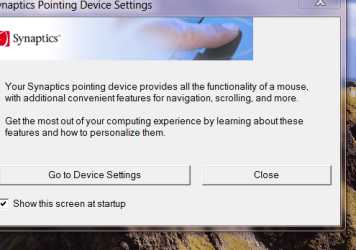
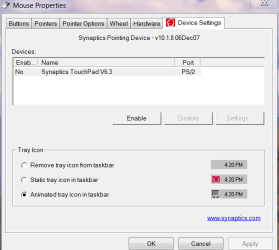
download the synaptics pointing device driver
it starts up with a screen (you can disable it) which gives you the option of turning on or off the touchpad -- I hate touchpads.
Synaptics
The Generic driver works on pretty well all laptops I've ever used.
Here's the startup / options screenshots
Cheers
jimbo
download the synaptics pointing device driver
it starts up with a screen (you can disable it) which gives you the option of turning on or off the touchpad -- I hate touchpads.
Synaptics
The Generic driver works on pretty well all laptops I've ever used.
Here's the startup / options screenshots
Cheers
jimbo
Attachments
My Computer
- Computer type
- PC/Desktop
- Computer Manufacturer/Model Number
- Custom built, several laptops HP/ASUS
- OS
- Linux CENTOS 7 / various Windows OS'es and servers
- CPU
- Intel i7 Intel i5
- Memory
- 8GB, 16GB
- Graphics Card(s)
- On Motherboard
- Sound Card
- Realtek HD audio
- Monitor(s) Displays
- Apple Cinema display, Samsung LCD
- Screen Resolution
- 1920 X 1080
- Hard Drives
- 4 X 1TB SATA
- Mouse
- Toshiba wireless laser
- Internet Speed
- > 20MB up
spaanbjerg
New member
- Local time
- 6:08 AM
- Messages
- 2
touchpad in Windows 7
You could try to download the VISTA Synaptics drivers for your computer if you had Vista on it before, or just the Vista Sybaptics drivers for a similar model.
My laptop is a Medion. I did an upgrade to 7 and the Synaptics drivers supplied with the upgrade didn't work, nor the drivers for 7 from the Medion website, nor the generic drivers from the Synaptics website, but the drivers for my previous Vista OS worked.
Good luck!
You could try to download the VISTA Synaptics drivers for your computer if you had Vista on it before, or just the Vista Sybaptics drivers for a similar model.
My laptop is a Medion. I did an upgrade to 7 and the Synaptics drivers supplied with the upgrade didn't work, nor the drivers for 7 from the Medion website, nor the generic drivers from the Synaptics website, but the drivers for my previous Vista OS worked.
Good luck!
My Computer
- Computer Manufacturer/Model Number
- Medion Akoya
- OS
- Windows 7
- Motherboard
- 4 GB
hey, How can i make it so that the touch pad is disabled when i'm typing? I keep hitting it with a knuckle or something when i'm typing and I can't figure out how to do it with windows seven. Vista had it.
Disabling laptop mouse pad For Windows 7 , go to Control Panel > Hardware and Sound , then under Devices and Printer click MOUSE.
A window will appear about MOUSE PROPERTIES then click the "Finger Sensing Pad" tab .. Then click " Configure"
On "Configure Item" on the left corner click the "Enable/Disable Pad" and under this you go to "USB MOUSE DETECTION" and check the box "Disable pad while external USB is plugged in"
My Computer
- OS
- windows 7
DISABLING LAPTOP MOUSE PAD on WINDOWS 7
Disabling laptop mouse pad For Windows 7 , go to Control Panel > Hardware and Sound , then under Devices and Printer click MOUSE.
A window will appear about MOUSE PROPERTIES then click the "Finger Sensing Pad" tab .. Then click " Configure"
On "Configure Item" on the left corner click the "Enable/Disable Pad" and under this you go to "USB MOUSE DETECTION" and check the box "Disable pad while external USB is plugged in"
hey, How can i make it so that the touch pad is disabled when i'm typing? I keep hitting it with a knuckle or something when i'm typing and I can't figure out how to do it with windows seven. Vista had it.
Disabling laptop mouse pad For Windows 7 , go to Control Panel > Hardware and Sound , then under Devices and Printer click MOUSE.
A window will appear about MOUSE PROPERTIES then click the "Finger Sensing Pad" tab .. Then click " Configure"
On "Configure Item" on the left corner click the "Enable/Disable Pad" and under this you go to "USB MOUSE DETECTION" and check the box "Disable pad while external USB is plugged in"
My Computer
- OS
- windows 7
This can do it:
touchfreeze - Utility for Windows that disables touchpad automatically while you are typing text - Google Project Hosting
It's a little program you download and run and it does exactly what you want.
By they way this feature is installed in Ubuntu Linux by default (and most Linux distribution I'd imagine). It's called "syndaemon" there.
I think OSX also has it, since i've never had such a problem when using OSX.
touchfreeze - Utility for Windows that disables touchpad automatically while you are typing text - Google Project Hosting
It's a little program you download and run and it does exactly what you want.
By they way this feature is installed in Ubuntu Linux by default (and most Linux distribution I'd imagine). It's called "syndaemon" there.
I think OSX also has it, since i've never had such a problem when using OSX.
My Computer
- Computer Manufacturer/Model Number
- Asus 5733
- OS
- Windows 7 32bit Unfortunate Version
- CPU
- i3
- Memory
- 4GB DDR3
- Graphics Card(s)
- Intel
- Hard Drives
- Kingston SSD 64GB
- Case
- Laptop