Disable webcam permanently

Dahl

New member
Local time
9:43 PM
Messages
4
hi, I have a problem with my webcam on a acer 3935 with win7 x64.

The webcam is broken and i really dont care, but it keeps switching in and out all the time, and it makes me crazy! A massage in the systemtray pops up saying "unknown device" and if I go to device manager I can see it swiching on and off all along.

I tryed disable and uninstall in devicemanager, but it is reinstalls automaticly at restart.

Is there any way to uninstall it permanently or do I have to physicaly remove it (because thats a problem)?
 

My Computer

OS
Windows 7 Ultimate x64
Hrmm..
You have "tried" to disable it in device manager and what happens?
Because that's your best bet in disabling it..
Dont uninstall it, or yet it will try to reinstall the drivers everytime you do that.
 

My Computer

Computer Manufacturer/Model Number
Custom
OS
win 7 pro x64
CPU
AMD [email protected]
Motherboard
MSI NF-980a
Memory
16gb G.Skill RipJaws 1333mhz
Graphics Card(s)
Tri Sli MSI GTX 470
Sound Card
Audigy
Monitor(s) Displays
View Sonic G220f
Screen Resolution
2046x1536
Hard Drives
SATA

Raid0-3x64gbSSD-500-640-1TB
PSU
Corsair TX950
Case
CM 932KWN3
Cooling
Corsair H-50 2kP&P
Keyboard
Microsoft
Mouse
G9x
Internet Speed
25mb/4mb
disable

disableing it does nothing really.. It still keeps switching on and off, only difference is that I am not able to use the webcam. (it`s not possible anyway) but still...
 

My Computer

OS
Windows 7 Ultimate x64
If you are Uninstalling the device and the problem persists then you may need to disconnect it. To do that you really should find and download a Service Manual for that laptop. The SM will show how to remove/replace the webcam.

Not all webcams are the same. Some have the camera and control chip in one unit that is connected to the motherboard through a long cable that snakes along the edge of the display bezel.
But others have just the camera in the display bezel and the long cable connects to a control chip on the motherboard.
If the control chip is on the motherboard it will be difficult to disconnect the device completely.

Always a good idea to check in the BIOS settings to see if you can disable the webcam there (although I have never seen this setting).
 

My Computer

Computer type
PC/Desktop
Computer Manufacturer/Model Number
Home Built - Jan 2013
OS
Windows 7 64 Bit Home Premium SP1
CPU
i7-3820
Motherboard
Asus P9X79-PRO - Bios 4608
Memory
GSkill F3-14900CL9Q - 16GB
Graphics Card(s)
EVGA GeForce GTX660 - Driver 352.86
Sound Card
On board Realtek ALC898
Monitor(s) Displays
Acer S271HL
Screen Resolution
1920 x 1080
Hard Drives
#1- Samsung 840 Pro Series
#2- Western Digital WD1002FAEX Sata3 Black
#3- Western Digital WD1002FAEX Sata3 Black
PSU
Corsair CMPSU-850TX-V2 - 850 watt (by Seasonic)
Case
Corsair Obsidian 550D
Cooling
Standard 3 120mm case fans, Cooler Master Hyper 212 EVO
Keyboard
MS KC-0405
Mouse
Intellimouse 5-button
Internet Speed
56 Mbits/Sec (on a good day)
Antivirus
Avast & Malwarebytes
Browser
Firefox
Other Info
Asus DVD - DRW-24B1ST 24X
thanks

Thank you for good advice. Cant find anything in bios as expected. So then my only hope is to disconnect the damn thing. Downloaded SM, but I suspect the Webcam is a built in part of the LCD-unit, or they just forgot the whole Webcam.

I really wish there was a way around the "hardware remove" solution..:confused:

feel free to share if any of you out there have a software "quick- fix" for this problem :p
 

My Computer

OS
Windows 7 Ultimate x64
Put up a link to the SM and we can take a look. Maybe see something that can help.

But a lot of manufacturers do not put out good manuals these days. It's a throw-away mentality.
 

My Computer

Computer type
PC/Desktop
Computer Manufacturer/Model Number
Home Built - Jan 2013
OS
Windows 7 64 Bit Home Premium SP1
CPU
i7-3820
Motherboard
Asus P9X79-PRO - Bios 4608
Memory
GSkill F3-14900CL9Q - 16GB
Graphics Card(s)
EVGA GeForce GTX660 - Driver 352.86
Sound Card
On board Realtek ALC898
Monitor(s) Displays
Acer S271HL
Screen Resolution
1920 x 1080
Hard Drives
#1- Samsung 840 Pro Series
#2- Western Digital WD1002FAEX Sata3 Black
#3- Western Digital WD1002FAEX Sata3 Black
PSU
Corsair CMPSU-850TX-V2 - 850 watt (by Seasonic)
Case
Corsair Obsidian 550D
Cooling
Standard 3 120mm case fans, Cooler Master Hyper 212 EVO
Keyboard
MS KC-0405
Mouse
Intellimouse 5-button
Internet Speed
56 Mbits/Sec (on a good day)
Antivirus
Avast & Malwarebytes
Browser
Firefox
Other Info
Asus DVD - DRW-24B1ST 24X
I found it!

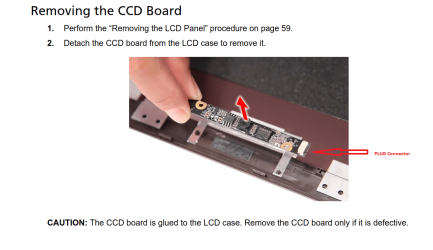
On Pg 62: "Removing the CCD Board"
It's part of the "LCD Module Disassembly" chapter.

Better yet, the control chip is part of the assembly, and it can easily be disconnected with the plug:

Capture.PNG

Hope that helps!
 

My Computer

Computer type
PC/Desktop
Computer Manufacturer/Model Number
Home Built - Jan 2013
OS
Windows 7 64 Bit Home Premium SP1
CPU
i7-3820
Motherboard
Asus P9X79-PRO - Bios 4608
Memory
GSkill F3-14900CL9Q - 16GB
Graphics Card(s)
EVGA GeForce GTX660 - Driver 352.86
Sound Card
On board Realtek ALC898
Monitor(s) Displays
Acer S271HL
Screen Resolution
1920 x 1080
Hard Drives
#1- Samsung 840 Pro Series
#2- Western Digital WD1002FAEX Sata3 Black
#3- Western Digital WD1002FAEX Sata3 Black
PSU
Corsair CMPSU-850TX-V2 - 850 watt (by Seasonic)
Case
Corsair Obsidian 550D
Cooling
Standard 3 120mm case fans, Cooler Master Hyper 212 EVO
Keyboard
MS KC-0405
Mouse
Intellimouse 5-button
Internet Speed
56 Mbits/Sec (on a good day)
Antivirus
Avast & Malwarebytes
Browser
Firefox
Other Info
Asus DVD - DRW-24B1ST 24X
Back
Top