Disable Windows 7 log in password

GTI WR6

New member
Local time
8:59 PM
Messages
3
Hello all,

I was wondering if it is possible to disable the W7 log in password. I looked around the forum but did not see a solution.

Will appreciate any help.

Thanks!!
 

My Computer

Computer Manufacturer/Model Number
Sony Vaio VGN-FS660/W
OS
Windows 7 Ultimate
CPU
Intel Pentium M 740
Motherboard
Intel® 915PM
Memory
1GB PC-2700 333MHz DDR
Graphics Card(s)
NVIDIA GeForce Go 6200 128MB Dedicated Graphics With TurboCa
Sound Card
Realtek® High Definition Audio Device
Monitor(s) Displays
15.4” WXGA (1280x800) with XBRITE™ technology
Hard Drives
80GB 4200rpm Ultra ATA
Hi GTI WR6

Yes.

In User Accounts.

Delete Password.
 

My Computer

OS
ME/XP/Vista/Win7
Thanks for fast reply!

so Start -> Control Panel -> User Accounts -> Disable Password?
 

My Computer

Computer Manufacturer/Model Number
Sony Vaio VGN-FS660/W
OS
Windows 7 Ultimate
CPU
Intel Pentium M 740
Motherboard
Intel® 915PM
Memory
1GB PC-2700 333MHz DDR
Graphics Card(s)
NVIDIA GeForce Go 6200 128MB Dedicated Graphics With TurboCa
Sound Card
Realtek® High Definition Audio Device
Monitor(s) Displays
15.4” WXGA (1280x800) with XBRITE™ technology
Hard Drives
80GB 4200rpm Ultra ATA
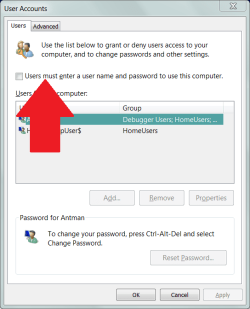
Start
Run
NETPLWIZ (caps not necessary, just showing the letters)
Remove check

You will be prompted for username and pwd
 

Attachments

  • Capture.PNG
    Capture.PNG
    53.1 KB · Views: 1,425
I want to remove my password as well, but I do not have the same option that is shown in the screen shot.

In the other User Account window in control panel, I also do not have the option..

capturefss.jpg


If I try to change the password by hitting ctrl-alt-del, it will not allow me to leave it blank


I have also tried to follow this, which does not work..

How can I remove password sign on with Windows7? I upgraded from Vista where I had password sign on. I do not want this feature any more.

I don't have the same folder layout, and didn't find anything when searching for the name of the value. Obviously, it's not the same because i didn't use an upgrade.

I really need to get my password off so that my boss can remotely connect without inputing a password. And yes, I know.. a VNC program would work a lot easier, but he is unwilling.
 

My Computer

OS
Windows 7
Have you done what it suggests and press ctrl+alt+del and then select Change Password?
 

My Computer

Computer Manufacturer/Model Number
tw33k
OS
Windows 7 Ultimate (x64) SP1
CPU
Intel 3770k 4.6GHz
Motherboard
ASUS Maximus V Formula
Memory
8GB (2x 4GB) Crucial Ballistix
Graphics Card(s)
Sapphire 7950 (1060/1600)
Sound Card
On Board Realtek HD Audio
Monitor(s) Displays
27" Acer B273HU (via HDMI)
Screen Resolution
2048 x 1152
Hard Drives
Crucial M4 128GB
2TB WD Black
1TB Samsung F3 SATA
1TB WD Elite External
2TB WD USB 3.0
PSU
Corsair AX750 Gold
Case
Corsair Obsidian 800DW
Cooling
Corsair H100 (2x AP-121/2x UK-3000 push/pull)
Keyboard
Microsoft Wireless 5000
Mouse
Microsoft Wireless 5000
Internet Speed
5mb/s
Other Info
Logitech z-2300 2.1 speakers
Lamptron FC-5 v2
When you press ctrl+alt+del do you have an option to "Change the way Users log-on"?

Group Policy Edit | Computer Configuration | Windows Settings | Security Settings | Local Policies | Security Options.

Interactive logon: Do not display last user name
This security setting determines whether the name of the last user to log on to the computer is displayed in the Windows logon screen.

If this policy is enabled, the name of the last user to successfully log on is not displayed in the Logon Screen.
If this policy is disabled, the name of the last user to log on is displayed.
Default: Disabled.

Interactive logon: Do not require CTRL+ALT+DEL
This security setting determines whether pressing CTRL+ALT+DEL is required before a user can log on.
If this policy is enabled on a computer, a user is not required to press CTRL+ALT+DEL to log on.

Not having to press CTRL+ALT+DEL leaves users susceptible to attacks that attempt to intercept the users' passwords. Requiring CTRL+ALT+DEL before users log on ensures that users are communicating by means of a trusted path when entering their passwords.

If this policy is disabled, any user is required to press CTRL+ALT+DEL before logging on to Windows (unless they are using a smart card for Windows logon).
Default on domain-computers: Disabled.
Default on stand-alone computers: Enabled.
 

My Computer

Computer Manufacturer/Model Number
tw33k
OS
Windows 7 Ultimate (x64) SP1
CPU
Intel 3770k 4.6GHz
Motherboard
ASUS Maximus V Formula
Memory
8GB (2x 4GB) Crucial Ballistix
Graphics Card(s)
Sapphire 7950 (1060/1600)
Sound Card
On Board Realtek HD Audio
Monitor(s) Displays
27" Acer B273HU (via HDMI)
Screen Resolution
2048 x 1152
Hard Drives
Crucial M4 128GB
2TB WD Black
1TB Samsung F3 SATA
1TB WD Elite External
2TB WD USB 3.0
PSU
Corsair AX750 Gold
Case
Corsair Obsidian 800DW
Cooling
Corsair H100 (2x AP-121/2x UK-3000 push/pull)
Keyboard
Microsoft Wireless 5000
Mouse
Microsoft Wireless 5000
Internet Speed
5mb/s
Other Info
Logitech z-2300 2.1 speakers
Lamptron FC-5 v2
Thank you for trying, but that did not work. I think I have figured out why the option isn't available to me.

My computer is connected to a LAN File Server which is also set up to be a Domain Controller. I didn't think about it at first but, being logged into a domain changes local user login settings (in XP: having to press ctrl-alt-del every login, etc) even if you are not on a domain account. With Win7, I have no idea how it operates on a DC

Anyways, I don't mind having to input a blank password (this is how everyone elses Win XP computer is set up, which happened when we implemented a domain). But I have Password complexity requirements disallowing a blank password. I know you can change the password complexity on server 2003 (yeah im not up to date :P), but since I'm on a local profile I'm uncertain if it would even be effective.

My guess is I need to change the password complexity requirements in Windows 7. I don't have to worry about security, for everyone at work uses this computer regularly and knows the password.

*edit*
The guy at my work can easily log into the server and change any setting
 
Last edited:

My Computer

OS
Windows 7
Alright, I found the password complexity requirements policy. And of course, I can't disable it because it is grayed out :(

Does anyone know how I can work around this by editing the registry, or something?

All I need is to have a blank or disabled password for easy remote access
 

My Computer

OS
Windows 7
I really need help. I have to walk over to my boss' computer and input the password every time he needs to connect to my computer. This is wasting a lot of time I need to be proficient.

Can somebody help me out?
 

My Computer

OS
Windows 7
Thank you for trying, but that did not work. I think I have figured out why the option isn't available to me.

My computer is connected to a LAN File Server which is also set up to be a Domain Controller. I didn't think about it at first but, being logged into a domain changes local user login settings (in XP: having to press ctrl-alt-del every login, etc) even if you are not on a domain account. With Win7, I have no idea how it operates on a DC

Anyways, I don't mind having to input a blank password (this is how everyone elses Win XP computer is set up, which happened when we implemented a domain). But I have Password complexity requirements disallowing a blank password. I know you can change the password complexity on server 2003 (yeah im not up to date :P), but since I'm on a local profile I'm uncertain if it would even be effective.

My guess is I need to change the password complexity requirements in Windows 7. I don't have to worry about security, for everyone at work uses this computer regularly and knows the password.

*edit*
The guy at my work can easily log into the server and change any setting

Since your machine appears to be part of a Domain, the blank password requirements will be very hard (if not impossible) to remove from the Domain.

I would suggest that since you don't mind putting a blank password; that you enter a simple password that complies with the domain policy for passwords, and share the password with your boss so that he can enter it anytime he wants.
 

My Computer

Computer Manufacturer/Model Number
Dell Latitude E6500
OS
Windows 7 Pro 64b
CPU
Intel P8700
Memory
4 GB
Graphics Card(s)
NVIDIA Quadro NVS 160M
Sound Card
IDT High Definition
Make yourself as administrator by going into
Start->Run->control userpasswords2 , and then under properties make yourself as administator and then the option will be enabled for you
 

My Computer

Computer Manufacturer/Model Number
Microsoft
OS
Windows 7 and MAC
Graphics Card(s)
NVIDIA 9200 GT
Sound Card
NvIdiA
Will task manager run with no password?

I am a 1 user home account, with no log in password (so log in is faster). It seems that Syncback won't run schedules though task manager, because it requires a password. Is there a way to disable this password requirement?
 

My Computer

Computer Manufacturer/Model Number
Dell XPS 8100
OS
Windows 7 64 bit
CPU
i5-750
Memory
6gb
Graphics Card(s)
GTS 240
Monitor(s) Displays
Dell U2311
Screen Resolution
1920 x 1080
Hard Drives
Seagate ST3250318AS
Samsung HD103SJ 1T
I used the instructions posted by Antman on my first install of win7. It worked.
I think others would like to know that it still works on SP1.
 

My Computer

Computer type
PC/Desktop
Computer Manufacturer/Model Number
custom build
OS
windows 7 pro x64
CPU
i5 3570K
Motherboard
asus p8z77-v
Memory
8 gb
Hard Drives
samsung ssd + seagate hdd
Antivirus
Eset
Browser
Opera, Chrome
Back
Top