
You are using an out of date browser. It may not display this or other websites correctly.
You should upgrade or use an alternative browser.
You should upgrade or use an alternative browser.
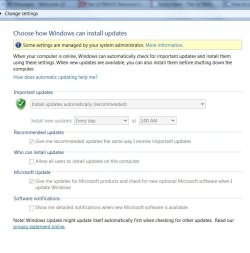
Disable Windows 7 Ultimate Updates administrator issues
- Thread starter oohansel
- Start date

- Local time
- 9:05 AM
- Messages
- 5,053
Click Start button, type gpedit.msc and press enter.
Navigate to Computer Configuration-> Administrative Templates -> Windows Component -> Windows Update. Make sure the state of each setting is "Not Configured".
Navigate to Computer Configuration-> Administrative Templates-> System-> Internet Communication Management-> Internet Communication settings. Make sure the state of “Turn off access to all Windows Update features” is "Not Configured".
Navigate to Computer Configuration-> Administrative Templates -> Windows Component -> Windows Update. Make sure the state of each setting is "Not Configured".
Navigate to Computer Configuration-> Administrative Templates-> System-> Internet Communication Management-> Internet Communication settings. Make sure the state of “Turn off access to all Windows Update features” is "Not Configured".
My Computer
- Computer Manufacturer/Model Number
- Too many to describe...
- OS
- Windows 7 x64 pro/ Windows 7 x86 Pro/ XP SP3 x86
seavixen32
New member
Try using the hidden administrator account seeing as you are the only user.
To activate this account you'll need to run a command prompt with elevated privileges thus:
Start/cmd/right-click cmd/run as administrator then type: net user administrator /active:yes
To hide this account you need to type: net user administrator /active:no
Just remember that your computer is at a higher risk of infection if you use this account.
To activate this account you'll need to run a command prompt with elevated privileges thus:
Start/cmd/right-click cmd/run as administrator then type: net user administrator /active:yes
To hide this account you need to type: net user administrator /active:no
Just remember that your computer is at a higher risk of infection if you use this account.
My Computer
- Computer Manufacturer/Model Number
- HP Pavilion Elite 495UK
- OS
- Windows 7 Ultimate SP1 64-Bit
- CPU
- Intel Core i7 870 @ 2.93GHz
- Motherboard
- MSI 2A9C (CPU1)
- Memory
- 8Gb Dual-Channel DDR3 @ 664MHz
- Graphics Card(s)
- nVidia GeForce GTX 460 1024MB dedicated RAM
- Sound Card
- Realtek HD Audio
- Monitor(s) Displays
- HP2310i
- Screen Resolution
- 1920 x 1080
- Hard Drives
- 1x1954GB Hitachi HDS22020ALA 330 (RAID), 1x1954GB Hitachi External for backup and storage
- PSU
- 460W
- Case
- HP Elite
- Cooling
- Air cooled
- Keyboard
- Logitech K750 solar-powered keyboard
- Mouse
- Logitech Wireless M180 mouse
- Internet Speed
- 2Mb
- Other Info
- Pure Avanti Flow Internet Radio with iPod Dock, 64Gb iPod, HP USB Speakers, Sony MDR-V500 Headphones, Sony Vaio F-Series Laptop
seavixen32
sorry i do not understand the point of your instructions. not technically inclined. will it allow me to change the control panel? and turn off updates?
sorry i do not understand the point of your instructions. not technically inclined. will it allow me to change the control panel? and turn off updates?
My Computer
- OS
- windows 7 x64
seavixen32
New member
seavixen32
sorry i do not understand the point of your instructions. not technically inclined. will it allow me to change the control panel? and turn off updates?
Yes. It will give you access to the Administrator Account that runs with full privileges.
After you run the command line you just restart your computer, and then you'll see two account buttons on your desktop: one will be for your user account and the other will be for the "real" administrator account.
My Computer
- Computer Manufacturer/Model Number
- HP Pavilion Elite 495UK
- OS
- Windows 7 Ultimate SP1 64-Bit
- CPU
- Intel Core i7 870 @ 2.93GHz
- Motherboard
- MSI 2A9C (CPU1)
- Memory
- 8Gb Dual-Channel DDR3 @ 664MHz
- Graphics Card(s)
- nVidia GeForce GTX 460 1024MB dedicated RAM
- Sound Card
- Realtek HD Audio
- Monitor(s) Displays
- HP2310i
- Screen Resolution
- 1920 x 1080
- Hard Drives
- 1x1954GB Hitachi HDS22020ALA 330 (RAID), 1x1954GB Hitachi External for backup and storage
- PSU
- 460W
- Case
- HP Elite
- Cooling
- Air cooled
- Keyboard
- Logitech K750 solar-powered keyboard
- Mouse
- Logitech Wireless M180 mouse
- Internet Speed
- 2Mb
- Other Info
- Pure Avanti Flow Internet Radio with iPod Dock, 64Gb iPod, HP USB Speakers, Sony MDR-V500 Headphones, Sony Vaio F-Series Laptop