Disable Windows Live Email 2011 Slide Show & Display Attachments Inlin

ozarkarkie

New member
Local time
6:58 AM
Messages
3
Disable Windows Live Email 2011 Slide Show & Display Attachments Inlin

Has anyone figured out how to disable the slide show in WLM 2011 and display attachments inline like they used to?

Any help would be greatly appreciated! Thanks, JT/ozarkarkie :)
 

My Computer My Computer

At a glance

Windows 7 home Premium 64 bit
OS
Windows 7 home Premium 64 bit
Has anyone figured out how to disable the slide show in WLM 2011 and display attachments inline like they used to?

Any help would be greatly appreciated! Thanks, JT/ozarkarkie :)

+1. This is kind of annoying.
 

My Computer My Computer

At a glance

Windows 7i7 2.8 GhzCorsaire 8GBATI 5850
OS
Windows 7
CPU
i7 2.8 Ghz
Memory
Corsaire 8GB
Graphics Card(s)
ATI 5850
Has anyone figured out how to disable the slide show in WLM 2011 and display attachments inline like they used to?
If the sender did not use "Insert/image/inline..." but instead chose to send a slide show (via their Sky Drive or as an attachment) I doubt the recipient can change it.
 

My Computer My Computer

At a glance

Windows 8 Pro w/MC 32-bitIntel Atom 1.86 GHz2 GBIntel GMA 500
Computer type
PC/Desktop
Computer Manufacturer/Model Number
OQO 2+
OS
Windows 8 Pro w/MC 32-bit
CPU
Intel Atom 1.86 GHz
Motherboard
OQO 2+
Memory
2 GB
Graphics Card(s)
Intel GMA 500
Sound Card
IDT
Monitor(s) Displays
LCD
Screen Resolution
800 x 480 (portable) 1280 x 1024 (docked)
Hard Drives
64 GB SSD
PSU
9 Ah Battery (portable) or OQO Brick (docked)
Case
Shirt Pocket Sized
Cooling
Tiny Fan
Keyboard
Slide out (portable) DiNovo Edge (docked)
Mouse
Eraser head (portable) Logitech Bluetooth (docked)
Internet Speed
WWAN or 802.11G (portable) T1 (docked)
Browser
IE 10
Other Info
DVD-RW OQO Docking Station
Has anyone figured out how to disable the slide show in WLM 2011 and display attachments inline like they used to?
If the sender did not use "Insert/image/inline..." but instead chose to send a slide show (via their Sky Drive or as an attachment) I doubt the recipient can change it.

No, the sender (me) just send attached images from Thunderbird;)
 

My Computer My Computer

At a glance

Windows 7i7 2.8 GhzCorsaire 8GBATI 5850
OS
Windows 7
CPU
i7 2.8 Ghz
Memory
Corsaire 8GB
Graphics Card(s)
ATI 5850
...No, the sender (me) just send attached images from Thunderbird.
In WLM the sender has the choice of Photo Email (unlimited in size since it uses SkyDrive), or Inset/Image/Inline (no slide show or server involved) to just display a series of pictures each one where you put the cursor for that image, or as attachments. It's more complicated but with the inline option you can control the position within the text.
 

My Computer My Computer

At a glance

Windows 8 Pro w/MC 32-bitIntel Atom 1.86 GHz2 GBIntel GMA 500
Computer type
PC/Desktop
Computer Manufacturer/Model Number
OQO 2+
OS
Windows 8 Pro w/MC 32-bit
CPU
Intel Atom 1.86 GHz
Motherboard
OQO 2+
Memory
2 GB
Graphics Card(s)
Intel GMA 500
Sound Card
IDT
Monitor(s) Displays
LCD
Screen Resolution
800 x 480 (portable) 1280 x 1024 (docked)
Hard Drives
64 GB SSD
PSU
9 Ah Battery (portable) or OQO Brick (docked)
Case
Shirt Pocket Sized
Cooling
Tiny Fan
Keyboard
Slide out (portable) DiNovo Edge (docked)
Mouse
Eraser head (portable) Logitech Bluetooth (docked)
Internet Speed
WWAN or 802.11G (portable) T1 (docked)
Browser
IE 10
Other Info
DVD-RW OQO Docking Station
...No, the sender (me) just send attached images from Thunderbird.
In WLM the sender has the choice of Photo Email (unlimited in size since it uses SkyDrive), or Inset/Image/Inline (no slide show or server involved) to just display a series of pictures each one where you put the cursor for that image, or as attachments. It's more complicated but with the inline option you can control the position within the text.
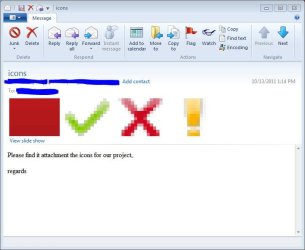
As I said earlier, the sender does not use WLM nor "Photo Email" nor "SkyDrive". I just attach some icons to the email and the recipient (who uses WLM) sees a slideshow which looks totally ugly (see screenshot) and is pointless. The question is "how can the recipient disable the slideshow"
 

Attachments

  • Capture.JPG
    Capture.JPG
    44.6 KB · Views: 22

My Computer My Computer

At a glance

Windows 7i7 2.8 GhzCorsaire 8GBATI 5850
OS
Windows 7
CPU
i7 2.8 Ghz
Memory
Corsaire 8GB
Graphics Card(s)
ATI 5850
+1. This is kind of annoying.[/QUOTE]


It it is definitely annoying!!
 

My Computer My Computer

At a glance

Windows 7 home Premium 64 bit
OS
Windows 7 home Premium 64 bit
Has anyone figured out how to disable the slide show in WLM 2011 and display attachments inline like they used to?
If the sender did not use "Insert/image/inline..." but instead chose to send a slide show (via their Sky Drive or as an attachment) I doubt the recipient can change it.

This is not the case, no sky drive is involved. Anyone sending mutiple attatchments instead of scrolling down to view in the email like we've always done before even back in OE. This is silly, we should be able to scroll down and view all inline attatchments (without doing slide show) as we have done before WLM 2011. I would think there should be a way to disable this slide show.

Even when I send an email with multiple attatchments (photos) and I go to my Outbox to review the email before sending it to make sure that I got the right attatchments. I have to still do the view slide show to even review my own email. This is totally rediculous!!
 

My Computer My Computer

At a glance

Windows 7 home Premium 64 bit
OS
Windows 7 home Premium 64 bit
...Even when I send an email with multiple attatchments (photos) and I go to my Outbox to review the email before sending it to make sure that I got the right attatchments. I have to still do the view slide show to even review my own email. This is totally rediculous!!
I agree that is ridiculous if that's how it works. So I just did a test. I attached (i.e. with the paper-clip icon) 3 photos to an email and sent it to myself. When I looked at the email in sent items it displayed them in the body of the text just like Outlook Express and Windows Mail. There was also the "view slide show" option which I did not need to use. I wonder if your options are set so as to "view images" and if your safety options (security tab--"download images") are set too high. (I should also mention that I'm using the 2009 version of WLM but I doubt that is the issue in this case.) If your options are correct and allowing images, all I can suggest is a repair of the Essentials package via Programs and Features.
 

My Computer My Computer

At a glance

Windows 8 Pro w/MC 32-bitIntel Atom 1.86 GHz2 GBIntel GMA 500
Computer type
PC/Desktop
Computer Manufacturer/Model Number
OQO 2+
OS
Windows 8 Pro w/MC 32-bit
CPU
Intel Atom 1.86 GHz
Motherboard
OQO 2+
Memory
2 GB
Graphics Card(s)
Intel GMA 500
Sound Card
IDT
Monitor(s) Displays
LCD
Screen Resolution
800 x 480 (portable) 1280 x 1024 (docked)
Hard Drives
64 GB SSD
PSU
9 Ah Battery (portable) or OQO Brick (docked)
Case
Shirt Pocket Sized
Cooling
Tiny Fan
Keyboard
Slide out (portable) DiNovo Edge (docked)
Mouse
Eraser head (portable) Logitech Bluetooth (docked)
Internet Speed
WWAN or 802.11G (portable) T1 (docked)
Browser
IE 10
Other Info
DVD-RW OQO Docking Station
  • Like
Reactions: 2xg
Back
Top