Disabling "Libraries" in everything

Erratic Fox

Internet Abuser
Member
Local time
1:35 PM
Messages
62
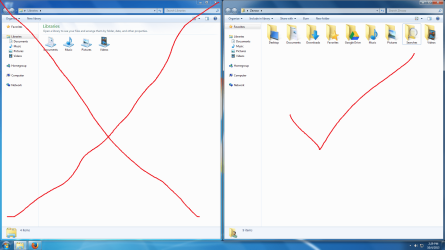
I was wondering how could I just potentially get rid of stupid "libraries", I've dealt with it for 4+ years and I dislike it even more ever time I see it. On my left pane inside my Windows Explorer, I just want to see my folders Like "Documents, Downloads, Music, Photos, Videos". I especially hate it how libraries is the default thing to pop up when you have your Windows Explorer pinned to the task bar. So how could I achieve this?
 

Attachments
  • Untitled.png
    Untitled.png
    103.7 KB · Views: 2

My Computer

Computer type
PC/Desktop
Computer Manufacturer/Model Number
Custom Built
OS
Windows 7 Home Premium 64-bit SP1
CPU
AMD FX-6300 Vishera 3.5GHz (4.1GHz Turbo)
Motherboard
ASRock PRO3 R2.0
Memory
Corsair 8GB DDR3
Graphics Card(s)
1024MB ATI Radeon HD 4650 (XFX Pine Group)
Sound Card
AMD High Definition Audio Device
Monitor(s) Displays
VE247 on ATI Radeon HD 4650
Screen Resolution
1920x1080
Hard Drives
150GB Seagate ST316081,
3TB Seagate Barracuda ST3000DM001
Mouse
Razor Deathadder
For Windows7 this is the easiest I've found.

edit: it says "Intenet Explorer" at the top, but uncheck Libraries and hit the button, and they're gone!
I've used it to enable disable stuff in the navbar for months with no ill effects. Easier than messing with the settings directly.
 

My Computer

Computer Manufacturer/Model Number
HP Media Center
OS
Windows 7 32 bit
CPU
AMD 5200+ dual core
Memory
2 GB
Graphics Card(s)
NVidia GeForce 6150SE 128 MB
Monitor(s) Displays
CRT
Screen Resolution
1280x1024
Hard Drives
500 GB Sata internal :

SIIG USB 3.0 docking stations w/WD Caviar Black 6 Gb/s drives
Keyboard
PS/2
Mouse
PS/2 Wheel Mouse
Other Info
SIIG USB 3.0 PCIexpress card.
For Windows7 this is the easiest I've found.

edit: it says "Intenet Explorer" at the top, but uncheck Libraries and hit the button, and they're gone!
I've used it to enable disable stuff in the navbar for months with no ill effects. Easier than messing with the settings directly.

What about Windows Explorer automatically opening Libraries? Could I set it to my User Folder?
 

My Computer

Computer type
PC/Desktop
Computer Manufacturer/Model Number
Custom Built
OS
Windows 7 Home Premium 64-bit SP1
CPU
AMD FX-6300 Vishera 3.5GHz (4.1GHz Turbo)
Motherboard
ASRock PRO3 R2.0
Memory
Corsair 8GB DDR3
Graphics Card(s)
1024MB ATI Radeon HD 4650 (XFX Pine Group)
Sound Card
AMD High Definition Audio Device
Monitor(s) Displays
VE247 on ATI Radeon HD 4650
Screen Resolution
1920x1080
Hard Drives
150GB Seagate ST316081,
3TB Seagate Barracuda ST3000DM001
Mouse
Razor Deathadder

My Computer

Computer type
PC/Desktop
Computer Manufacturer/Model Number
Self built custom
OS
64-bit Windows 11 Pro for Workstations
CPU
Intel i7-8700K OC'd to 5 GHz
Motherboard
ASUS ROG Maximus XI Formula Z390
Memory
64 GB (4x16GB) G.SKILL TridentZ RGB DDR4 3600 MHz
Graphics Card(s)
ASUS ROG-STRIX-GTX1080TI-O11G-GAMING
Sound Card
Integrated
Monitor(s) Displays
2 x Samsung Odyssey G7 27"
Screen Resolution
2560x1440
Hard Drives
1TB Samsung 990 PRO M.2,
4TB Samsung 990 PRO PRO M.2,
TerraMaster F8 SSD Plus NAS
PSU
Seasonic Prime Titanium 850W
Case
Thermaltake Core P3
Cooling
Corsair Hydro H115i
Keyboard
Logitech wireless K800
Mouse
Logitech MX Master 4
Internet Speed
2 Gb/s Download and 100 Mb/s Upload
Antivirus
Malwarebyte Anti-Malware Premium
Browser
Google Chrome
Other Info
Logitech Z625 speaker system,
Logitech BRIO 4K Pro webcam,
HP Color LaserJet Pro MFP M477fdn,
APC SMART-UPS RT 1000 XL - SURT1000XLI,
Galaxy S23 Plus phone
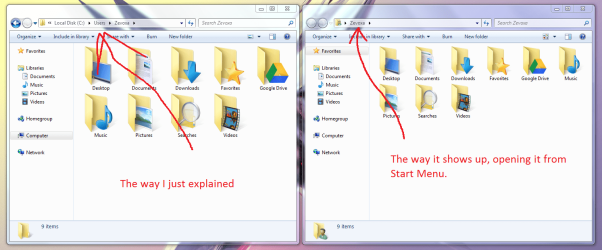
I figured out how to do it, kinda. You set the target in Windows Explorer to %SystemRoot%\explorer.exe /n, /e, C:\users\username

But you get the result of having the path scattered in the address bar. What's the exe path for the user folder in the start menu?

EDIT:
Just seen your reply, Brink. Thank you for your time. I've already figured out the first thing you mentioned. Now I'm just having a bit of a problem with opening it from the TaskBar.
 

Attachments

  • Untitled.png
    Untitled.png
    103.3 KB · Views: 3

My Computer

Computer type
PC/Desktop
Computer Manufacturer/Model Number
Custom Built
OS
Windows 7 Home Premium 64-bit SP1
CPU
AMD FX-6300 Vishera 3.5GHz (4.1GHz Turbo)
Motherboard
ASRock PRO3 R2.0
Memory
Corsair 8GB DDR3
Graphics Card(s)
1024MB ATI Radeon HD 4650 (XFX Pine Group)
Sound Card
AMD High Definition Audio Device
Monitor(s) Displays
VE247 on ATI Radeon HD 4650
Screen Resolution
1920x1080
Hard Drives
150GB Seagate ST316081,
3TB Seagate Barracuda ST3000DM001
Mouse
Razor Deathadder
Back
Top