Solved Disabling Library Access from Start menu

  • Thread starter Thread starter SevenUser09
  • Start date Start date
S

SevenUser09

Guest
I do not want to use the libraries if I go to start and click documents,pictures, etc to go to my user folder quivalent of them. is there a way to change it? I don't care if they are in explorer I just don't want them when I click my user folder links. This really makes me want to go back to vista and is the one feature that is really causing me to not give 7 a chance. all the other little stuff i don't like i can get used to but not this.
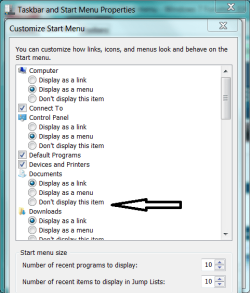
 
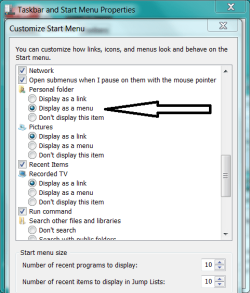
Start Menu Properties
Do not show Pix, Docs, Music etc.

User folders
Show as menu

A possible alternative.
 

Attachments

  • Capture.PNG
    Capture.PNG
    24.9 KB · Views: 9
  • Capture2.PNG
    Capture2.PNG
    23.9 KB · Views: 10
But is it possible to have documents and such listed but have it to go to the folder? Wouldn't displayign as a menu still use the library?
 
But is it possible to have documents and such listed but have it to go to the folder? Wouldn't displayign as a menu still use the library?
But is it possible to have documents and such listed but have it to go to the folder?

Development is underway.

Wouldn't displayign as a menu still use the library?
Is your hand or mouse broken? Try it.
 
Just tried and it still keeps the library behavior. Ijust want the links to function as they did in Vista.
 
Confirming - you cascaded User folder to reveal Docs, Pix, etc and when you click one the library opens?

Not here. This is worth exploring (pun).

I will not assist you further unless you fill out your system specs.
 

Attachments

  • 0 UserCP2.PNG
    0 UserCP2.PNG
    7.3 KB · Views: 5
  • 0 UserCP1.PNG
    0 UserCP1.PNG
    10.8 KB · Views: 3
Alright I have noticed that if you add Downloads to the start menu it goes right to the folder. This would imply there being a registry entry somewhere that controls the link. Any idea where I might start searching for it?
 
What build of 7 are you on?

I am buying time. Checking reg. -

Also, the kids want to go swimming. I might be gone shorlty. Because you filled out your specs, now many knowledgeable SF members can help.
 
I am running Windows 7 Professional x86.
 
Cool on the 7600. Certain features in Win 7 change from build to build.

Libraries functions are not controlled in the registry. They are XML driven. I do not recommend playing with the XML file(s).

Will this compromise create the result you seek -

Open the offending Library
Select the folder you do NOT want
Right click
Remove this location from Library
cull the library down to a single folder.
 
I do not mind keeping the libraries I just do not want them accessed from my start menu. So to do that all you need to do is change the link. But I cannot figure out how. I have a feeling this is all that nees done because adding Downloads will take you right to the user folder and bypass any libraries.
 
Has anyone found the registry location for the links yet?
 
I apologize but I fail to see the difference between the Documents folder and the Documents library...by default Windows 7 has Public Documents and My Documents the only folders in the Documents library. As such that would be the difference I guess if a difference that could be considered.
 

My Computer

Computer Manufacturer/Model Number
Compal JFT02 (Custom Build Laptop)
OS
Windows 7 Home Premium x64 - Mac OS X 10.6.4 x64
CPU
Intel Core 2 Duo T9300 2.5 GHz
Motherboard
JFT02
Memory
4GB Kingston DDR2-800
Graphics Card(s)
NVIDIA Geforce 8600M GT (512MB Model)
Sound Card
Realtek HD Audio
Monitor(s) Displays
WUXGA Standard Laptop Display
Screen Resolution
1680*1050
Hard Drives
Toshiba 320GB 5400RPM Laptop HD
PSU
Standard Laptop Power Supply
Case
Standard Laptop Case
Cooling
Standard Laptop Cooling
Keyboard
Standard Laptop 105 Key-Keyboard
Mouse
Synaptics Touchpad
Internet Speed
Verizion Online DSL 3360/864 kbs (dl/up)
Exactly why do you want this behavior?
 

My Computer

Computer Manufacturer/Model Number
Compal JFT02 (Custom Build Laptop)
OS
Windows 7 Home Premium x64 - Mac OS X 10.6.4 x64
CPU
Intel Core 2 Duo T9300 2.5 GHz
Motherboard
JFT02
Memory
4GB Kingston DDR2-800
Graphics Card(s)
NVIDIA Geforce 8600M GT (512MB Model)
Sound Card
Realtek HD Audio
Monitor(s) Displays
WUXGA Standard Laptop Display
Screen Resolution
1680*1050
Hard Drives
Toshiba 320GB 5400RPM Laptop HD
PSU
Standard Laptop Power Supply
Case
Standard Laptop Case
Cooling
Standard Laptop Cooling
Keyboard
Standard Laptop 105 Key-Keyboard
Mouse
Synaptics Touchpad
Internet Speed
Verizion Online DSL 3360/864 kbs (dl/up)
Because I feel that if I wanted all of my related stuff in one place I would have put it that way. I have my own organization methods and do not want to be forced to use this horrible way or managing files. I just want to be able to directly access my folders anot jump thrugh others, even if they lead there.
 
Because I feel that if I wanted all of my related stuff in one place I would have put it that way. I have my own organization methods and do not want to be forced to use this horrible way or managing files. I just want to be able to directly access my folders anot jump thrugh others, even if they lead there.
They best way I know to resolve this is to right click on Documents in the start menu and erase all folders BUT My Documents...That is essentially the My Documents of Vista except it will still be under the Documents Library banner


BTW How is this organization method horrible...unless you are hiding something that the Documents library keeps pulling up:o
 

My Computer

Computer Manufacturer/Model Number
Compal JFT02 (Custom Build Laptop)
OS
Windows 7 Home Premium x64 - Mac OS X 10.6.4 x64
CPU
Intel Core 2 Duo T9300 2.5 GHz
Motherboard
JFT02
Memory
4GB Kingston DDR2-800
Graphics Card(s)
NVIDIA Geforce 8600M GT (512MB Model)
Sound Card
Realtek HD Audio
Monitor(s) Displays
WUXGA Standard Laptop Display
Screen Resolution
1680*1050
Hard Drives
Toshiba 320GB 5400RPM Laptop HD
PSU
Standard Laptop Power Supply
Case
Standard Laptop Case
Cooling
Standard Laptop Cooling
Keyboard
Standard Laptop 105 Key-Keyboard
Mouse
Synaptics Touchpad
Internet Speed
Verizion Online DSL 3360/864 kbs (dl/up)
It is horrible due to being forced. I know it only uses my documents if that is the only folder added but I still dislike the whole idea. I want to access my folder directly not through another. It seems very redundant to me. I found out how to remove Libraries and Homegroup (another thing I don't use) from Windows Explorer but it still doesn't change the behavior, and will still appear if I enter those folders.
 
Back
Top