
Disabling Other Microsoft Drivers - Especially Intel

dw85745

New member
Member
VIP
Local time
2:39 AM
Messages
199
-----------
Ques #1
-----------
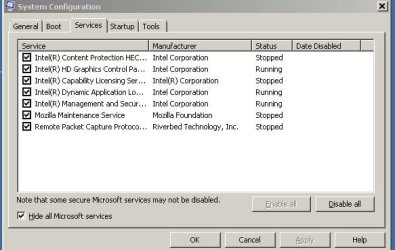
Is it OK to disable ALL non-Microsoft Services (drivers) including Intel
without killing my system.
See list of Non-Microsoft Drivers at end.


------------
Quest #2
------------
If I disable the drivers and I kill my system how do I Re-Enable Them?
For example can I boot from CD and then do what?

-----------
FWIW
-----------
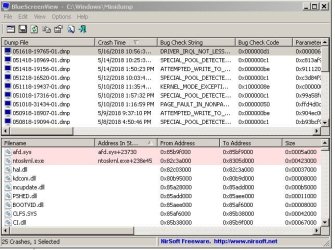
I'm experiencing a number of random numbered BSOD's about 1 a day.
Have verified Intel Processor is OK using their diagnostic tool (everything passes).
However event view does show:
1) The BSOD errors and
2) Periodic Warnings related to WuDFrd ACPI\PNP
 

Attachments
  • DriverList.JPG
    DriverList.JPG
    40.6 KB · Views: 21

My Computer

Computer type
PC/Desktop
Computer Manufacturer/Model Number
build -
OS
Win 7 Pro x32
CPU
Intel I5-4690K
Motherboard
ASUS H-97Plus
Memory
8 GB
Graphics Card(s)
On Board
Sound Card
On Board
Other Info
ASUS MOBO Issues never resolved even by ASUS:
1) MOBO will NOT boot from other than the Default HDD drive.
2) MOBO will NOT boot Most DOS based CDs
So far, what is shown in the screen clip is good:
* You have gone to the Services tab.
* You have hidden all Microsoft services.
* All items are checked.

You now need to click "Disable All", then "Apply". Now restart your computer.

You won't hurt anything by doing this. But you need to be aware that some things that you may consider necessary aren't going to work, such as Mozilla Maintenance Service.

Use the computer for a while, to see if the BSODs have stopped. After you have used it for sufficient time to know, you can start re-enabling the non-Microsoft services, one at a time, with a reboot after each one, to see if the BSODs return. If they do, then you will know that the service you just re-enabled was the cause of the BSODs. If you find one, go back into MSCONFIG and disable that service; then continue re-enabling one service at a time, to see if there are any more problematic services.

The only service which is a possible candidate in my opinion is "Remote Packet Capture Protocol". I don't know that it is the culprit; but I doubt that any of the others are problematic. Maybe Mozilla Maintenance Service; not likely any of the Intel services; but you should still enable each of these one at a time, then test your system, just to make sure.

But a more likely solution would be found in the area of USB. (The error you posted (WuDFrd ACPI\PNP) relates to USB.) Is an external USB hard drive connected to the computer? If so, then shut down the computer, disconnect the drive, and restart the computer. See if the problem has gone away. If so, then you need to uninstall your USB drivers and then let the system reinstall them. If that doesn't do it, then perhaps a Windows update would do it -- search for updates, then install only those which relate to USB. Or maybe go to the computer manufacturer's website and install any USB (and perhaps other hardware) drivers that are listed.

Here is some helpful information:
https://answers.microsoft.com/en-us...-for-the/4d3f00ed-6a94-42e3-9227-f217a68d3886
 

My Computer

Computer type
PC/Desktop
Computer Manufacturer/Model Number
Dell
OS
Linux Mint 18.2 xfce 64-bit (VMWare host) / Windows 8.1 Pro 32-bit (VMWare guest)
CPU
Haswell
Memory
4 GB
Monitor(s) Displays
Acer 23"
Screen Resolution
1920 x 1080
Hard Drives
Two hard drives, 1TB each: One for Linux, one for my data.
Keyboard
IBM Model M
Antivirus
Sophos (Linux), Trend Micro (Windows)
Browser
Firefox, Opera
Other Info
I use Samba to share my data drive with the other computers at my house and with my guest session in VMWare Workstation Player.
mrjimphelps: Thank you for responding.

Is an external USB hard drive connected to the computer?
The only USB I'm running is keyboard and mouse.
THese go through a convertor cable as keyboard is original IBM Model M and mouse has a PS2 plug.

perhaps a Windows update would do it
Everything is Updated.
sfc scan says everything OK as well as all other scans I've done.

Just for kicks here's the random errors I'm getting:
 

Attachments

  • BSODList_20180517.JPG
    BSODList_20180517.JPG
    80.2 KB · Views: 19

My Computer

Computer type
PC/Desktop
Computer Manufacturer/Model Number
build -
OS
Win 7 Pro x32
CPU
Intel I5-4690K
Motherboard
ASUS H-97Plus
Memory
8 GB
Graphics Card(s)
On Board
Sound Card
On Board
Other Info
ASUS MOBO Issues never resolved even by ASUS:
1) MOBO will NOT boot from other than the Default HDD drive.
2) MOBO will NOT boot Most DOS based CDs
A service is not only a driver as a service can/does exist of various other files (executables, dlls, drivers, etc), therefore disabling a service disables a part of a program and no program I've seen causes issues when any of its service is disabled.
 

My Computer

Computer type
PC/Desktop
Computer Manufacturer/Model Number
Custom build
OS
Windows 10 Pro
CPU
i5-6500
Motherboard
Gigabyte B150-HD3P-CF
Memory
16GB DDR4 2133 Crucial Ballistix Sport LT
Graphics Card(s)
MSI GeForce GTX 1060 GAMING X 6G
Sound Card
Intel Display Audio
Monitor(s) Displays
Liyama ProLite XB2483HSU-B2
Screen Resolution
1920 x 1080
Hard Drives
Crucial MX200 500GB & Toshiba DT01ACA300 3TB
PSU
Corsair RM550x
Case
Fractal Design Define S
Cooling
Cooler Master TX3 i
Keyboard
Func KB-460 (MX Red)
Mouse
Corsair Gaming M65 RGB
Antivirus
Bitdefender Total Security 2016 + MBAM Pro + MBAE Pro
Browser
Google Chrome
Other Info
Creative Sound Blaster Tactic3D Rage V2 headset
Back
Top