Disabling Ping Response or even stealth it

glennc

New member
Power User
VIP
Local time
11:36 PM
Messages
1,024
Hello again,
I was reading under the Commodo FireWall Thread of a site to test your online security. Gibson Research tested my machine and all passed except IIRC the Ping was responding. I have looked in Commodo and have been unable to find out how to stealth or just disable the Ping requests. Thanks for any assistance.
glennc
 

My Computer

Computer type
PC/Desktop
Computer Manufacturer/Model Number
Self-Built
OS
Windows 7 Ultimate
CPU
AMD Phenom-II X4 965
Motherboard
Gigabyte GA-MA785GM-US2H
Memory
8192 MB DDR2-SDRAM
Graphics Card(s)
ATI Radeon HD 4200
Sound Card
ATI Radeon HD 4200 High Definition Audo
Monitor(s) Displays
LG Electronics W1943
Screen Resolution
1360 X 768
Hard Drives
C: 500 GB Caviar Black SATA
E: 500 GB Caviar Black SATA
PSU
Ultra LSP 750
Case
Ultra XBlaster
Cooling
2 Fans, CPU Fan, PS Fan
Keyboard
Acer
Mouse
Logitech
Internet Speed
6 MB
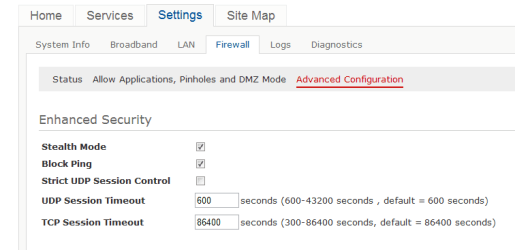
you'll probably have to do it through your router settings, as it is the router being pinged, not your pc.

(i assume you have a router, and not a usb type modem?)

your settings will no doubt be different, but here's mine, for example:

stealth.PNG

------------------------------------------------

PS - anyone know what 'strict udp session control' is, and is it a good idea to enable it?
 

My Computer

Computer Manufacturer/Model Number
mickey megabyte 1234
OS
ultimate 64 sp1
CPU
i5 2500K [email protected]
Motherboard
MSI P67A-GD53
Memory
8 gigs GSkill Ripjaws 1600
Graphics Card(s)
amd hd6950
Sound Card
creative x-fi gamer
Monitor(s) Displays
samsung 24"
Screen Resolution
1920x1080
Hard Drives
ocz vertex 2e 60 gig, samsung f3 1tb, buffalo 2tb ext
PSU
antec 550
Case
antec three hundred
Cooling
i'm a cooling fan
Keyboard
saitek eclipse ii
Mouse
logitech g3
Internet Speed
about 4 Mbps
Other Info
i love win7
you'll probably have to do it through your router settings, as it is the router being pinged, not your pc.

(i assume you have a router, and not a usb type modem?)

your settings will no doubt be different, but here's mine, for example:

View attachment 148309

------------------------------------------------

PS - anyone know what 'strict udp session control' is, and is it a good idea to enable it?

Hello mickey megabyte,
Thank you for your assistance. I now seem to recall ages ago when I set it up, that it might be there. I will certainly give it a check out. Appreciate your help.
glennc
 

My Computer

Computer type
PC/Desktop
Computer Manufacturer/Model Number
Self-Built
OS
Windows 7 Ultimate
CPU
AMD Phenom-II X4 965
Motherboard
Gigabyte GA-MA785GM-US2H
Memory
8192 MB DDR2-SDRAM
Graphics Card(s)
ATI Radeon HD 4200
Sound Card
ATI Radeon HD 4200 High Definition Audo
Monitor(s) Displays
LG Electronics W1943
Screen Resolution
1360 X 768
Hard Drives
C: 500 GB Caviar Black SATA
E: 500 GB Caviar Black SATA
PSU
Ultra LSP 750
Case
Ultra XBlaster
Cooling
2 Fans, CPU Fan, PS Fan
Keyboard
Acer
Mouse
Logitech
Internet Speed
6 MB
my pleasure, glennc :)
 

My Computer

Computer Manufacturer/Model Number
mickey megabyte 1234
OS
ultimate 64 sp1
CPU
i5 2500K [email protected]
Motherboard
MSI P67A-GD53
Memory
8 gigs GSkill Ripjaws 1600
Graphics Card(s)
amd hd6950
Sound Card
creative x-fi gamer
Monitor(s) Displays
samsung 24"
Screen Resolution
1920x1080
Hard Drives
ocz vertex 2e 60 gig, samsung f3 1tb, buffalo 2tb ext
PSU
antec 550
Case
antec three hundred
Cooling
i'm a cooling fan
Keyboard
saitek eclipse ii
Mouse
logitech g3
Internet Speed
about 4 Mbps
Other Info
i love win7
y

PS - anyone know what 'strict udp session control' is, and is it a good idea to enable it?


Strict UDP Session Control - UDP stands for "User Datagram Protocol". UDP is used to transmit video and voice across networks and across the Internet. Restricting UDP limits traffic sent to your computer from unknown sources. Some online applications may not work with Strict UDP Session Control enabled.

Regards....Mike Connor
 
Last edited:

My Computer

OS
Several, including Windows 7 x64 Ultimate
thanks
 

My Computer

Computer Manufacturer/Model Number
mickey megabyte 1234
OS
ultimate 64 sp1
CPU
i5 2500K [email protected]
Motherboard
MSI P67A-GD53
Memory
8 gigs GSkill Ripjaws 1600
Graphics Card(s)
amd hd6950
Sound Card
creative x-fi gamer
Monitor(s) Displays
samsung 24"
Screen Resolution
1920x1080
Hard Drives
ocz vertex 2e 60 gig, samsung f3 1tb, buffalo 2tb ext
PSU
antec 550
Case
antec three hundred
Cooling
i'm a cooling fan
Keyboard
saitek eclipse ii
Mouse
logitech g3
Internet Speed
about 4 Mbps
Other Info
i love win7
Hello again,
I was reading under the Commodo FireWall Thread of a site to test your online security. Gibson Research tested my machine and all passed except IIRC the Ping was responding. I have looked in Commodo and have been unable to find out how to stealth or just disable the Ping requests. Thanks for any assistance.
glennc


You can disable the PING service in your router, but it doesn't make any difference to security. The PING only reaches your router, the router firewall prevents any traffic with your machine. ( Assuming of course that it is properly configured!). If you have ports open, as for P2P ( Peer to Peer), TorrentServices, then you are vulnerable. This is also a common source of malware infection.

PS. There is no way to "stealth" the PING service. Either it runs or it doesn't. If it is not running, it will not answer any PING requests.

Regards....Mike Connor
 
Last edited:

My Computer

OS
Several, including Windows 7 x64 Ultimate
Hello again,
I was reading under the Commodo FireWall Thread of a site to test your online security. Gibson Research tested my machine and all passed except IIRC the Ping was responding. I have looked in Commodo and have been unable to find out how to stealth or just disable the Ping requests. Thanks for any assistance.
glennc


You can disable the PING service in your router, but it doesn't make any difference to security. The PING only reaches your router, the router firewall prevents any traffic with your machine. ( Assuming of course that it is properly configured!). If you have ports open, as for P2P ( Peer to Peer), TorrentServices, then you are vulnerable. This is also a common source of malware infection.

PS. There is no way to "stealth" the PING service. Either it runs or it doesn't. If it is not running, it will not answer any PING requests.

Regards....Mike Connor

Howdy Mike Connor,
Thanks for confirming and further explaining my issue. Now I have to remember how to get back into my router and do it!
glennc
 

My Computer

Computer type
PC/Desktop
Computer Manufacturer/Model Number
Self-Built
OS
Windows 7 Ultimate
CPU
AMD Phenom-II X4 965
Motherboard
Gigabyte GA-MA785GM-US2H
Memory
8192 MB DDR2-SDRAM
Graphics Card(s)
ATI Radeon HD 4200
Sound Card
ATI Radeon HD 4200 High Definition Audo
Monitor(s) Displays
LG Electronics W1943
Screen Resolution
1360 X 768
Hard Drives
C: 500 GB Caviar Black SATA
E: 500 GB Caviar Black SATA
PSU
Ultra LSP 750
Case
Ultra XBlaster
Cooling
2 Fans, CPU Fan, PS Fan
Keyboard
Acer
Mouse
Logitech
Internet Speed
6 MB
Howdy Mike Connor,
Thanks for confirming and further explaining my issue. Now I have to remember how to get back into my router and do it!
glennc


My pleasure.

I keep notes on stuff like that, so I know what I did, and when and why I did it. Much easier than trying to remember everything, especially stuff you don't use often.

I use this for keeping all those notes, images, diagrams etc. ;

http://www.mytreedb.com/treedbnotes_free.html

Regards....Mike Connor
 

My Computer

OS
Several, including Windows 7 x64 Ultimate
Howdy Mike Connor,
Thanks for confirming and further explaining my issue. Now I have to remember how to get back into my router and do it!
glennc


My pleasure.

I keep notes on stuff like that, so I know what I did, and when and why I did it. Much easier than trying to remember everything, especially stuff you don't use often.

I use this for keeping all those notes, images, diagrams etc. ;

TreeDBNotes Free

Regards....Mike Connor


That is a great idea, except that I'd probably loose the data in my meanderings or forget how to use the program. Kidding, might look into that, thanks
Glenn
 

My Computer

Computer type
PC/Desktop
Computer Manufacturer/Model Number
Self-Built
OS
Windows 7 Ultimate
CPU
AMD Phenom-II X4 965
Motherboard
Gigabyte GA-MA785GM-US2H
Memory
8192 MB DDR2-SDRAM
Graphics Card(s)
ATI Radeon HD 4200
Sound Card
ATI Radeon HD 4200 High Definition Audo
Monitor(s) Displays
LG Electronics W1943
Screen Resolution
1360 X 768
Hard Drives
C: 500 GB Caviar Black SATA
E: 500 GB Caviar Black SATA
PSU
Ultra LSP 750
Case
Ultra XBlaster
Cooling
2 Fans, CPU Fan, PS Fan
Keyboard
Acer
Mouse
Logitech
Internet Speed
6 MB
That is a great idea, except that I'd probably loose the data in my meanderings or forget how to use the program. Kidding, might look into that, thanks
Glenn

If you use Firefox, then this is also extremely useful;

https://addons.mozilla.org/en-US/firefox/addon/scrapbook/

Regards....Mike Connor

Much appreciated. But it's too late. I can't get on to my router. It won't accept the correct URL and when it takes a bad one it won't accept the password. Ratz!
Glenn
 

My Computer

Computer type
PC/Desktop
Computer Manufacturer/Model Number
Self-Built
OS
Windows 7 Ultimate
CPU
AMD Phenom-II X4 965
Motherboard
Gigabyte GA-MA785GM-US2H
Memory
8192 MB DDR2-SDRAM
Graphics Card(s)
ATI Radeon HD 4200
Sound Card
ATI Radeon HD 4200 High Definition Audo
Monitor(s) Displays
LG Electronics W1943
Screen Resolution
1360 X 768
Hard Drives
C: 500 GB Caviar Black SATA
E: 500 GB Caviar Black SATA
PSU
Ultra LSP 750
Case
Ultra XBlaster
Cooling
2 Fans, CPU Fan, PS Fan
Keyboard
Acer
Mouse
Logitech
Internet Speed
6 MB
what router do you have??

maybe someone can help...
 

My Computer

Computer Manufacturer/Model Number
mickey megabyte 1234
OS
ultimate 64 sp1
CPU
i5 2500K [email protected]
Motherboard
MSI P67A-GD53
Memory
8 gigs GSkill Ripjaws 1600
Graphics Card(s)
amd hd6950
Sound Card
creative x-fi gamer
Monitor(s) Displays
samsung 24"
Screen Resolution
1920x1080
Hard Drives
ocz vertex 2e 60 gig, samsung f3 1tb, buffalo 2tb ext
PSU
antec 550
Case
antec three hundred
Cooling
i'm a cooling fan
Keyboard
saitek eclipse ii
Mouse
logitech g3
Internet Speed
about 4 Mbps
Other Info
i love win7
What router do you have?

Regards....Mike Connor
 

My Computer

OS
Several, including Windows 7 x64 Ultimate
Doesn't Comodo have a Stealth ports function - there may be an option to block incoming ICMP there.

Long time since I looked at Comodo.
 

My Computers

System One System Two

  • Computer type
    PC/Desktop
    OS
    7 X64
    CPU
    i5 8400
    Motherboard
    gigabyte b365m ds3h
    Memory
    2x8gb 3200mhz
    Hard Drives
    various
    PSU
    pure power 11 400w cm
    Case
    Coolermaster
    Cooling
    cryorig m9i
  • Computer type
    PC/Desktop
    OS
    7x64
    CPU
    g5400
    Motherboard
    ga b365m ds3h
    Memory
    8gb ddr4 2400
    PSU
    xfx pro 450w
Doesn't Comodo have a Stealth ports function - there may be an option to block incoming ICMP there.

Long time since I looked at Comodo.

Wouldn't make any difference. The router answers the PING, not the machine. If you want to disable ping, you have to disable it on the router.

Regards....Mike Connor
 

My Computer

OS
Several, including Windows 7 x64 Ultimate
what router do you have??

maybe someone can help...

Hello,
The beastie is a refurbished Linksys WRT 120N, hope that is some help.
Thanks for the thought!
Glenn
 

My Computer

Computer type
PC/Desktop
Computer Manufacturer/Model Number
Self-Built
OS
Windows 7 Ultimate
CPU
AMD Phenom-II X4 965
Motherboard
Gigabyte GA-MA785GM-US2H
Memory
8192 MB DDR2-SDRAM
Graphics Card(s)
ATI Radeon HD 4200
Sound Card
ATI Radeon HD 4200 High Definition Audo
Monitor(s) Displays
LG Electronics W1943
Screen Resolution
1360 X 768
Hard Drives
C: 500 GB Caviar Black SATA
E: 500 GB Caviar Black SATA
PSU
Ultra LSP 750
Case
Ultra XBlaster
Cooling
2 Fans, CPU Fan, PS Fan
Keyboard
Acer
Mouse
Logitech
Internet Speed
6 MB
What router do you have?

Regards....Mike Connor

Thank all you Gentlemen for the assistance. It is indeed a Linksys WRT 120N refurbished. I reinstalled it, and it took, but the Network Magic software on the disk didn't let me in or do anything to it. It set itself up with my password, the same as the first time. All paperwork indicates 192.168.1.1, but it will only respond on 192.168.0.1. Double ratz!
Glenn
 

My Computer

Computer type
PC/Desktop
Computer Manufacturer/Model Number
Self-Built
OS
Windows 7 Ultimate
CPU
AMD Phenom-II X4 965
Motherboard
Gigabyte GA-MA785GM-US2H
Memory
8192 MB DDR2-SDRAM
Graphics Card(s)
ATI Radeon HD 4200
Sound Card
ATI Radeon HD 4200 High Definition Audo
Monitor(s) Displays
LG Electronics W1943
Screen Resolution
1360 X 768
Hard Drives
C: 500 GB Caviar Black SATA
E: 500 GB Caviar Black SATA
PSU
Ultra LSP 750
Case
Ultra XBlaster
Cooling
2 Fans, CPU Fan, PS Fan
Keyboard
Acer
Mouse
Logitech
Internet Speed
6 MB
Doesn't Comodo have a Stealth ports function - there may be an option to block incoming ICMP there.

Long time since I looked at Comodo.

Howdy SIW2,
I looked but am in over my head again. I couldn't find it if it was in Commodo and numerous others said it is a router thing. Triple Ratz! Thanks for responding!
Glenn
 

My Computer

Computer type
PC/Desktop
Computer Manufacturer/Model Number
Self-Built
OS
Windows 7 Ultimate
CPU
AMD Phenom-II X4 965
Motherboard
Gigabyte GA-MA785GM-US2H
Memory
8192 MB DDR2-SDRAM
Graphics Card(s)
ATI Radeon HD 4200
Sound Card
ATI Radeon HD 4200 High Definition Audo
Monitor(s) Displays
LG Electronics W1943
Screen Resolution
1360 X 768
Hard Drives
C: 500 GB Caviar Black SATA
E: 500 GB Caviar Black SATA
PSU
Ultra LSP 750
Case
Ultra XBlaster
Cooling
2 Fans, CPU Fan, PS Fan
Keyboard
Acer
Mouse
Logitech
Internet Speed
6 MB
What router do you have?

Regards....Mike Connor

Thank all you Gentlemen for the assistance. It is indeed a Linksys WRT 120N refurbished. I reinstalled it, and it took, but the Network Magic software on the disk didn't let me in or do anything to it. It set itself up with my password, the same as the first time. All paperwork indicates 192.168.1.1, but it will only respond on 192.168.0.1. Double ratz!
Glenn

Reset to factory defaults;

WRT120N reset to factory defaults - Cisco Home Community

Regards....Mike Connor
 

My Computer

OS
Several, including Windows 7 x64 Ultimate
Back
Top