Disappearing toolbar

whs

New member
Guru
VIP
Local time
6:31 PM
Messages
26,200
Location
Florida in winter, Black Forest/Germany
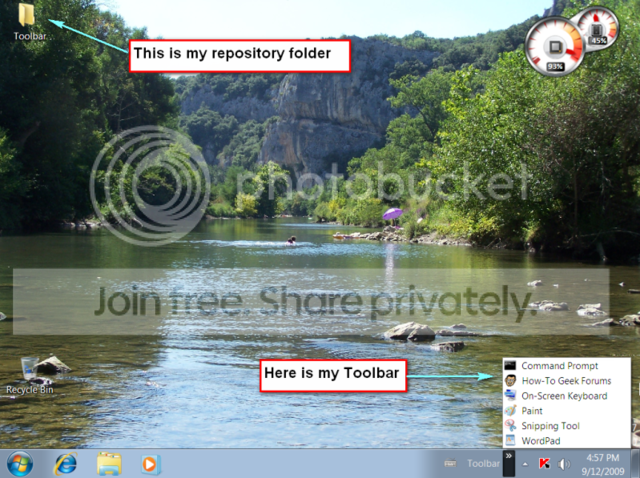
As a substitute for the missing Quick Launch in W7 I have created a toolbar for my shortcuts. But every time I reboot, my toolbar disappears. The repository folder with the shortcuts stays intact, but I always have to recreate the toolbar. Anybody have an idea on how to permanently pin the toolbar down?
 

My Computer

Computer Manufacturer/Model Number
HP, Dell, Gateway, Toshiba - 4 laptops and 2 desktops
OS
Vista, Windows7, Mint Mate, Zorin, Windows 8
CPU
from 1.6GHz Duo to i7
Monitor(s) Displays
2x HP w2207
Hard Drives
5x HDD, 7x SSD, 12x Externals
Keyboard
with trackball - no mices
Mouse
Trackball mice
Internet Speed
DSL 6000
Sassa, thanks. I know how to do that. Problem is, that it does not work like in Vista because there is no "Pin to Quick Launch" in the right click context menu with that tweak. I therefore decided to go with the toolbar approach which is easier to deal with. In addition I also want to make other toolbars for folder shortcuts, etc.
 
Last edited:

My Computer

Computer Manufacturer/Model Number
HP, Dell, Gateway, Toshiba - 4 laptops and 2 desktops
OS
Vista, Windows7, Mint Mate, Zorin, Windows 8
CPU
from 1.6GHz Duo to i7
Monitor(s) Displays
2x HP w2207
Hard Drives
5x HDD, 7x SSD, 12x Externals
Keyboard
with trackball - no mices
Mouse
Trackball mice
Internet Speed
DSL 6000
Isn't the entire bar now essentially the quicklaunch bar? ;)

I was dissapointed by the lack of ability to create a working set of custom vertical popup toolbars.

Sooner or later someone will make one that works well. "7 stacks" is one that is close, it wasn't exactly what I wanted but it may be what your looking for.
 

My Computer

Computer Manufacturer/Model Number
Scratch built
OS
Windows 7 x64 Ultimate
CPU
i7 960
Motherboard
Asus P6X58D
Memory
12 Gig Corsair Dominator
Graphics Card(s)
Nvidia 480
Sound Card
Maudio Delta 44 + breakout box
Monitor(s) Displays
Dell UltraSharp U2410 24in and Samsung 21 dual monitors
Screen Resolution
1920x1200 and 1280x1024
Hard Drives
Primary: Intel X-25M G2 160G SSD
Secondary: Segate baracuda 1.0 TB
HDs in AHCI mode.
PSU
Corasair TX850
Case
Cooler Master HAF
Cooling
Corsair H50
Keyboard
Logitech G15 + N52 game pad
Mouse
Logitech MX518
Internet Speed
15kbs down 4.5kbps up
Other Info
WEI 7.6
CPU & RAM 7.6
Graphics 7.9
Hard disk 7.7
fseal, that's what they say. But with about 100 program, folder and device shortcuts that I have currently (in Vista) distributed over the Quick Launch, the toolbar on top of my screen (which does not work any more in W7) and the AppLauncher in the sidebar (which does not work in W7 either), the taskbar would get pretty crowded and messy. I figured that the toolbars would be the neatest solution.
 
Last edited:

My Computer

Computer Manufacturer/Model Number
HP, Dell, Gateway, Toshiba - 4 laptops and 2 desktops
OS
Vista, Windows7, Mint Mate, Zorin, Windows 8
CPU
from 1.6GHz Duo to i7
Monitor(s) Displays
2x HP w2207
Hard Drives
5x HDD, 7x SSD, 12x Externals
Keyboard
with trackball - no mices
Mouse
Trackball mice
Internet Speed
DSL 6000
Heh yeah, I knew what you meant :) I tried for along time to find a satisfatory way of having multiple toolbars using native W7 tools and was very disspointed that nothing worked well or even at all.

Very probably have to look to external solutions. Give seven stacks a try, I wanted the bars to pop up on mouse over, not having to click or right click them, But that was a few months ago. May work better now.
 

My Computer

Computer Manufacturer/Model Number
Scratch built
OS
Windows 7 x64 Ultimate
CPU
i7 960
Motherboard
Asus P6X58D
Memory
12 Gig Corsair Dominator
Graphics Card(s)
Nvidia 480
Sound Card
Maudio Delta 44 + breakout box
Monitor(s) Displays
Dell UltraSharp U2410 24in and Samsung 21 dual monitors
Screen Resolution
1920x1200 and 1280x1024
Hard Drives
Primary: Intel X-25M G2 160G SSD
Secondary: Segate baracuda 1.0 TB
HDs in AHCI mode.
PSU
Corasair TX850
Case
Cooler Master HAF
Cooling
Corsair H50
Keyboard
Logitech G15 + N52 game pad
Mouse
Logitech MX518
Internet Speed
15kbs down 4.5kbps up
Other Info
WEI 7.6
CPU & RAM 7.6
Graphics 7.9
Hard disk 7.7
In earlier builds, I have experienced difficulty with the QuickLaunch trick maintaining itself after reboot. I no longer even try.

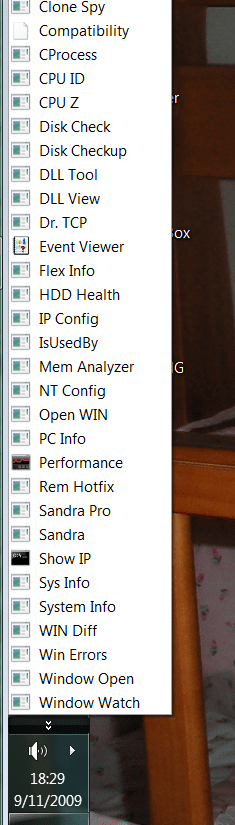
However, the sample folder has maintained itself through multiple boots today. The test folder is from a subfolder, Admin Tools, on my XP Start Menu. I selected that folder because it had no sub-folders and cannot be Win7 confused with anything else. It is for demo purposes only.

It is an example of what I think so many people are trying to accomplish - a single click menu with custom contents, resident on the new taskbar.
 

Attachments

  • Capture.PNG
    Capture.PNG
    69 KB · Views: 111
  • Capture2.PNG
    Capture2.PNG
    35.3 KB · Views: 213
Antman, I am not really sure how you got that in. Is that a toolbar or what? Could you please elaborate.
 

My Computer

Computer Manufacturer/Model Number
HP, Dell, Gateway, Toshiba - 4 laptops and 2 desktops
OS
Vista, Windows7, Mint Mate, Zorin, Windows 8
CPU
from 1.6GHz Duo to i7
Monitor(s) Displays
2x HP w2207
Hard Drives
5x HDD, 7x SSD, 12x Externals
Keyboard
with trackball - no mices
Mouse
Trackball mice
Internet Speed
DSL 6000
Right click Taskbar
Select Toolbars
New Toolbar
Navigate to desired folder

The folder I am demonstrating is not special to Windows in any way.

I suggest that you create a folder, populate it with what you need - folders are OK also, they will expand.

Then, add it to the taskbar.
 
But that is exactly what I did. Problem is, that it lasts only for the length of the session. After reboot, the toolbar (not the repository folder) has disappeared and I have to do the same mimic again.


W7.png
 

My Computer

Computer Manufacturer/Model Number
HP, Dell, Gateway, Toshiba - 4 laptops and 2 desktops
OS
Vista, Windows7, Mint Mate, Zorin, Windows 8
CPU
from 1.6GHz Duo to i7
Monitor(s) Displays
2x HP w2207
Hard Drives
5x HDD, 7x SSD, 12x Externals
Keyboard
with trackball - no mices
Mouse
Trackball mice
Internet Speed
DSL 6000
Odd. It is surviving reboot here. What is the exact folder/path that you are using?

Select the tarhet folder, hold SHIFT. right click COPY AS PATH - post it here.
 
Like so often before, it seems I don't understand these complaints of Quick Launch. Am I missing something? Mine works perfectly, doing exactly what Quick Launch is supposed to do. When I want to add a new application to it, I just drag and drop the icon there.

toolbar.PNG
 

My Computer

Computer type
Laptop
Computer Manufacturer/Model Number
HP ENVY 17-1150eg
OS
Windows 10 Pro x64 EN-GB
CPU
1.6 GHz Intel Core i7-720QM Processor
Memory
6 GB
Graphics Card(s)
ATI Mobility Radeon HD 5850 Graphics
Sound Card
Beats sound system with integrated subwoofer
Monitor(s) Displays
17" laptop display, 22" LED and 32" Full HD TV through HDMI
Screen Resolution
1600*900 (1), 1920*1080 (2&3)
Hard Drives
Internal: 2 x 500 GB SATA Hard Disk Drive 7200 rpm
External: 2TB for backups, 3TB USB3 network drive for media
Cooling
As Envy runs a bit warm, I have it on a Cooler Master pad
Keyboard
Logitech diNovo Media Desktop Laser (bluetooth)
Mouse
Logitech Performance Mouse MX
Internet Speed
50/10 Mbps VDSL
Antivirus
Windows Defender 4.3.9431.0
Browser
Maxthon 3.5.2., IE11
Like so often before, it seems I don't understand these complaints of Quick Launch. Am I missing something? Mine works perfectly, doing exactly what quick Launch is supposed to do. When I want to add a new application to it, I just drag and drop the icon there.
I will try it again. One advantage to my new method - I don't have the new Quick Launch location in my archive routine. I don't want all of the default and uninvited guests there.

I do agree with the underlying point - whatever is causing the toolbar to disappear remains unidentified.
 

My Computer

Computer type
Laptop
Computer Manufacturer/Model Number
HP ENVY 17-1150eg
OS
Windows 10 Pro x64 EN-GB
CPU
1.6 GHz Intel Core i7-720QM Processor
Memory
6 GB
Graphics Card(s)
ATI Mobility Radeon HD 5850 Graphics
Sound Card
Beats sound system with integrated subwoofer
Monitor(s) Displays
17" laptop display, 22" LED and 32" Full HD TV through HDMI
Screen Resolution
1600*900 (1), 1920*1080 (2&3)
Hard Drives
Internal: 2 x 500 GB SATA Hard Disk Drive 7200 rpm
External: 2TB for backups, 3TB USB3 network drive for media
Cooling
As Envy runs a bit warm, I have it on a Cooler Master pad
Keyboard
Logitech diNovo Media Desktop Laser (bluetooth)
Mouse
Logitech Performance Mouse MX
Internet Speed
50/10 Mbps VDSL
Antivirus
Windows Defender 4.3.9431.0
Browser
Maxthon 3.5.2., IE11
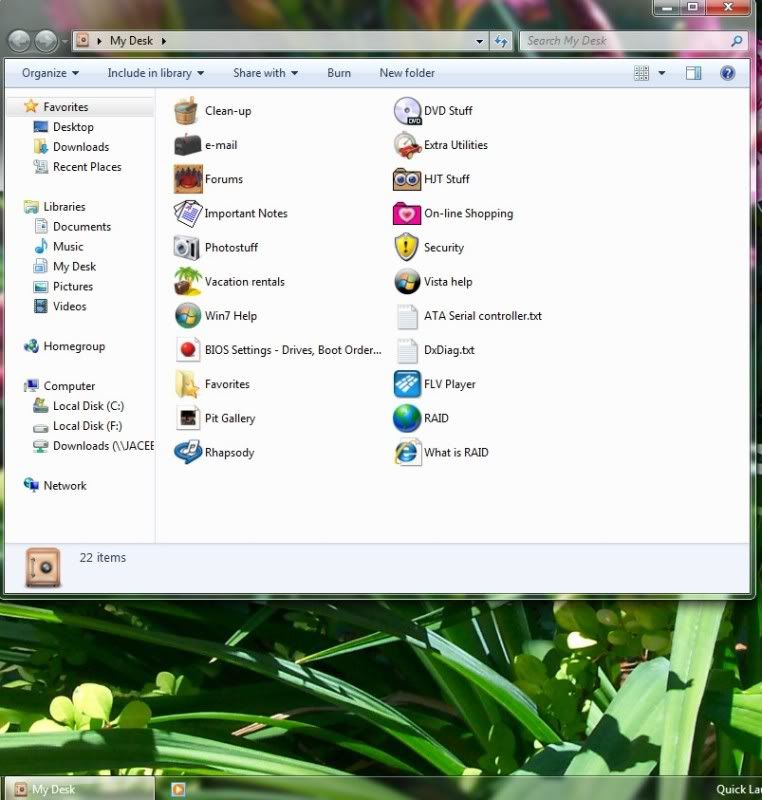
I can't stand a messy desktop, so I have one folder with several other folders in it.
This one folder can be sent to quick launch. This is quick and easy for me to pull up what I need
 

Attachments

  • mydesk.jpg
    mydesk.jpg
    81.4 KB · Views: 39

My Computer

Computer type
PC/Desktop
Computer Manufacturer/Model Number
Bruce ... somewhere in his 40's
OS
Windows 7 Ultimate 32bit SP1
CPU
Intel(R) Core(TM)2 Quad CPU @ 2.40GHz, 2400 MHz
Motherboard
INTEL/D975XBX2
Memory
4 GB
Graphics Card(s)
ATI Radeon HD 2600 Pro
Monitor(s) Displays
Samsung SyncMaster 914v
Screen Resolution
1280 x 1024
Hard Drives
2/500GB each ... ST3500630AS ATA Device.
One is not connected
PSU
Rocketfish 700 W
Case
G.Skill Gigabyte Chassis
Keyboard
Standard PS/2 Keyboard
Mouse
Microsoft PS/2 Mouse
Internet Speed
DSL
Antivirus
Avira Internet Security
Browser
IE 11
Other Info
ATI HDMI Audio
Hi Antman,
1. The path is normal. C:>user>myname>desktop>toolbar
2. The system is Windows7 RT that I am running right now in a vBox virtual partition. Host system is Vista on a Q6600 with 4GB of RAM.
I have another setup on an SSD, but that is at another location (6000 miles away).
3. User account is "Administrator".
 

My Computer

Computer Manufacturer/Model Number
HP, Dell, Gateway, Toshiba - 4 laptops and 2 desktops
OS
Vista, Windows7, Mint Mate, Zorin, Windows 8
CPU
from 1.6GHz Duo to i7
Monitor(s) Displays
2x HP w2207
Hard Drives
5x HDD, 7x SSD, 12x Externals
Keyboard
with trackball - no mices
Mouse
Trackball mice
Internet Speed
DSL 6000
Like so often before, it seems I don't understand these complaints of Quick Launch. Am I missing something? Mine works perfectly, doing exactly what Quick Launch is supposed to do. When I want to add a new application to it, I just drag and drop the icon there.

View attachment 27672

I am not really complaining about the Quick Launch tweak in W7, it is the drag and drop part that I do not like. I have an easier time to keep order in my repository folder.
 

My Computer

Computer Manufacturer/Model Number
HP, Dell, Gateway, Toshiba - 4 laptops and 2 desktops
OS
Vista, Windows7, Mint Mate, Zorin, Windows 8
CPU
from 1.6GHz Duo to i7
Monitor(s) Displays
2x HP w2207
Hard Drives
5x HDD, 7x SSD, 12x Externals
Keyboard
with trackball - no mices
Mouse
Trackball mice
Internet Speed
DSL 6000
Hi Antman,
1. The path is normal. C:>user>myname>desktop>toolbar
2. The system is Windows7 RT that I am running right now in a vBox virtual partition. Host system is Vista on a Q6600 with 4GB of RAM.
I have another setup on an SSD, but that is at another location (6000 miles away).
3. User account is "Administrator".

Part 2 could be the problem, is vBox set up to save any session information after you close the session?
 

My Computer

Computer Manufacturer/Model Number
Compaq Desktop
OS
Windows 7 Ultimate x64
CPU
AMD Sempron Dual Core
Memory
3GB
Graphics Card(s)
NVIDIA GeForce 6150SE nForce 430
Screen Resolution
1024x768
Hard Drives
150GB Sata
I do not close vBox. I just shut down W7. But I will check whether there is a specific vBox setting that I may have missed.
 

My Computer

Computer Manufacturer/Model Number
HP, Dell, Gateway, Toshiba - 4 laptops and 2 desktops
OS
Vista, Windows7, Mint Mate, Zorin, Windows 8
CPU
from 1.6GHz Duo to i7
Monitor(s) Displays
2x HP w2207
Hard Drives
5x HDD, 7x SSD, 12x Externals
Keyboard
with trackball - no mices
Mouse
Trackball mice
Internet Speed
DSL 6000
Back
Top