Disconnect HDD0 during new install on HDD1

aaron1948

New member
Local time
6:45 PM
Messages
3
Dual Boot, Dual HDD Installation Question I have Vista Home Premium x32 on HDD0 and am installing Windows 7 x64 on HDD1-- to end up with a Dual Boot configuration.

In my research I've found that some advise to disconnect HDD0 while installing Windows 7 on HDD1, and then reconnecting.

I have 2 questions:

1. What are the benefits of disconnecting vs not disconnecting first HDD while installing on second HDD? Which strategy is safest?

2. If a disconnect install is the best way to go, when I reconnect HDD0, will Drive C be re-assigned to the Windows 7 installation on HDD1? If so, will that impact the Vista installation finding files formally mapped to C drive.

Note: On my HDD0, I have 3 partitions: C: Vista installation; D: Special documents; E: main Documents directory, Contacts, Favorites, Music, Videos

Thanks
 

My Computer My Computer

At a glance

Vista Home Premium 321.80 gigahertz Intel Core 2 Duo4 GBNVIDIA GeForce 210
Computer Manufacturer/Model Number
Dell Dimension E520
OS
Vista Home Premium 32
CPU
1.80 gigahertz Intel Core 2 Duo
Motherboard
Dell Inc. 0WG864
Memory
4 GB
Graphics Card(s)
NVIDIA GeForce 210
Monitor(s) Displays
DELL 2007WFP, DELL S2209W
Hard Drives
Internal:
SEAGATE ST3250820A 250GB, ST3250820AS 250 GG
External:
TOSHIBA External HDD, 750 GB
WD 1200BB External USB 120 GB
WDC WD2500KS-00MJB0 260 GB
The benefit is that when booted via the BIOS Boot order or one-time BIOS Boot Menu key it keeps the HD's independent to come and go as you please, whereas allowing Windows to configure a Dual Boot interlocks them requiring surgery to remove one later.

Both will remain C when booted into each.
 
One time boot menu is best way to go.

GA BIOS2.PNG
 

My Computer My Computer

At a glance

ME/XP/Vista/Win7
OS
ME/XP/Vista/Win7
Thanks gregrocker.

Another question arises: (I apologize for the length of this, and hope it is clear. As a PC user from the beginning--1985--I recall many issues with drive letters changing, and thus want to set this dual boot/dual HDD up right).

1) If I boot into Windows 7, for example, and that becomes my C drive, I assume that the Vista drive will now be assigned another drive letter.

If C is used with both the Vista and Windows partitions on each HDD--depending which op system I've booted into--when, for example, I'm in Windows 7, and need to access and modify a file in the Vista drive (now temporarily another letter) will my file indexing get screwed up when, say, I boot into Vista the next time?

Two specific examples:
(1) I do web design, and use a folder in my current Vista C-drive to contain the local testing server files, and the local versions of several sites. If I access and work with these files in both Vista and Windows 7 (until I make the complete transition to Windows 7 and get rid of Vista), do I risk confusion?

Would it be safer for me to move the Web folder to another partition, e.g., the one where I keep my Documents?

(2) For a while, I will have duplicate programs in both Vista & Windows 7--but will have a separate partition for Documents (E Drive, currently a partition of HDD), which will be accessed and modified by both op systems.

Since the "C Drive" will keep changing back and forth, should I do anything to make sure I don't confuse the programs?

For example, to avoid potential C drive confusion, should I, for example, reserve C for just for Windows 7, and permanently change the Vista C to another letter? (Can a drive letter other than C be used for the op system?) So, for example, the Windows 7 boot drive and op system would be on C, and the Vista drive and op system would be on G.

Thanks for wading through this!
 

My Computer My Computer

At a glance

Vista Home Premium 321.80 gigahertz Intel Core 2 Duo4 GBNVIDIA GeForce 210
Computer Manufacturer/Model Number
Dell Dimension E520
OS
Vista Home Premium 32
CPU
1.80 gigahertz Intel Core 2 Duo
Motherboard
Dell Inc. 0WG864
Memory
4 GB
Graphics Card(s)
NVIDIA GeForce 210
Monitor(s) Displays
DELL 2007WFP, DELL S2209W
Hard Drives
Internal:
SEAGATE ST3250820A 250GB, ST3250820AS 250 GG
External:
TOSHIBA External HDD, 750 GB
WD 1200BB External USB 120 GB
WDC WD2500KS-00MJB0 260 GB
Thanks theog

I'm not sure what you mean by "One time boot menu is best way to go" and what the image means.

Are you recommending that I disconnect the HDD0 (Vista) drive, while installing Windows 7 on HDD1? Or do you mean to leave it connected?

One issue with the disconnect issue is that my current C drive has 3 partitions: C, D, E, with E holding my Documents.

Before I install Windows 7, perhaps I should move the Documents folder to a second partition on the HDD1, so when I install Windows 7, it can access the Documents folder (which, otherwise would be inaccessible during installation, with HDD0 disconnected).

Thanks.
 

My Computer My Computer

At a glance

Vista Home Premium 321.80 gigahertz Intel Core 2 Duo4 GBNVIDIA GeForce 210
Computer Manufacturer/Model Number
Dell Dimension E520
OS
Vista Home Premium 32
CPU
1.80 gigahertz Intel Core 2 Duo
Motherboard
Dell Inc. 0WG864
Memory
4 GB
Graphics Card(s)
NVIDIA GeForce 210
Monitor(s) Displays
DELL 2007WFP, DELL S2209W
Hard Drives
Internal:
SEAGATE ST3250820A 250GB, ST3250820AS 250 GG
External:
TOSHIBA External HDD, 750 GB
WD 1200BB External USB 120 GB
WDC WD2500KS-00MJB0 260 GB
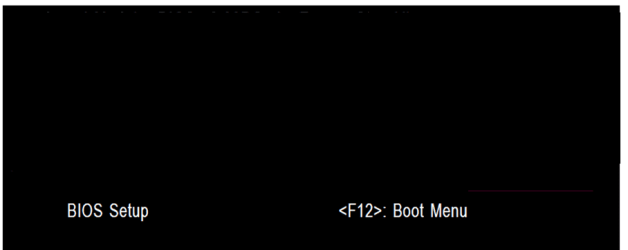
We are both say, Use the one time boot menu to boot the OS's.
The screenshot a BIOS post screen.

When installing Windows 7
1) Remove Disk0 with Windows Vista.
2) Install Windows 7 to Disk1
3) Replace Disk0.
4) Use the one boot menu to boot the OS's.

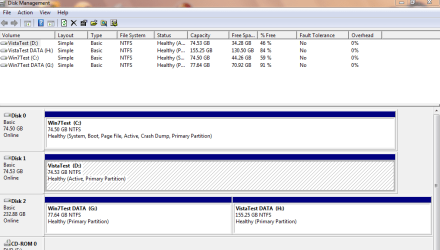
Drive letters as seen from Windows 7.

Capture0000033.PNG


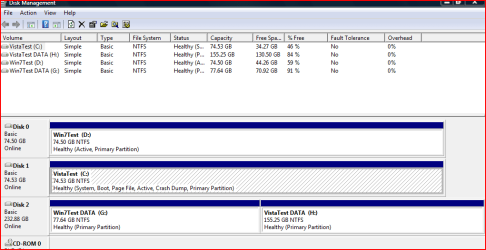
Drive letters as seen from Windows Vista.

Capture00000344.PNG
 

My Computer My Computer

At a glance

ME/XP/Vista/Win7
OS
ME/XP/Vista/Win7
Hello aaron1948, welcome to Seven Forums!


   Information

The easiest way to do away with boot issues between separate Operating Systems (OS) is to use the BIOS one time boot menu to select which OS to boot at system startup, each motherboard has an individual hot-key to tap during system start-up to access this menu.

If you have 2 separate Hard Disk Drives (HDD) and have one OS installed to one HDD and you want to install another OS to the second HDD, disconnect the HDD with the first OS installed on it and leave only the HDD you want to install the second OS to connected.

Install the second OS to the connected HDD and when complete and the system is booting good, power down and reconnect the first HDD with the first OS on it.

This way the OSs will boot independently of each other and there will be no boot conflicts between the 2 separate OSs to have to sort later.


Then set the BIOS to boot the HDD / OS you want as default and if you want to start the other (new) OS you use the BIOS one-time boot menu to select that HDD / OS to start when the PC is started.
  • Asus - F8
  • HP/Compaq - Esc
  • Sony - F2
  • Acer – F12
  • Packard Bell
  • Gateway - F10
  • eMachnes - F10
  • Gigabyte – F12
  • Toshiba - F12
  • Dell - F12
 

My Computer My Computer

At a glance

W 7 64-bit UltimateIntel Q9550 Yorkfield8GB Dominator 8500C5DATI : XFX 5870
Computer Manufacturer/Model Number
* BFK Customs *
OS
W 7 64-bit Ultimate
CPU
Intel Q9550 Yorkfield
Motherboard
ASUS P5Q Pro
Memory
8GB Dominator 8500C5D
Graphics Card(s)
ATI : XFX 5870
Sound Card
Realtek HD Audio 7-1
Monitor(s) Displays
1x 47" LCD HDMI & 3x 26" LCD HDMI
Screen Resolution
1920x1080P & 1920x1200
Hard Drives
1x 80GB Intel X25-M G2 SSD : 1x 500GB & 1x 640GB WD Caviar Black(s)
PSU
Corsair 620HX
Case
Cooler Master RC-690
Cooling
Tuniq Tower 120, 2x 140mm and 3x 120mm case fans
Keyboard
Microsoft 500
Mouse
Razer Diamondback 3G
Internet Speed
14 Mb/s
Other Info
1x Koutech 3Gb/s SATA HDD Hot Swap Rack
Whether you configure a BIOS-managed Dual Boot as recommended (unplugging other during install to keep HD's independent) or a Windows-managed Dual Boot (leaving both HD's plugged in, requiring surgery later to remove one) the OS you are in will be seen as C. This will not affect the location of your files at all.

The only way you can reserve a drive letter is if the other OS is incorrectly installed from the desktop of the existing OS. There is no reason to do this, and many reasons not to.
 
Back
Top