Disk boot failure after deleting WinXP partition

Tetsuma

New member
Local time
9:23 PM
Messages
3
Greetings,

I've recently rendered my computer useless by deleting my Windows XP partition to merge the remaining space into my Windows 7 partition. Now I get a "disk boot failure, insert system disk and press enter" error.

I've run the Startup Repair utility about six times now and have had no progress. The 'System Recovery Options' panel doesn't detect anything (The window that has two dot check points; One being 'restore your computer using a system image that you created earlier', the other 'Use recovery tools that can help fix problems starting Windows'). I don't know what drivers it expects me to find, but any help there would be great.

So here are a few things i've tried;

I'm not sure what information is worth mentioning, so i'll mention it all.
Running the startup repair six times, as mentioned previously.

Bootrec /scanos - [1] D:\Windows
Bootrec /fixboot - Element not found
Bootrec /fixmbr - The operation completed successfully.

Diskpart List disk: Disk 0 Status online.

I selected disk 0
Diskpart list partition:
Partition 1 T:Primary S:93gigs Offset: 31kb
Partition 2 T:Primary S:138gigs Offset: 94gigs

I don't have have experience in Diskpart, so I didn't do any more queries.

How could I get out of this rut?
 

My Computer

OS
Win7
Hello Tetsuma, welcome to Seven Forums!


First you have to mark the Windows 7 partition as active, then you will need to run as many as 3 separate startup repairs with system restarts between the repairs to write the boot files to the Windows 7 partition.
Be sure to post back to keep us informed.


Partition - Mark as Active

Startup Repair

System Repair Disc - Create
 

My Computer

Computer Manufacturer/Model Number
* BFK Customs *
OS
W 7 64-bit Ultimate
CPU
Intel Q9550 Yorkfield
Motherboard
ASUS P5Q Pro
Memory
8GB Dominator 8500C5D
Graphics Card(s)
ATI : XFX 5870
Sound Card
Realtek HD Audio 7-1
Monitor(s) Displays
1x 47" LCD HDMI & 3x 26" LCD HDMI
Screen Resolution
1920x1080P & 1920x1200
Hard Drives
1x 80GB Intel X25-M G2 SSD : 1x 500GB & 1x 640GB WD Caviar Black(s)
PSU
Corsair 620HX
Case
Cooler Master RC-690
Cooling
Tuniq Tower 120, 2x 140mm and 3x 120mm case fans
Keyboard
Microsoft 500
Mouse
Razer Diamondback 3G
Internet Speed
14 Mb/s
Other Info
1x Koutech 3Gb/s SATA HDD Hot Swap Rack
Bare Foot Kid, you're awesome.

I'm posting this from my recently defunct computer, now up and running :) .

In the interest of keeping it this way, I was hoping you could help me with one last problem.

Here is a screen shot of my hard-drive from with-in paragon's partition manager:


Could you tell me how to merge these partitions without issues please?
 

My Computer

OS
Win7

My Computer

Computer Manufacturer/Model Number
Dell and Custom
OS
Systems 1 and 2: Windows 7 Enterprise x64, Win 8 Developer
CPU
System 1: i7 [email protected], System 2: AMD FX-4100 Zambezi 3.6G
Motherboard
System 1:Dell 06NWYK System 2: ASUS M5A97 AM3+
Memory
System 1: 8GB System 2: 8GB
Graphics Card(s)
System 1: ATI FirePro V4800 System 2: Radeon HD 6850
Sound Card
System 1: onboard System 2: onboard
Monitor(s) Displays
System1: Viewsonic HDMI 24"
Screen Resolution
System 1: 1920x1080 System 2: 1920x1080
Hard Drives
System 1: Mirrored .5B drives System 2: Seagate Barracuda ST1000DM003 1TB 7200 RPM 64MB Cache SATA 6.0Gb/s
Case
System 1: Dell System 2: Cooler Master
Internet Speed
10 MBPS
I'm glad you got it running; you'll have to use the program at the link below as Windows can not resize to the left; have a good look through the whole tutorial and you'll see how.


Partition Wizard : Use the Bootable CD


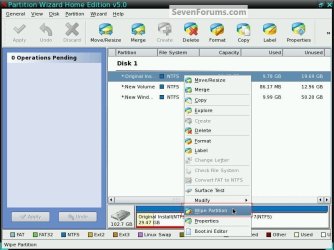
Though I'd do a wipe of that partition before you resize Windows back into it.

click to enlarge
Wipe.jpg
 

My Computer

Computer Manufacturer/Model Number
* BFK Customs *
OS
W 7 64-bit Ultimate
CPU
Intel Q9550 Yorkfield
Motherboard
ASUS P5Q Pro
Memory
8GB Dominator 8500C5D
Graphics Card(s)
ATI : XFX 5870
Sound Card
Realtek HD Audio 7-1
Monitor(s) Displays
1x 47" LCD HDMI & 3x 26" LCD HDMI
Screen Resolution
1920x1080P & 1920x1200
Hard Drives
1x 80GB Intel X25-M G2 SSD : 1x 500GB & 1x 640GB WD Caviar Black(s)
PSU
Corsair 620HX
Case
Cooler Master RC-690
Cooling
Tuniq Tower 120, 2x 140mm and 3x 120mm case fans
Keyboard
Microsoft 500
Mouse
Razer Diamondback 3G
Internet Speed
14 Mb/s
Other Info
1x Koutech 3Gb/s SATA HDD Hot Swap Rack
Bare Foot Kid, you're awesome.

I'm posting this from my recently defunct computer, now up and running :) .

In the interest of keeping it this way, I was hoping you could help me with one last problem.

Here is a screen shot of my hard-drive from with-in paragon's partition manager:

Could you tell me how to merge these partitions without issues please?


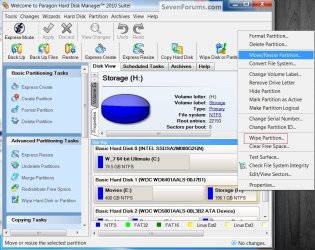
I just realised you have Paragon as I do; right click the partition to be resized and select resize; as I said before I would use Paragon to do a wipe of the old partition before the resize.
Par.jpg
 

My Computer

Computer Manufacturer/Model Number
* BFK Customs *
OS
W 7 64-bit Ultimate
CPU
Intel Q9550 Yorkfield
Motherboard
ASUS P5Q Pro
Memory
8GB Dominator 8500C5D
Graphics Card(s)
ATI : XFX 5870
Sound Card
Realtek HD Audio 7-1
Monitor(s) Displays
1x 47" LCD HDMI & 3x 26" LCD HDMI
Screen Resolution
1920x1080P & 1920x1200
Hard Drives
1x 80GB Intel X25-M G2 SSD : 1x 500GB & 1x 640GB WD Caviar Black(s)
PSU
Corsair 620HX
Case
Cooler Master RC-690
Cooling
Tuniq Tower 120, 2x 140mm and 3x 120mm case fans
Keyboard
Microsoft 500
Mouse
Razer Diamondback 3G
Internet Speed
14 Mb/s
Other Info
1x Koutech 3Gb/s SATA HDD Hot Swap Rack
Sorry for the late reply, issues with my ISP.

I have my full drive unpartitioned again, thanks Bare Foot Kid- I can't stress enough, just how much help you've provided.
 

My Computer

OS
Win7
I'n very glad I could help, you're welcome and thanks for the update.
 

My Computer

Computer Manufacturer/Model Number
* BFK Customs *
OS
W 7 64-bit Ultimate
CPU
Intel Q9550 Yorkfield
Motherboard
ASUS P5Q Pro
Memory
8GB Dominator 8500C5D
Graphics Card(s)
ATI : XFX 5870
Sound Card
Realtek HD Audio 7-1
Monitor(s) Displays
1x 47" LCD HDMI & 3x 26" LCD HDMI
Screen Resolution
1920x1080P & 1920x1200
Hard Drives
1x 80GB Intel X25-M G2 SSD : 1x 500GB & 1x 640GB WD Caviar Black(s)
PSU
Corsair 620HX
Case
Cooler Master RC-690
Cooling
Tuniq Tower 120, 2x 140mm and 3x 120mm case fans
Keyboard
Microsoft 500
Mouse
Razer Diamondback 3G
Internet Speed
14 Mb/s
Other Info
1x Koutech 3Gb/s SATA HDD Hot Swap Rack
Back
Top