
Disk Boot Failure with RAID 0 Array

MrNosebleed

New member
Local time
6:33 AM
Messages
26
Hi

I have two 500Gb SATA drives in a RAID 0 config set as my system drive 'C', and a 1TB SATA as a storage drive 'E'

Never had this problem until last night when I removed the storage drive. Tried the usual fixes with no luck, put the drive back in and the system boots normally.

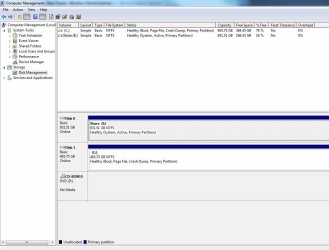
The problem seems to be that I installed Windows on the RAID array while the storage drive was attached, and for some reason Windows decided to make 'E' the active partition.

Have attached a screenshot.

'E' also shows as System for some reason, even tho Windows is on 'C'.

What I want to know is can I fix this problem without reformatting/reinstalling, and what will potentially happen if I make the 'C' partition active? Dont really want to kill my machine right now!

All comments and advice appreicated.
 

Attachments
  • screenshot.jpg
    screenshot.jpg
    88.7 KB · Views: 171

My Computer

OS
Windows 7

My Computer

Computer Manufacturer/Model Number
Custom
OS
Windows 7 Professional x64
CPU
Intel i7 2600K OC'd @ 4620 MHz
Motherboard
Asus P8Z68-V Pro
Memory
16GB GSkill Sniper 2133 Mhz (4x4GB)
Graphics Card(s)
EVGA GeForce GTX 480 SuperClocked+
Sound Card
Realtek High Definition Audio
Monitor(s) Displays
2x Acer S273HLbmii 27"
Screen Resolution
2 x 1920x1080
Hard Drives
64GB Crucial M4 SSD

Storage: Hitachi 1TB 5400RPM, Samsung 1.5TB 5400RPM
PSU
Corsair HW Series 750w (modular)
Case
Cooler Master HAF 932 Advanced Blue Edition
Cooling
CM Hyper 212+ CPU cooler, 3x 230mm + 1x 140mm case fans
Keyboard
Logitech MK320 (wireless)
Mouse
Logitech MK320 (wireless)
Internet Speed
30 Mb/s : 2 Mb/s
Curious as to why E is showing as System as well. Any ideas on that?
 

My Computer

OS
Windows 7
I say "should" because I can't 100% guarantee it will work. However, I have a very strong suspicion it will.

At worst, it doesn't work. In that case, simply mark the E partition as active again, and you should be back to normal.

One thing I forgot to mention. In your BIOS, make sure the C drive is set to be the first one to boot.
 

My Computer

Computer Manufacturer/Model Number
Custom
OS
Windows 7 Professional x64
CPU
Intel i7 2600K OC'd @ 4620 MHz
Motherboard
Asus P8Z68-V Pro
Memory
16GB GSkill Sniper 2133 Mhz (4x4GB)
Graphics Card(s)
EVGA GeForce GTX 480 SuperClocked+
Sound Card
Realtek High Definition Audio
Monitor(s) Displays
2x Acer S273HLbmii 27"
Screen Resolution
2 x 1920x1080
Hard Drives
64GB Crucial M4 SSD

Storage: Hitachi 1TB 5400RPM, Samsung 1.5TB 5400RPM
PSU
Corsair HW Series 750w (modular)
Case
Cooler Master HAF 932 Advanced Blue Edition
Cooling
CM Hyper 212+ CPU cooler, 3x 230mm + 1x 140mm case fans
Keyboard
Logitech MK320 (wireless)
Mouse
Logitech MK320 (wireless)
Internet Speed
30 Mb/s : 2 Mb/s
Cheers for that, but my concern is that if it doesnt work, i wont be able to boot back in to mark the E partition as active. Bit of a catch 22 i suspect.
 

My Computer

OS
Windows 7
No go. I set the partition as active, booted from the install disk, used startup recovery, says it cant repair the disk and that no os is present.

I am now officially screwed. ANyone have any ideas how I can get back into my pc?
 

My Computer

OS
Windows 7
ps - I assume the windows setup disk is not seeing the os because it is installed on a raid set and it doesnt have raid drivers, if this makes sense. Any way of loading raid drivers prior to running startup recovery?
 

My Computer

OS
Windows 7
Oops. Answered my own question. Working now, touch wood. Was not quite as straightforward as all that - seems the biggest problem was Windows still insisting on assigning the drive letter C to the storage drive and not the raid set. Had to bludgeon it into submission by unplugging everything but the raid set and assigning drive letters manually. So far so good.
 

My Computer

OS
Windows 7
Startup Recovery, looks for Boot files on Disk 0, which is your E: drive.
 

My Computer

OS
ME/XP/Vista/Win7
I am glad that you managed to fix it yourself.
 

My Computer

Computer Manufacturer/Model Number
Advent
OS
Dual-boot: Windows 7 HP 32-bit SP1 & Windows XP Pro 32-bit SP2.
CPU
AMD Phenom X4 9550 2.8Ghz
Motherboard
FOXCONN A6VMX (Socket 940)
Memory
4.0GB RAM
Graphics Card(s)
256MB On-board ATI Radeon X1200 Series
Sound Card
UnKnown
Monitor(s) Displays
19" TFT Mointor
Screen Resolution
1400 by 900
Hard Drives
500GB Western Digital WDC
Keyboard
HP Keyboard
Internet Speed
Dial-up via Mobile phone (Three)
Other Info
80GB External Hard-drive.

Also I have an old Windows XP Laptop for backup/occasional use etc.
Startup Recovery, looks for Boot files on Disk 0, which is your E: drive.

It seems this problem probably came about because I did the install on the new raid set while the storage drive was still present. I usually disconnect everything, but this being about my millionth installI guess I was blase about it.

Is it possible to set up the raid set as Disk 0 now? Will it screw things further? Or will it always default to Disk 1?
 

My Computer

OS
Windows 7
MrNosebleed, you are one brave individual... I personally will NEVER EVER consider RAID 0 as OS volume... or for anything for that matter. The thought of someday somehow, either my controller went south, or one of the RAID member disk went to HDD heaven - I'll loose a running system... But each to one's own I guess...

Glad the problem is solved though :)

zzz2496
 

My Computer

Computer Manufacturer/Model Number
Self Built
OS
Windows7 Ultimate 64bit
CPU
Intel Core 2 Quad Q6600
Motherboard
Abit IN9-32X-MMAX
Memory
DDR2 Adata 4GB
Graphics Card(s)
Nvidia GeForce GTX 285 1024 and Nvidia GeForce 8800GT 512
Sound Card
Asus Xonar HDAV 1.3
Monitor(s) Displays
Dell 2407WFP and BenQ 2400v and Philips 150v3
Screen Resolution
3840x1200 and 1024x768
Hard Drives
2 WDC 1TB
1 WDC 1.5TB
1 WDC 640GB
1 WDC 320GB
1 Seagate 200GB
PSU
Corsair TX 850W
Case
Cooler Master HAF932
Cooling
Arctic Cooling Freezer Extreme and plenty of fans...
Keyboard
MicrosoftNaturalKeyboard 4000/Apple Alu keyboard/Dinovo mini
Mouse
Logitech G5/MarbleMouseTrackball/PerformanceMX/SpacePilotPRO
Internet Speed
1.5Mbps down/384Kbps up
Other Info
APC SURT 1000XL
Logitech Z-560
Wiimote
Mikrotik Router
Linksys (now Cisco) SD2008 8 port Gigabit switch
Linksys WRT54G (acting as AP)
Apple wireless Aluminium keyboard
Apple Magic Mouse
Xbox360 wired controller
MrNosebleed, you are one brave individual... I personally will NEVER EVER consider RAID 0 as OS volume... or for anything for that matter. The thought of someday somehow, either my controller went south, or one of the RAID member disk went to HDD heaven - I'll loose a running system... But each to one's own I guess...

Glad the problem is solved though :)

zzz2496

Just slap me round the head a few times and call me stoopid. I meant to say RAID 1.

I had a system drive fail once many years back and I learned my lesson. Storage is cheap compared to critical data. Since then every OS I've installed has been on a mirrored set. Probably better ways to do it, like keeping all your data on a seperate drive and keeping a disk image up to date, but who has time for thet these days?

Maybe what I lose my bravery points I make back in common sense.

Cheers
 

My Computer

OS
Windows 7
I've always had my Windows installed on a RAID 0. I think it's mostly personal preference. I feel that if a RAID member drive goes bad, worst case scenario, I just have to buy another drive and install Windows again from the CD/DVD or a Ghost image. I'm personally more concerned about precious data. After all, Windows and all the programs can be re-installed but if you lose your data (for example, I had about 1,000 pictures from a vacation and lost it all), you're pretty much screwed.
 

My Computer

Computer Manufacturer/Model Number
Custom Built
OS
Windows 7 Ultimate x64
CPU
Intel Core i5 750 @ 2.67 GHz
Motherboard
ASUS P7P55D
Memory
8 GB - G.Skill DDR3
Graphics Card(s)
Sapphire Radeon HD 4670
Sound Card
VIA Onboard HD Audio
Monitor(s) Displays
LG W2252TQ
Hard Drives
250 GB Western Digital RE3 (X2) - Raid0
1 TB Western Digital RE3
PSU
Raidmax RX-730SS
Case
Rosewill Destroyer
I've always had my Windows installed on a RAID 0. I think it's mostly personal preference. I feel that if a RAID member drive goes bad, worst case scenario, I just have to buy another drive and install Windows again from the CD/DVD or a Ghost image. I'm personally more concerned about precious data. After all, Windows and all the programs can be re-installed but if you lose your data (for example, I had about 1,000 pictures from a vacation and lost it all), you're pretty much screwed.

With hard drives being so big there is really no need for RAID 0 for the OS.

RAID 0 is typically used where you have a ton of data and need a lot of space. Especially before you could buy a 1TB drive. But if you need 8TB of space and only have enough space for 4 drives in your system you can install 4 drives 2TB each and use RAID 0. Giving you 8TB of space as one huge drive. You would be much better off using RAID 1 for your OS then you have a small bit of fault protection. Or if as you say that data is more important and the OS is an easy reload. Use 1 drive for the OS and 2 drives RAID 1 for the data. If the OS drive crashes, replace it and reload the OS. If 1 data drive crashes you just need to replace the drive and let the RAID rebuild.
 

My Computer

Computer type
PC/Desktop
Computer Manufacturer/Model Number
Dell OP7010
OS
Windows 7 Enterprise (x64); Windows Server 2008 R2 (x64)
Memory
16GB
Monitor(s) Displays
4 Dell 24" LCD
Screen Resolution
1280x1024
Keyboard
Dell
Mouse
Dell Optical
Internet Speed
40meg
or WindowsStar, you could use RAID 01 - Raid 01 explained (at least 4 HDD's, pairs of 2) in which way, you gain both: fastest speed for your massive applications AND protection for your data. What do you say? :)

ChiefRA
 

My Computer

Computer Manufacturer/Model Number
3R SYSTEM R120 V2 BK
OS
Windows 7 x64
CPU
AMD Phenom II X6 1055T, 2.8GHz, socket AM3 - 6 cores
Motherboard
Asus M4A89TD-PRO/USB3, Socket AM3
Memory
Corsair Dual Channel 4GB (2 x 2GB), DDR3, 1600MHz 8-8-8-24
Graphics Card(s)
Sapphire Radeon HD 5770 VaporX 1Gb DDR5
Sound Card
Realtek HD + ATI HD both on-board.
Monitor(s) Displays
Dell E228WFP 22"
Screen Resolution
1680x1050
Hard Drives
2 x HDD Western Digital Caviar Black EX, 640GB, 7200rpm, 64MB, SATA 3 - WD6402AAEX
- RAID0 configuration
PSU
Sharkoon Rush Power 600 W Modular
Case
Tower Middle - 3R SYSTEM R120 V2 BK
Cooling
For CPU: NoiseBlocker NB-TwinTec
Keyboard
Logitech 310x
Mouse
Logitech G9
Internet Speed
Optic Fiber 100 Mbps/sec
or WindowsStar, you could use RAID 01 - Raid 01 explained (at least 4 HDD's, pairs of 2) in which way, you gain both: fastest speed for your massive applications AND protection for your data. What do you say? :)

ChiefRA

Respectfully you missed the point of what the OP is requesting. He only has 2 hard drives and wants to use RAID 0. We have been explaining to him that USING RAID 0 is unsafe and that he should use RAID 1 if nothing else to protect his data. I then went on to explain theoretical scenarios with 3 and 4 drives; however he does not have those drives. Using RAID 0+1 would give the best of both worlds if he had 4 hard drives but since he only has the 2 that is not going to work for him.

Thanks -WS
 

My Computer

Computer type
PC/Desktop
Computer Manufacturer/Model Number
Dell OP7010
OS
Windows 7 Enterprise (x64); Windows Server 2008 R2 (x64)
Memory
16GB
Monitor(s) Displays
4 Dell 24" LCD
Screen Resolution
1280x1024
Keyboard
Dell
Mouse
Dell Optical
Internet Speed
40meg
If the OP have 4 (or more) disks, he'd probably use RAID-5 instead of RAID 01...

zzz2496
 

My Computer

Computer Manufacturer/Model Number
Self Built
OS
Windows7 Ultimate 64bit
CPU
Intel Core 2 Quad Q6600
Motherboard
Abit IN9-32X-MMAX
Memory
DDR2 Adata 4GB
Graphics Card(s)
Nvidia GeForce GTX 285 1024 and Nvidia GeForce 8800GT 512
Sound Card
Asus Xonar HDAV 1.3
Monitor(s) Displays
Dell 2407WFP and BenQ 2400v and Philips 150v3
Screen Resolution
3840x1200 and 1024x768
Hard Drives
2 WDC 1TB
1 WDC 1.5TB
1 WDC 640GB
1 WDC 320GB
1 Seagate 200GB
PSU
Corsair TX 850W
Case
Cooler Master HAF932
Cooling
Arctic Cooling Freezer Extreme and plenty of fans...
Keyboard
MicrosoftNaturalKeyboard 4000/Apple Alu keyboard/Dinovo mini
Mouse
Logitech G5/MarbleMouseTrackball/PerformanceMX/SpacePilotPRO
Internet Speed
1.5Mbps down/384Kbps up
Other Info
APC SURT 1000XL
Logitech Z-560
Wiimote
Mikrotik Router
Linksys (now Cisco) SD2008 8 port Gigabit switch
Linksys WRT54G (acting as AP)
Apple wireless Aluminium keyboard
Apple Magic Mouse
Xbox360 wired controller
Back
Top