Disk Cleanup : Extended

How to Use Extended Disk Cleanup in Vista, Windows 7, and Windows 8

This will show you how to access and run the Extended Disk Cleanup function in Windows, allowing you to clean up more HDD space for you to use.

   Note

This must be done in an elevated command window to complete.


Let's get started!

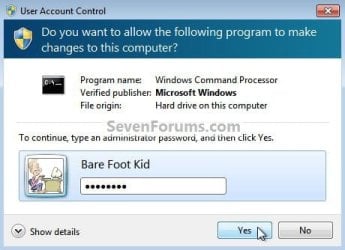
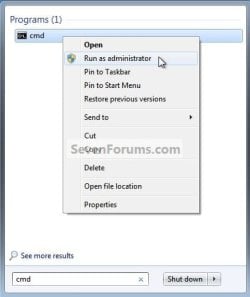
1) In the Windows 7 start menu search box type "cmd" (without the quotes) right click the entry and select "Run As Administrator" then enter your user credentials for the UAC prompt and click yes to open the command window.
cmd runas.jpg
cmd UAC.jpg
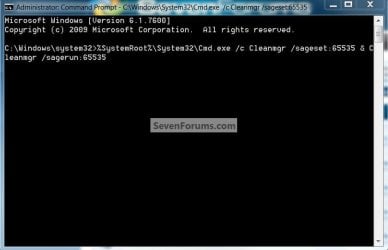
2) In the command window that opens type the command below and hit enter.

Be advised: the command window must be left open while the cleanup is carried out.

Code:
%SystemRoot%\System32\Cmd.exe /c Cleanmgr /sageset:65535 & Cleanmgr /sagerun:65535
cmd text.jpg


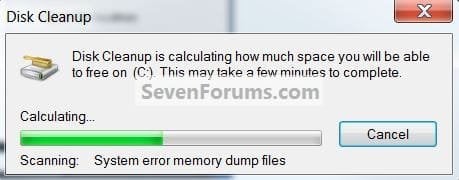
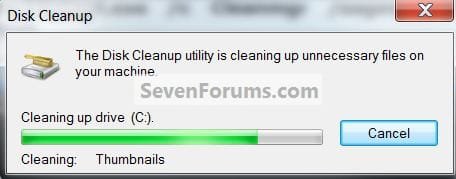
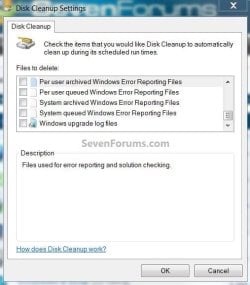
3) Now you will see the Disk Cleanup Settings window with more options available to you, select the ones you want to clean up then click ok; wait for the search and then the cleanup and then you're done.
disk cleanup.jpg
Checking.jpg
cleaning.jpg
To add a shortcut to the desktop.

   Note

This .bat file was created by CarlTR6 credit for this goes to him!


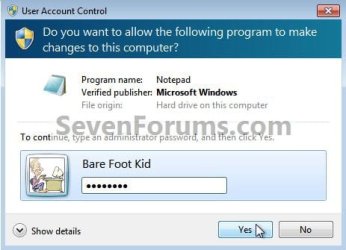
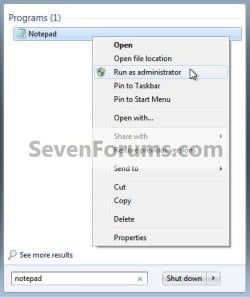
1) In the Windows start menu search box type "notepad" (without the quotes) right click the entry and choose Run as Administrator then enter your user credentials in the UAC prompt and click yes to open notepad.
Notepad Runas.jpg
UAC Notepad.jpg
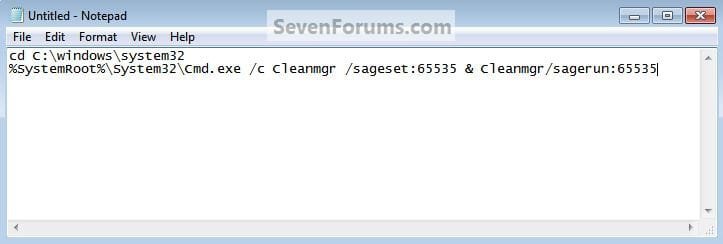
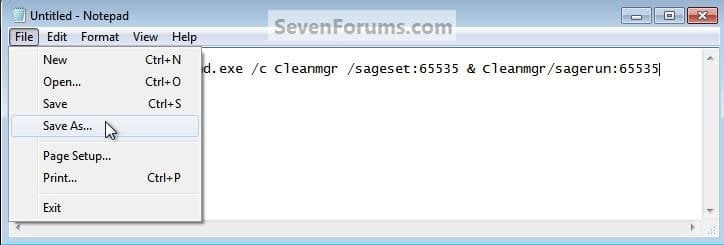
2) In notepad type the code below then in the upper left of notepad at File select "Save as" name the file anything you want but it must have the .bat extension then browse to C:/Windows/System32 and click Save, then back at "File" click "Exit" to close notepad.
Code:
 cd C:\windows\system32 
%SystemRoot%\System32\Cmd.exe /c Cleanmgr /sageset:65535 & Cleanmgr /sagerun:65535
Carl's.jpg
Carl's1.jpg
Carl's2.jpg
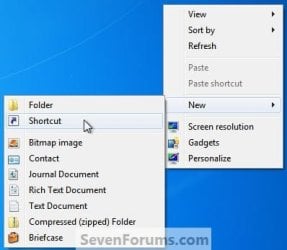
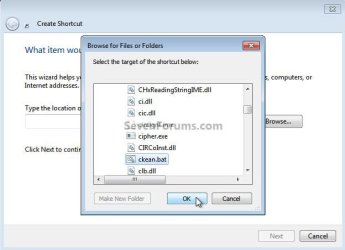
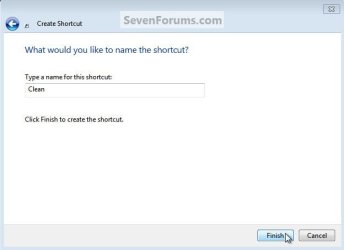
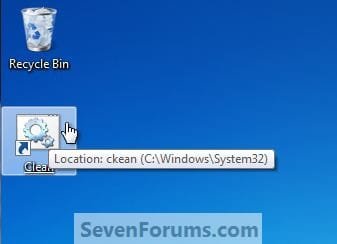
3) Now click an empty spot on the desktop and click, "New, Shortcut" in the "Create Shortcut" window browse to C:\Windows\System32\<your file name.bat> and click ok, then in the next window click next, then for the last "Choose Name" window name the shortcut whatever you want (I chose something clever, "Clean") then click "Finish" to add the shortcut to the desktop, you're done.
Carl's6.jpg
Carl's7.jpg
Carl's8.jpg
Name.jpg
Clean.jpg
Enjoy! :)


Last edited by a moderator:
Hi,
Yep I don't use this anymore no need disk space is cheap now days
If someone really needs the little space it might find it is past time to get a larger ssd or hdd ;)
 

My Computer

Computer type
PC/Desktop
Computer Manufacturer/Model Number
Custom assembled by me :}
OS
Win-7-Pro64bit 7-H-Prem-64bit
CPU
i7-5930K 2nd i9-9940x both water blocked VRM's too
Motherboard
ASUS SABERTOOTH X99 2nd ASUS x299 Apex
Memory
Trident-z 3200C14 2nd Trident-z 3600C16
Graphics Card(s)
EVGA 1080ti ftw3 2nd Titan Xp both water blocked
Sound Card
Built-in Realtek
Monitor(s) Displays
1-AOC G2460PG 24"G-Sync 144Hz/ 2nd 1-ASUS VG248QE 24" 144Hz
Screen Resolution
1920 x 1080 144Hz
Hard Drives
2-Samsung M.2 Evo & Evo Plus
2-Samsung 850 EVO 500GB SSD's/ 3-2.5 W.D. Black 1tb-&3-1tb/3-3.5 WD Black 1tb hdd's
PSU
EVGA SuperNOVA 1000-P2 2nd 1200-P2
Case
2-Corsair Obsidian Series 450D Black ATX Mid Tower
Cooling
Custom water loops
Keyboard
Logitech G710+/ 2nd Logitech G910
Mouse
2-RedDragon M901 Perdition 16400 dpi Gaming mouse = wired
Internet Speed
Comcast Ping 19ms 89.31mbps download speed 6.12mbps upload
Antivirus
Malwarebytes Pro/ Superantispyware Pro
Browser
FireFox & Pale moon
Other Info
2nd ASUS X299 Apex/Intel i9-9940x with Custom water loop/7H-Prem-x64/Corsair 450D case/Ram Trident-z 3600C16 4x8gb / Samsung970Evo plus 500gb SSD/Dual ssd EZ swap evo/PSU EVGA SuperNova 1200w-P2 80+Platinum/GPU Titan Xp /8-ML-140 on push-pull on 2-280GTX rads
Auto Run In Task Scheduler

Hi Everyone,

If I setup a task to run the VBS file at a certain time, every day, How can I make the task hit ok and just run it minimized?

I'm guessing I need to add a few extra commands?

Thank You !!
 

My Computer

Computer type
Laptop
Computer Manufacturer/Model Number
Toshiba Qosmio X875-Q7290
OS
Windows 7 64 Bit
CPU
Mobile QuadCore Intel Core i7-3610QM, 3100 MHz (31 x 100)
Motherboard
DMI
Memory
32 GB
Graphics Card(s)
Nvidia GTX 670M 3 Gig Dedicated Ram
Sound Card
Built In Harman Kardon Speaker 3d Setup output to see below.
Monitor(s) Displays
17" @120 Hz With A Pair Of Rechargeable Nvidia 3D Glasses
Screen Resolution
1920 x 1080
Hard Drives
Plextor 128 Gb M3Pro
Mushkin Reactor 1TB SSD
Cooling
Cooler Master NotePal Laptop Cooling Pad with 3 Movable Fans
Keyboard
On-Screen
Mouse
Kensington Optical on 3M Precise Mouse Pad Repositionable
Internet Speed
110 Mbps Wireless
Antivirus
Microsoft Security Essentials x64
Browser
Google Portable x64
Other Info
Harman Kardon Soundsticks III 2.1 Channel Multimedia Speaker System with Subwoofer.
Built in R/W Blu-Ray - DVD & CD Burner
Netgear (R7000-100PAS) Nighthawk AC1900 Dual Band WiFi Router.
Good evening,

I know this is an old thread now but I have a question please about Windows 7: Disk Cleanup : Extended.

Excellent by the way Bare Foot Kid :thumbsup:.

I want to include this and run it in a batch file at the end of other stuff that is done (I have condensed the code below to just include the Disk Cleanup : Extended portion).

It does actually work fine but I have to press "OK" for it to continue or "Cancel" to not.

How can I adapt the script below so it automatically presses the "OK" for me in the script please?

I don't want the popup box to appear I just want it to do it.

I have tried /Q at the end, I have also tried Click [OK] but to no avail.

I have also tried all of the following: (with the cd C:\windows\system32 first obviously)

C:\Windows\System32\Cmd.exe /c Cleanmgr /sageset:65535 & Cleanmgr /sagerun:65535
Shell ("%SystemRoot%\System32\Cmd.exe /c Cleanmgr /sageset:65535 & Cleanmgr /sagerun:65535")
Shell C:\Windows\System32\Cmd.exe /c Cleanmgr /sageset:65535 & Cleanmgr /sagerun:65535
Shell "C:\Windows\System32\Cmd.exe /c Cleanmgr /sageset:65535 & Cleanmgr /sagerun:65535"
Shell ("C:\Windows\System32\Cmd.exe /c Cleanmgr /sageset:65535 & Cleanmgr /sagerun:65535")

Unfortunately on the occasions when Shell is included it gives me an error saying:
'Shell' is not recognised as an internal or external command, operable program or batch file.

Anyway, here is the batch file script I have:

Code:
echo off
echo.
echo [12] Running extended cleanup...
cd C:\windows\system32 
%SystemRoot%\System32\Cmd.exe /c Cleanmgr /sageset:65535 & Cleanmgr /sagerun:65535
echo. & echo This process completed successfully. & echo. & pause & cls
exit

Any help will be greatly appreciated.

Thanks in advance.
 

My Computer

Computer type
Laptop
Computer Manufacturer/Model Number
Fujitsu LIFEBOOK
OS
Win 7 HP SP1 64-bit Vista HB SP2 32-bit Linux Mint 18.3
CPU
Intel(R) Pentium(R) CPU P6200 @ 2.13GHz
Motherboard
FUJITSU FJNBB06
Memory
4.00 GB
Graphics Card(s)
Intel(R) Graphics Media Accelerator HD
Sound Card
[1] Realtek High Definition Audio [2] Intel(R) Display Audio
Screen Resolution
1366 x 768 x 32 bits (4294967296 colors) @ 59 Hz
Hard Drives
TOSHIBA MK5076GSX
Antivirus
AVG FREE

My Computer

Computer type
PC/Desktop
Computer Manufacturer/Model Number
Self built custom
OS
64-bit Windows 11 Pro for Workstations
CPU
Intel i7-8700K OC'd to 5 GHz
Motherboard
ASUS ROG Maximus XI Formula Z390
Memory
64 GB (4x16GB) G.SKILL TridentZ RGB DDR4 3600 MHz
Graphics Card(s)
ASUS ROG-STRIX-GTX1080TI-O11G-GAMING
Sound Card
Integrated
Monitor(s) Displays
2 x Samsung Odyssey G7 27"
Screen Resolution
2560x1440
Hard Drives
1TB Samsung 990 PRO M.2,
4TB Samsung 990 PRO PRO M.2,
TerraMaster F8 SSD Plus NAS
PSU
Seasonic Prime Titanium 850W
Case
Thermaltake Core P3
Cooling
Corsair Hydro H115i
Keyboard
Logitech wireless K800
Mouse
Logitech MX Master 4
Internet Speed
2 Gb/s Download and 100 Mb/s Upload
Antivirus
Malwarebyte Anti-Malware Premium
Browser
Google Chrome
Other Info
Logitech Z625 speaker system,
Logitech BRIO 4K Pro webcam,
HP Color LaserJet Pro MFP M477fdn,
APC SMART-UPS RT 1000 XL - SURT1000XLI,
Galaxy S23 Plus phone
Thanks for the reply Brink, it is appreciated.

Unfortunately this still requires me to click the OK button to continue, which is what I want to bypass!
I just want it to run without me having to do this.

Everything else runs without problems. I am using DISM commands etc before hand and I just want to tidy up after the batch file has completed (that is why I want to execute this as the last thing in the batch file).

As you will see from my code, it will allow it to run to completion (so there are no interuptions to it running) before anything can be done, i.e. Pause = Press any key to continue.

Thanks in advance.
 

My Computer

Computer type
Laptop
Computer Manufacturer/Model Number
Fujitsu LIFEBOOK
OS
Win 7 HP SP1 64-bit Vista HB SP2 32-bit Linux Mint 18.3
CPU
Intel(R) Pentium(R) CPU P6200 @ 2.13GHz
Motherboard
FUJITSU FJNBB06
Memory
4.00 GB
Graphics Card(s)
Intel(R) Graphics Media Accelerator HD
Sound Card
[1] Realtek High Definition Audio [2] Intel(R) Display Audio
Screen Resolution
1366 x 768 x 32 bits (4294967296 colors) @ 59 Hz
Hard Drives
TOSHIBA MK5076GSX
Antivirus
AVG FREE

My Computer

Computer type
PC/Desktop
Computer Manufacturer/Model Number
Self built custom
OS
64-bit Windows 11 Pro for Workstations
CPU
Intel i7-8700K OC'd to 5 GHz
Motherboard
ASUS ROG Maximus XI Formula Z390
Memory
64 GB (4x16GB) G.SKILL TridentZ RGB DDR4 3600 MHz
Graphics Card(s)
ASUS ROG-STRIX-GTX1080TI-O11G-GAMING
Sound Card
Integrated
Monitor(s) Displays
2 x Samsung Odyssey G7 27"
Screen Resolution
2560x1440
Hard Drives
1TB Samsung 990 PRO M.2,
4TB Samsung 990 PRO PRO M.2,
TerraMaster F8 SSD Plus NAS
PSU
Seasonic Prime Titanium 850W
Case
Thermaltake Core P3
Cooling
Corsair Hydro H115i
Keyboard
Logitech wireless K800
Mouse
Logitech MX Master 4
Internet Speed
2 Gb/s Download and 100 Mb/s Upload
Antivirus
Malwarebyte Anti-Malware Premium
Browser
Google Chrome
Other Info
Logitech Z625 speaker system,
Logitech BRIO 4K Pro webcam,
HP Color LaserJet Pro MFP M477fdn,
APC SMART-UPS RT 1000 XL - SURT1000XLI,
Galaxy S23 Plus phone
Thanks again Brink for the reply.

I don't have the UAC enabled so that is not a problem.
I need to run it from WITHIN my batch script that I posted and for it to ignore the popup asking me to click OK or Cancel.

Thanks in advance.
 

My Computer

Computer type
Laptop
Computer Manufacturer/Model Number
Fujitsu LIFEBOOK
OS
Win 7 HP SP1 64-bit Vista HB SP2 32-bit Linux Mint 18.3
CPU
Intel(R) Pentium(R) CPU P6200 @ 2.13GHz
Motherboard
FUJITSU FJNBB06
Memory
4.00 GB
Graphics Card(s)
Intel(R) Graphics Media Accelerator HD
Sound Card
[1] Realtek High Definition Audio [2] Intel(R) Display Audio
Screen Resolution
1366 x 768 x 32 bits (4294967296 colors) @ 59 Hz
Hard Drives
TOSHIBA MK5076GSX
Antivirus
AVG FREE
Ah, you want it to run silently.

I'm not aware of a way to do so. :(
 

My Computer

Computer type
PC/Desktop
Computer Manufacturer/Model Number
Self built custom
OS
64-bit Windows 11 Pro for Workstations
CPU
Intel i7-8700K OC'd to 5 GHz
Motherboard
ASUS ROG Maximus XI Formula Z390
Memory
64 GB (4x16GB) G.SKILL TridentZ RGB DDR4 3600 MHz
Graphics Card(s)
ASUS ROG-STRIX-GTX1080TI-O11G-GAMING
Sound Card
Integrated
Monitor(s) Displays
2 x Samsung Odyssey G7 27"
Screen Resolution
2560x1440
Hard Drives
1TB Samsung 990 PRO M.2,
4TB Samsung 990 PRO PRO M.2,
TerraMaster F8 SSD Plus NAS
PSU
Seasonic Prime Titanium 850W
Case
Thermaltake Core P3
Cooling
Corsair Hydro H115i
Keyboard
Logitech wireless K800
Mouse
Logitech MX Master 4
Internet Speed
2 Gb/s Download and 100 Mb/s Upload
Antivirus
Malwarebyte Anti-Malware Premium
Browser
Google Chrome
Other Info
Logitech Z625 speaker system,
Logitech BRIO 4K Pro webcam,
HP Color LaserJet Pro MFP M477fdn,
APC SMART-UPS RT 1000 XL - SURT1000XLI,
Galaxy S23 Plus phone
OK, thanks anyway Brink for your time and help with this, it is very much appreciated :thumbsup:.
 

My Computer

Computer type
Laptop
Computer Manufacturer/Model Number
Fujitsu LIFEBOOK
OS
Win 7 HP SP1 64-bit Vista HB SP2 32-bit Linux Mint 18.3
CPU
Intel(R) Pentium(R) CPU P6200 @ 2.13GHz
Motherboard
FUJITSU FJNBB06
Memory
4.00 GB
Graphics Card(s)
Intel(R) Graphics Media Accelerator HD
Sound Card
[1] Realtek High Definition Audio [2] Intel(R) Display Audio
Screen Resolution
1366 x 768 x 32 bits (4294967296 colors) @ 59 Hz
Hard Drives
TOSHIBA MK5076GSX
Antivirus
AVG FREE
I think I have worked out how to do it, sort of (well I don't have to click OK or Cancel)!

Code:
echo off
echo.
echo [12] Running extended cleanup...
cd C:\windows\system32 
[B][COLOR=red]Start[/COLOR][/B] %SystemRoot%\System32\Cmd.exe /c Cleanmgr /sageset:65535 & Cleanmgr /sagerun:65535
echo. & echo This process completed successfully. & echo. & pause & cls
exit

This also seems to work:

Code:
echo off
echo.
echo [12] Running extended cleanup...
cd C:\windows\system32 
[B][COLOR=red]Start[/COLOR][/B] Cmd.exe /c Cleanmgr /sageset:65535 & Cleanmgr /sagerun:65535
echo. & echo This process completed successfully. & echo. & pause & cls
exit
If anyone knows if this is WRONG then please let me know.

The only problem appears to be is at the end of the cleanup process that there is an extra (so I have 2) disk cleanup box that appears (but goes off in about 3 seconds).
The first box says "Scanning: whatever" for example and the second box says "Cleaning: whatever".

Any ideas please?

Thanks in advance.

EDIT:

I have worked it out! :what:

The clicking of the OK button obviously invokes the program to start, hence using Start at the beginning of the command.

The second box only appears because I moved the first box to another location on the screen.

I ran the command from the desktop shortcut that I had created a long time ago (and NOT from inside the batch file itself) leaving the normal position of the box in the middle of the screen and I didn't get a second box appear.

I then ran the command again from the desktop shortcut that I had created a long time ago (and NOT from inside the batch file itself) but this time moving the normal position of the box in the middle of the screen and I DID get a second box appear.

This means that there are 2 boxes generated when the command is run, the 1st box saying Scanning: whatever and the 2nd box saying Cleaning: whatever. The 2nd box is exactly mirrored on top of the 1st box.

I then tested BOTH these scenarios above by running it from WITHIN the Batch file and got EXACTLY the SAME results.

I hope this will help anyone trying to do this in the future.

Brink,

Out of the two code options I posted above, is there one that is better to use than the other one please?
 
Last edited:

My Computer

Computer type
Laptop
Computer Manufacturer/Model Number
Fujitsu LIFEBOOK
OS
Win 7 HP SP1 64-bit Vista HB SP2 32-bit Linux Mint 18.3
CPU
Intel(R) Pentium(R) CPU P6200 @ 2.13GHz
Motherboard
FUJITSU FJNBB06
Memory
4.00 GB
Graphics Card(s)
Intel(R) Graphics Media Accelerator HD
Sound Card
[1] Realtek High Definition Audio [2] Intel(R) Display Audio
Screen Resolution
1366 x 768 x 32 bits (4294967296 colors) @ 59 Hz
Hard Drives
TOSHIBA MK5076GSX
Antivirus
AVG FREE
Great news Paul. Thank you for sharing your findings. :party:
 

My Computer

Computer type
PC/Desktop
Computer Manufacturer/Model Number
Self built custom
OS
64-bit Windows 11 Pro for Workstations
CPU
Intel i7-8700K OC'd to 5 GHz
Motherboard
ASUS ROG Maximus XI Formula Z390
Memory
64 GB (4x16GB) G.SKILL TridentZ RGB DDR4 3600 MHz
Graphics Card(s)
ASUS ROG-STRIX-GTX1080TI-O11G-GAMING
Sound Card
Integrated
Monitor(s) Displays
2 x Samsung Odyssey G7 27"
Screen Resolution
2560x1440
Hard Drives
1TB Samsung 990 PRO M.2,
4TB Samsung 990 PRO PRO M.2,
TerraMaster F8 SSD Plus NAS
PSU
Seasonic Prime Titanium 850W
Case
Thermaltake Core P3
Cooling
Corsair Hydro H115i
Keyboard
Logitech wireless K800
Mouse
Logitech MX Master 4
Internet Speed
2 Gb/s Download and 100 Mb/s Upload
Antivirus
Malwarebyte Anti-Malware Premium
Browser
Google Chrome
Other Info
Logitech Z625 speaker system,
Logitech BRIO 4K Pro webcam,
HP Color LaserJet Pro MFP M477fdn,
APC SMART-UPS RT 1000 XL - SURT1000XLI,
Galaxy S23 Plus phone
Thanks Brink,

I just hope it can help someone in the future.
After all, we are all trying to achieve our individual goals.
This thread is quite informative, especially with the links that you posted as well.
Thanks again for your help :thumbsup:.
 

My Computer

Computer type
Laptop
Computer Manufacturer/Model Number
Fujitsu LIFEBOOK
OS
Win 7 HP SP1 64-bit Vista HB SP2 32-bit Linux Mint 18.3
CPU
Intel(R) Pentium(R) CPU P6200 @ 2.13GHz
Motherboard
FUJITSU FJNBB06
Memory
4.00 GB
Graphics Card(s)
Intel(R) Graphics Media Accelerator HD
Sound Card
[1] Realtek High Definition Audio [2] Intel(R) Display Audio
Screen Resolution
1366 x 768 x 32 bits (4294967296 colors) @ 59 Hz
Hard Drives
TOSHIBA MK5076GSX
Antivirus
AVG FREE
Extended Disk Cleanup batch file [direct download] => View attachment Extended_Disk_Cleanup_v1.bat

The program script allows the user to:

[1] Abort the program in case they double-clicked the .bat file accidentally.
[2] Select [check] the items that they want cleaned.

I hope you find this useful!
 
Last edited:

My Computer

Computer type
Laptop
Computer Manufacturer/Model Number
Fujitsu LIFEBOOK
OS
Win 7 HP SP1 64-bit Vista HB SP2 32-bit Linux Mint 18.3
CPU
Intel(R) Pentium(R) CPU P6200 @ 2.13GHz
Motherboard
FUJITSU FJNBB06
Memory
4.00 GB
Graphics Card(s)
Intel(R) Graphics Media Accelerator HD
Sound Card
[1] Realtek High Definition Audio [2] Intel(R) Display Audio
Screen Resolution
1366 x 768 x 32 bits (4294967296 colors) @ 59 Hz
Hard Drives
TOSHIBA MK5076GSX
Antivirus
AVG FREE
Thank you for sharing Paul. :-)
 

My Computer

Computer type
PC/Desktop
Computer Manufacturer/Model Number
Self built custom
OS
64-bit Windows 11 Pro for Workstations
CPU
Intel i7-8700K OC'd to 5 GHz
Motherboard
ASUS ROG Maximus XI Formula Z390
Memory
64 GB (4x16GB) G.SKILL TridentZ RGB DDR4 3600 MHz
Graphics Card(s)
ASUS ROG-STRIX-GTX1080TI-O11G-GAMING
Sound Card
Integrated
Monitor(s) Displays
2 x Samsung Odyssey G7 27"
Screen Resolution
2560x1440
Hard Drives
1TB Samsung 990 PRO M.2,
4TB Samsung 990 PRO PRO M.2,
TerraMaster F8 SSD Plus NAS
PSU
Seasonic Prime Titanium 850W
Case
Thermaltake Core P3
Cooling
Corsair Hydro H115i
Keyboard
Logitech wireless K800
Mouse
Logitech MX Master 4
Internet Speed
2 Gb/s Download and 100 Mb/s Upload
Antivirus
Malwarebyte Anti-Malware Premium
Browser
Google Chrome
Other Info
Logitech Z625 speaker system,
Logitech BRIO 4K Pro webcam,
HP Color LaserJet Pro MFP M477fdn,
APC SMART-UPS RT 1000 XL - SURT1000XLI,
Galaxy S23 Plus phone
Hi Brink,

Thank you for sharing Paul. :-)

Not a problem at all, I am glad that I could make this available for other members to benefit from!
 

My Computer

Computer type
Laptop
Computer Manufacturer/Model Number
Fujitsu LIFEBOOK
OS
Win 7 HP SP1 64-bit Vista HB SP2 32-bit Linux Mint 18.3
CPU
Intel(R) Pentium(R) CPU P6200 @ 2.13GHz
Motherboard
FUJITSU FJNBB06
Memory
4.00 GB
Graphics Card(s)
Intel(R) Graphics Media Accelerator HD
Sound Card
[1] Realtek High Definition Audio [2] Intel(R) Display Audio
Screen Resolution
1366 x 768 x 32 bits (4294967296 colors) @ 59 Hz
Hard Drives
TOSHIBA MK5076GSX
Antivirus
AVG FREE
Back
Top