Disk Drive has one bad sector, worth doing anything drastic?

TheLoneWolf527

New member
Local time
3:52 AM
Messages
5
Earlier tonight I got the message saying Windows has detected a hard disk problem and wasn't really sure what to do. I downloaded Eassos PartitionGuru since it seemed like it would give me a detailed description of things and doing a scan informed me that my computer has only one bad sector. Well over 99% of my sectors were "Excellent" a small amount were "Good" but one was labeled "Damaged" with the message "IO Device Timeout." I've seen some places saying to get a new hard drive or wipe this one clean if you have a bunch of bad sectors, but I'm not sure what to do with only one in total.

Also, if I "repaired" this sector, would it wipe my entire hard drive clean? I've seen some say that you should backup data near that sector but I honestly have no clue what data is near this sector whatsoever or how to figure any of that out.
 

My Computer My Computer

At a glance

Windows 7 64-bit
Computer type
PC/Desktop
OS
Windows 7 64-bit
A (hard or physical) bad sector is a damged part of the platter and can`t be fixed, it`s no big deal and windows just can`t write any data there, I wouldn`t worry about it yet.

You can try to fix it, but ususlly you can`t.

Wiping the drive clean will do nothing, you`ll still have bad sectors.

Bad Sectors Explained: Why Hard Drives Get Bad Sectors and What You Can Do About It

https://www.davescomputers.com/hard-drive-bad-sectors/

What Are Physical & Logical Hard Drive Bad Sectors, How To Repair Them

Beginners Guides: Diagnosing Bad Hard Drives - PCSTATS.com
 

My Computer My Computer

At a glance

Windows 10 Pro x64Intel Core i7 6700KGSkill TridentZ RGB 16GB 3600 16-16-16-36EVGA GTX 980 Ti SC x2
Computer type
PC/Desktop
Computer Manufacturer/Model Number
Skylake Special #666
OS
Windows 10 Pro x64
CPU
Intel Core i7 6700K
Motherboard
Asus Sabertooth Z170 Mark 1
Memory
GSkill TridentZ RGB 16GB 3600 16-16-16-36
Graphics Card(s)
EVGA GTX 980 Ti SC x2
Sound Card
Realtek High Definition
Monitor(s) Displays
AOC G2460PG
Screen Resolution
1920 x 1080 144Hz
Hard Drives
Samsung 860 Pro 256GB, Seagate Barracuda 4TB x2
PSU
EVGA 1000 P2, EVGA White Custom Braided Cables
Case
Corsair Vengeance C70 Gunmetal Black
Cooling
Corsair H100i v2, Corsair ML120 x2, Thermal Grizzly Kryonaut
Keyboard
Logitech G910 Orion Spectrum
Mouse
Logitech G700s
Internet Speed
Verizon Fios Quantum Gateway 75/75
Antivirus
Windows Defender, Malwarebytes Free 3.8.3
Browser
Chrome
Other Info
Corsair SP120 x4, LG Blu-ray Drive, Durabrand HT-395 100 Watt Dolby Digital Amp, Corsair H2100 Wireless 7.1 Headset
Normally a bad sector will be remapped to a reserved sector. ( Any hard drive will have a certain % of sectors reserved for replacing the bad sectors.)

If you can see a bad sector that would mean that all the reserved sectors have already been exhausted and no more bad sector will be taken in. It would also mean that you can no longer rely on this HDD.As more and more bad sectors are created, your HDD may become inaccessible and shut off.It can happen anytime.

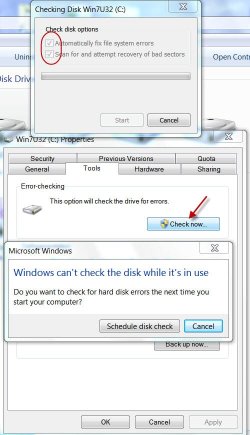
Now the safest course for you is to check your HDD with Windows Check Disk with the "Scan for and attempt recovery of bad sectors" checked.( If it is your system drive it should be scheduled to run on the next boot, for a boot time run.)

06-01-2016 12-45-55.jpg

After this if you still see even one bad sector or many bad sectors, forthwith stop using the drive and back up all important data on it. Then run the manufacturer's diagnostic/repair Utility and check its status.
 
Last edited:

My Computer My Computer

At a glance

Windows 7 Home Premium 32 bit
OS
Windows 7 Home Premium 32 bit
Normally a bad sector will be remapped to a reserved sector. ( Any hard drive will have a certain % of sectors reserved for replacing the bad sectors.)

If you can see a bad sector that would mean that all the reserved sectors have already been exhausted and no more bad sector will be taken in. It would also mean that you can no longer rely on this HDD.As more and more bad sectors are created, your HDD may become inaccessible and shut off.It can happen anytime.

Now the safest course for you is to check your HDD with Windows Check Disk with the "Scan for and attempt recovery of bad sectors" checked.( If it is your system drive it should be scheduled to run on the next boot, for a boot time run.)

View attachment 379183

After this if you still see even one bad sector or many bad sectors, forthwith stop using the drive and back up all important data on it. Then run the manufacturer's diagnostic/repair Utility and check its status.
I ran this earlier except I didn't have the first box of "Automatically fix file system errors" checked off. I figured out the amount of bad sectors I had and downloaded the program I mentioned AFTER doing this check. Should I run this with the fix errors box checked?
 

My Computer My Computer

At a glance

Windows 7 64-bit
Computer type
PC/Desktop
OS
Windows 7 64-bit
Of course.
 

My Computer My Computer

At a glance

Windows 10 Pro x64Intel Core i7 6700KGSkill TridentZ RGB 16GB 3600 16-16-16-36EVGA GTX 980 Ti SC x2
Computer type
PC/Desktop
Computer Manufacturer/Model Number
Skylake Special #666
OS
Windows 10 Pro x64
CPU
Intel Core i7 6700K
Motherboard
Asus Sabertooth Z170 Mark 1
Memory
GSkill TridentZ RGB 16GB 3600 16-16-16-36
Graphics Card(s)
EVGA GTX 980 Ti SC x2
Sound Card
Realtek High Definition
Monitor(s) Displays
AOC G2460PG
Screen Resolution
1920 x 1080 144Hz
Hard Drives
Samsung 860 Pro 256GB, Seagate Barracuda 4TB x2
PSU
EVGA 1000 P2, EVGA White Custom Braided Cables
Case
Corsair Vengeance C70 Gunmetal Black
Cooling
Corsair H100i v2, Corsair ML120 x2, Thermal Grizzly Kryonaut
Keyboard
Logitech G910 Orion Spectrum
Mouse
Logitech G700s
Internet Speed
Verizon Fios Quantum Gateway 75/75
Antivirus
Windows Defender, Malwarebytes Free 3.8.3
Browser
Chrome
Other Info
Corsair SP120 x4, LG Blu-ray Drive, Durabrand HT-395 100 Watt Dolby Digital Amp, Corsair H2100 Wireless 7.1 Headset
Hello TheLoneWolf527!

You have most of the information now. :)

Usually, when one bad sector occurs, more start to develop. In such cases running the tool suggested by Jumanji and checking out the links provided by AddRAM would only help.

Your system will isolate that (those) bad sector(s) and no data will be written on them. Still, back up your files as soon as possible so that you feel calm about that aspect and you can continue using the drive as long as it has good and stable performance.

The minute you see the performance is degrading, I would suggest replacing it. And till that point, always have regular back ups made. :)

Best of luck! :)

CK_WD
 

My Computer My Computer

At a glance

Windows 7 Home Premium x64
Computer type
PC/Desktop
OS
Windows 7 Home Premium x64
Back
Top