- Local time
- 6:39 PM
- Messages
- 108
Hi folks,
History:
Yesterday I installed W7 and all working ok. For resons I wont go into I decided that a re-install (as so little info was in the o/s) was easier than trying to solve admin/user issues.
Setup before re-install:
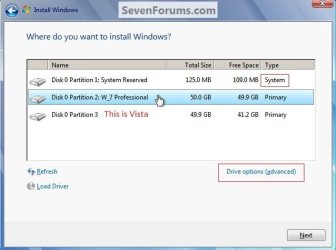
My HDD has 3 partitions and some unallocated space
Partition 1 - System Reserved 300 Mb (NTFS, Primary, Active)
Partition 2 - Windows 7 400 Gb (NTFS, Primary)
Partition 3 - Vista Image from another HDD 150 Gb (NTFS, Primary)
Unallocated space - approx 400 Gb
Prior to beginning the renstall W7 was stable and happy. I could also dual boot happily into Vista on the other partition using the Win boot menu.
Re-Instal Process:
Went into Partition Wizard Boot CD and then wiped both the Sys Reserved partition and the Windows 7 partition (i wrote 0's to both)
I then formated both of these partitions using PWBD
Lastly I ensured that the Sys Res partition was Active (which it still was from last time)
I then re-booted using the W7 install DVD
It went through the instal process quite happily until the first re-boot is needed.
At this point during the previous and sucessful installation on Sat, upon booting up it said 'press any key to boot ffrom DVD drive' so i left it and it then booted from the HDD and carried on with the W7 install for 5 more mins and was done.
However this time, I got the same message about booting from the DVD and again I left it and nothing happened. After 5 mins I gave up and hit a key and it just said disk read error and hung on a back screen with flashing cursor.
So I ejected the W7 DVD and rebooted and just got the same message.
SO I rebooted with the W7 dvd in this time - and it began re-installing W7 again. It got about 5 mins into the instal process (was going a lot faster than normal cos most of the files were already there and uncompressed) and then gave the message of 'there are already windows files on the drive, it will copy them to a file called windows.old and carry on with the install'
Becasue I want a clean install (and dont want a messed up install in there somewhere), whilst I wait for replies Ive been back into PWBD and am currently re-wiping the Sys Res drive and the W7 drive ahead of another attempt at installing
I decided agaiunst this at the time and have just stopped and am writing this here to see what people think is the best way to proceed or if Im doing something obviously silly.
Aside from the wipe Im doing, the method of installing W7 with a pre created Sys Res partition worked perfectly on Sat under Barefoot Kids guidance
Thanks in advance for any thoughts
Matt
History:
Yesterday I installed W7 and all working ok. For resons I wont go into I decided that a re-install (as so little info was in the o/s) was easier than trying to solve admin/user issues.
Setup before re-install:
My HDD has 3 partitions and some unallocated space
Partition 1 - System Reserved 300 Mb (NTFS, Primary, Active)
Partition 2 - Windows 7 400 Gb (NTFS, Primary)
Partition 3 - Vista Image from another HDD 150 Gb (NTFS, Primary)
Unallocated space - approx 400 Gb
Prior to beginning the renstall W7 was stable and happy. I could also dual boot happily into Vista on the other partition using the Win boot menu.
Re-Instal Process:
Went into Partition Wizard Boot CD and then wiped both the Sys Reserved partition and the Windows 7 partition (i wrote 0's to both)
I then formated both of these partitions using PWBD
Lastly I ensured that the Sys Res partition was Active (which it still was from last time)
I then re-booted using the W7 install DVD
It went through the instal process quite happily until the first re-boot is needed.
At this point during the previous and sucessful installation on Sat, upon booting up it said 'press any key to boot ffrom DVD drive' so i left it and it then booted from the HDD and carried on with the W7 install for 5 more mins and was done.
However this time, I got the same message about booting from the DVD and again I left it and nothing happened. After 5 mins I gave up and hit a key and it just said disk read error and hung on a back screen with flashing cursor.
So I ejected the W7 DVD and rebooted and just got the same message.
SO I rebooted with the W7 dvd in this time - and it began re-installing W7 again. It got about 5 mins into the instal process (was going a lot faster than normal cos most of the files were already there and uncompressed) and then gave the message of 'there are already windows files on the drive, it will copy them to a file called windows.old and carry on with the install'
Becasue I want a clean install (and dont want a messed up install in there somewhere), whilst I wait for replies Ive been back into PWBD and am currently re-wiping the Sys Res drive and the W7 drive ahead of another attempt at installing
I decided agaiunst this at the time and have just stopped and am writing this here to see what people think is the best way to proceed or if Im doing something obviously silly.
Aside from the wipe Im doing, the method of installing W7 with a pre created Sys Res partition worked perfectly on Sat under Barefoot Kids guidance
Thanks in advance for any thoughts
Matt
My Computer
- Computer Manufacturer/Model Number
- Manufacturer: Me
- OS
- W7 Home Prem, Vista home Prem
- CPU
- Intel E8600 3.3GHz dual core
- Motherboard
- Asus (need to find model)
- Memory
- 4 Gb
- Graphics Card(s)
- Nvidia - GForce GTX 280 - 1Gb
- Sound Card
- Xonar Dx 5.1
- Monitor(s) Displays
- Hazro flatscreen
- Screen Resolution
- 1920 x 1200
- Hard Drives
- 1 x Samsung Spinpoint F1 300 gb
1 x Samsung Spinpoint F1 1 Tb
1 x Samsung Spinpoint F3 1 Tb
- PSU
- Later
- Case
- Infiniti Midi tower
- Cooling
- later
- Keyboard
- Logitech G11
- Mouse
- Logitech G9 Laser
- Internet Speed
- 3mb/s - awful
- Other Info
- I built this three years ago. It was very fast at the time. Now it's about average but still runs any game I throw at it at max detail.
Currently