Disk is not intializing

GopalTFA

New member
Local time
12:46 PM
Messages
2
Hello Friends

i am new here


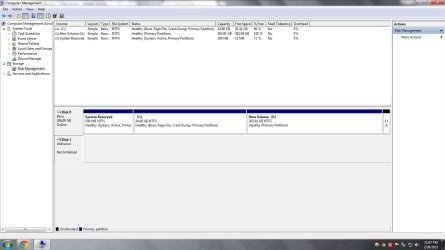
my 1 tb wd hard disk is not opening when i go to disk management it says "Disk is Not Initialized"

can anyone Please please please help me ?
 

Attachments

  • diskpart.jpg
    diskpart.jpg
    30.3 KB · Views: 5
  • 2.jpg
    2.jpg
    87.9 KB · Views: 9

My Computer

Computer type
PC/Desktop
OS
Window 7 Ultimate 32 bit
Hello GopalTFA!

Is there information on the drive? What was the last occasion you successfully used it and did something happen then – power surge, accidental sudden unplugging, did you install anything while the drive connected?

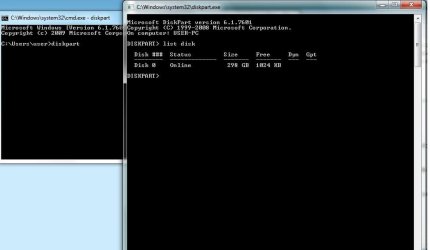
The WD drive is not listed in Diskpart, as well, which could be a problem.

What kind of drive is this – external or internal? I would suggest you try using it with different SATA and power cables that work (if it's internal), and a different working USB cable (if it's external). In the second, case also, check your USB ports.

Right click on the drive in Disk Management and tell me which options does it give you?

How and is the drive shown in Device Manager? Is there an icon next to it or?

CK_WD
 
Last edited:

My Computer

Computer type
PC/Desktop
OS
Windows 7 Home Premium x64
First thanks for your help

I think the media of this hard is damage because it was felt down by me accidentally
 

My Computer

Computer type
PC/Desktop
OS
Window 7 Ultimate 32 bit
I see now. This is an important information that you left out in the first post.

Physical damage like a hit or drop could be fatal to a hard drive. These are very delicate devices, none the less, and if you dropped it, even by mistake, that would explain its inability to connect to the system.

Please try what I've suggested in my previous post and do provide the information on the questions asked, just to see if by some chance the drive wouldn't appear.

Otherwise, it looks like it's too fatally damaged and you could either take it to a professional to see if it can be fixed, or see if you can RMA it.

You could check for RMA of the WD drive here:
Support Answers

And this is the WD Warranty Policy:
Support Answers

If you have valuable information on it, I would suggest a Data recovery company.

WD Data Recovery Partners:
Support Answers

Best of luck!

CK_WD
 

My Computer

Computer type
PC/Desktop
OS
Windows 7 Home Premium x64
How to Install&Initialise a Disk in Windows7

Provided the new drive is not damaged from being dropped it should be able to be initialised.
Download and unzip the zip file I have attached and it has information showing you how to initialise an
internal hard drive step by step.

The message saying disk is not initialised is telling you to do that to get disk functionality.
These links are same as in zip file and explain how to initialise new HD:

How to: Initialize And Format A New Disk For Use In Windows

How to Install a SATA Drive in a Windows 7 Desktop Computer - For Dummies

http://www.sevenforums.com/tutorials/67662-sata-hard-drive-how-install-setup.html

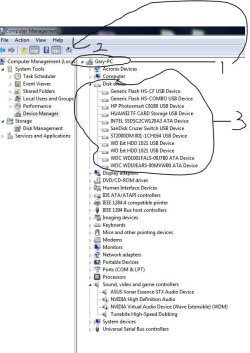
Alternatively look at jpeg I have attached. Go to device manager under Computer Management...open device manager...select your computer name at top in right pane...select symbol at 2 arrowhead...your new drive
should appear under Disk Drives with icon showing it differently from your other drives...double click that drive with this icon and initialise process should start.

The fact that it is telling you to initialise it indicates it may not be faulty despite being dropped.
Give it a go and see what happens. Gary
 

Attachments

My Computer

Computer type
PC/Desktop
OS
Microsoft Windows 7 Professional 64-bit 7601 Multiprocessor Free Service Pack 1
CPU
Intel(R) Core(TM) i7-4770 CPU @ 3.40GHz
Motherboard
ASUSTeK COMPUTER INC. Z87-C
Memory
16.00 GB
Graphics Card(s)
NVIDIA GeForce GTX 1060
Sound Card
Asus Xonar Essence STX
Monitor(s) Displays
2X Dell U2713H
Screen Resolution
2560 x 1440 x 32 bits (4294967296 colors) @ 59 Hz
Hard Drives
(1) INTEL SSDSC2CW120A3 ATA Device (2) WDC WD1001FALS-00J7B0 ATA Device (3) WDC WD10EARS-00MVWB0 ATA Device (4) Generic- SD/MMC/MS/MSPRO USB Device (5) HP Photosmart C6180 USB Device (6) SanDisk Cruzer Switch USB Device (7) ST2000DM 001-1
Antivirus
Avast Pro Antivirus
Back
Top