
Solved Disk Management is not displaying correct HDD size. Partition issues?

Heinz Getwellvet

Trainer of Dolphin
Member
Local time
1:00 PM
Messages
38
Location
Pennsylvania
I recently created an image using Clonezilla using partitions rather than whole disk. I had to do this to apply the image to a 80GB HDD rather from a 250GB HDD. This way my whole disk image would fit on smaller drives. Well I think my shortcut to making a whole new image on the 80GB broke something.

I did this by shrinking the partition on the 250 to ~24GB and making an image of the System Reserved (100MB) and the C drive (~24GB). I then applied this image to an 80GB drive so I would be able to take a whole disk image to apply to any drive that is 80GB and larger.

After I applied the Clonezilla Part-Image to the 80GB the partition was only ~24GB... This is expected. I figured I would be able to expand the partition to the un-formatted space.

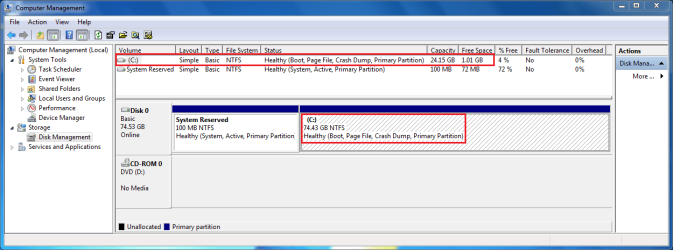
The kicker is, I can't do that. Disk Management says that the C drive is actually ~74GB.

--See attachment--

My brain hurts. Is there a known solution for this?

What I am going to try next is remove this 80GB HDD, plug it into another computer and delete everything off it. Make it RAW no partitions. Then I will apply the part image again and hope that it will have three partitions. 100MB, ~24GB, ~50GB. The 50GB will be un-partitioned space that I can extend the C drive to. This is my theory and I hope it will work.
 

Attachments
  • Capture.PNG
    Capture.PNG
    30.1 KB · Views: 40

My Computer My Computer

Computer Manufacturer/Model Number
Self Built
OS
Windows 7 Pro x64
CPU
Intel Core 2 Quad Q9550 OC
Motherboard
ASUS P5Q SE PLUS LGA 775 Intel P45 ATX Intel
Memory
8GB (4x2GB) OCZ Platinum DDR2-1066 + G.SKILL DDR2-1200
Graphics Card(s)
EVGA GeForce GTX 480 SuperClocked OC
Sound Card
HT Omega Striker 7.1
Monitor(s) Displays
Samsung SyncMaster 2433BW, TOSHIBA 32" HDTV 32RV525R
Screen Resolution
1920 x 1200 and 1920x1080
Hard Drives
(Internal)
1. Western Digital VelociRaptor 150GB SATA 10000RPM
(External)
2. DroboS 5x2TB
PSU
CORSAIR 650W
Case
Antec Three Hundred Black Steel ATX Mid Tower Computer Case
Cooling
XIGMATEK HDT-S1283 120mm Rifle CPU Cooler
Keyboard
Logitech Illuminated Keyboard
Mouse
Logitech MX518
Internet Speed
25 Up 25 Down
Other Info
Logitech z-5500 Digital Surround Sound Speaker System
I am able to extend the partition if I use a 160GB drive but not the 80GB. This is very strange.
 

My Computer My Computer

Computer Manufacturer/Model Number
Self Built
OS
Windows 7 Pro x64
CPU
Intel Core 2 Quad Q9550 OC
Motherboard
ASUS P5Q SE PLUS LGA 775 Intel P45 ATX Intel
Memory
8GB (4x2GB) OCZ Platinum DDR2-1066 + G.SKILL DDR2-1200
Graphics Card(s)
EVGA GeForce GTX 480 SuperClocked OC
Sound Card
HT Omega Striker 7.1
Monitor(s) Displays
Samsung SyncMaster 2433BW, TOSHIBA 32" HDTV 32RV525R
Screen Resolution
1920 x 1200 and 1920x1080
Hard Drives
(Internal)
1. Western Digital VelociRaptor 150GB SATA 10000RPM
(External)
2. DroboS 5x2TB
PSU
CORSAIR 650W
Case
Antec Three Hundred Black Steel ATX Mid Tower Computer Case
Cooling
XIGMATEK HDT-S1283 120mm Rifle CPU Cooler
Keyboard
Logitech Illuminated Keyboard
Mouse
Logitech MX518
Internet Speed
25 Up 25 Down
Other Info
Logitech z-5500 Digital Surround Sound Speaker System
What might have happened is that somehow, during restoring your image to the 80GB HD, the restore process automatically expanded the 24GB partition to fill the whole drive, but not the filesystem. So NTFS would still think it was occupying a 24GB partition when it's really much larger.
It is possible to use diskpart to extend a filesystem "after the fact" to make it fill the partition it's occupying. The command to do this is simply "extend filesystem" at the diskpart prompt (of course you have to select the disk and partition/volume first).
 

My Computer My Computer

Computer type
PC/Desktop
Computer Manufacturer/Model Number
Custom-built
OS
Windows 7 Professional SP1 32-bit
CPU
Intel Core 2 Duo E6600 2.4GHz
Motherboard
Asus PL5D2
Memory
4GB DDR2-667 (4x1GB in dual-channel config)
Graphics Card(s)
nVidia GeForce 9800 GT
Sound Card
Creative X-Fi XtremeMusic
Monitor(s) Displays
Acer P236H
Screen Resolution
1920x1200 (DVI)
Hard Drives
OCZ SSD Vertex Plus 60GB SATA (Firmware 3.55), 64MB cache
Hitachi HD321KJ SATA, 320GB, 7200rpm, 16MB cache
PSU
Antec TruePower 2.0
Case
Cooler Master Centurion
Cooling
Too many fans
Keyboard
Standard
Mouse
Microsoft wireless optical mouse
Internet Speed
AT&T U-verse (18mbit/sec)
Antivirus
Microsoft Security Essentials
Browser
Firefox
Other Info
Other devices:
Compaq CQ-60 laptop
Google Nexus 7 (2012) tablet
Nvidia SHIELD tablet (US/LTE)
Hardkernel ODROID-XU single-board computer (Samsung Exynos 5420)
I figured it out.

I took the 80GB drive, manually created the 3 separate partitions. I then imaged the 2 smaller partitions using my original Part-Image which included 2 partitions. Once I was in windows I was able to extend the 24GB partition to the unformatted 50GB partition. Viola.

Thanks for your response. I may try that just for kicks to see if it works.
 

My Computer My Computer

Computer Manufacturer/Model Number
Self Built
OS
Windows 7 Pro x64
CPU
Intel Core 2 Quad Q9550 OC
Motherboard
ASUS P5Q SE PLUS LGA 775 Intel P45 ATX Intel
Memory
8GB (4x2GB) OCZ Platinum DDR2-1066 + G.SKILL DDR2-1200
Graphics Card(s)
EVGA GeForce GTX 480 SuperClocked OC
Sound Card
HT Omega Striker 7.1
Monitor(s) Displays
Samsung SyncMaster 2433BW, TOSHIBA 32" HDTV 32RV525R
Screen Resolution
1920 x 1200 and 1920x1080
Hard Drives
(Internal)
1. Western Digital VelociRaptor 150GB SATA 10000RPM
(External)
2. DroboS 5x2TB
PSU
CORSAIR 650W
Case
Antec Three Hundred Black Steel ATX Mid Tower Computer Case
Cooling
XIGMATEK HDT-S1283 120mm Rifle CPU Cooler
Keyboard
Logitech Illuminated Keyboard
Mouse
Logitech MX518
Internet Speed
25 Up 25 Down
Other Info
Logitech z-5500 Digital Surround Sound Speaker System
Thanks for that tool it is pretty nifty. Turns out I was able to extend the partition but when I make a new full disk image and apply it to a larger drive it leaves un-partitioned space. (Eg. 160GB drive ends up with the 100 Sys Reserve, ~74GB C:\ drive and ~85GB unpartitioned).

I am going to just bite the bullet and make a whole new 80GB image from scratch. It's a pain since we have a laundry list of stuff to install and configure but I gotta do it.

Thanks for all your input guys.
 

My Computer My Computer

Computer Manufacturer/Model Number
Self Built
OS
Windows 7 Pro x64
CPU
Intel Core 2 Quad Q9550 OC
Motherboard
ASUS P5Q SE PLUS LGA 775 Intel P45 ATX Intel
Memory
8GB (4x2GB) OCZ Platinum DDR2-1066 + G.SKILL DDR2-1200
Graphics Card(s)
EVGA GeForce GTX 480 SuperClocked OC
Sound Card
HT Omega Striker 7.1
Monitor(s) Displays
Samsung SyncMaster 2433BW, TOSHIBA 32" HDTV 32RV525R
Screen Resolution
1920 x 1200 and 1920x1080
Hard Drives
(Internal)
1. Western Digital VelociRaptor 150GB SATA 10000RPM
(External)
2. DroboS 5x2TB
PSU
CORSAIR 650W
Case
Antec Three Hundred Black Steel ATX Mid Tower Computer Case
Cooling
XIGMATEK HDT-S1283 120mm Rifle CPU Cooler
Keyboard
Logitech Illuminated Keyboard
Mouse
Logitech MX518
Internet Speed
25 Up 25 Down
Other Info
Logitech z-5500 Digital Surround Sound Speaker System
Back
Top