
Disk Management properties seem incorrect

win123

New member
Local time
11:48 PM
Messages
20
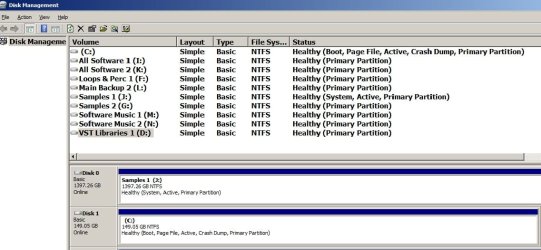
I recently re-installed Windows 7. I have 2 internal drives and the drives properties seem incorrect in disk management.

The System drive's properties are listed as
Disk 1 (Boot, Page File, Active, Crash Dump, Primary Partition)

The data drive's properties are listed as
Disk 0 (System, Active, Primary Partition)

I believe the System drive should have System as one of it's properties

...and the data drive should not have System, Active as properties.

Should I change these properties and how can these properties be changed? Also the Disk number are reversed. Should the disk numbers be corrected also?
 

My Computer

Computer Manufacturer/Model Number
Reyniers Audio
OS
Windows 7 Ultimate x64
CPU
2x Intel Xeon E5450 (8 x 3.0GHz Cores)
Motherboard
Tyan S5396
Memory
16 GB
Graphics Card(s)
XFX GeForce 7200GS
Sound Card
Fireface 800
Monitor(s) Displays
Samsung 22"
Hard Drives
System 250GB
Drive 2 (2 TB)
Drive 3 )2 Tb)
Post a picture of Windows Disk Management to avoid confusion.

We need to see info at the partition level, not drive level.

I'd guess you have a System Reserved partition on the data drive.
 

My Computer

Computer type
PC/Desktop
Computer Manufacturer/Model Number
Ignatz Special; 4 speed manual gearbox; factory air conditioning; one of one
OS
Windows 7 Home Premium SP1, 64-bit
CPU
Intel Skylake i5-6600K, not overclocked
Motherboard
AsRock Z170M Extreme 4, micro ATX
Memory
8 GB HyperX DDR4-2666 (2 x 4 GB)
Graphics Card(s)
none; graphics are integrated on CPU
Sound Card
onboard: Realtek ALC1150; external: USB Behringer UF0-202
Monitor(s) Displays
Dell S2340M 23 inch IPS
Screen Resolution
1600 x 900
Hard Drives
System: Crucial MX100 series SSD, 128 GB;
Data: Samsung Spinpoint 103SJ, 1 TB;
Backup: WD Caviar Green WD30EZRX-00D8PB0, 3 TB
PSU
Rosewill SilentNight 500 watt fanless, semi-modular
Case
Antec Solo II
Cooling
Noctua NH-U12S; Noctua F12 intake, Noctua S12A exhaust
Keyboard
Microsoft 200 6JH-00001 USB
Mouse
Dell or Microsoft optical wired; USB
Antivirus
Microsoft Security Essentials and Malwarebytes Premium
Browser
Pale Moon
Other Info
All fans PWM; speeds at idle: CPU circa 500 rpm; intake circa 600 rpm; exhaust circa 600 rpm; CPU temps 27 idle and 47 C load in a warm room (27 C/81 F) when running Intel Extreme Tuning Utility stress test.
How does one post an image?
 

My Computer

Computer Manufacturer/Model Number
Reyniers Audio
OS
Windows 7 Ultimate x64
CPU
2x Intel Xeon E5450 (8 x 3.0GHz Cores)
Motherboard
Tyan S5396
Memory
16 GB
Graphics Card(s)
XFX GeForce 7200GS
Sound Card
Fireface 800
Monitor(s) Displays
Samsung 22"
Hard Drives
System 250GB
Drive 2 (2 TB)
Drive 3 )2 Tb)
Open disk management and expand it so we can see the top and bottom portions of the window. Click the start button and type snipping tool, open the snipping tool. In the top left corner next to New click the arrow and select window. Go to the top of the page and click. In the window click file and save as. Save it to someplace easy to find, such as your desktop. In yout reply here, the top of the reply box, click the paperclip icon, click browse and select the file you just made, click upload, and when it is finished uploading close the window. In the reply box click the paperclip icon and you will see the file you uploaded, select it and it will insert it into the post.
 

My Computers

System One System Two

  • Computer type
    PC/Desktop
    Computer Manufacturer/Model Number
    ALWAYS UNDER CONSTRUCTION
    OS
    Windows 11 Pro
    CPU
    Ryzen 9 5900X
    Motherboard
    Asus X570 Crosshair Viii Hero
    Memory
    32GB G Skill DDR4-3600
    Graphics Card(s)
    EVGA RTX 3080 FTW 3 Ultra
    Sound Card
    On Board/Sennheiser PC37X Headset
    Monitor(s) Displays
    3 X Asus 27"
    Screen Resolution
    2560x1440
    Hard Drives
    2 X 1 TB NVME drives
    PSU
    EVGA 850
    Case
    Phanteks Eclipse P400A
    Cooling
    EVGA 280 AIO
    Keyboard
    Logitech G510s/ Logitech G13
    Mouse
    Logitech G502
    Internet Speed
    24/1
    Antivirus
    ESET/MBAM Pro/SAS Pro
    Browser
    Chrome/ Firefox/ Edge
  • Computer type
    Laptop
    System Manufacturer/Model Number
    Dell 16 Plus
    OS
    Windows 11 Pro
    CPU
    Intel Ultra 9 288V
    Memory
    32 GB LPDDR5X 8533
    Monitor(s) Displays
    16" Mini-LED HDR600 Touch 90 Hz
    Screen Resolution
    2560X1600
    Hard Drives
    1 TB NVME
post a picture of windows disk management to avoid confusion.

We need to see info at the partition level, not drive level.

I'd guess you have a system reserved partition on the data drive.

Both drives seem to have one partition each.

Drives.jpg
 

My Computer

Computer Manufacturer/Model Number
Reyniers Audio
OS
Windows 7 Ultimate x64
CPU
2x Intel Xeon E5450 (8 x 3.0GHz Cores)
Motherboard
Tyan S5396
Memory
16 GB
Graphics Card(s)
XFX GeForce 7200GS
Sound Card
Fireface 800
Monitor(s) Displays
Samsung 22"
Hard Drives
System 250GB
Drive 2 (2 TB)
Drive 3 )2 Tb)
My Computer

Computer type
PC/Desktop
Computer Manufacturer/Model Number
Ignatz Special; 4 speed manual gearbox; factory air conditioning; one of one
OS
Windows 7 Home Premium SP1, 64-bit
CPU
Intel Skylake i5-6600K, not overclocked
Motherboard
AsRock Z170M Extreme 4, micro ATX
Memory
8 GB HyperX DDR4-2666 (2 x 4 GB)
Graphics Card(s)
none; graphics are integrated on CPU
Sound Card
onboard: Realtek ALC1150; external: USB Behringer UF0-202
Monitor(s) Displays
Dell S2340M 23 inch IPS
Screen Resolution
1600 x 900
Hard Drives
System: Crucial MX100 series SSD, 128 GB;
Data: Samsung Spinpoint 103SJ, 1 TB;
Backup: WD Caviar Green WD30EZRX-00D8PB0, 3 TB
PSU
Rosewill SilentNight 500 watt fanless, semi-modular
Case
Antec Solo II
Cooling
Noctua NH-U12S; Noctua F12 intake, Noctua S12A exhaust
Keyboard
Microsoft 200 6JH-00001 USB
Mouse
Dell or Microsoft optical wired; USB
Antivirus
Microsoft Security Essentials and Malwarebytes Premium
Browser
Pale Moon
Other Info
All fans PWM; speeds at idle: CPU circa 500 rpm; intake circa 600 rpm; exhaust circa 600 rpm; CPU temps 27 idle and 47 C load in a warm room (27 C/81 F) when running Intel Extreme Tuning Utility stress test.
Back
Top