disk management

baccini

New member
Member
VIP
Local time
5:25 AM
Messages
98
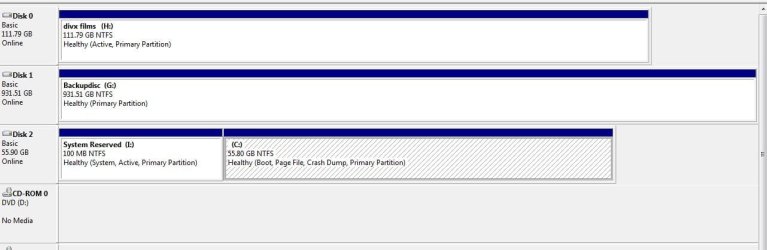
Can someone tell me if this looks right with the boot drive C being disk 3
thxs
 

Attachments

  • disk managment.JPG
    disk managment.JPG
    51.9 KB · Views: 49

My Computer

Computer type
PC/Desktop
OS
windows 7 64bit sp1
CPU
I7 2700K @3.5GHz
Motherboard
GA-Z68XP-UD3P
Memory
Corsair 16GB PC3-12800 1600 MHz (4x4GB)
Graphics Card(s)
ATI Radeon HD 6450 - 1 GB - (XFX) - Silent - (PCI-E)
Sound Card
none
Monitor(s) Displays
lg 23"
Hard Drives
90GB Corsair Force Series 3 SATA 6Gb/s SSD 1 TB Seagate ST31000524AS Barracuda SATA-III 7200RPM and 3tb seagate
PSU
Corsair 600W (CMPSU-600CX)
Case
Cooler Master Sileo 500 - Silent
Antivirus
mcafee
It would be better to swap C to Disk0 so any future Startup Repair won't derail the System Boot files to a preceding partition which is accidentally marked Active. Remember to set it first to boot if you do.

Either way you need to mark H Inactive - only the System drive should be marked Active: Partition - Mark as Inactive - Windows 7 Forums
 
thanks for the reply Gregrocker Ive marked the h drive inactive how do i go about changing the boot drive to disk 0 thanks again for your help
john......................
 

My Computer

Computer type
PC/Desktop
OS
windows 7 64bit sp1
CPU
I7 2700K @3.5GHz
Motherboard
GA-Z68XP-UD3P
Memory
Corsair 16GB PC3-12800 1600 MHz (4x4GB)
Graphics Card(s)
ATI Radeon HD 6450 - 1 GB - (XFX) - Silent - (PCI-E)
Sound Card
none
Monitor(s) Displays
lg 23"
Hard Drives
90GB Corsair Force Series 3 SATA 6Gb/s SSD 1 TB Seagate ST31000524AS Barracuda SATA-III 7200RPM and 3tb seagate
PSU
Corsair 600W (CMPSU-600CX)
Case
Cooler Master Sileo 500 - Silent
Antivirus
mcafee
If you don't mind me butting in, you need to open your box and swap the leads from the hard drives 0 and 2 on the SATA ports on your motherboard.

That is, the lead now on port 2 wants to go on port 0 and the lead on port 0 wants to go on port 2.
 

My Computer

Computer Manufacturer/Model Number
HP Pavilion Elite 495UK
OS
Windows 7 Ultimate SP1 64-Bit
CPU
Intel Core i7 870 @ 2.93GHz
Motherboard
MSI 2A9C (CPU1)
Memory
8Gb Dual-Channel DDR3 @ 664MHz
Graphics Card(s)
nVidia GeForce GTX 460 1024MB dedicated RAM
Sound Card
Realtek HD Audio
Monitor(s) Displays
HP2310i
Screen Resolution
1920 x 1080
Hard Drives
1x1954GB Hitachi HDS22020ALA 330 (RAID), 1x1954GB Hitachi External for backup and storage
PSU
460W
Case
HP Elite
Cooling
Air cooled
Keyboard
Logitech K750 solar-powered keyboard
Mouse
Logitech Wireless M180 mouse
Internet Speed
2Mb
Other Info
Pure Avanti Flow Internet Radio with iPod Dock, 64Gb iPod, HP USB Speakers, Sony MDR-V500 Headphones, Sony Vaio F-Series Laptop
cheers for that do that now
 

My Computer

Computer type
PC/Desktop
OS
windows 7 64bit sp1
CPU
I7 2700K @3.5GHz
Motherboard
GA-Z68XP-UD3P
Memory
Corsair 16GB PC3-12800 1600 MHz (4x4GB)
Graphics Card(s)
ATI Radeon HD 6450 - 1 GB - (XFX) - Silent - (PCI-E)
Sound Card
none
Monitor(s) Displays
lg 23"
Hard Drives
90GB Corsair Force Series 3 SATA 6Gb/s SSD 1 TB Seagate ST31000524AS Barracuda SATA-III 7200RPM and 3tb seagate
PSU
Corsair 600W (CMPSU-600CX)
Case
Cooler Master Sileo 500 - Silent
Antivirus
mcafee
changed the data leads and got a start up error "boot disk failure insert system disk and press enter" put them back for now
 

My Computer

Computer type
PC/Desktop
OS
windows 7 64bit sp1
CPU
I7 2700K @3.5GHz
Motherboard
GA-Z68XP-UD3P
Memory
Corsair 16GB PC3-12800 1600 MHz (4x4GB)
Graphics Card(s)
ATI Radeon HD 6450 - 1 GB - (XFX) - Silent - (PCI-E)
Sound Card
none
Monitor(s) Displays
lg 23"
Hard Drives
90GB Corsair Force Series 3 SATA 6Gb/s SSD 1 TB Seagate ST31000524AS Barracuda SATA-III 7200RPM and 3tb seagate
PSU
Corsair 600W (CMPSU-600CX)
Case
Cooler Master Sileo 500 - Silent
Antivirus
mcafee

My Computer

Computer Manufacturer/Model Number
HP Pavilion Elite 495UK
OS
Windows 7 Ultimate SP1 64-Bit
CPU
Intel Core i7 870 @ 2.93GHz
Motherboard
MSI 2A9C (CPU1)
Memory
8Gb Dual-Channel DDR3 @ 664MHz
Graphics Card(s)
nVidia GeForce GTX 460 1024MB dedicated RAM
Sound Card
Realtek HD Audio
Monitor(s) Displays
HP2310i
Screen Resolution
1920 x 1080
Hard Drives
1x1954GB Hitachi HDS22020ALA 330 (RAID), 1x1954GB Hitachi External for backup and storage
PSU
460W
Case
HP Elite
Cooling
Air cooled
Keyboard
Logitech K750 solar-powered keyboard
Mouse
Logitech Wireless M180 mouse
Internet Speed
2Mb
Other Info
Pure Avanti Flow Internet Radio with iPod Dock, 64Gb iPod, HP USB Speakers, Sony MDR-V500 Headphones, Sony Vaio F-Series Laptop
You didn't follow all of the instructions to also make sure Win7 HD is set first HD to boot in BIOS setup:

It would be better to swap C to Disk0 so any future Startup Repair won't derail the System Boot files to a preceding partition which is accidentally marked Active. Remember to set it first to boot if you do.
 
What Greg said. Just switching the SATA cables around does do it. After you do that you have to go into the BIOS setup and set Disk 0 as the Boot drive.
 

My Computer

OS
7 x64
just had a look in the bios cant find anywhere to set disk 0 as the boot drive the choices are only hard drive,cdrom
 

My Computer

Computer type
PC/Desktop
OS
windows 7 64bit sp1
CPU
I7 2700K @3.5GHz
Motherboard
GA-Z68XP-UD3P
Memory
Corsair 16GB PC3-12800 1600 MHz (4x4GB)
Graphics Card(s)
ATI Radeon HD 6450 - 1 GB - (XFX) - Silent - (PCI-E)
Sound Card
none
Monitor(s) Displays
lg 23"
Hard Drives
90GB Corsair Force Series 3 SATA 6Gb/s SSD 1 TB Seagate ST31000524AS Barracuda SATA-III 7200RPM and 3tb seagate
PSU
Corsair 600W (CMPSU-600CX)
Case
Cooler Master Sileo 500 - Silent
Antivirus
mcafee
I know you guys are often concerned when the boot disk is not on part0. But actually it does not really make any difference for normal operations - except for a reinstall. But who reinstalls systems these days. You go back to an image instead.

And if you really reinstall (e.g. from a clean .iso), just disconnect the lower port disks or install into a predefined active primary partition - or even easier, move the bootmgr afterwards if it went astray. Avoids gymnastics, LOL.
 

My Computer

Computer Manufacturer/Model Number
HP, Dell, Gateway, Toshiba - 4 laptops and 2 desktops
OS
Vista, Windows7, Mint Mate, Zorin, Windows 8
CPU
from 1.6GHz Duo to i7
Monitor(s) Displays
2x HP w2207
Hard Drives
5x HDD, 7x SSD, 12x Externals
Keyboard
with trackball - no mices
Mouse
Trackball mice
Internet Speed
DSL 6000
About half of users with multiple HD's who post up screenshots have a data partition marked Active.

OP is one of these users as one can see from screenshot.

When that partition precedes the Win7 partition it will claim the System Boot Files during Startup Repair, which writes them to the first Active partition in order.
 
Right Greg. I would just move the bootmgr to C:. Is that not a valid option ??
 

My Computer

Computer Manufacturer/Model Number
HP, Dell, Gateway, Toshiba - 4 laptops and 2 desktops
OS
Vista, Windows7, Mint Mate, Zorin, Windows 8
CPU
from 1.6GHz Duo to i7
Monitor(s) Displays
2x HP w2207
Hard Drives
5x HDD, 7x SSD, 12x Externals
Keyboard
with trackball - no mices
Mouse
Trackball mice
Internet Speed
DSL 6000
I'd leave his Win7 HD alone as it's set up correctly and running ok.

The BIOS likely has a way to set Win7 HD first to boot, under HD's if not boot order.

But he marked H Inactive so there's little worry if he doesn't want to swap Disks 0 and 2 - as long as no other preceding partitions get wrongly marked Active.
 
just had a look in the bios cant find anywhere to set disk 0 as the boot drive the choices are only hard drive,cdrom

You would actually be looking for boot disk priority which is usually right under boot device sequence.
 

My Computer

Computer type
PC/Desktop
Computer Manufacturer/Model Number
Skylake Special #666
OS
Windows 10 Pro x64
CPU
Intel Core i7 6700K
Motherboard
Asus Sabertooth Z170 Mark 1
Memory
GSkill TridentZ RGB 16GB 3600 16-16-16-36
Graphics Card(s)
EVGA GTX 980 Ti SC x2
Sound Card
Realtek High Definition
Monitor(s) Displays
AOC G2460PG
Screen Resolution
1920 x 1080 144Hz
Hard Drives
Samsung 860 Pro 256GB, Seagate Barracuda 4TB x2
PSU
EVGA 1000 P2, EVGA White Custom Braided Cables
Case
Corsair Vengeance C70 Gunmetal Black
Cooling
Corsair H100i v2, Corsair ML120 x2, Thermal Grizzly Kryonaut
Keyboard
Logitech G910 Orion Spectrum
Mouse
Logitech G700s
Internet Speed
Verizon Fios Quantum Gateway 75/75
Antivirus
Windows Defender, Malwarebytes Free 3.8.3
Browser
Chrome
Other Info
Corsair SP120 x4, LG Blu-ray Drive, Durabrand HT-395 100 Watt Dolby Digital Amp, Corsair H2100 Wireless 7.1 Headset
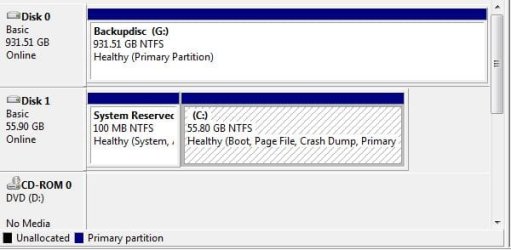
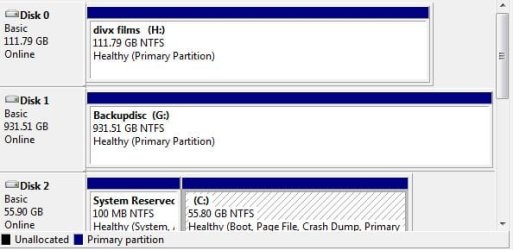
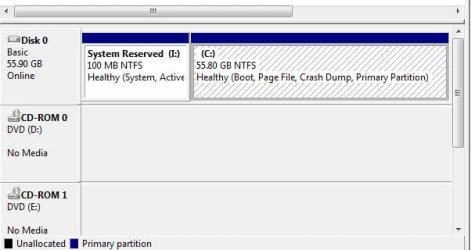
ok got the bios sorted to boot in the correct order. Ive attached three Thumbnails of the disc managment with one two and three drives connected
thanks for all the help
john.......................
 

Attachments

  • boot and storage.JPG
    boot and storage.JPG
    31.9 KB · Views: 8
  • boot and two storage drives.JPG
    boot and two storage drives.JPG
    33.4 KB · Views: 7
  • boot drive only.JPG
    boot drive only.JPG
    31.6 KB · Views: 8
Last edited:

My Computer

Computer type
PC/Desktop
OS
windows 7 64bit sp1
CPU
I7 2700K @3.5GHz
Motherboard
GA-Z68XP-UD3P
Memory
Corsair 16GB PC3-12800 1600 MHz (4x4GB)
Graphics Card(s)
ATI Radeon HD 6450 - 1 GB - (XFX) - Silent - (PCI-E)
Sound Card
none
Monitor(s) Displays
lg 23"
Hard Drives
90GB Corsair Force Series 3 SATA 6Gb/s SSD 1 TB Seagate ST31000524AS Barracuda SATA-III 7200RPM and 3tb seagate
PSU
Corsair 600W (CMPSU-600CX)
Case
Cooler Master Sileo 500 - Silent
Antivirus
mcafee
You can plug G and H into Disk 1 and 2 respectively.

Be sure Win7 HD remains set as first HD to boot.

If you need help with settings in the BIOS, ask back. Look under HD's if not in Boot Order.
 
Ok thanks, i found a list of the drives in the bios and moved the boot drive to the top and set the boot order to hard drive then cdrom all seems to ok now
cheers john.............
 

My Computer

Computer type
PC/Desktop
OS
windows 7 64bit sp1
CPU
I7 2700K @3.5GHz
Motherboard
GA-Z68XP-UD3P
Memory
Corsair 16GB PC3-12800 1600 MHz (4x4GB)
Graphics Card(s)
ATI Radeon HD 6450 - 1 GB - (XFX) - Silent - (PCI-E)
Sound Card
none
Monitor(s) Displays
lg 23"
Hard Drives
90GB Corsair Force Series 3 SATA 6Gb/s SSD 1 TB Seagate ST31000524AS Barracuda SATA-III 7200RPM and 3tb seagate
PSU
Corsair 600W (CMPSU-600CX)
Case
Cooler Master Sileo 500 - Silent
Antivirus
mcafee
Back
Top