Disk management

gerribol

New member
Local time
2:50 PM
Messages
22
Location
Australia
My Asus Notebook came with the HD partitioned into OS (C) 75 gb and data (D) 208gb. I have just about filled C partition. I don't need it to be partition. I have tried shrinking D drive using the disk management tool. But the shrink volume does not go to C but to something called free volume. When i open my computer I cannot see the shrinked GB. I just want an unpartioned HD.

How can I do this?

Thanks
 

My Computer

Computer type
Laptop
Computer Manufacturer/Model Number
Toshiba Sattelite C850/02D
OS
Microsoft Windows 7 Home Premium 64-bit 7601 Multiprocessor Free Service Pack 1
CPU
Intel(R) Core(TM) i5-2450M CPU @ 2.50GHz
Motherboard
Type2 - Board Vendor Name1 Type2 - Board Product Name1
Memory
4.00 GB
Graphics Card(s)
AMD Radeon HD 7610M
Sound Card
(1) AMD High Definition Audio Device (2) Realtek High Defi
Hard Drives
TOSHIBA MK5075GSX
Try this util, it should help you extend the C partition: News
 

My Computer

Computer type
PC/Desktop
Computer Manufacturer/Model Number
Dell OP7010
OS
Windows 7 Enterprise (x64); Windows Server 2008 R2 (x64)
Memory
16GB
Monitor(s) Displays
4 Dell 24" LCD
Screen Resolution
1280x1024
Keyboard
Dell
Mouse
Dell Optical
Internet Speed
40meg
you can reinstall to get one partition or the free volume is made and the you need to extend C into that space it doesnt happen automatically
 

My Computer

Computer Manufacturer/Model Number
Custom built super system & Fujitsu Lifebook (Lap)
OS
Win7 Ultimate (32) & Win7 Pro (64)
CPU
i7-860 (2.8 Ghz Overclocked) & intel centrino duo
Motherboard
Asus P7P55D & standard fujitsu
Memory
4 GB (Patriot) & 2 GB
Graphics Card(s)
nivida GeForce GTS 250 & standard
Sound Card
Creative Sound Blaster X-Fi Xtreme Audio & default fujitsu
Monitor(s) Displays
View Sonic , Samsung
Hard Drives
1 TB Caviar Black
1 TB Caviar Green
1/2 TB WD (my book thing)
60 gig Hitachi Travel star in the fuji lifebook
(I administer multiple systems but these are mine and usually they are not the ones with problems ---because theyre mine)
PSU
THERMALTAKE Toughpower 750 & Standard
Case
Cooler Master Sniper
Cooling
Standard
Hello gerribol Welcome to SF!

The Parted Magic pointed to there requires configuring a Grub boot loader or following the documentation on unpacking files onto a usb flash and making it bootable. The PM tool is based on the alternate free Linux driver tool GParted which is downloaded in ISO format and can be written to a flash drive with a program that supports the iso format very easily. Even the shareware version of UltraISO will see that done.

First however before attempting any partitiion changes you will want to back up any important files ahead of time before booting live from either a cd burned with a live image or seeing one written onto a flash drive for booting live from that. If you are simply looking to expand the C primary across the drive once you have everything backed up from the D partition you would simply delete that volume and use the resize option to expand the C primary to fill in the empty space created or in other words merge the two partitions.

If something does go wrong during the resize at least your important files are stored hopefully on another drive where you can restore Windows back to factory with the recovery disks or bios option using a conbination of keys assigned now seen on most newer models for the last few years. Most partitioning programs will also show a small 7-10gb recovery partition generally hidden from view in Windows you would want to keep intact especially if still under a warranty.

The screens shown the documentation page here will show how resizing partitions is done with GParted. http://gparted.sourceforge.net/larry/resize/resizing.htm
 

My Computers

System One System Two

  • Computer type
    PC/Desktop
    Computer Manufacturer/Model Number
    Custom builds = 2
    OS
    W7 Ultimate x64/W10 Pro x64/W11 Pro Triple Boot - Main PC W7 Remote PC Micro ATX W7 Pro x64/W11 Pro
    CPU
    AMD Phenom II X4 975 Deneb 3.6ghz - 965 2nd remote pc
    Motherboard
    Gigabyte GA-790XTA-UD4-Gigabyte GA-880GM-D2H remote pc
    Memory
    Kingston Hyper X DDR3 1600 1.5v 16gb - Hyper X Fury 8gb 2nd
    Graphics Card(s)
    MSI HD Radeon 5750 1gb - MSI HD Radeon 6450 on mini tower
    Sound Card
    Creative Labs X-Fi Xtreme Audio P - Realtek onooard 2nd case
    Monitor(s) Displays
    ASUS VW199T-P 19" HP 2082a Main-HP 2082a 20" remote pc
    Screen Resolution
    Asus 1440x900 - HP 1600x900
    Hard Drives
    WD Black 1TB HD per OS W7, W10, and pending W11 presently on 500gb OS Drive - Pending Triple 1TB HDs for Spanned Storage/backup volume
    Single 2TB external USB enclosure, single 1TB System 7 Host/Boot drive, Pending 8TB external HD for system image b
    PSU
    Corsair 750TX - primary / Corsair CX600 - second
    Case
    Antec 900-2 - SSD compatible / NZXT Vulcan mini tower
    Cooling
    Zalman CNPS9900A
    Keyboard
    AZIO L70 Backlit Letters Gaming - ONN Cordless/USB
    Mouse
    MSI DS200 Programmable, Logitech Cordless
    Internet Speed
    30mbps upgrade - primary hard wired - mini tower usb WiFi
    Antivirus
    GFI VIPRE Internet Security 2014 on W7 2016 beta on W10,
    Browser
    Cyberfox, WaterFox 64bit FF variants, FireFox x64, Pale Moon
    Other Info
    Accomdata fan cooled usb 2.0 PIDE/Sata II, III external enclosure.
    Sambient usb/eSata PATA/Sata II, III external enclosure.
  • Computer type
    PC/Desktop
    System Manufacturer/Model Number
    CUSTOM ASSEMBLY
    OS
    W7 Pro x64/W11 Pro
    CPU
    AMD Deneb 3.6ghz - 965
    Motherboard
    Gigabyte GA-880GM-D2H remote pc
    Memory
    Kingston Hyper X Fury 8gb
    Graphics Card(s)
    MSI HD Radeon 6450 DVI Output
    Sound Card
    Realtek onooard Creative or Other separate PENDING
    Monitor(s) Displays
    VIZIO 32" LCD TV Separate LCD Pending
    Screen Resolution
    1600x1080
    Hard Drives
    WD 500GB OS Host/Boot WD Green 1TB Storage/Backup
    PSU
    Corsair 600W - THERMALTAKE 600W spare case
    Case
    NZXT Vulcan mini tower
    Cooling
    Twin 120mm Top Fans - 240mm Side Cover
    Keyboard
    ONN Cordless/USB Logitech Cordless
    Mouse
    ONN USB/Cordless - Logitech Cordless
    Internet Speed
    DSL 5G
    Browser
    MS Edge, FireFox, WaterFox x64, FireFox Nightly
    Other Info
    OS Testing-Remote Access to Main TeamViewer

My Computer

Computer type
PC/Desktop
Computer Manufacturer/Model Number
Dell OP7010
OS
Windows 7 Enterprise (x64); Windows Server 2008 R2 (x64)
Memory
16GB
Monitor(s) Displays
4 Dell 24" LCD
Screen Resolution
1280x1024
Keyboard
Dell
Mouse
Dell Optical
Internet Speed
40meg
For most resizing done with the C primary itself you would use a live tool to prevent problems seen with unmovable system files. Resizing the same partition you are booted into the OS from tends to cause problems.

One other thing to know however is once the C primary is fully expanded you will want to schedule a run of the disk check utility with the "dskchk /r /p" switches used to insure the integrity of the partition afterwards.
 

My Computers

System One System Two

  • Computer type
    PC/Desktop
    Computer Manufacturer/Model Number
    Custom builds = 2
    OS
    W7 Ultimate x64/W10 Pro x64/W11 Pro Triple Boot - Main PC W7 Remote PC Micro ATX W7 Pro x64/W11 Pro
    CPU
    AMD Phenom II X4 975 Deneb 3.6ghz - 965 2nd remote pc
    Motherboard
    Gigabyte GA-790XTA-UD4-Gigabyte GA-880GM-D2H remote pc
    Memory
    Kingston Hyper X DDR3 1600 1.5v 16gb - Hyper X Fury 8gb 2nd
    Graphics Card(s)
    MSI HD Radeon 5750 1gb - MSI HD Radeon 6450 on mini tower
    Sound Card
    Creative Labs X-Fi Xtreme Audio P - Realtek onooard 2nd case
    Monitor(s) Displays
    ASUS VW199T-P 19" HP 2082a Main-HP 2082a 20" remote pc
    Screen Resolution
    Asus 1440x900 - HP 1600x900
    Hard Drives
    WD Black 1TB HD per OS W7, W10, and pending W11 presently on 500gb OS Drive - Pending Triple 1TB HDs for Spanned Storage/backup volume
    Single 2TB external USB enclosure, single 1TB System 7 Host/Boot drive, Pending 8TB external HD for system image b
    PSU
    Corsair 750TX - primary / Corsair CX600 - second
    Case
    Antec 900-2 - SSD compatible / NZXT Vulcan mini tower
    Cooling
    Zalman CNPS9900A
    Keyboard
    AZIO L70 Backlit Letters Gaming - ONN Cordless/USB
    Mouse
    MSI DS200 Programmable, Logitech Cordless
    Internet Speed
    30mbps upgrade - primary hard wired - mini tower usb WiFi
    Antivirus
    GFI VIPRE Internet Security 2014 on W7 2016 beta on W10,
    Browser
    Cyberfox, WaterFox 64bit FF variants, FireFox x64, Pale Moon
    Other Info
    Accomdata fan cooled usb 2.0 PIDE/Sata II, III external enclosure.
    Sambient usb/eSata PATA/Sata II, III external enclosure.
  • Computer type
    PC/Desktop
    System Manufacturer/Model Number
    CUSTOM ASSEMBLY
    OS
    W7 Pro x64/W11 Pro
    CPU
    AMD Deneb 3.6ghz - 965
    Motherboard
    Gigabyte GA-880GM-D2H remote pc
    Memory
    Kingston Hyper X Fury 8gb
    Graphics Card(s)
    MSI HD Radeon 6450 DVI Output
    Sound Card
    Realtek onooard Creative or Other separate PENDING
    Monitor(s) Displays
    VIZIO 32" LCD TV Separate LCD Pending
    Screen Resolution
    1600x1080
    Hard Drives
    WD 500GB OS Host/Boot WD Green 1TB Storage/Backup
    PSU
    Corsair 600W - THERMALTAKE 600W spare case
    Case
    NZXT Vulcan mini tower
    Cooling
    Twin 120mm Top Fans - 240mm Side Cover
    Keyboard
    ONN Cordless/USB Logitech Cordless
    Mouse
    ONN USB/Cordless - Logitech Cordless
    Internet Speed
    DSL 5G
    Browser
    MS Edge, FireFox, WaterFox x64, FireFox Nightly
    Other Info
    OS Testing-Remote Access to Main TeamViewer
For most resizing done with the C primary itself you would use a live tool to prevent problems seen with unmovable system files. Resizing the same partition you are booted into the OS from tends to cause problems.

One other thing to know however is once the C primary is fully expanded you will want to schedule a run of the disk check utility with the "dskchk /r /p" switches used to insure the integrity of the partition afterwards.

Agreed!
 

My Computer

Computer type
PC/Desktop
Computer Manufacturer/Model Number
Dell OP7010
OS
Windows 7 Enterprise (x64); Windows Server 2008 R2 (x64)
Memory
16GB
Monitor(s) Displays
4 Dell 24" LCD
Screen Resolution
1280x1024
Keyboard
Dell
Mouse
Dell Optical
Internet Speed
40meg
+1 chkdsk afterwards.

If you convert it to dynamic volume, you should be able to change the partition sizes without using a 3rd party tool.
 

My Computer

OS
W764BitEnt. 2K8R2 XPSP3
<If you are simply looking to expand the C primary across the drive once you have everything backed up from the D partition you would simply delete that volume and use the resize option to expand the C primary to fill in the empty space created or in other words merge the two partitions.>

Thanks everyone. This is all a bit scary for me. So I have deleted everything from the D partition. All my data, programs, everything is on the C partition.

So I can delete the D partition? Right?

Using disk management - last time I 'shrank' the D partition I thought I would be able to expand the C partition by the corresponding amount, but the 'expand' option was greyed out in the menu. The 'shrunk' GBs went to ?free volume

I would rather use the Windows tool (DM) as this is not something I plan to be doing again.

So after I delete partition D I should be able to expand C?

Do I have to back up C partition before I delete D and expand C

Thanks
 

My Computer

Computer type
Laptop
Computer Manufacturer/Model Number
Toshiba Sattelite C850/02D
OS
Microsoft Windows 7 Home Premium 64-bit 7601 Multiprocessor Free Service Pack 1
CPU
Intel(R) Core(TM) i5-2450M CPU @ 2.50GHz
Motherboard
Type2 - Board Vendor Name1 Type2 - Board Product Name1
Memory
4.00 GB
Graphics Card(s)
AMD Radeon HD 7610M
Sound Card
(1) AMD High Definition Audio Device (2) Realtek High Defi
Hard Drives
TOSHIBA MK5075GSX
If you cannot currently expand C: with all that free space, you won't be able to even if you delete D.

Do you get an option to convert to dynamic?

If not, probably only choice is a 3rd party app. The UBCD contains a couple free simple ones that will do what you want, but again, make sure you back up anything ultra important, cos there is a small chance you'll loose everything.

Also, if it is W7 make sure you don't touch/blow away the 100MB boot partition, otherwise you'll be in trouble :P
 

My Computer

OS
W764BitEnt. 2K8R2 XPSP3
Welcome to Seven Forums gerribol.

You can do as Night Hawk mentioned.

Delete the D partition, then expand the C partition into the unallocated space.

First backup you Data, anytime you move partitions you can lose it all. Macrium Reflect is free and a very good Backup/Restore program.
You should store your backups on a separate physical HDD if possible, if your main HDD fails you will still have your backup, an external HDD works well for this. If you don't have another separate HDD then you will need to store it in another partition as it can't be restored from the same partition your restoring to.

I would recommend to keep your OS and programs in your C partition and move all of your personal data into the D partition. This will give you the free space you need in the C partition.
If you ever need to restore your OS, then your personal data will be safe in another partition.
You can set up so all your personal data gets saved to the D partition.

If you decide to delete the D partition anyway, and Disk Management isn't cooperating you can use Partition Wizard another free program that is very good and easy to use.

Good luck and let us know if you have any questions.

A few helpful tutorials:

How to Create a New Partition or Volume in Windows 7

Imaging with free Macrium
 
Last edited:

My Computer

Computer type
PC/Desktop
Computer Manufacturer/Model Number
76~2.0
OS
Windows 7 Ult x64 - SP1/ Windows 8 Pro x64
CPU
Intel Core i5-3570K 4.6GHz
Motherboard
Gigabyte GA-Z77X UD3H, f18
Memory
8GB (2X4GB) DDR3 1600 Corsair Vengeance CL8 1.5v
Graphics Card(s)
Sapphire HD 7770 Vapor-X OC 1GB DDR5
Sound Card
Onboard VIA VT2021
Monitor(s) Displays
22" LCD Dell
Screen Resolution
1680x1050
Hard Drives
Samsung 840Pro 128GB SSD,
Seagate Barracuda 500GB SATA2 7200rpm 32MB cache, Seagate Barracuda 1TB SATA2 7200rpm 32MB cache,
PSU
Corsair HX650W
Case
Cooler Master Storm Scout
Cooling
Corsair H80 2x12cm Noctua NF P12 , 2x14cm case fans
Keyboard
Logitech Wave
Mouse
CM Sentinel
Internet Speed
Dismal
Antivirus
Avast
Browser
Opera Next
Other Info
Haswell laptop: HP Envy 17t-j, i7-4700MQ, GeForce 740M 2GB DDR3, 17.3" Full HD 1920x1080, 16GB RAM, Samsung 840 Pro 128GB, 1TB Hitachi 7200 HDD,
Desktop: eSATA ports,
External eSATA Seagate 500GB SATA2 7200rpm,
External WD USB 500GB
Thanks for the help
 

My Computer

Computer type
Laptop
Computer Manufacturer/Model Number
Toshiba Sattelite C850/02D
OS
Microsoft Windows 7 Home Premium 64-bit 7601 Multiprocessor Free Service Pack 1
CPU
Intel(R) Core(TM) i5-2450M CPU @ 2.50GHz
Motherboard
Type2 - Board Vendor Name1 Type2 - Board Product Name1
Memory
4.00 GB
Graphics Card(s)
AMD Radeon HD 7610M
Sound Card
(1) AMD High Definition Audio Device (2) Realtek High Defi
Hard Drives
TOSHIBA MK5075GSX
Your welcome, let us know what you decided to do and how it went.

If you have any questions, just reply here.

Good luck...
 

My Computer

Computer type
PC/Desktop
Computer Manufacturer/Model Number
76~2.0
OS
Windows 7 Ult x64 - SP1/ Windows 8 Pro x64
CPU
Intel Core i5-3570K 4.6GHz
Motherboard
Gigabyte GA-Z77X UD3H, f18
Memory
8GB (2X4GB) DDR3 1600 Corsair Vengeance CL8 1.5v
Graphics Card(s)
Sapphire HD 7770 Vapor-X OC 1GB DDR5
Sound Card
Onboard VIA VT2021
Monitor(s) Displays
22" LCD Dell
Screen Resolution
1680x1050
Hard Drives
Samsung 840Pro 128GB SSD,
Seagate Barracuda 500GB SATA2 7200rpm 32MB cache, Seagate Barracuda 1TB SATA2 7200rpm 32MB cache,
PSU
Corsair HX650W
Case
Cooler Master Storm Scout
Cooling
Corsair H80 2x12cm Noctua NF P12 , 2x14cm case fans
Keyboard
Logitech Wave
Mouse
CM Sentinel
Internet Speed
Dismal
Antivirus
Avast
Browser
Opera Next
Other Info
Haswell laptop: HP Envy 17t-j, i7-4700MQ, GeForce 740M 2GB DDR3, 17.3" Full HD 1920x1080, 16GB RAM, Samsung 840 Pro 128GB, 1TB Hitachi 7200 HDD,
Desktop: eSATA ports,
External eSATA Seagate 500GB SATA2 7200rpm,
External WD USB 500GB
I have decided to wait until someone can 'hold' my hand. It's not urgent. I don't want to risk a meltdown!

Thanks anyway
 

My Computer

Computer type
Laptop
Computer Manufacturer/Model Number
Toshiba Sattelite C850/02D
OS
Microsoft Windows 7 Home Premium 64-bit 7601 Multiprocessor Free Service Pack 1
CPU
Intel(R) Core(TM) i5-2450M CPU @ 2.50GHz
Motherboard
Type2 - Board Vendor Name1 Type2 - Board Product Name1
Memory
4.00 GB
Graphics Card(s)
AMD Radeon HD 7610M
Sound Card
(1) AMD High Definition Audio Device (2) Realtek High Defi
Hard Drives
TOSHIBA MK5075GSX
No problem, if you need more space on C partition, just move some personal files and folder, pics, music, videos, to the D partition.

Take your time and read up on the procedure before you begin.

Be sure to leave enough free space on your C partition so Win7 can work correctly. If it gets too full it will start to slow down.
Maximum used space for your C partition should be 60GB.
A good rule to follow is 20% free space.
 

My Computer

Computer type
PC/Desktop
Computer Manufacturer/Model Number
76~2.0
OS
Windows 7 Ult x64 - SP1/ Windows 8 Pro x64
CPU
Intel Core i5-3570K 4.6GHz
Motherboard
Gigabyte GA-Z77X UD3H, f18
Memory
8GB (2X4GB) DDR3 1600 Corsair Vengeance CL8 1.5v
Graphics Card(s)
Sapphire HD 7770 Vapor-X OC 1GB DDR5
Sound Card
Onboard VIA VT2021
Monitor(s) Displays
22" LCD Dell
Screen Resolution
1680x1050
Hard Drives
Samsung 840Pro 128GB SSD,
Seagate Barracuda 500GB SATA2 7200rpm 32MB cache, Seagate Barracuda 1TB SATA2 7200rpm 32MB cache,
PSU
Corsair HX650W
Case
Cooler Master Storm Scout
Cooling
Corsair H80 2x12cm Noctua NF P12 , 2x14cm case fans
Keyboard
Logitech Wave
Mouse
CM Sentinel
Internet Speed
Dismal
Antivirus
Avast
Browser
Opera Next
Other Info
Haswell laptop: HP Envy 17t-j, i7-4700MQ, GeForce 740M 2GB DDR3, 17.3" Full HD 1920x1080, 16GB RAM, Samsung 840 Pro 128GB, 1TB Hitachi 7200 HDD,
Desktop: eSATA ports,
External eSATA Seagate 500GB SATA2 7200rpm,
External WD USB 500GB
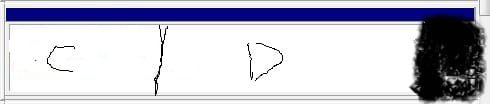
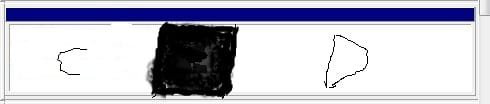
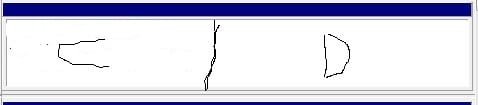
When you have everything backed up you want to safeguard from any possible losses and since you already shrank the D partition note the unallocated drive space is seen at the rear of the drive where now you would first have to move the D partition in that directtion before being to expand C into the new gap between C and D you would then see.

The three images here will show the way your C and D partitions look now, after the D partition is moved to shift where the unallocated drive space will be seen, and then how the later expanded C primary will meet up with D once expanded into the gap between the two.
 

Attachments

  • CD Disk Layout1.jpg
    CD Disk Layout1.jpg
    12.8 KB · Views: 3
  • CD Disk Layout2.jpg
    CD Disk Layout2.jpg
    12.8 KB · Views: 1
  • CD Disk Layout3.jpg
    CD Disk Layout3.jpg
    11.9 KB · Views: 1

My Computers

System One System Two

  • Computer type
    PC/Desktop
    Computer Manufacturer/Model Number
    Custom builds = 2
    OS
    W7 Ultimate x64/W10 Pro x64/W11 Pro Triple Boot - Main PC W7 Remote PC Micro ATX W7 Pro x64/W11 Pro
    CPU
    AMD Phenom II X4 975 Deneb 3.6ghz - 965 2nd remote pc
    Motherboard
    Gigabyte GA-790XTA-UD4-Gigabyte GA-880GM-D2H remote pc
    Memory
    Kingston Hyper X DDR3 1600 1.5v 16gb - Hyper X Fury 8gb 2nd
    Graphics Card(s)
    MSI HD Radeon 5750 1gb - MSI HD Radeon 6450 on mini tower
    Sound Card
    Creative Labs X-Fi Xtreme Audio P - Realtek onooard 2nd case
    Monitor(s) Displays
    ASUS VW199T-P 19" HP 2082a Main-HP 2082a 20" remote pc
    Screen Resolution
    Asus 1440x900 - HP 1600x900
    Hard Drives
    WD Black 1TB HD per OS W7, W10, and pending W11 presently on 500gb OS Drive - Pending Triple 1TB HDs for Spanned Storage/backup volume
    Single 2TB external USB enclosure, single 1TB System 7 Host/Boot drive, Pending 8TB external HD for system image b
    PSU
    Corsair 750TX - primary / Corsair CX600 - second
    Case
    Antec 900-2 - SSD compatible / NZXT Vulcan mini tower
    Cooling
    Zalman CNPS9900A
    Keyboard
    AZIO L70 Backlit Letters Gaming - ONN Cordless/USB
    Mouse
    MSI DS200 Programmable, Logitech Cordless
    Internet Speed
    30mbps upgrade - primary hard wired - mini tower usb WiFi
    Antivirus
    GFI VIPRE Internet Security 2014 on W7 2016 beta on W10,
    Browser
    Cyberfox, WaterFox 64bit FF variants, FireFox x64, Pale Moon
    Other Info
    Accomdata fan cooled usb 2.0 PIDE/Sata II, III external enclosure.
    Sambient usb/eSata PATA/Sata II, III external enclosure.
  • Computer type
    PC/Desktop
    System Manufacturer/Model Number
    CUSTOM ASSEMBLY
    OS
    W7 Pro x64/W11 Pro
    CPU
    AMD Deneb 3.6ghz - 965
    Motherboard
    Gigabyte GA-880GM-D2H remote pc
    Memory
    Kingston Hyper X Fury 8gb
    Graphics Card(s)
    MSI HD Radeon 6450 DVI Output
    Sound Card
    Realtek onooard Creative or Other separate PENDING
    Monitor(s) Displays
    VIZIO 32" LCD TV Separate LCD Pending
    Screen Resolution
    1600x1080
    Hard Drives
    WD 500GB OS Host/Boot WD Green 1TB Storage/Backup
    PSU
    Corsair 600W - THERMALTAKE 600W spare case
    Case
    NZXT Vulcan mini tower
    Cooling
    Twin 120mm Top Fans - 240mm Side Cover
    Keyboard
    ONN Cordless/USB Logitech Cordless
    Mouse
    ONN USB/Cordless - Logitech Cordless
    Internet Speed
    DSL 5G
    Browser
    MS Edge, FireFox, WaterFox x64, FireFox Nightly
    Other Info
    OS Testing-Remote Access to Main TeamViewer
yep delete d: and then you can expand, although in my opinion moving files to d: is the better option. Having 2 partitions is good as when you reinstall windows and wipe over c: data on d: will stay intact.
 

My Computer

Computer type
PC/Desktop
Computer Manufacturer/Model Number
home built
OS
windows 8.1 Pro x64
CPU
intel i5 4670k @ 4.3ghz
Motherboard
asus z87-plus
Memory
16 gig ram ddr3 @ 1600 corsair vengeance
Graphics Card(s)
evga 970 GTX 4 GIG FTW ACX 2.0
Sound Card
asus xonar D2X
Monitor(s) Displays
benq gw2765ht
Screen Resolution
2560x1440
Hard Drives
Samsung 850 pro SSD 512gig - boot device wooosh
WD black cavalier 640gig WD6401AALS
Seagate 500gig ST3500630AS
WD 2TB Green WDC20EARS
2 x WD Red 3TB WD30EFRX
Samsung 750gig HD753LG - on asmedia controller
PSU
coolermaster silent pro 600watt modular
Case
fractal define R4
Cooling
artic freezer i30, 3 case fans
Keyboard
microsoft business ps2 keyboard
Mouse
microsoft optical black mouse
Internet Speed
80/20 FTTC SkyBB
Antivirus
Nod32 AV v8, HitmanProAlert, SRP, System Hardening
Browser
Chrome x64
Other Info
Intel controller is in AHCI mode currently using IaSTOR 12.8.0.1016 drivers
I am really puzzled. Why on earth would you want to throw everything into one bucket and delete the data partition. An independent data partition (independent from the OS partition) is the best scenario you can have. Any hit on your C partition will also be a hit on your data if that is in the same partition. The OS is always easy to reinstall, but if you get a hit on your data, you are in real trouble.
It would be useful if you could explain your motivation for wanting to merge the 2 partitions. As recommended, I would move all the data to D - but do it the right way. Here is a video tutorial that explains how (disregard the part about the partition creation because you already have a D partition for the purpose).
A picture of your Disk Management would also be useful for further discussion. We have to make sure that you do not fall into the trap of dynamic partitions.
 

My Computer

Computer Manufacturer/Model Number
HP, Dell, Gateway, Toshiba - 4 laptops and 2 desktops
OS
Vista, Windows7, Mint Mate, Zorin, Windows 8
CPU
from 1.6GHz Duo to i7
Monitor(s) Displays
2x HP w2207
Hard Drives
5x HDD, 7x SSD, 12x Externals
Keyboard
with trackball - no mices
Mouse
Trackball mice
Internet Speed
DSL 6000
The backup wouldn't be to the D partition if the plan is to see that removed and the C primary expanded to fill in the empty drive space afterwards. You would want either a second drive if one was added or to an external HD or removable media. That insures files are safety out of the way(harm's way included) when going to make the changes.

The first option for that would the Windows Easy Transfer tool for seeing your user settings as well as other personal data and files stored locally on the drive backed up somewhere. The idea of having a second storage backup partition on any single drive system like a laptop can work when the drive is a little larger then the eventual total amount of files to stored and backed up. That then allows for a large C primary as well.
 

My Computers

System One System Two

  • Computer type
    PC/Desktop
    Computer Manufacturer/Model Number
    Custom builds = 2
    OS
    W7 Ultimate x64/W10 Pro x64/W11 Pro Triple Boot - Main PC W7 Remote PC Micro ATX W7 Pro x64/W11 Pro
    CPU
    AMD Phenom II X4 975 Deneb 3.6ghz - 965 2nd remote pc
    Motherboard
    Gigabyte GA-790XTA-UD4-Gigabyte GA-880GM-D2H remote pc
    Memory
    Kingston Hyper X DDR3 1600 1.5v 16gb - Hyper X Fury 8gb 2nd
    Graphics Card(s)
    MSI HD Radeon 5750 1gb - MSI HD Radeon 6450 on mini tower
    Sound Card
    Creative Labs X-Fi Xtreme Audio P - Realtek onooard 2nd case
    Monitor(s) Displays
    ASUS VW199T-P 19" HP 2082a Main-HP 2082a 20" remote pc
    Screen Resolution
    Asus 1440x900 - HP 1600x900
    Hard Drives
    WD Black 1TB HD per OS W7, W10, and pending W11 presently on 500gb OS Drive - Pending Triple 1TB HDs for Spanned Storage/backup volume
    Single 2TB external USB enclosure, single 1TB System 7 Host/Boot drive, Pending 8TB external HD for system image b
    PSU
    Corsair 750TX - primary / Corsair CX600 - second
    Case
    Antec 900-2 - SSD compatible / NZXT Vulcan mini tower
    Cooling
    Zalman CNPS9900A
    Keyboard
    AZIO L70 Backlit Letters Gaming - ONN Cordless/USB
    Mouse
    MSI DS200 Programmable, Logitech Cordless
    Internet Speed
    30mbps upgrade - primary hard wired - mini tower usb WiFi
    Antivirus
    GFI VIPRE Internet Security 2014 on W7 2016 beta on W10,
    Browser
    Cyberfox, WaterFox 64bit FF variants, FireFox x64, Pale Moon
    Other Info
    Accomdata fan cooled usb 2.0 PIDE/Sata II, III external enclosure.
    Sambient usb/eSata PATA/Sata II, III external enclosure.
  • Computer type
    PC/Desktop
    System Manufacturer/Model Number
    CUSTOM ASSEMBLY
    OS
    W7 Pro x64/W11 Pro
    CPU
    AMD Deneb 3.6ghz - 965
    Motherboard
    Gigabyte GA-880GM-D2H remote pc
    Memory
    Kingston Hyper X Fury 8gb
    Graphics Card(s)
    MSI HD Radeon 6450 DVI Output
    Sound Card
    Realtek onooard Creative or Other separate PENDING
    Monitor(s) Displays
    VIZIO 32" LCD TV Separate LCD Pending
    Screen Resolution
    1600x1080
    Hard Drives
    WD 500GB OS Host/Boot WD Green 1TB Storage/Backup
    PSU
    Corsair 600W - THERMALTAKE 600W spare case
    Case
    NZXT Vulcan mini tower
    Cooling
    Twin 120mm Top Fans - 240mm Side Cover
    Keyboard
    ONN Cordless/USB Logitech Cordless
    Mouse
    ONN USB/Cordless - Logitech Cordless
    Internet Speed
    DSL 5G
    Browser
    MS Edge, FireFox, WaterFox x64, FireFox Nightly
    Other Info
    OS Testing-Remote Access to Main TeamViewer
yep delete d: and then you can expand, although in my opinion moving files to d: is the better option. Having 2 partitions is good as when you reinstall windows and wipe over c: data on d: will stay intact.

This seems to be the consensus here as well, a safer option IMO.
 

My Computer

Computer type
PC/Desktop
Computer Manufacturer/Model Number
76~2.0
OS
Windows 7 Ult x64 - SP1/ Windows 8 Pro x64
CPU
Intel Core i5-3570K 4.6GHz
Motherboard
Gigabyte GA-Z77X UD3H, f18
Memory
8GB (2X4GB) DDR3 1600 Corsair Vengeance CL8 1.5v
Graphics Card(s)
Sapphire HD 7770 Vapor-X OC 1GB DDR5
Sound Card
Onboard VIA VT2021
Monitor(s) Displays
22" LCD Dell
Screen Resolution
1680x1050
Hard Drives
Samsung 840Pro 128GB SSD,
Seagate Barracuda 500GB SATA2 7200rpm 32MB cache, Seagate Barracuda 1TB SATA2 7200rpm 32MB cache,
PSU
Corsair HX650W
Case
Cooler Master Storm Scout
Cooling
Corsair H80 2x12cm Noctua NF P12 , 2x14cm case fans
Keyboard
Logitech Wave
Mouse
CM Sentinel
Internet Speed
Dismal
Antivirus
Avast
Browser
Opera Next
Other Info
Haswell laptop: HP Envy 17t-j, i7-4700MQ, GeForce 740M 2GB DDR3, 17.3" Full HD 1920x1080, 16GB RAM, Samsung 840 Pro 128GB, 1TB Hitachi 7200 HDD,
Desktop: eSATA ports,
External eSATA Seagate 500GB SATA2 7200rpm,
External WD USB 500GB
Back
Top