Disk Missing After Patch Tuesday

Mindfield

New member
Local time
11:35 PM
Messages
3
I should have known better after the last time this happened than to let Windows install updates automatically, but here I am again, and worse off than last time.

Here's what's happened. I run twin 3TB WD hard drives. My boot drive is a 1.5TB dynamic partition that has a Windows mirror on the twin drive. The rest of the space is divvied up amongst various other volumes for various purposes.

After this past PAtch Tuesday, Windows did its business installing 11 updates since the last Patch Tuesday, and upon rebooting, my second 3TB drive was just missing. On, it's there -- BIOS recognizes it and I can boot from the second plex, though it just went into Windows Repair mode, which accomplished nothing as it was unable to repair anything. However, Disk Management regarded the entire drive as missing. Reactivating solved nothing but a "The Plex is missing" error. I tried disconnecting the drive, rebooting, shutting down, reconnected and rebooting again, but no luck. Same deal. I tried a rollback to three days ago, but the damage was apparently already done. Still no luck. I tried removing the C mirror in the hopes that this would help. Nope, the twin drive now only shows 3 partitions (instead of 4) with the mirror partition just totally gone. I can't reactivate the drive at all, whether from Disk Management or DISKPART from the command line. Nothing works.

I freaking hate Windows update for doing this.

This happened once before several months ago. I was able to fix it by attempting the first round of shut down/disconnect/reboot/shut/down/reconnect/reboot, then I was able to reactivate the disk (which it saw as a foreign volume) and then import the foreign volume. It had to rebuild the mirror but otherwise everything was fine. This time I wasn't even able to get that far.

Can anyone help? Any ideas what's going on here and how to fix it? I'm totally at a loss. The mirror drive I don't care about, I can just rebuild the mirror if only I can get the drive recognized again, but it's the other three partitions that have data on them that I need, and I can't even get to them anymore.

Any advice would be greatly appreciated.
 

My Computer

Computer type
PC/Desktop
Computer Manufacturer/Model Number
Custom build
OS
Windows 7 Professional x64
CPU
AMX FX 8350 Black
Motherboard
Asus M5A99FX Pro R2.0
Memory
2x8GB Corsair Vengeance Pro DDR3-1866
Graphics Card(s)
Radeon HD5870
Hard Drives
2x Western Digital 3TB
1x Western Digital 1.5TB
1x Western Digital 1TB
Browser
Firefox
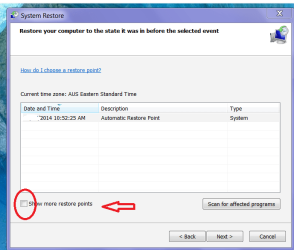
Hello and welcome Mindfield is three days the very furthest back you can get in system restore??

did you tick the back dated ones?
 

Attachments

  • SYSREST.PNG
    SYSREST.PNG
    23.6 KB · Views: 17

My Computer

Computer type
PC/Desktop
Computer Manufacturer/Model Number
Own build (new) Desk1 / Asus ROG Win 7 / Desk2 1st build
OS
Desk1 7 Home Prem / Desk2 10 Pro / Main lap Asus ROG 10 Pro 2 laptop Toshiba 7 Pro Asus P2520 7 & 10
CPU
Desk1 i5 3750K / Laptop i7 GTX 860M / Desk2 i5 2500
Motherboard
Desk1 Asus P877-V / Desk2 Gigabyte H67 UD3H / Laptop ?
Memory
Desk1 8GB (1866) / Desk2 16GB (1333) / Laptop 8Gb DDR3
Graphics Card(s)
Desk 1& 2NVidia GTX 650 & Laptops on board Intel
Sound Card
Desk 1 & 2 -XONAR DG Realtek High Def audio Laptop
Monitor(s) Displays
Desk 1 Benq HD 2450 / Desk2 Philips 24" / Laptop 17.5"
Screen Resolution
1920x1080 D1 & D2 & Laptop 1
Hard Drives
Desk1 Samsung 120GB 830 SSD
Asus ROG 256GB 850 Pro SSD
Desk2 Samsung 840 256 SSD
Toshiba 120GB EVO
PSU
Desk 1 Corsair HX 1050/ Laptop ? / Desk 2 Corsair HX 650
Case
Desk 1 Cooler HAF XM ? Toshiba laptop / Desk2 Coolermaster
Cooling
Fans on all Desk1 -2 Desk2 - all Coolermasters 5 Laptop ?
Keyboard
Desk 1 MS Sidewinder X6 Desk 2 MS Sidewinder X 4
Mouse
Desk 1&2 - Gigabyte MS 900 gamer - laptop - Logitec wireless
Internet Speed
ADSL2+
Other Info
One other Desktop (tester) and spare Toshba laptop both with SSD's
Running Kaspersky 2016 ISS on all machines config'd identically
Logitec audio stereo systems on each machine (x3)
Canon MG5250MFC
Router/modem TP-Link running WPA2SK
Hi there,

If restoring to an even earlier date doesn't solve it you could use WDs testing tool WD Support / Downloads / SATA & SAS / WD Green / GP to check the drive, and use the “write zeros” option to wipe it clean. Then you will be able to start fresh considering there is no physical damage to the drive. If there are any bad sectors it will show on the tests. However you will loose all data. Maybe before you wipe it you could post a screenshot of the current findings in disc management and the test results? Just to make sure there is nothing else left to try.

Keep us posted.
 

My Computer

Computer type
PC/Desktop
OS
Windows
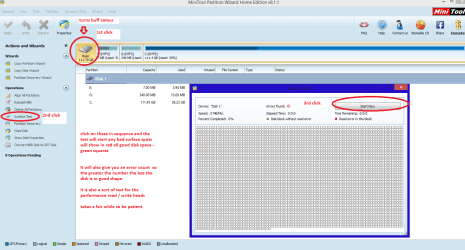
Yep Techy there is an alternative too with a surface test using Partition Wizard Best Free Partition Manager Freeware and free partition magic for Windows 7, Windows 8, Windows Vista and Windows XP 32 bit & 64 bit. MiniTool Free Partition Manager Software Home Edition. it will test the actual platter physical surfaces and to some extent will test out the read / write heads.
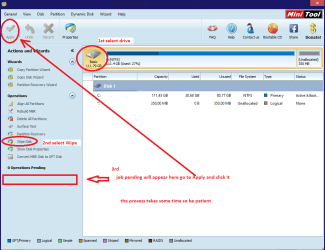
It can also wipe the drive and the data recovery although I haven't used it very much is a good tool also tough I prefer to use a Ubuntu boot to recover data..;)

For the surface test just follow my pic. If you need to wipe the drive then use the other pic.
 

Attachments

  • MINI TOOL SURFACE 2.PNG
    MINI TOOL SURFACE 2.PNG
    46.8 KB · Views: 0
  • MINI TOOLS _ WIPE.PNG
    MINI TOOLS _ WIPE.PNG
    31.5 KB · Views: 0

My Computer

Computer type
PC/Desktop
Computer Manufacturer/Model Number
Own build (new) Desk1 / Asus ROG Win 7 / Desk2 1st build
OS
Desk1 7 Home Prem / Desk2 10 Pro / Main lap Asus ROG 10 Pro 2 laptop Toshiba 7 Pro Asus P2520 7 & 10
CPU
Desk1 i5 3750K / Laptop i7 GTX 860M / Desk2 i5 2500
Motherboard
Desk1 Asus P877-V / Desk2 Gigabyte H67 UD3H / Laptop ?
Memory
Desk1 8GB (1866) / Desk2 16GB (1333) / Laptop 8Gb DDR3
Graphics Card(s)
Desk 1& 2NVidia GTX 650 & Laptops on board Intel
Sound Card
Desk 1 & 2 -XONAR DG Realtek High Def audio Laptop
Monitor(s) Displays
Desk 1 Benq HD 2450 / Desk2 Philips 24" / Laptop 17.5"
Screen Resolution
1920x1080 D1 & D2 & Laptop 1
Hard Drives
Desk1 Samsung 120GB 830 SSD
Asus ROG 256GB 850 Pro SSD
Desk2 Samsung 840 256 SSD
Toshiba 120GB EVO
PSU
Desk 1 Corsair HX 1050/ Laptop ? / Desk 2 Corsair HX 650
Case
Desk 1 Cooler HAF XM ? Toshiba laptop / Desk2 Coolermaster
Cooling
Fans on all Desk1 -2 Desk2 - all Coolermasters 5 Laptop ?
Keyboard
Desk 1 MS Sidewinder X6 Desk 2 MS Sidewinder X 4
Mouse
Desk 1&2 - Gigabyte MS 900 gamer - laptop - Logitec wireless
Internet Speed
ADSL2+
Other Info
One other Desktop (tester) and spare Toshba laptop both with SSD's
Running Kaspersky 2016 ISS on all machines config'd identically
Logitec audio stereo systems on each machine (x3)
Canon MG5250MFC
Router/modem TP-Link running WPA2SK
I'll see if I can post screenshots later on. But the key here was that before I removed the mirror, I was actually able to boot from the second plex, wherein it launched itself into Windows Repair mode. As I mentioned this didn't accomplish anything as the repair attempt failed. Rolling back to three days prior did work but didn't solve anything; whatever Windows did to break the plex and cause the drive to effectively become unrecognized (but not by BIOS, which sees it just fine) was already done and was not something that gets undone during a rollback.

Now that I've removed the plex however the second C partition doesn't even show up in disk management. Just the remaining 3 partitions on the same drive, which also remain inaccessible.

I don't suppose there is any way to solve this without wiping the drive?
 

My Computer

Computer type
PC/Desktop
Computer Manufacturer/Model Number
Custom build
OS
Windows 7 Professional x64
CPU
AMX FX 8350 Black
Motherboard
Asus M5A99FX Pro R2.0
Memory
2x8GB Corsair Vengeance Pro DDR3-1866
Graphics Card(s)
Radeon HD5870
Hard Drives
2x Western Digital 3TB
1x Western Digital 1.5TB
1x Western Digital 1TB
Browser
Firefox
I completely understand what you mean. My idea was that eventually, if you are able to get back to a point where you still have the mirrored set, you could try Resynchronizing the Mirror, as you haven't mentioned trying that yet. As far as I'm aware, a volume will be listed as missing if the data on the mirrored drives is out of sync (but not only then). We cannot be sure if that is the reason, but it is still an option :) As for not seeing the second C partition at the moment – when you remove the mirror it actually deletes it and it should be now unallocated space.

I have seen users using third-party tools to convert a dynamic disk to a basic disk without having to delete or format them. If you are able to convert the disc volumes you should be able to access your 3 data partitions using Ubuntu LiveCD for example. Maybe ICit2lol could help with the Ubuntu steps.
 

My Computer

Computer type
PC/Desktop
OS
Windows
Hmm. I have a virtual Ubuntu installation -- an old one but I'm sure it could be updated. I wouldn't know where to go from there though.

However here's the rub: I can't try recreating and resyncing the mirror because I can't get Windows to recognize that the drive even exists. It is listed as "Missing" in the storage manager, and when I right-click and try re-activating, it simply comes up with a "The Plex is missing" error. since removing the mirror (and subsequent disappearance of the drive -- it doesn't even show up as unallocated space, it just thinks the drive is now half the size it used to be) if I try and reactivate, it literally does nothing. It seems to attempt ... something, but no errors, no messages, and no activity happens. It remains listed as missing. I can't rebuild the mirror because it doesn't see a drive to mirror it too; the entry in storage management seems like a ghost -- an entry in the table that says it should be there but isn't.
 

My Computer

Computer type
PC/Desktop
Computer Manufacturer/Model Number
Custom build
OS
Windows 7 Professional x64
CPU
AMX FX 8350 Black
Motherboard
Asus M5A99FX Pro R2.0
Memory
2x8GB Corsair Vengeance Pro DDR3-1866
Graphics Card(s)
Radeon HD5870
Hard Drives
2x Western Digital 3TB
1x Western Digital 1.5TB
1x Western Digital 1TB
Browser
Firefox

My Computer

Computer type
PC/Desktop
OS
Windows
Back
Top