Disk Partitioning in windows 7?

quuxbazer

New member
Local time
9:52 AM
Messages
5
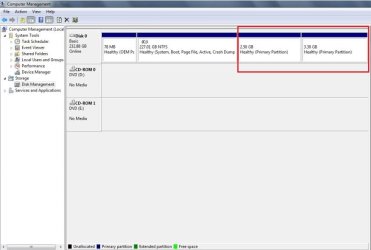
I want to extend my C:\ drive and make another primary partition to install Ubuntu on. But when I open up the diskpart manager, I see that I already have 4 primary partitions (max)..., can anyone tell me what the purpose of the last 2 partitions is, and if I can delete them?:

http://i946.photobucket.com/albums/ad302/quuxbazer/Diskpart.jpg
 

My Computer

Computer Manufacturer/Model Number
Dell Inspiron 1520
OS
windows 7
CPU
T7500 @ 2.20 GHz dual core
Memory
4 GB 800 Mhz DDR2
Graphics Card(s)
Nvidia 8600m GT
Hard Drives
Toshiba 250 GB @ 5400 RPM
Cooling
stock
hmm its hard to tell. Do they appear under My Computer?
 

My Computer

Computer Manufacturer/Model Number
Sony
OS
Main OS: Windows 7 64 bit, Secondary: Vista 32 bit
CPU
Intel Core 2 Duo P8400 @ 2.26 Ghz
Motherboard
Intel PM45
Memory
4GB DDR2
Graphics Card(s)
ATI Radeon Mobility HD3470
Sound Card
Integrated Realtek
Monitor(s) Displays
Integrated (Laptop) 16.4 inch
Screen Resolution
1600x900
Hard Drives
320 GB
Mouse
Logitech
Internet Speed
1 Mb/s
Nope...they don't show up on My Computer.

My other option is use my portable HD, but I already have Mac OS on that, and I feel like Ubuntu will overwrite and mess up the bootloader...
 

My Computer

Computer Manufacturer/Model Number
Dell Inspiron 1520
OS
windows 7
CPU
T7500 @ 2.20 GHz dual core
Memory
4 GB 800 Mhz DDR2
Graphics Card(s)
Nvidia 8600m GT
Hard Drives
Toshiba 250 GB @ 5400 RPM
Cooling
stock
i isntalled a linux distro before when i was running the windows 7 beta. It will install its own boot manager GRUB and from there you can choose between windows 7 and ubuntu. The point that im trying to make is that if eventually you want to remove ubuntu alltogether there might be problems. GRUB is a nightmare to remove (i ended up wiping my whole HDD to get rid of it). Also u cant simply delete the ubuntu partition because that will render you computer a brick. You wont be able to launch into windows or ubuntu.

Im just describing my experience, but installing on a thumb drive is possible though. I personally have ubuntu installed in virtualbox and it runs great.
 

My Computer

Computer Manufacturer/Model Number
Sony
OS
Main OS: Windows 7 64 bit, Secondary: Vista 32 bit
CPU
Intel Core 2 Duo P8400 @ 2.26 Ghz
Motherboard
Intel PM45
Memory
4GB DDR2
Graphics Card(s)
ATI Radeon Mobility HD3470
Sound Card
Integrated Realtek
Monitor(s) Displays
Integrated (Laptop) 16.4 inch
Screen Resolution
1600x900
Hard Drives
320 GB
Mouse
Logitech
Internet Speed
1 Mb/s
If you want to play around with various distros of Linux and even other versions of windows, I can't recommend VirtualBox strongly enough. Not only does it only take like 5 minutes to install an OS under it, but you get full mouse pointer, cut/paste, drag and drop between windows and Linux (or windows and windows). And the hardware config is /ususaly/ incredibly fast and easy due to the virtualization of the hardware being a constant target.

VirtualBox is a dream for running Linux and Windows on the same machine. No partitioning or bootloader issues at all!

It's also free for personal use at home or at work!
 

My Computer

Computer Manufacturer/Model Number
Scratch built
OS
Windows 7 x64 Ultimate
CPU
i7 960
Motherboard
Asus P6X58D
Memory
12 Gig Corsair Dominator
Graphics Card(s)
Nvidia 480
Sound Card
Maudio Delta 44 + breakout box
Monitor(s) Displays
Dell UltraSharp U2410 24in and Samsung 21 dual monitors
Screen Resolution
1920x1200 and 1280x1024
Hard Drives
Primary: Intel X-25M G2 160G SSD
Secondary: Segate baracuda 1.0 TB
HDs in AHCI mode.
PSU
Corasair TX850
Case
Cooler Master HAF
Cooling
Corsair H50
Keyboard
Logitech G15 + N52 game pad
Mouse
Logitech MX518
Internet Speed
15kbs down 4.5kbps up
Other Info
WEI 7.6
CPU & RAM 7.6
Graphics 7.9
Hard disk 7.7
Cool! I'll give that a try.

And OMG...I know what those 2 partitions are...they were created when I installed leopard and snow leopard thru my external hard drive. *Bangs his head against the wall :doh:
 

My Computer

Computer Manufacturer/Model Number
Dell Inspiron 1520
OS
windows 7
CPU
T7500 @ 2.20 GHz dual core
Memory
4 GB 800 Mhz DDR2
Graphics Card(s)
Nvidia 8600m GT
Hard Drives
Toshiba 250 GB @ 5400 RPM
Cooling
stock
I want to extend my C:\ drive and make another primary partition to install Ubuntu on. But when I open up the diskpart manager, I see that I already have 4 primary partitions (max)..., can anyone tell me what the purpose of the last 2 partitions is, and if I can delete them?:

http://i946.photobucket.com/albums/ad302/quuxbazer/Diskpart.jpg
So this is your disk management snipshot
Capture.JPG

I will suggest you two alternatives so that you can get ubuntu installed.
1. Use Wubi - Ubuntu Installer for Windows . This is the easiest and the best way to unstall ubuntu in a windows machine . Most easy to install and uninstall. Sets up dual boot menu automatically . I strongly recommend you to use this option, if you dont have an ample experience with ubuntu installation and GRUB. Here you dont need any other partition, too. It installs ok in windows partition ( more info in the link )

2. Partition Wizard Bootable CD allows user to boot computer directly to manage partition. . Download and burn it in a cd (use imgburn ,recommended). Boot up from it, and delete the last two partitions using it, create a new one there, set it primary. It is enough space for ubuntu. But if you want to proceed in this way at first get a http://www.sevenforums.com/tutorials/663-backup-complete-computer-create-image-backup.html , and still there may be a chance to mess up with MBR . So keep it in hand Download Windows 7 System Recovery Discs — The NeoSmart Files

I hope you are not confused ;) But if I had been in place of you, I'd go with the first option :D
 

My Computer

Computer type
PC/Desktop
Computer Manufacturer/Model Number
Self Assembled
OS
Microsoft Windows 10 Pro Insider Preview 64-bit
CPU
Intel(R) Core(TM) i3-4130 CPU @ 3.40GHz
Motherboard
Gigabyte Technology Co., Ltd. B85M-D3H
Memory
Corsair Vengence 4GB x2 (8.00GB Dual-Channel DDR3 @ 798MHz)
Graphics Card(s)
2047MB GeForce GTS 450 (ZOTAC International)
Sound Card
Onboard (Realtek High Definition Audio)
Monitor(s) Displays
LG Flatron E2040T
Screen Resolution
1600x900
Hard Drives
Western Digital 1 TB
Seagate 500 GB
PSU
Corsair VS550
Case
Cooler Master K380
Cooling
Cooler Master Seidon 120V Plus
Keyboard
Logitech MK260r
Mouse
Logitech MK260r
Internet Speed
PMPL Broadband
Antivirus
Windows Defender + MBAM
Browser
Firefox
Other Info
Dell Studio 15" Laptop
DaRonRon and fseal: I just installed virtual box and it runs pretty well! However, it's a bit slow, and actually the main reason I wanted to install Linux so that I would be more productive - I have too many video games on windows lol.

Arc: Thanks for the suggestion, I will try Wubi right now and see how it goes!
 

My Computer

Computer Manufacturer/Model Number
Dell Inspiron 1520
OS
windows 7
CPU
T7500 @ 2.20 GHz dual core
Memory
4 GB 800 Mhz DDR2
Graphics Card(s)
Nvidia 8600m GT
Hard Drives
Toshiba 250 GB @ 5400 RPM
Cooling
stock
DaRonRon and fseal: I just installed virtual box and it runs pretty well! However, it's a bit slow, and actually the main reason I wanted to install Linux so that I would be more productive - I have too many video games on windows lol.

Arc: Thanks for the suggestion, I will try Wubi right now and see how it goes!

You are most welcome, pal ! Know why I didn't included VM thing in my suggestions ? Coz I am not sure whether I can install Compiz on a virtual ubuntu. In my case, I failed. But you know pal, the main fun ... the attraction of ubuntu is Compiz :p
 

My Computer

Computer type
PC/Desktop
Computer Manufacturer/Model Number
Self Assembled
OS
Microsoft Windows 10 Pro Insider Preview 64-bit
CPU
Intel(R) Core(TM) i3-4130 CPU @ 3.40GHz
Motherboard
Gigabyte Technology Co., Ltd. B85M-D3H
Memory
Corsair Vengence 4GB x2 (8.00GB Dual-Channel DDR3 @ 798MHz)
Graphics Card(s)
2047MB GeForce GTS 450 (ZOTAC International)
Sound Card
Onboard (Realtek High Definition Audio)
Monitor(s) Displays
LG Flatron E2040T
Screen Resolution
1600x900
Hard Drives
Western Digital 1 TB
Seagate 500 GB
PSU
Corsair VS550
Case
Cooler Master K380
Cooling
Cooler Master Seidon 120V Plus
Keyboard
Logitech MK260r
Mouse
Logitech MK260r
Internet Speed
PMPL Broadband
Antivirus
Windows Defender + MBAM
Browser
Firefox
Other Info
Dell Studio 15" Laptop
DaRonRon and fseal: I just installed virtual box and it runs pretty well! However, it's a bit slow, and actually the main reason I wanted to install Linux so that I would be more productive - I have too many video games on windows lol.

Arc: Thanks for the suggestion, I will try Wubi right now and see how it goes!

You are most welcome, pal ! Know why I didn't included VM thing in my suggestions ? Coz I am not sure whether I can install Compiz on a virtual ubuntu. In my case, I failed. But you know pal, the main fun ... the attraction of ubuntu is Compiz :p

yes you can in the new virtualbox. I have all the effects set on. They're awesome man, i dont even think windows 7 aero effects compare.
 

My Computer

Computer Manufacturer/Model Number
Sony
OS
Main OS: Windows 7 64 bit, Secondary: Vista 32 bit
CPU
Intel Core 2 Duo P8400 @ 2.26 Ghz
Motherboard
Intel PM45
Memory
4GB DDR2
Graphics Card(s)
ATI Radeon Mobility HD3470
Sound Card
Integrated Realtek
Monitor(s) Displays
Integrated (Laptop) 16.4 inch
Screen Resolution
1600x900
Hard Drives
320 GB
Mouse
Logitech
Internet Speed
1 Mb/s
yes you can in the new virtualbox. I have all the effects set on. They're awesome man, i dont even think windows 7 aero effects compare.

Are you sure , Ron ? Then I would try it again ! Actually my favorite virtualisation platform is vmware ... but still I am going to download virtualbox. Thanks for the info, pal :D

woobley window ... desktop cube ... all the killer things it includes . Damn nice !
 

My Computer

Computer type
PC/Desktop
Computer Manufacturer/Model Number
Self Assembled
OS
Microsoft Windows 10 Pro Insider Preview 64-bit
CPU
Intel(R) Core(TM) i3-4130 CPU @ 3.40GHz
Motherboard
Gigabyte Technology Co., Ltd. B85M-D3H
Memory
Corsair Vengence 4GB x2 (8.00GB Dual-Channel DDR3 @ 798MHz)
Graphics Card(s)
2047MB GeForce GTS 450 (ZOTAC International)
Sound Card
Onboard (Realtek High Definition Audio)
Monitor(s) Displays
LG Flatron E2040T
Screen Resolution
1600x900
Hard Drives
Western Digital 1 TB
Seagate 500 GB
PSU
Corsair VS550
Case
Cooler Master K380
Cooling
Cooler Master Seidon 120V Plus
Keyboard
Logitech MK260r
Mouse
Logitech MK260r
Internet Speed
PMPL Broadband
Antivirus
Windows Defender + MBAM
Browser
Firefox
Other Info
Dell Studio 15" Laptop
yeah im sure of it. You wont be disappointed :)
 

My Computer

Computer Manufacturer/Model Number
Sony
OS
Main OS: Windows 7 64 bit, Secondary: Vista 32 bit
CPU
Intel Core 2 Duo P8400 @ 2.26 Ghz
Motherboard
Intel PM45
Memory
4GB DDR2
Graphics Card(s)
ATI Radeon Mobility HD3470
Sound Card
Integrated Realtek
Monitor(s) Displays
Integrated (Laptop) 16.4 inch
Screen Resolution
1600x900
Hard Drives
320 GB
Mouse
Logitech
Internet Speed
1 Mb/s
Hey guys, I used Wubi, and have Ubuntu working flawlessly. ITS SO BEAUTIFUL...so customizable it's ridiculous. Windows 7 is still awesome, but Ubuntu 10.04 is just...incredible. I can't believe I even bothered installing Mac SL, lol...

Thank you so much Arc, and also you guys too DaRonRon and fseal.
 

My Computer

Computer Manufacturer/Model Number
Dell Inspiron 1520
OS
windows 7
CPU
T7500 @ 2.20 GHz dual core
Memory
4 GB 800 Mhz DDR2
Graphics Card(s)
Nvidia 8600m GT
Hard Drives
Toshiba 250 GB @ 5400 RPM
Cooling
stock
Hey guys, I used Wubi, and have Ubuntu working flawlessly. ITS SO BEAUTIFUL...so customizable it's ridiculous. Windows 7 is still awesome, but Ubuntu 10.04 is just...incredible. I can't believe I even bothered installing Mac SL, lol...

Thank you so much Arc, and also you guys too DaRonRon and fseal.

Want Mac ? Just install Mac4Lin theme in ubuntu ... it will look even better than Mac ;)
 

My Computer

Computer type
PC/Desktop
Computer Manufacturer/Model Number
Self Assembled
OS
Microsoft Windows 10 Pro Insider Preview 64-bit
CPU
Intel(R) Core(TM) i3-4130 CPU @ 3.40GHz
Motherboard
Gigabyte Technology Co., Ltd. B85M-D3H
Memory
Corsair Vengence 4GB x2 (8.00GB Dual-Channel DDR3 @ 798MHz)
Graphics Card(s)
2047MB GeForce GTS 450 (ZOTAC International)
Sound Card
Onboard (Realtek High Definition Audio)
Monitor(s) Displays
LG Flatron E2040T
Screen Resolution
1600x900
Hard Drives
Western Digital 1 TB
Seagate 500 GB
PSU
Corsair VS550
Case
Cooler Master K380
Cooling
Cooler Master Seidon 120V Plus
Keyboard
Logitech MK260r
Mouse
Logitech MK260r
Internet Speed
PMPL Broadband
Antivirus
Windows Defender + MBAM
Browser
Firefox
Other Info
Dell Studio 15" Laptop
im a little curious about wubi. How does it install ubuntu without touching the bootloader? Does it run in Windows like a virtual machine would? And does this mean no GRUB?

edit: i just read the FAQ so ignore this post.

But are there any possible drawback from doing this?
 

My Computer

Computer Manufacturer/Model Number
Sony
OS
Main OS: Windows 7 64 bit, Secondary: Vista 32 bit
CPU
Intel Core 2 Duo P8400 @ 2.26 Ghz
Motherboard
Intel PM45
Memory
4GB DDR2
Graphics Card(s)
ATI Radeon Mobility HD3470
Sound Card
Integrated Realtek
Monitor(s) Displays
Integrated (Laptop) 16.4 inch
Screen Resolution
1600x900
Hard Drives
320 GB
Mouse
Logitech
Internet Speed
1 Mb/s

My Computer

Computer type
PC/Desktop
Computer Manufacturer/Model Number
Self Assembled
OS
Microsoft Windows 10 Pro Insider Preview 64-bit
CPU
Intel(R) Core(TM) i3-4130 CPU @ 3.40GHz
Motherboard
Gigabyte Technology Co., Ltd. B85M-D3H
Memory
Corsair Vengence 4GB x2 (8.00GB Dual-Channel DDR3 @ 798MHz)
Graphics Card(s)
2047MB GeForce GTS 450 (ZOTAC International)
Sound Card
Onboard (Realtek High Definition Audio)
Monitor(s) Displays
LG Flatron E2040T
Screen Resolution
1600x900
Hard Drives
Western Digital 1 TB
Seagate 500 GB
PSU
Corsair VS550
Case
Cooler Master K380
Cooling
Cooler Master Seidon 120V Plus
Keyboard
Logitech MK260r
Mouse
Logitech MK260r
Internet Speed
PMPL Broadband
Antivirus
Windows Defender + MBAM
Browser
Firefox
Other Info
Dell Studio 15" Laptop
Back
Top