disk partitions

Sagegrp

New member
Local time
7:17 PM
Messages
24
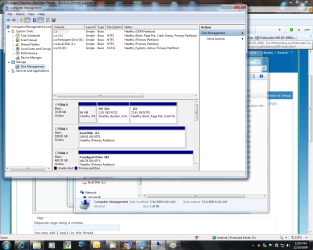
here is what I have setup (SEE ATTACHMENT) from an Upgrade to Windows 7 Professional:

What is the blank OEM partition and should the D: partition be FAT32 OR CAN IT BE ntfs?

disk partitions.png

thx
 

My Computer

OS
Windows 7 Professional
here is what I have setup (SEE ATTACHMENT) from an Upgrade to Windows 7 Professional:

What is the blank OEM partition and should the D: partition be FAT32 OR CAN IT BE ntfs?

View attachment 42628

thx

When you bought your computer it had an OS installed. If you read your manual, in the case of problem there is an f key, that can be pressed which enalbles you to return to factory condition,like the day that you received the computer. That OEM partition probably contains the original settings. Why is it empty? Probably when you did the upgrade the settings were erased.

Many may disagree, but I would do the install again, this time as a clean install. And delete the extra partitions, unless desired. When done you only need C: and one other for the backups, you actually can pick the letter.
 

My Computer

Computer type
PC/Desktop
Computer Manufacturer/Model Number
Dell XPS 420
OS
Windows 10, Home Clean Install
CPU
Intel Core2 processsor Q8200(2.33Ghz 1333FSB) Quad Core Tech
Motherboard
Dell
Memory
6 gb
Graphics Card(s)
ATI Radeon 256MB HD3650
Sound Card
Intergrated 7.1 Channel Audio
Monitor(s) Displays
Dell SP2009W 20"
Hard Drives
640 GB Serial ATA Hard drive
Cooling
Fan
Keyboard
Dell USB Keyboard
Mouse
Dell Premium Optical USB
Internet Speed
DSL 2.85
As suggested, boot from the Win7DVD and select Custom install, then Advanced drive tools to delete all, repartition as you desire, then format before installing.

When the DVD boots up, it will read the prior OS and allow Upgrade key,.
 
Back
Top