Disk Problem - help please

WinchesterStoke

New member
Member
Local time
12:15 PM
Messages
49
Hi, I've just booted up my desktop and it's stopped seeing one of the disks.:cry:

The BIOS sees the disk fine, but Windows can't see it.

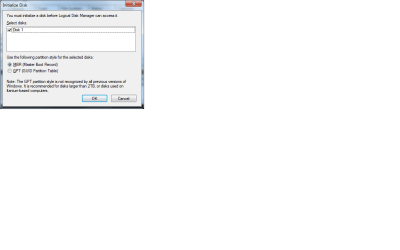
Have gone into disk management - and I get the message:

"You must initialize a disk before Logical Disk Manager can access it"

I then have the options of: Use MBR or GPT?

It's a 2TB disk - with a number of partitions - which is backed up - but will take ages to recover.

Any help on the best way forwards really appreciated.

Thanks in advance
 

My Computer

Computer Manufacturer/Model Number
Acer
OS
Windows x64 Premium
CPU
AMD Phenom II X6
Memory
4G

My Computer

Computer type
Laptop
Computer Manufacturer/Model Number
Sony Vaio VPCEB47GM Laptop
OS
Win 7 Pro 64-bit
CPU
Intel i5 2.4 Ghz
Memory
8GB DDR3
Graphics Card(s)
Intel HD 3000
Sound Card
IDT High Definition
Monitor(s) Displays
15.6 WGXA Anti-Glare LED
Screen Resolution
1280x800
Hard Drives
640Gb 7200rpm
Antivirus
MSE
Browser
Opera (primary) with IE9 backup
Thanks marsmimar.

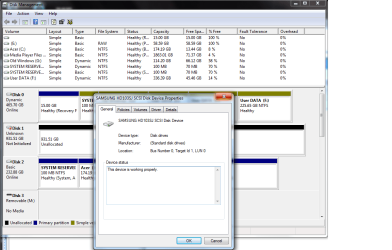
Here's the screen shots.
 

Attachments

  • screen shot1.png
    screen shot1.png
    12.7 KB · Views: 3
  • screen shot2.png
    screen shot2.png
    30.9 KB · Views: 3
  • screen shot3.png
    screen shot3.png
    43.1 KB · Views: 1

My Computer

Computer Manufacturer/Model Number
Acer
OS
Windows x64 Premium
CPU
AMD Phenom II X6
Memory
4G
My usual disclaimer: I'm not an expert in anything. :)

The screenshot shows the entire disk has 931.51GB of unallocated space. But you say it's a 2TB drive. So if the entire drive is unallocated space I think it should show about 1862GB. From my limited perspective something isn't adding up. I've contacted one of the Forum experts and asked him to take a look at this. He's from California and travels around a lot. The time difference may be several hours before he responds.
 

My Computer

Computer type
Laptop
Computer Manufacturer/Model Number
Sony Vaio VPCEB47GM Laptop
OS
Win 7 Pro 64-bit
CPU
Intel i5 2.4 Ghz
Memory
8GB DDR3
Graphics Card(s)
Intel HD 3000
Sound Card
IDT High Definition
Monitor(s) Displays
15.6 WGXA Anti-Glare LED
Screen Resolution
1280x800
Hard Drives
640Gb 7200rpm
Antivirus
MSE
Browser
Opera (primary) with IE9 backup
My usual disclaimer: I'm not an expert in anything. :)

The screenshot shows the entire disk has 931.51GB of unallocated space. But you say it's a 2TB drive. So if the entire drive is unallocated space I think it should show about 1862GB. From my limited perspective something isn't adding up. I've contacted one of the Forum experts and asked him to take a look at this. He's from California and travels around a lot. The time difference may be several hours before he responds.

Oh, just opened it up to have a look - it is actually 1 TB disk (thought was 2TB - but I must have put them in my NAS). So I was wrong in my opening statement -1 TB but I think with 2 or 3 partitions on it.

Any idea about the best way to recover the partitions?

Many thanks for the help - really appreciated.
 

My Computer

Computer Manufacturer/Model Number
Acer
OS
Windows x64 Premium
CPU
AMD Phenom II X6
Memory
4G
Try Partition Wizard Partition Recovery Wizard - Video Help cwhich can sometimes find lost partitions if they have not yet been formatted over. Let us know what it finds.

Another serious problem is that you've converted DISK0 HD partitions to Dynamic which is only meant to span a partition across multiple HD's. If it isn't a spanned drive like this then it should not be Dynamic.

If DISKO has an abandoned OS then what I would do is move the data off to wipe it using Diskpart Clean Command then repartition it as a data drive. The correct way to delete an OS is always to delete its partition or wipe its disk to get it cleanest. The partitions which should go with it are System Reserved and Recovery which are now useless if you don't use that OS any longer.

If you don't have storage which allows you to move the data off DISK0 to wipe it then follow the steps here for the non-destructive Option 1 to Convert a Dynamic Disk to a Basic Disk.

In order for it to convert you'll need to first move the data off of two of the extra F partitions you created which tipped it to Dynamic, then delete them. You can only have four total Primary partitions on a Basic drive. To add any more you need to first convert one to Logical, then you can add as many adjacent Logical partitions as you want.

You might also be able to move data off of C, then delete it, SysReserved and Recovery if you don't need them any longer (Recov won't run anyway) to see if it will convert without them. If so you can use PW to Create a Logical data partition in the space after conversion. You may also need to reletter two of the data partitions.
Partition Wizard Create Partition - Video Help
 
Last edited:
Many thanks Greg - trying it now.....
 

My Computer

Computer Manufacturer/Model Number
Acer
OS
Windows x64 Premium
CPU
AMD Phenom II X6
Memory
4G
Do you know if this (Partition Wizard) will recover TrueCrypt partitions?

It seems to find the other partitions fine, but not the TrueCrypt encrypted partition (after the quick scan, and so far about half way through full scan)?
 

My Computer

Computer Manufacturer/Model Number
Acer
OS
Windows x64 Premium
CPU
AMD Phenom II X6
Memory
4G
OK - some good news! Many thanks for all the help!

I managed to recover 2 of the partitions - but no luck with the TrueCrypt partition.

The disk has 160G unallocated and the TrueCrypt partition was 160G. Any idea how I can recover it please?
 

My Computer

Computer Manufacturer/Model Number
Acer
OS
Windows x64 Premium
CPU
AMD Phenom II X6
Memory
4G
Had you mentioned True Crypt we would have advised you to research how it is recovered. PW may not work since it has the extra encryption level of security.

I would leave the space unallocated until you find out from TrueCrypt how to undelete the partition.

What I would also do is swap Disks 0 and 2 so that your OS HD is always in Disk0 position, so that its boot files will not be derailed to any preceding partition if reinstalled or repaired. Make sure it remains set HD first to boot in BIOS setup.

Is the present Disk0 still needed for an OS, or can you wipe it to convert to Basic? Do you have storage space to move the data off to wipe it with Diskpart Clean Command?
 
Thanks again Greg. Must admit I'd forgotten that I had that partition on that drive. I'll have a look at the TrueCrypt forums to see what they say.

I have two copies of Windows (the original copy on disk 0 - which I want to keep in case I need to send the PC back under warrantee, and the actual version on disk 2 which is a hybrid SSD).

I'll have a look in the morning to see if I have spare disk space.

Cheers
 

My Computer

Computer Manufacturer/Model Number
Acer
OS
Windows x64 Premium
CPU
AMD Phenom II X6
Memory
4G
Are you able to access your data on the F partitions to back it up as at least two of these will need to be deleted before DISK0 will convert back to Basic as a single HD should be. It should have never been allowed to convert to Dynamic. What tipped it is the attempt to have six Primary Partitions instead of converting the fourth one to Logical to add as many adjacent Logicals as you want. So it won't convert back unless it only has four Primary. Then what I would do is just extend F all the way over to the right to use for data: Partition or Volume - Extend

Ask back if you have any questions about doing this.http://www.sevenforums.com/tutorials/26829-convert-dynamic-disk-basic-disk.html?ltr=C
 
Back
Top