Solved Disk Read Error, Acer eRecovery Doesn't Work, Can't Access Safe Mode

c6251555

New member
Local time
9:37 PM
Messages
2
My sister's Acer Aspire One 722 running Windows 7 gives this message "A disk read error occurred. Press Control +Alt to restart" every time we try to start the computer. She did not download anything new or made any changes prior to this. However, she told me that before this happened she had put her computer to sleep, and when she tried to wake it up, it showed "For Atheros PCIE Ethernet Controller. Check cable connection! PXE-ROM: Exiting Intel PXE ROM. No bootable device--insert boot disk and press any key". So she forced shut down her computer. When she restarted, the countdown that always comes up whenever computer is forced shutdown came up, then a message about the computer performing a disk recovery and an automatic repair appeared. When that was finally finished, the option menu for starting windows normally or in safe mode came up. She chose to start normally. After an hour or two of use, the computer started lagging and eventually froze, so she forced shutdown again. She turned her computer back on and it was working normally, so she shut it down normally and went to sleep. Then today every time she start her computer the Acer logo would pop up normally but then it would say "A disk read error occured. Press Control+Alt+Del to restart". The BIOs menu (F2) is accessible, so is boot option menu (F12). I tried to access both Safe Mode with F8 and Acer eRecovery Console with Alt+F12 to no avail. This computer doesn't have a CD/DVD optical drive. So what can we do now?

BTW, I booted Ubuntu with a USB and it worked perfectly fine.
 

My Computer My Computer

Computer type
Laptop
Computer Manufacturer/Model Number
Lenovo
OS
Windows 8.1 64 bit
Hello and welcome c mate some system specs please cannot make any start until we know what we are dealing with
http://www.sevenforums.com/tutorials/180324-system-info-see-your-system-specs.html

I see you are running Windows 8 too it might be an idea to post in there the site is at the top of this page and is run by the same folks as here and a lot of members myself included are registered there although I don't go there a lot.
 

My Computer My Computer

Computer type
PC/Desktop
Computer Manufacturer/Model Number
Own build (new) Desk1 / Asus ROG Win 7 / Desk2 1st build
OS
Desk1 7 Home Prem / Desk2 10 Pro / Main lap Asus ROG 10 Pro 2 laptop Toshiba 7 Pro Asus P2520 7 & 10
CPU
Desk1 i5 3750K / Laptop i7 GTX 860M / Desk2 i5 2500
Motherboard
Desk1 Asus P877-V / Desk2 Gigabyte H67 UD3H / Laptop ?
Memory
Desk1 8GB (1866) / Desk2 16GB (1333) / Laptop 8Gb DDR3
Graphics Card(s)
Desk 1& 2NVidia GTX 650 & Laptops on board Intel
Sound Card
Desk 1 & 2 -XONAR DG Realtek High Def audio Laptop
Monitor(s) Displays
Desk 1 Benq HD 2450 / Desk2 Philips 24" / Laptop 17.5"
Screen Resolution
1920x1080 D1 & D2 & Laptop 1
Hard Drives
Desk1 Samsung 120GB 830 SSD
Asus ROG 256GB 850 Pro SSD
Desk2 Samsung 840 256 SSD
Toshiba 120GB EVO
PSU
Desk 1 Corsair HX 1050/ Laptop ? / Desk 2 Corsair HX 650
Case
Desk 1 Cooler HAF XM ? Toshiba laptop / Desk2 Coolermaster
Cooling
Fans on all Desk1 -2 Desk2 - all Coolermasters 5 Laptop ?
Keyboard
Desk 1 MS Sidewinder X6 Desk 2 MS Sidewinder X 4
Mouse
Desk 1&2 - Gigabyte MS 900 gamer - laptop - Logitec wireless
Internet Speed
ADSL2+
Other Info
One other Desktop (tester) and spare Toshba laptop both with SSD's
Running Kaspersky 2016 ISS on all machines config'd identically
Logitec audio stereo systems on each machine (x3)
Canon MG5250MFC
Router/modem TP-Link running WPA2SK
Problem Resolved By Itself

Thanks for those of you who replied. After leaving the computer alone for a few days, it miraculously turned on fine today.
 

My Computer My Computer

Computer type
Laptop
Computer Manufacturer/Model Number
Lenovo
OS
Windows 8.1 64 bit
You should check your hard disk. That should be the problem of hardware
 

My Computer My Computer

Computer type
PC/Desktop
Computer Manufacturer/Model Number
custom build
OS
Windows 7 Ultimate x64
CPU
Intel
You should check your hard disk. That should be the problem of hardware
Yep I agree but I would put it as could be the cause but that is being a bit pedantic:)

If you do then you can run tests on the drive/s the usual one is this

SeaTools for Windows | Seagate

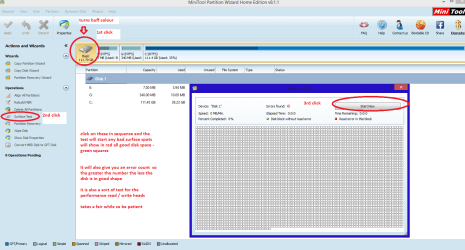
and I always add a physical surface test with this program as it tests the platter surfaces and to some degree the state of the read / write heads. see pic and the program is very handy to keep for future use Free Partition Manager for Window PC | MiniTool Partition Wizard Free Edition
 

Attachments

  • MINI TOOL SURFACE 2.PNG
    MINI TOOL SURFACE 2.PNG
    46.8 KB · Views: 1

My Computer My Computer

Computer type
PC/Desktop
Computer Manufacturer/Model Number
Own build (new) Desk1 / Asus ROG Win 7 / Desk2 1st build
OS
Desk1 7 Home Prem / Desk2 10 Pro / Main lap Asus ROG 10 Pro 2 laptop Toshiba 7 Pro Asus P2520 7 & 10
CPU
Desk1 i5 3750K / Laptop i7 GTX 860M / Desk2 i5 2500
Motherboard
Desk1 Asus P877-V / Desk2 Gigabyte H67 UD3H / Laptop ?
Memory
Desk1 8GB (1866) / Desk2 16GB (1333) / Laptop 8Gb DDR3
Graphics Card(s)
Desk 1& 2NVidia GTX 650 & Laptops on board Intel
Sound Card
Desk 1 & 2 -XONAR DG Realtek High Def audio Laptop
Monitor(s) Displays
Desk 1 Benq HD 2450 / Desk2 Philips 24" / Laptop 17.5"
Screen Resolution
1920x1080 D1 & D2 & Laptop 1
Hard Drives
Desk1 Samsung 120GB 830 SSD
Asus ROG 256GB 850 Pro SSD
Desk2 Samsung 840 256 SSD
Toshiba 120GB EVO
PSU
Desk 1 Corsair HX 1050/ Laptop ? / Desk 2 Corsair HX 650
Case
Desk 1 Cooler HAF XM ? Toshiba laptop / Desk2 Coolermaster
Cooling
Fans on all Desk1 -2 Desk2 - all Coolermasters 5 Laptop ?
Keyboard
Desk 1 MS Sidewinder X6 Desk 2 MS Sidewinder X 4
Mouse
Desk 1&2 - Gigabyte MS 900 gamer - laptop - Logitec wireless
Internet Speed
ADSL2+
Other Info
One other Desktop (tester) and spare Toshba laptop both with SSD's
Running Kaspersky 2016 ISS on all machines config'd identically
Logitec audio stereo systems on each machine (x3)
Canon MG5250MFC
Router/modem TP-Link running WPA2SK
Back
Top